最近几天在主要论坛活跃的用户肯定已经听到了这则消息。
我不会评论原因和经过,但简短来说,Bukkit 几乎可以确定无法挺过这一关。
因此,BukkitDev 的未来非常不确定。即使法律问题明天就得到解决,实际上也没有人再来处理文件提交了。目前尚不清楚网站会维持运营多久,那些文件又将作何处理。
无论如何,虽然我会继续更新和开发我的插件,但你需要去别的地方寻找更新,也就是这个 wiki。我将在未来几天内更新这个 wiki,以方便更好的沟通(论坛、电子邮件等)并补充任何缺失的文档。
当然,我也会着手将这些插件移植到从灰烬中诞生的新 API 上!**

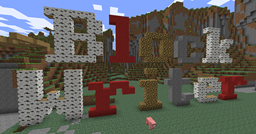
以方块形式书写信息!以优雅的方式宣称你的领地!重现好莱坞标志,但要用方块搭建!此插件会根据你输入的文字构建高达7个方块的字符。
功能
- 支持 SuperPerms
- 屏蔽选定的词语
- 自定义材料
- 移除方块
- 撤销更改
- 编辑可用字符
命令
- /write_blocks 或 /wb
- 使用选定的材料构建文本,或使用默认材料
- 示例 - /wb Block Writer
- 需要权限 block_writer.can_write
- /count_blocks 或 /cb
- 计算构建文本所需的空格大小
- 示例 - /cb Block Writer
- 需要权限 block_writer.can_write
- /undo_blocks 或 /ub
- 撤销最后一次操作。影响写入和移除方块
- 需要权限 block_writer.can_write
- /remove_blocks 或 /rb
- 将 7 x 参数 网格中的方块变为空气
- 示例 - /rb 25
- 需要权限 block_writer.can_remove_blocks
- /set_material 或 /sm
- 覆盖默认材料(5)或服务器范围设置
- 示例 - /sm 89
- 示例 - /sm 17:2
- 示例 - /sm 35:14 4 89
- 需要权限 block_writer.can_set_material
- /reload_block_writer 或 /rbw
- 重新加载配置文件和字符文件,而无需重新加载插件本身
- 需要权限 block_writer.can_reload_config
配置
所有这些设置都有默认值,因此只有在你想要覆盖默认值时,才需要在配置文件中添加该设置
- reach
- 设置玩家可以选择起始方块的距离。数字越小,玩家必须站得越靠近方块。默认为 25。
- banned_words
- 设置一个单词列表,如果玩家使用了这些单词,则会取消方块构建。用单个空格分隔。默认为空列表。
- default_material
- 设置要使用的服务器范围材料。默认为 5。
- banned_materials
- 设置一个不可使用的材料列表。用单个空格分隔。默认为 6 8 9 10 11 26 27 28。
权限
- block_writer.can_write
- 允许玩家访问 count_blocks、write_blocks 和 undo_blocks 命令。默认为 false。
- block_writer.can_remove_blocks
- 允许访问 remove_blocks 命令。默认为 false。
- block_writer.can_set_material
- 允许访问 set_material 命令。默认为 false。
- block_writer.can_reload_config
- 允许访问 reload_block_writer 命令。默认为 false。
教程
write_blocks 和 remove_blocks 命令以其瞄准的方块 上方 的方块作为起始方块。
材料
材料需要以数字形式输入。如果只使用一种材料(无论是玩家输入的还是配置文件中的),所有构建的字符都将使用该材料。
要设置带有数据值的材料(树木、羊毛等),请在类型和数据之间使用分号。例如,17:2 代表银桦。
如果设置了多种材料,文本将循环使用这些材料。例如,35:14 35:5 将在红色和绿色羊毛之间交替。每种材料之间用单个空格分隔。
字符
该插件包含的字符为 A..Z、a..z、0..9 以及大多数标准美式键盘上的标点符号。我认为 Minecraft 不支持 Unicode(真遗憾!),因此唯一能正常使用的字符是那些可以在聊天中输入的字符(例如 ó)。
如果您想添加新字符或编辑现有字符,可以通过 Block Writer\chars.txt 文件来完成。以下是 A 的定义:
<char value="A" blocks="0,1,2,3,4,7,8,9,10,11,12,16,19,20,23,26,27,28,29,30,31,32,33,35,36,37,38,39"/>
value 表示字符本身。它区分大小写,因此 A 和 a 是不同的。blocks 是一个方块列表,用于定义组成该字母所需填充的所有位置。编号从左下角开始为 0,然后自下而上、从左至右递增。因此 6 代表左上角的方块,而 48 代表右上角的方块。较窄的字符无需居中,因此第一列始终应有内容。
计划中的改进
- 允许使用降部笔画的选项。
- 目前,通常低于基线的字母(如 g、y、q 等)会被抬高,使其与其他字母起始于同一水平线。我觉得这样比将所有其他字母都抬高一个方块离地看起来更美观,但我会添加一个选项供用户选择。
- 允许字母高于正常高度的选项。
- 考虑实现波浪形文字效果。
- 允许在字符正面添加装饰的选项。
- 在字符上放置火把或梯子以增加视觉效果。
- 将文本分行显示
- 使文本能够适应指定的宽度。
- 允许用材料包围字符的选项。
- 目前仅构建字符本身(这意味着可以向墙体内部建造)。
- 同时识别材料名称与数字。
- 目前所有材料都必须以数字形式输入(例如输入 3 而不是 grass)。
Anyone who has been active on the main forums in the last few days must surely have already heard the news.
I'm not going to comment on why and how, but the short version is that Bukkit is almost certainly not getting passed this.
Consequently, the future of BukkitDev is very uncertain. Even if the legal matters were resolved tomorrow there isn't really anybody left to deal with file submissions anyway. There's no indication about how long the site will stay up and what will happen to the files.
Anyway, while I will continue updating and developing my plugins you will need to look for updates somewhere else, namely the wiki. I will be updating this wiki in the next few days to facilitate better communication (forums, email, etc.) and adding any documentation that's missing.
I will also, of course, be looking into porting the plugins over to whichever API emerges from the ashes!**
Write messages in blocks! Claim your territory in style! Recreate the Hollywood sign but level! This plugin builds 7-block-high characters from the text you enter.
Features
- SuperPerms support
- Block selected words
- Customise materials
- Remove blocks
- Undo changes
- Edit available characters
Commands
- /write_blocks or /wb
- Builds the text using the selected materials. or the default
- Example - /wb Block Writer
- Needs permission block_writer.can_write
- /count_blocks or /cb
- Calculates how much space is needed to build the text
- Example - /cb Block Writer
- Needs permission block_writer.can_write
- /undo_blocks or /ub
- Undoes the last action. Affects writing and removing blocks
- Needs permission block_writer.can_write
- /remove_blocks or /rb
- Turns a 7 x arg grid of blocks into air
- Example - /rb 25
- Needs permission block_writer.can_remove_blocks
- /set_material or /sm
- Overrides the default material (5) or the server-wide setting
- Example - /sm 89
- Example - /sm 17:2
- Example - /sm 35:14 4 89
- Needs permission block_writer.can_set_material
- /reload_block_writer or /rbw
- Reloads the config file and the character file without reloading the plugin itself
- Needs permission block_writer.can_reload_config
Config
All of these have a default value so you only need to add the setting to the config file if you want to override the default
- reach
- Sets how far away the player can select the starting block. A smaller number means the player must be standing closer to the block. Default is 25.
- banned_words
- Sets a list of words that will cancel the block building if a player uses them. Separate with a single space. Default is an empty list.
- default_material
- Sets the server-wide material to be used. Default is 5.
- banned_materials
- Sets a list of materials that will cannot be used. Separate with a single space. Default is 6 8 9 10 11 26 27 28.
Permissions
- block_writer.can_write
- Allows the player to access to the count_blocks, write_blocks, and undo_blocks commands. Default is false.
- block_writer.can_remove_blocks
- Allows access to the remove_blocks command. Default is false.
- block_writer.can_set_material
- Allows access to the set_material command. Default is false.
- block_writer.can_reload_config
- Allows access to the reload_block_writer command. Default is false.
Tutorial
The write_blocks and remove_blocks commands take their starting block from the block above the one the player is targeting.
Materials
Materials need to be entered as a number. If only one material is used (either entered by a player or in the config file) all characters built will use this material.
To set a material with a data value (trees, wool, etc.) use a semi-colon between the type and data. For example, 17:2 would be silver birch.
If more than one material is set the text will have the materials cycled though it. For example, 35:14 35:5 will alternate between red and green wool. Separate each material with a single space.
Characters
The characters included with the plugin are A..Z, a..z, 0..9. and most of the punctuation found on a normal US keyboard. I don't believe Minecraft supports Unicode (for shame!) so the only characters that will work are the ones you can type in chat (ó, for example).
If you want to add new characters, or edit existing characters, this can be done in the Block Writer\chars.txt file. Here is A:
<char value="A" blocks="0,1,2,3,4,7,8,9,10,11,12,16,19,20,23,26,27,28,29,30,31,32,33,35,36,37,38,39"/>
value is the character. It's case-sensitive so A and a are different. blocks is a list of all the squares that need to be filled in to form the letter. It starts with 0 at the bottom-left, then goes from bottom to top and from left to right. So 6 is the square in the top-left corner and 48 the one in the top-right. There's no need to centre thinner characters, so there should always be something in the first column.
Planned improvements
There are a few ideas I plan to add in the near future.
- An option to allow descenders.
- Currently, letters which would normally drop below the line (g, y, q, etc.) are raised so they start at the same level as other letters. I felt this looked better than having all other letters raised a block off the ground but I'll add an option to choose.
- An option to allow letters to go higher than normal.
- Thought it might be nice to do wavy words.
- An option to allow decorations on the front of characters.
- Placing torches or ladders on the characters just to spice them up
- Splitting the text into lines
- Making it so the text will fit into a specified width.
- An option to surround the characters with a material.
- Currently, only the characters are built (which means it's possible to build into a wall).
- Recognise material names as well as numbers.
- Currently, all materials have to be entered as a number (so. 3 instead of grass).

 插件

 插件
 插件
 插件
 插件
 插件
评论 0
登录后参与评分
还没有评论,来抢沙发吧