BlockProt 是一款简单易用的方块与箱子保护插件。玩家可以锁定箱子、熔炉、门等更多方块。与传统箱子锁插件不同,它使用带有按钮的简易图形界面进行操作,无需制作告示牌或记忆命令。对于新手而言,这款插件极易上手和使用。
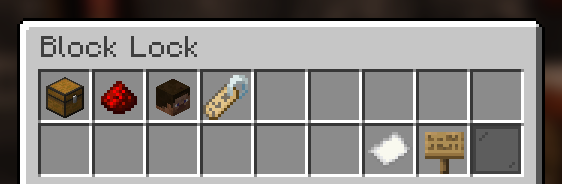
功能特性
- 保护箱子、熔炉、潜影盒等方块。
- 玩家可通过易于使用的图形界面配置自己的方块。
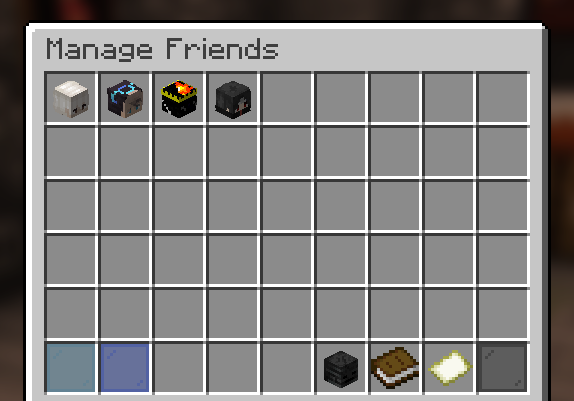
- 玩家可为各个方块添加好友,并设置这些好友可以执行的操作。
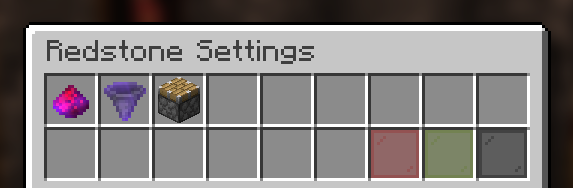
- 玩家可在图形界面中配置红石保护选项。
- 所有保护数据均以 UUID 形式保存。
- OP 用户及拥有
blockprot.admin 权限的玩家可移除受保护的箱子并进行管理。
- 完全兼容 WorldGuard、Towny 和 PlaceholderAPI!
- 支持 10 种语言!
- 以及更多功能!
权限说明
权限是 Bukkit 的功能特性,并非本插件自定义的内容!请参阅服务器中的 permissions.yml 文件,或选择其他插件来管理权限(通常这类插件具备丰富的功能)。
blockprot.lock: 允许玩家锁定方块并访问它们。blockprot.info: 允许玩家查看已锁定方块的持有者及好友列表。blockprot.admin: 允许玩家解锁非自己拥有的方块。blockprot.bypass: 允许玩家绕过所有保护机制,但禁止编辑方块。
翻译贡献
如果你掌握该插件尚未支持的语言,或者发现了翻译错误,欢迎为我们提供翻译!
你可以通过访问 gitlocalize 轻松完成翻译,或在 Discord 上发送给我。
技术支持
请勿在评论或我的个人资料页面寻求技术支持,而是通过 GitHub 提交问题反馈。如需更多帮助或提问,请使用 Discord 服务器 进行交流。
使用方法
在游戏中,手持空手右键点击可锁定的方块并蹲下,即可看到用于锁定/解锁方块的图形界面。为使此功能正常工作,请为默认玩家组分配 blockprot.lock 权限。
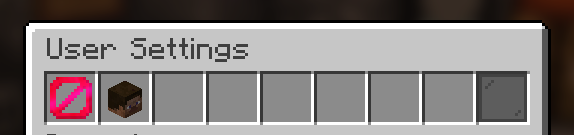
默认情况下,放置方块时即自动锁定;但玩家可使用 /blockprot settings 命令自行禁用此行为。该命令中的所有设置均为个人独立配置。
要获取上述权限,请使用 Bukkit 的 permission.yml 文件或借助权限管理插件。
本插件至少需要 Spigot 环境。不支持 CraftBukkit,且出于非开发目的也不建议使用 CraftBukkit。
BlockProt is a easy-to-use block and chest protection plugin. Players can lock chests, furnaces, doors and much more. Unlike traditional chest lock plugins, this uses a simple GUI with buttons to click. This removes the struggle of crafting signs or remembering commands. Especially for beginners, this plugin is very easy to grasp and use.
Features
- Protect chests, furnaces, shulker boxes etc.
- Players can configure their blocks with an easy to use GUI.
- Players can add friends to individual blocks and configure what those friends can do.
- Players can configure the redstone protection in the GUI.
- All protections are saved as UUIDs.
- OP Users and players with the blockprot.admin permission can remove chests and manage them.
- Full compatibility with WorldGuard, Towny and PlaceholderAPI!
- Available in 10 languages!
- And much more!
Permissions
Permissions are a Bukkit feature and not a custom thing of this plugin! Please refer to the permissions.yml file in your server or find another plugin to manage permissions (these usually have a lot of features and functionality).
blockprot.lock: Allows players to lock blocks and access them.blockprot.info: Allows players to see the owner and friends of a locked block.blockprot.admin: Allows players to unlock blocks that they do not ownblockprot.bypass: Allows players to bypass any protections, but doesn't allow them to edit blocks.
Translating
If you know a language that isn't supported by this plugin (yet) or found some translation error we'd love if you could translate for us!
You can do so easily by going to gitlocalize or sending me the translations on Discord.
Support
Please do not use reviews or my profile for support, instead use you can file an issue over at GitHub. If you require more support or want to ask questions, please use the Discord server for chatting.
Usage
Once in game, crouch and right click a lockable block with an empty hand and you will see the GUI to lock/unlock blocks. For this to work properly, give the default player group the blockprot.lock permission.
By default, the block gets locked upon placing it., though one can disable this for themselves with the command /blockprot settings. All settings in that command are per-player.
To give yourself the permissions listed above, use Bukkit's permission.yml file or see to some permission management plugin.
This plugin requires at least Spigot. CraftBukkit is not supported and shouldn't be used for non-development purposes anyway.

 插件

 插件

 插件
 插件
 插件
 插件
评论 0
登录后参与评分
还没有评论,来抢沙发吧