BlockShips
一款 Minecraft 插件,允许玩家创建可骑乘、具备物理效果的船只。使用方块建造自定义船只或生成预置船只,然后扬帆大海或翱翔天空。这一切都无需任何客户端模组或资源包!
在 Modrinth 下载:modrinth.com/plugin/blockships
与 BlockShips 配合良好的其他插件:
- DynLight 用于动态光照 -- 如果没有安装此插件,组装后的自定义船只上的发光方块将不会生效。
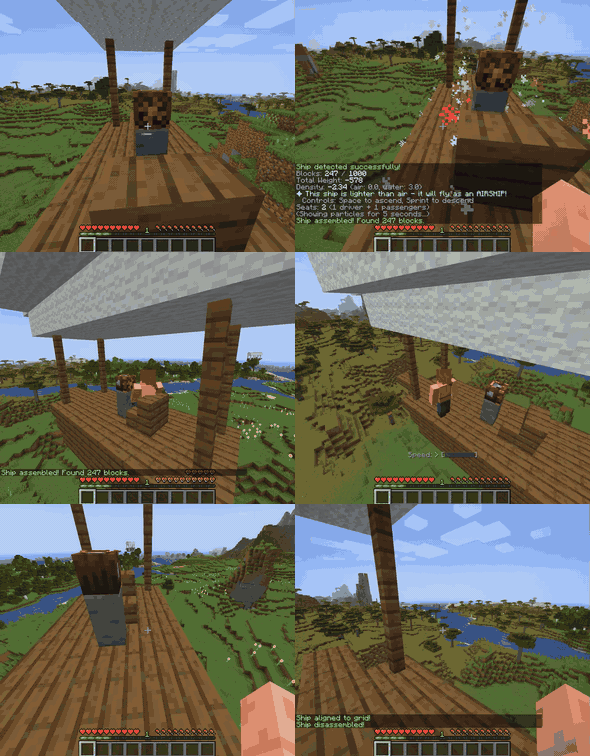
| 预制小型云杉木船 |
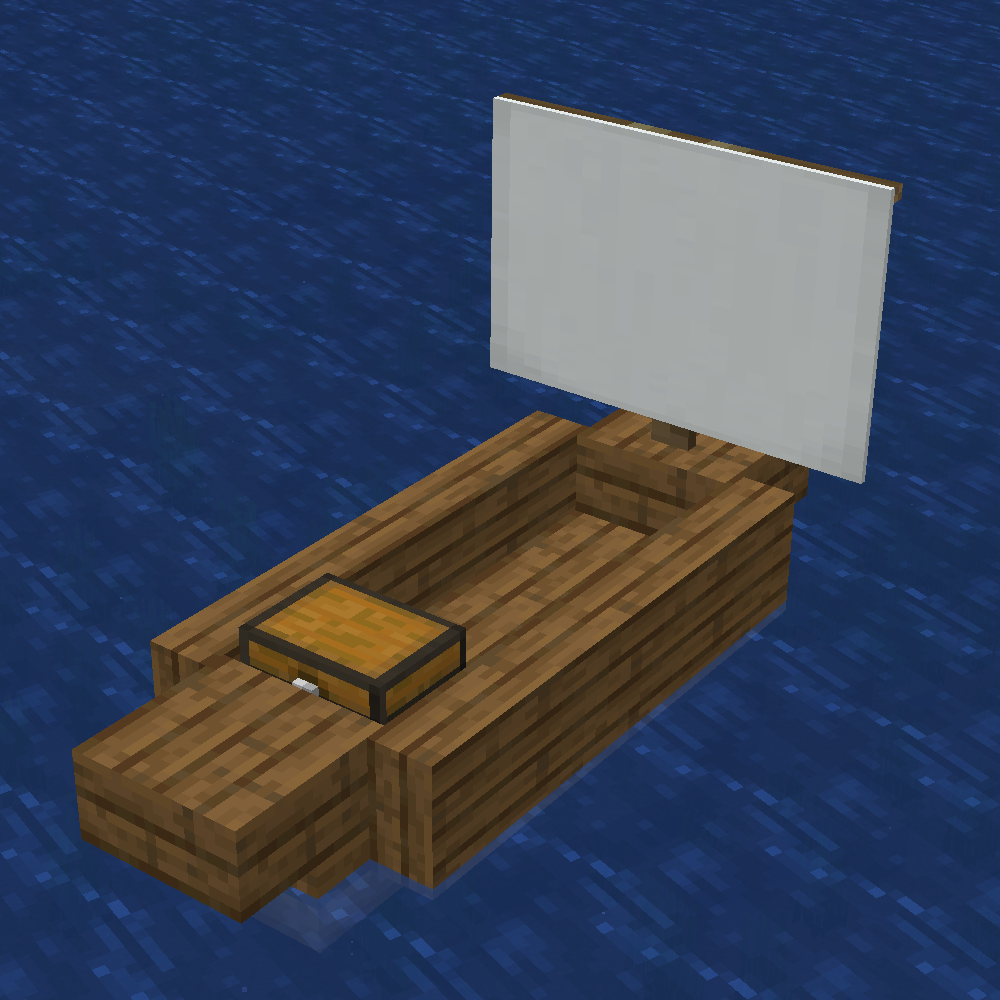
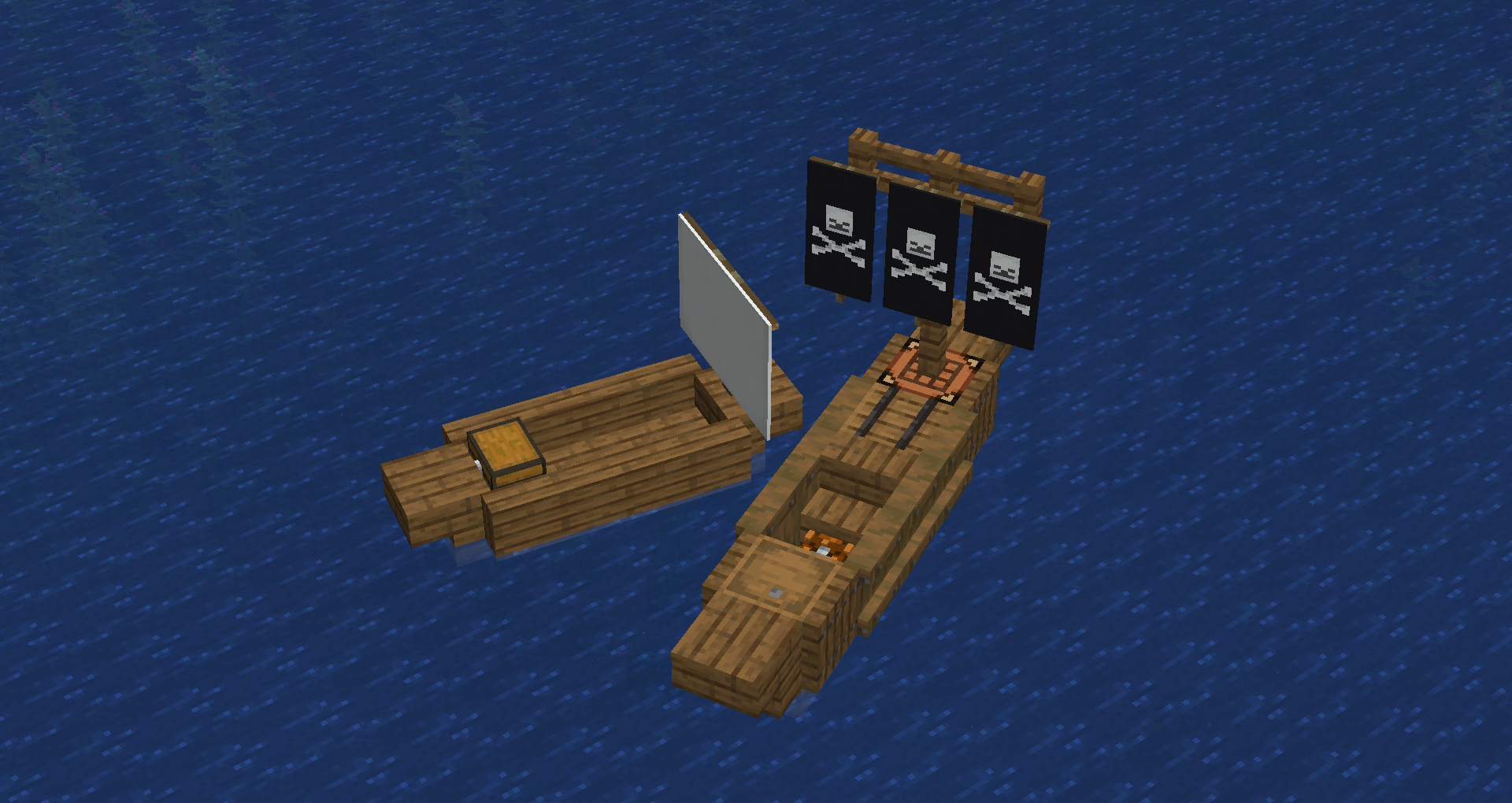
位于预制小型云杉木船旁边的小型自定义船只 |
 |
 |
|
|
警告: 本项目处于 Alpha 阶段。请预期会出现漏洞、缺失的功能以及破坏性变更。请自行承担风险,并经常备份你的世界。开发者不对由此插件造成的任何损坏负责。
功能
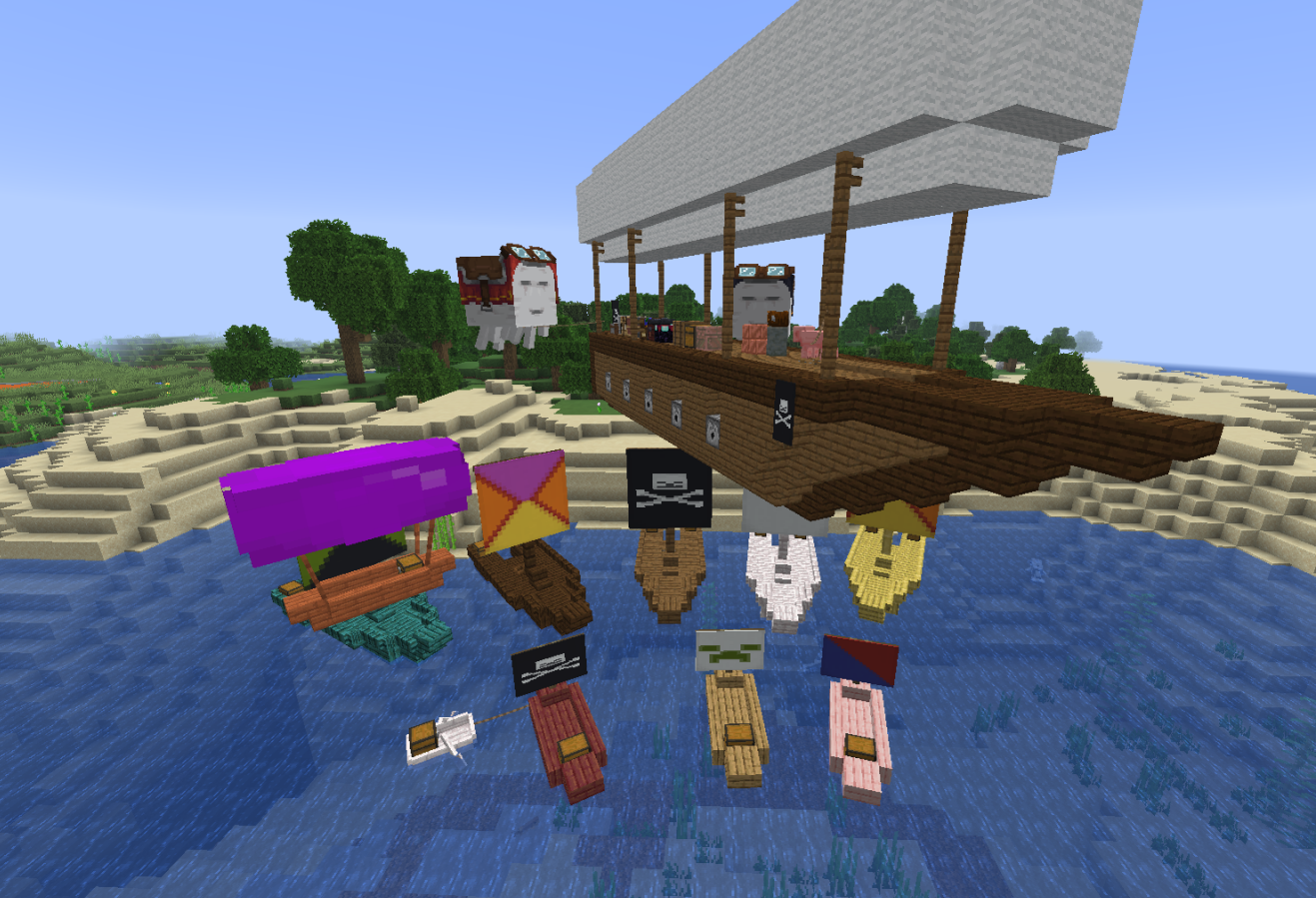
使用允许的方块建造船只,在其上放置一个“船舵”并右键点击,然后在菜单中点击“组装”。你的方块现在变成了一艘移动的船!根据船上方块的密度(完全可配置),你的船可能会在水中浮得更低或更高。使用足够多的“比空气轻”的方块(如萤石),你的船就会成为一艘飞行的飞艇。
船只可以包含以下元素:
- 功能性方块 - 工作台、铁砧、附魔台等正常工作。(熔炉/酿造台尚未完全支持)
- 储物空间 - 箱子、 barrels、发射器等保持可访问状态
- 座位 - 任何台阶都可以变成供乘客坐下的座位。
- 拴绳点 - 拴在栅栏上的任何东西都会固定在船上。你可以在船移动时将生物拴到船上。预制船只具有单个拴绳点。
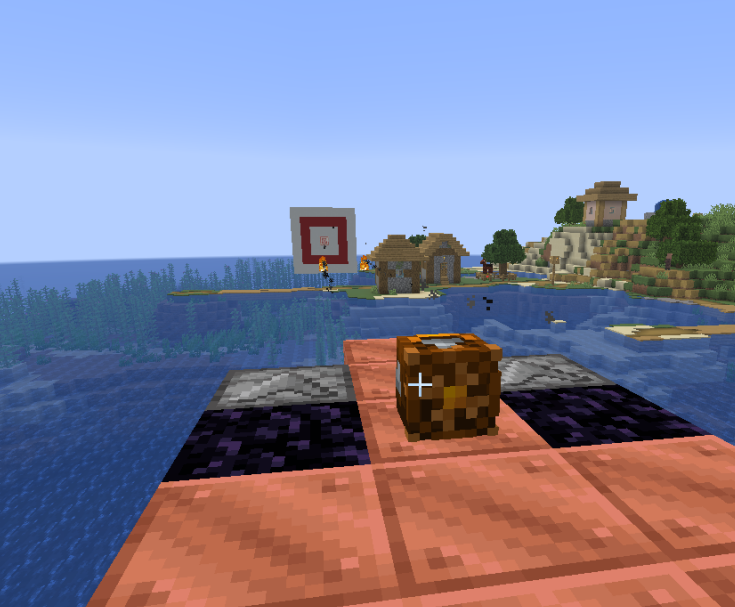
- 大炮 - 后方放置黑曜石的发射器可以发射其内容物。可以通过船只菜单全船开火,或者右键点击黑曜石来发射。
- 生命值与伤害 - 船只拥有生命值,会受到碰撞/攻击的伤害,并随时间恢复。当生命值耗尽时,船只会尝试将自己重新放置在世界中。
- 音效与特效 - 移动和伤害伴有视觉特效和音频效果。
- 溺尸船长 - 稀有的溺尸怪物携带船舵生成
- 动态光照 - 当安装了 DynLight(可选)时,船上的发光方块(萤石、灯笼、火把等)会发出动态光
自定义船只
- 使用允许的方块建造结构(查看或在
blocks.yml 中编辑)
- 通常,木材/金属/功能性方块是允许的,而石头/泥土/其他自然方块则不允许
- 提供光照的方块,如萤石、末影烛台和信标,可作为浮力辅助。足够多的这些方块,你就能得到一艘飞艇!
- 制作“船舵”
- 将船舵放置在你的结构上
- 右键点击船舵进行组装
- 再次右键点击以登船并操控
- 右键点击船舵,或潜行时右键点击,以打开菜单并拆解
预制船只
生成即用的船只,可自定义旗帜/颜色/木材类型:
- 小型船只 - 快速、轻便的水上载具。两个座位和一个双层箱。
- 大型船只 - 更大的水上载具,拥有更多生命值。两个双层箱,多个座位。
- 小型飞艇 - 悬浮在空中,具备垂直控制功能。同样有两个座位和一个双层箱。
指令: /blockships give <item> (物品: ship_wheel, small_ship, large_ship, small_airship)
物理系统
- 在船上行走 - 玩家在航行/飞行时可以在甲板上走动。这目前仍有漏洞!
- 浮力 - 船只根据方块重量和密度漂浮。有时会有漏洞!
- 移动 - 加速度、阻力和碰撞响应
- 碰撞检测 - 船只与地形和实体交互(与其他船只交互存在漏洞)
控制方式
| 按键 |
动作 |
| W |
前进 |
| S |
后退 / 刹车 |
| A |
左转 |
| D |
右转 |
| Space |
上升(仅限飞艇) |
| Sprint |
下降(仅限飞艇) |
合成配方
| 物品 |
合成配方 |
| Ship Wheel |
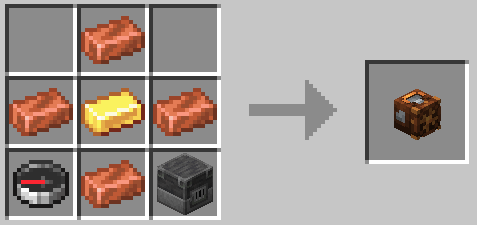 |
Small Ship
Wood type, banner customizable |
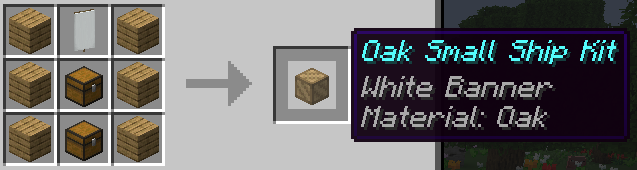 |
Large Ship
Wood type, banner customizable |
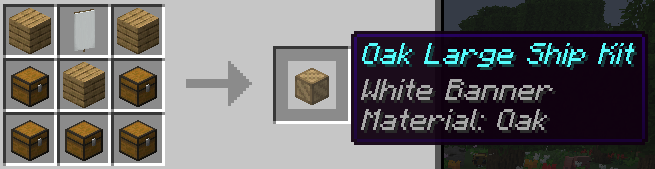 |
Ship Balloon
Wool color customizable |
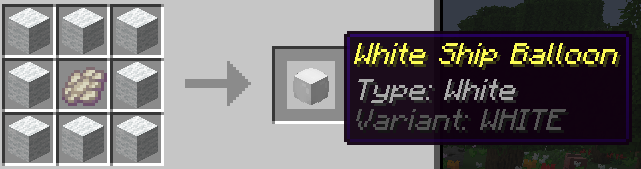 |
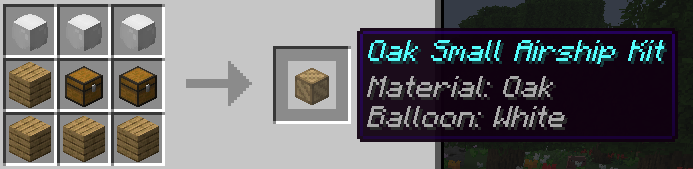
Small Airship
Wood type, balloon type customizable |
 |
Cannons
| Cannons Firing |
Cannon Menu |
 |
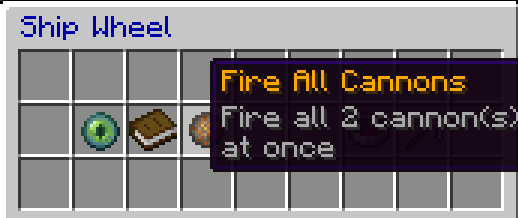 (or, right click obsidian to fire individually) |
Commands
| Command |
Description |
Permission |
/blockships help |
Show help and list all commands |
- |
/blockships info |
Show ship and wheel statistics |
- |
/blockships dismount |
Force-dismount from a ship |
blockships.dismount |
/blockships reload |
Reload configuration |
blockships.reload |
/blockships give <item> |
Give yourself a ship wheel or ship kit |
blockships.give |
/blockships recipes [player] |
Unlock crafting recipes |
blockships.recipes |
/blockships forcedisassembleall |
(DANGEROUS) Disassemble all custom ships |
blockships.admin |
/blockships killentities |
(DANGEROUS) Remove all ship entities |
blockships.admin |
Installation
- Download the BlockShips jar file from modrinth: modrinth.com/plugin/blockships
- IMPORTANT: Download ProtocolLib if using 1.21.2 or below! ProtocolLib is no longer required as of BlockShips 0.0.16
- Place both jars in your server's
plugins folder
- Restart the server
Configuration
config.yml
Main plugin settings including:
- Ship physics (speed, acceleration, drag)
- Buoyancy values (density, strength)
- Collision settings (mass, response)
- Crafting recipes
blocks.yml
Configure which blocks can be used in custom ships:
- Weight scale - Affects buoyancy
- Collider - Custom collision shapes
- Seat/storage - Special block behaviors
Inspiration
This plugin is inspired by mods which also implement rideable ships, as well as plugins which have attempted similar functionality. I made this plugin because I realized that with the addition of display entities, it might be possible to create a better ship plugin than previously possible, but without requiring any client-side mods. No code from any of other project has been used. In particular, this plugin was inspired by:
Although this plugin predates them, you should also check out the extremely cool Create Aeronautics Mod, as well as the similar SimpleShips plugin!
License
You are free to use this plugin only for non-commercial projects and servers. For commercial use, please contact the author for a license. For more details, see the LICENSE.txt file.
Developing
You will need java and gradle installed. Running make build will compile the plugin and create a jar file in bin/.
BlockShips
A Minecraft plugin that lets players create rideable, physics-enabled ships. Build custom ships from blocks or spawn pre-built vessels, then sail the seas or take to the skies. All of this without any client side mods or resource packs!
Download on Modrinth: modrinth.com/plugin/blockships
Other plugins that work nicely with BlockShips:
- DynLight for dynamic lighting -- without this, light emitting blocks on custom ships won't work when the ship is assembled.
| the prefab small spruce ship |
A small custom ship next to the prefab small spruce ship |
|
|
|
|
WARNING: THIS PROJECT IS IN ALPHA. EXPECT BUGS, MISSING FEATURES, AND BREAKING CHANGES. USE AT YOUR OWN RISK, AND BACKUP YOUR WORLD OFTEN. THE DEVELOPER IS NOT RESPONSIBLE FOR ANY DAMAGE CAUSED BY THIS PLUGIN.
Features
Build a ship out of allowed blocks, place a Ship's wheel on it and right click, and click "assemble" in the menu. Your blocks are now a mobile ship! Depending on the density (fully configurable) of the blocks in your ship, your ship might float lower or higher in the water. Use enough "lighter than air" blocks like glowstone, and your ship will be a flying airship.
Ships can include:
- Functional blocks - Crafting tables, anvils, enchanting tables work as normal. (furnaces/brewing stands don't fully yet work)
- Storage - Chests, barrels, dispensers, etc remain accessible
- Seats - any stair becomes a passenger seat you can sit on.
- Lead points - Anything leashed to a fence will stay tied to the ship. You can lead things to the ship while its moving. Prefab ships have a single lead point.
- Cannons - a dispenser with a block of obsidian behind it will shoot its contents. fire all through the ship menu, or right click on the obsidian to fire.
- Health & damage - Ships have health, take damage from collisions/attacks, and regenerate over time. When they run out of health, ships will attempt to place themselves back in the world.
- Sounds & effects - Movement and damage come with visual effects and audio.
- Drowned Captain - Rare drowned mobs spawn carrying ship wheels
- Dynamic lighting - Light-emitting blocks (glowstone, lanterns, torches, etc.) on ships emit dynamic light when DynLight is installed (optional)
Custom Ships
- Build a structure from allowed blocks (see or edit this in
blocks.yml)
- generally, wood/metal/functional blocks are allowed, while stone/dirt/other natural blocks are not
- light-giving blocks, like glowstone, end rods, and beacons, serve as floatation aids. enough of these, and you get an airship!
- Craft a "Ship Wheel"
- Place the wheel on your structure
- Right-click the wheel to assemble
- Right-click again to board and steer
- Right-click the wheel, or sneak right-click, to open menu and disassemble
Prefab Ships
Spawn ready-to-use ships, with customizable banners/colors/wood types:
- Small Ship - Fast, lightweight water vessel. Two seats and a double chest.
- Large Ship - Larger water vessel with more health. Two double chests, many seats.
- Small Airship - Floats in the air with vertical controls. Also two seats and a double chest.
Command: /blockships give <item> (items: ship_wheel, small_ship, large_ship, small_airship)
Physics System
- Walk on your ships - Players can walk around on deck while sailing/flying. this is still buggy!
- Buoyancy - Ships float based on block weight and density. this is buggy sometimes!
- Movement - Acceleration, drag, and collision response
- Collision detection - Ships interact with terrain and entities (interacting with other ships is buggy)
Controls
| Key |
Action |
| W |
Move forward |
| S |
Move backward / brake |
| A |
Rotate left |
| D |
Rotate right |
| Space |
Ascend (airships only) |
| Sprint |
Descend (airships only) |
Crafting Recipes
| Item |
Recipe |
| Ship Wheel |
|
Small Ship
Wood type, banner customizable |
|
Large Ship
Wood type, banner customizable |
|
Ship Balloon
Wool color customizable |
|
Small Airship
Wood type, balloon type customizable |
|
Cannons
| Cannons Firing |
Cannon Menu |
|
(or, right click obsidian to fire individually) |
Commands
| Command |
Description |
Permission |
/blockships help |
Show help and list all commands |
- |
/blockships info |
Show ship and wheel statistics |
- |
/blockships dismount |
Force-dismount from a ship |
blockships.dismount |
/blockships reload |
Reload configuration |
blockships.reload |
/blockships give <item> |
Give yourself a ship wheel or ship kit |
blockships.give |
/blockships recipes [player] |
Unlock crafting recipes |
blockships.recipes |
/blockships forcedisassembleall |
(DANGEROUS) Disassemble all custom ships |
blockships.admin |
/blockships killentities |
(DANGEROUS) Remove all ship entities |
blockships.admin |
Installation
- Download the BlockShips jar file from modrinth: modrinth.com/plugin/blockships
- IMPORTANT: Download ProtocolLib if using 1.21.2 or below! ProtocolLib is no longer required as of BlockShips 0.0.16
- Place both jars in your server's
plugins folder
- Restart the server
Configuration
config.yml
Main plugin settings including:
- Ship physics (speed, acceleration, drag)
- Buoyancy values (density, strength)
- Collision settings (mass, response)
- Crafting recipes
blocks.yml
Configure which blocks can be used in custom ships:
- Weight scale - Affects buoyancy
- Collider - Custom collision shapes
- Seat/storage - Special block behaviors
Inspiration
This plugin is inspired by mods which also implement rideable ships, as well as plugins which have attempted similar functionality. I made this plugin because I realized that with the addition of display entities, it might be possible to create a better ship plugin than previously possible, but without requiring any client-side mods. No code from any of other project has been used. In particular, this plugin was inspired by:
Although this plugin predates them, you should also check out the extremely cool Create Aeronautics Mod, as well as the similar SimpleShips plugin!
License
You are free to use this plugin only for non-commercial projects and servers. For commercial use, please contact the author for a license. For more details, see the LICENSE.txt file.
Developing
You will need java and gradle installed. Running make build will compile the plugin and create a jar file in bin/.

 插件

 插件

 插件
 插件
 插件
 插件
评论 0
登录后参与评分
还没有评论,来抢沙发吧