
? BWL – Minecraft 的 Discord 白名单插件
BWL 是一款现代且安全的基于 Discord 的 Minecraft 服务器白名单系统。通过简洁易用的方案,将你的 Discord 社区与服务器访问权限无缝连接。BWL 在设计时兼顾了性能、灵活性和简洁性,帮助服务器管理员轻松维护可信的玩家群体,无需繁琐操作。
✅ 功能特点:
- ? Discord 集成 – 关联 Minecraft 账号与 Discord 用户
- ?️ 安全白名单 – 仅允许经过验证的 Discord 成员加入
- ⚙️ 自定义设置 – 支持角色配置和语言编辑
- ? 现代设计 – 界面整洁,针对所有 Paper/Purpur 服务器优化
- ? 日志与反馈 – 提供详细日志和用户友好的提示信息
非常适合希望以更智能方式管理访问权限的私人社区、生存服(SMP)和网络服。
⚙️ 设置指南
开始使用 BWL 快速而简单。只需按照以下步骤将你的 Discord 服务器与 Minecraft 世界连接:
1️⃣ 创建你的 Discord 机器人
- 前往 Discord 开发者门户。
- 点击 “New Application”(新建应用),为其命名并创建。
- 在 “Bot” 选项卡下,点击 “Add Bot”(添加机器人),然后启用以下 特权网关意图(Privileged Gateway Intents):
- ✅ Presence Intent(在线状态意图)
- ✅ Server Members Intent(服务器成员意图)
- ✅ Message Content Intent(消息内容意图)
- 复制你的 Bot Token(机器人令牌) —— 稍后会用到。
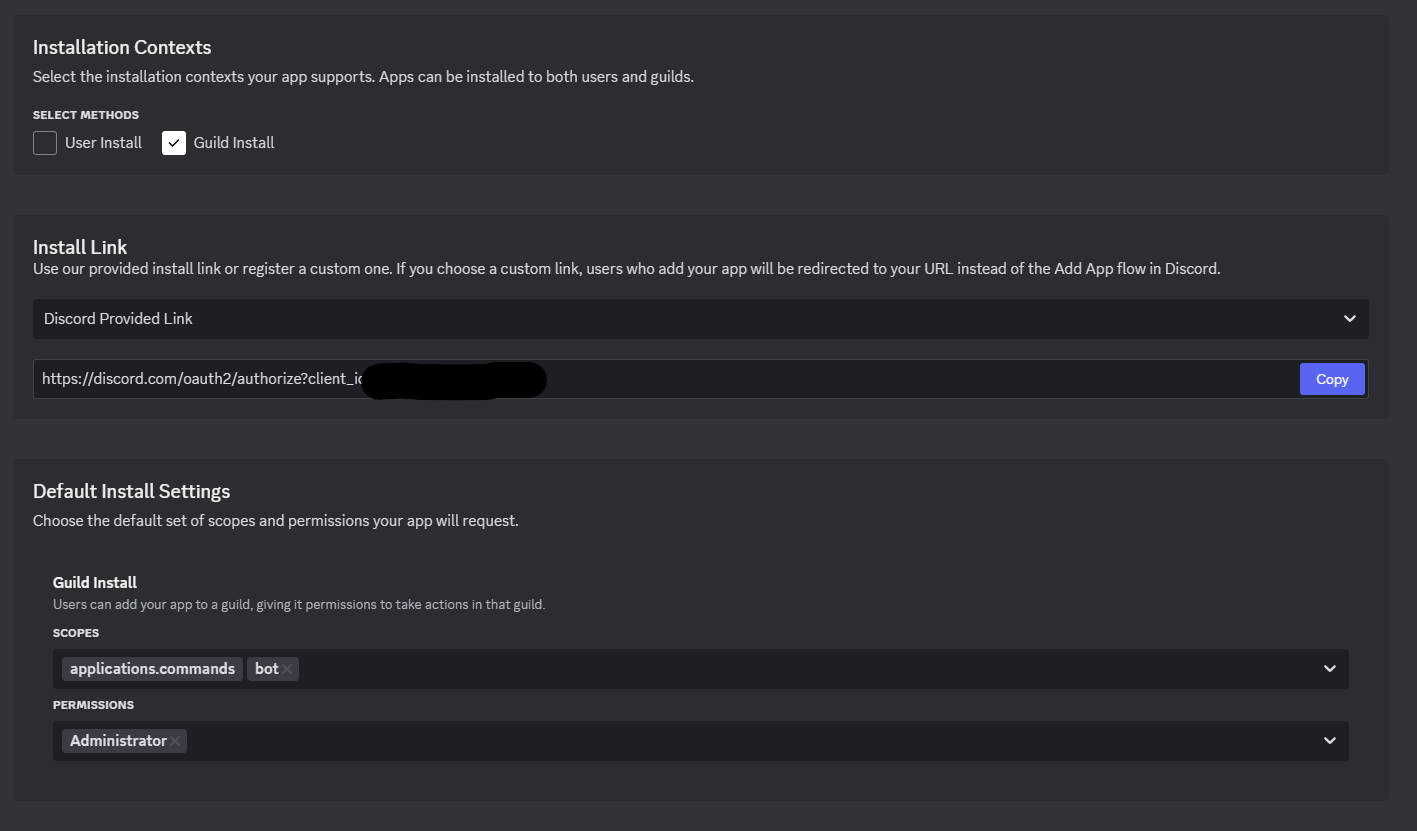
2️⃣ 将机器人添加到你的服务器
- 在 Installation > Install Link(安装 > 安装链接) 中,选择:
- Discord provided link(Discord 提供的链接)
- 权限:
Read Messages(读取消息)、Manage Roles(管理角色)、Send Messages(发送消息)等(根据需要选择)
- 复制生成的 URL,粘贴到浏览器中,邀请机器人加入你的 Discord 服务器。
3️⃣ 在服务器上安装 BWL
- 下载并将 BWL 插件
.jar文件放入服务器的/plugins文件夹中。 - 重启服务器以生成必要的配置文件。
4️⃣ 在游戏中连接机器人
- 加入你的服务器并运行命令:
/bwl - 这将打开 BWL 设置菜单。在这里你可以:
- 粘贴你的 Bot Token(机器人令牌)
- 输入你的 Guild ID(公会 ID,即你的 Discord 服务器 ID)
5️⃣ 设置完成!
从这里开始,你可以根据需求自定义角色和其他选项。BWL 将根据你的设置自动处理白名单。
如果你想修改踢出消息或其他内容,请打开 plugins/BlockyWhitelist/languages.json 并根据需要编辑!

你是这个资源的作者?登录后可认领此资源。
相似资源
 插件

数据包事件PacketEvents
retrooper
PacketEvents 是一款专为 Minecraft Java 版打造的协议库,旨在简化数据包的处理与传输。
前置科技
27
 插件
ExyliaLib
ExyliaServices
ExyliaPlugins 的库。
前置实用
26
 插件
ProAuthMeLogin
3623813757
通过对话框或铁砧界面帮助你的 Anthme
实用
16
 插件
Vessel
muhdfdeen
重新定义服务器上的生物运输方式。使用高度可定制的口袋道具,安全地捕获、存储和释放任何实体。
生物存储
13
 插件
Vivecraft Spigot Extension
fayer3
为基于 Spigot/Paper/Folia 的服务器添加对 Vivecraft 的支持
前置实用
12
 插件
旅行地图
mysticdrew
用于绘制游戏内地图或在浏览器中随探索实时进行地图绘制的实时地图。
冒险实用
12
评论 0
登录后参与评分
还没有评论,来抢沙发吧