BOBSHOP
所需插件
- ? Vault(必需)
- 任何兼容 Vault 的经济类插件(例如 EssentialsX Economy、CMI、XConomy、iConomy 等)
说明
- 不再需要外部全息图插件。
- BOBShop 现在内置了自己的全息图系统,用于展示物品和商店信息。
功能
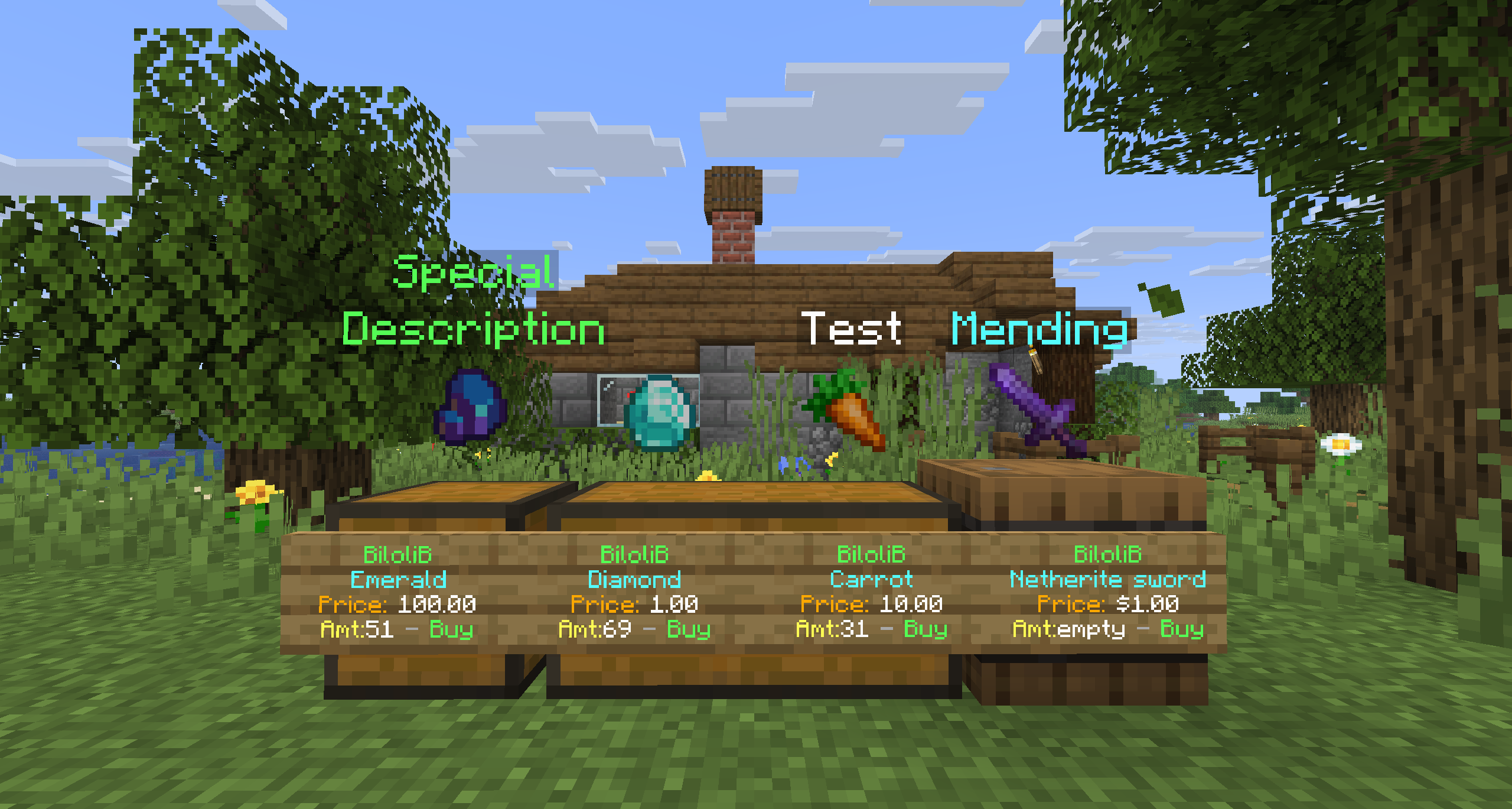
- ? 使用箱子或桶为玩家创建商店
- ? 自动创建和更新告示牌(支持购买/出售模式、价格、所有者名称、库存数量)
- ? 完全集成 Vault 经济系统(支持所有兼容 Vault 的经济插件)
- ? 可自定义的商店上方全息图(物品预览 + 描述文本)
- ? 管理员商店:拥有无限库存和特殊定价
- ⚙️ 可配置设置(商店上限、创建成本、税率、货币格式等)
- ? SQLite 数据库并支持自动备份
- ? 支持重载配置文件和语言文件
- ? 通过
lang 文件夹支持多语言(例如英语、土耳其语)
- ? 基于权限的税收折扣(例如 VIP 玩家支付更少的税)
- ? 保护机制:没有相应权限时,商店无法被破坏或修改
- ✨ 内置全息图系统(无需任何外部全息图插件)
安装方法
- 从 Modrinth 页面 下载 BOBShop 的最新发布版本。
- 将
.jar 文件放入服务器的 plugins 文件夹中。
- 确保已安装所需的依赖项:
- ? Vault
- 一个兼容 Vault 的经济插件(例如 EssentialsX Economy、CMI Economy 等)
- 重启服务器。
- (可选)编辑
plugins/BOBShop 文件夹中的 config.yml 和语言文件,以自定义商店上限、创建成本、税收、消息等。
- 使用
/bobshop reload 命令应用配置或语言更改,而无需重启服务器。
⚠️ 重要提示
仅使用最新版本(v3.0+)。
- 此版本包含内置的广告牌全息图系统——不再需要外部全息图插件。
- 旧版本可能需要外部全息图插件,且其全息图在新服务器上可能无法正常工作。
- 为了获得最佳的稳定性和性能,请勿使用旧版发布内容。
命令与权限
| 命令 / 节点 |
描述 |
权限 |
/bobshop |
打开插件设置菜单 |
bobshop.admin |
/bobshop reload |
重载插件配置和语言文件 |
bobshop.admin |
| (无命令) |
授予 20% 商店税收折扣 |
bobshop.tax.discount.20 |
| (无命令) |
授予 完全免税(0% 税收) |
bobshop.tax.free |
? 基于权限的税收倍率
multipliers.tax_by_permission 部分允许您为具有特定权限的玩家调整或覆盖商店税收。
示例 (config.yml)
multipliers:
  tax_by_permission:
    "bobshop.tax.discount.20": 0.8
    "bobshop.tax.free": 0.0
- 每个键是一个权限节点。
- 每个值是对税收百分比应用的倍率。
工作原理
- 如果玩家拥有权限 bobshop.tax.discount.20,其税收将乘以 0.8 → 他们支付的税款减少 20%。
- 如果玩家拥有权限 bobshop.tax.free,其税收将乘以 0.0 → 他们完全不支付税收。
- 没有这些权限的玩家使用 config.yml 中定义的默认税收值。
这使您可以通过简单地分配正确的权限来创建 VIP 等级、捐赠者福利或员工豁免。
LuckPerms 示例
# 给予玩家 20% 税收折扣
/lp user Steve permission set bobshop.tax.discount.20 true

# 使玩家完全免税
/lp user Alex permission set bobshop.tax.free true
注意:目前仅提供基础权限。
更多详细且可自定义的权限节点将在未来的更新中添加。
使用方法
/bobshop
|
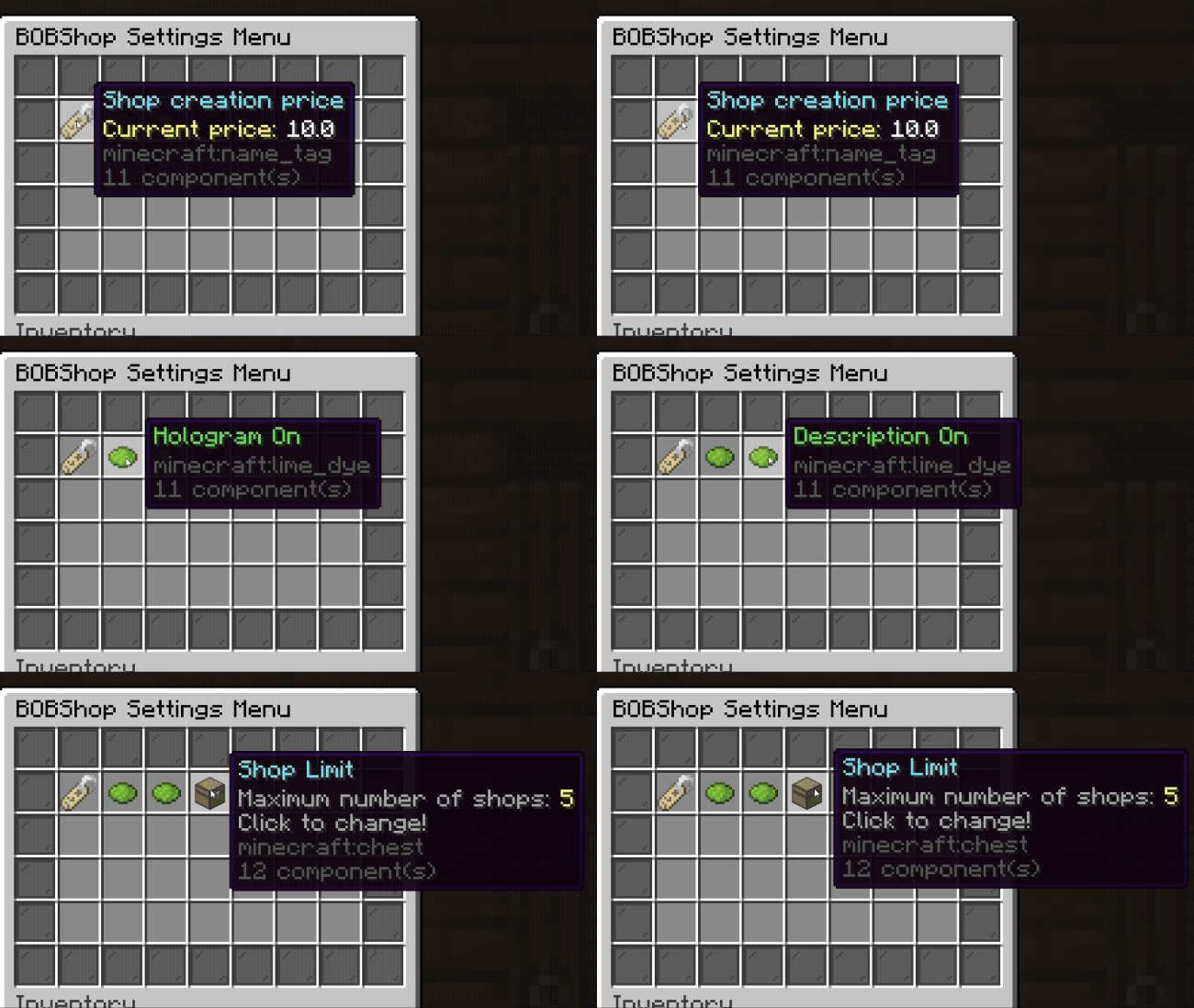
BOBShop 设置菜单
- 商店创建价格 – 设置玩家创建新市场必须支付的费用。
- 全息图开关 – 启用或禁用商店内物品的全息显示。
- 描述开关 – 在商店上方显示或隐藏物品描述。
- 商店上限 – 设置玩家可以创建的商店最大数量。
|
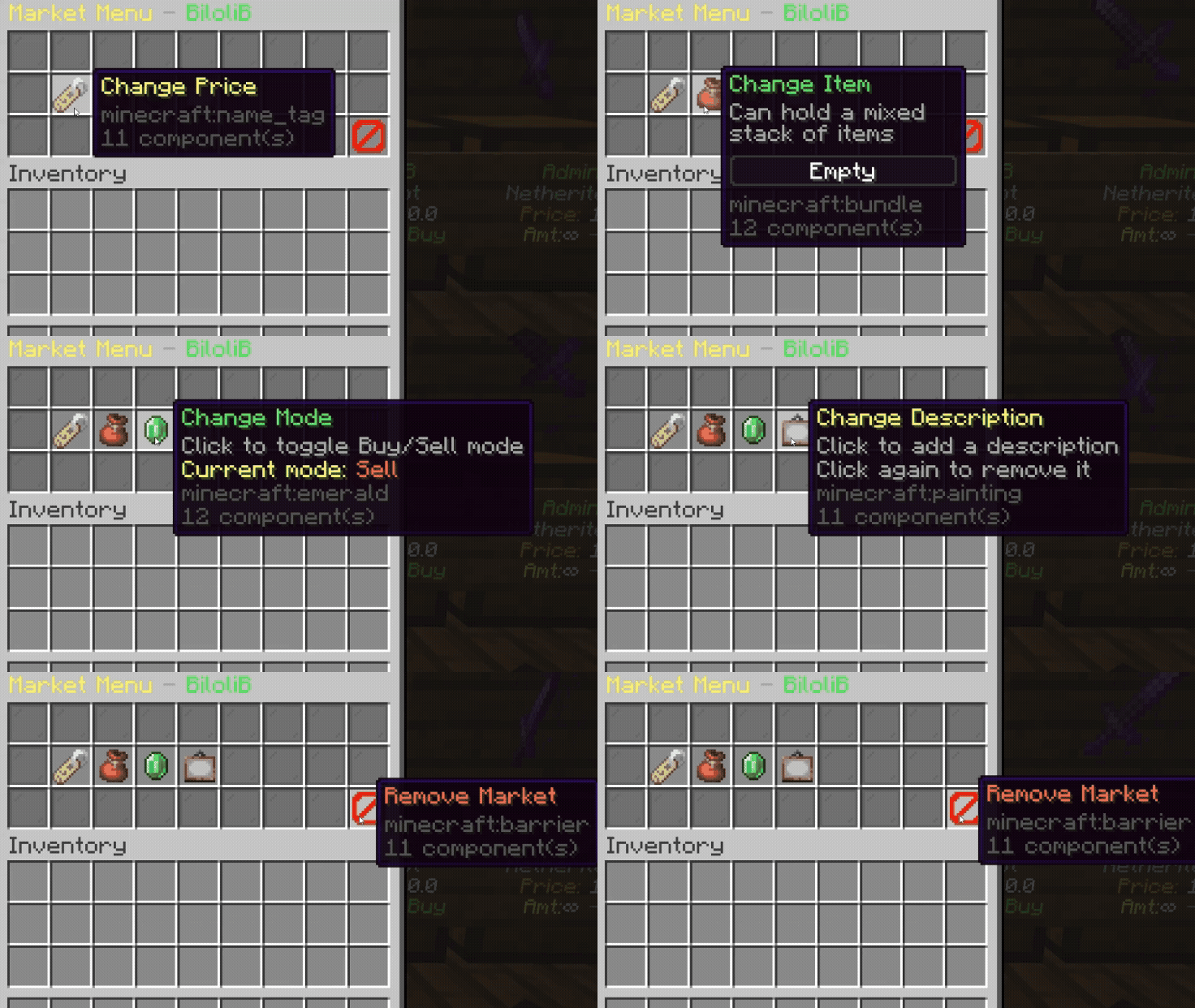
如果您右键点击自己市场的告示牌
|
Market Menu
- Change Price – 调整商店中物品的价格。
- Change Item – 更改当前在市场出售的物品。
- Change Mode – 在市场购买和出售模式之间切换。
- Description – ✨ 在市场全息投影上方显示自定义浮动文本,为玩家提供有关您物品的更多信息。
|
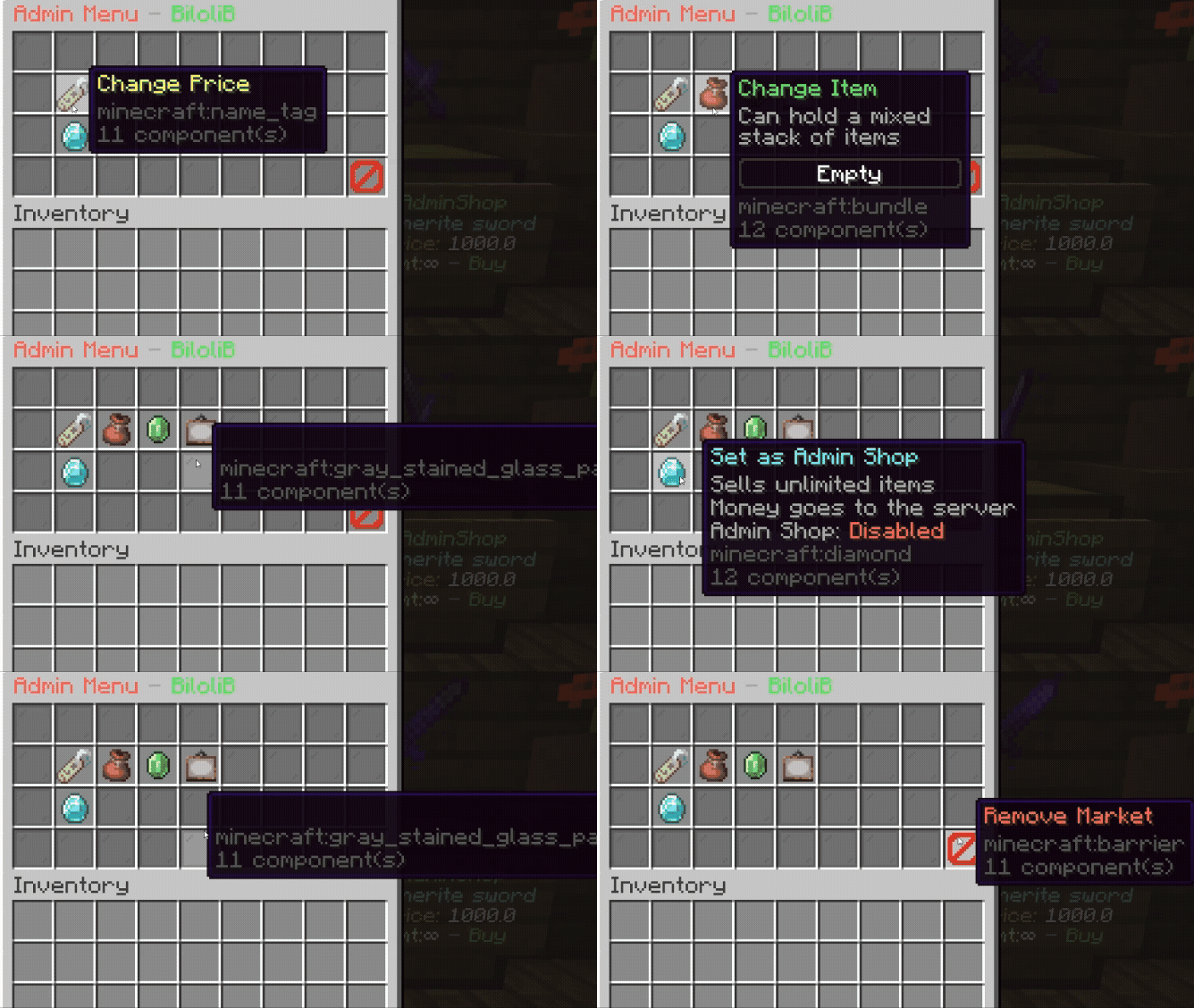
如果您 Shift + 右键点击 任意市场的告示牌
|
Admin Menu
Shift + 右键点击任意市场以打开管理员菜单并管理其设置。
- "Set as Admin Shop – 使商店物品无限供应,所有进出资金归服务器所有。”
|
如何出售与购买 ??
右键点击市场的告示牌 ?,然后在聊天栏 ? 输入您想要 购买 或 出售 的数量。
确认前请务必检查价格 ?!✅✨
注意
我受 QuickShop 启发创建了此插件,并加入了我自己的创意和功能。由于是我独自开发的,可能未能进行全面测试,因此可能存在一些错误。
非常感谢您的反馈——如果您遇到任何问题,请告诉我,我会尽力修复它们。感谢您关注 BobShop!
其他插件
? BobCase 是一款简单且可定制的 Minecraft 宝箱插件。
- 支持不同类型的宝箱
- 完全可配置奖励和概率
- 对玩家和管理员都易于使用
BOBSHOP
Required Plugins
- ? Vault (required)
- Any Vault-compatible economy plugin (e.g. EssentialsX Economy, CMI, XConomy, iConomy, etc.)
Notes
- External hologram plugins are no longer required.
- BOBShop now includes its own built-in hologram system for item and shop displays.
Features
- ? Create player shops with chests or barrels
- ? Automatic sign creation and updating (buy/sell modes, prices, owner name, stock amount)
- ? Fully integrated with Vault economy (supports all Vault-compatible economy plugins)
- ? Customizable holograms above shops (item preview + description text)
- ? Admin Shops with unlimited stock and special pricing
- ⚙️ Configurable settings (shop limits, creation cost, tax rates, currency format, etc.)
- ? SQLite database with automatic backups
- ? Reload support for configuration and language files
- ? Multi-language support via
lang folder (e.g. English, Turkish)
- ? Permission-based tax discounts (e.g. VIP players pay less tax)
- ? Protection: shops cannot be destroyed or modified without proper permissions
- ✨ Built-in hologram system (no need for any external hologram plugin)
How to Install
- Download the latest release of BOBShop from the Modrinth page.
- Place the
.jar file into your server’s plugins folder.
- Make sure you have installed the required dependency:
- ? Vault
- A Vault-compatible economy plugin (e.g. EssentialsX Economy, CMI Economy, etc.)
- Restart your server.
- (Optional) Edit
config.yml and language files in the plugins/BOBShop folder to customize shop limits, creation cost, taxes, messages, etc.
- Use
/bobshop reload to apply config or language changes without restarting the server.
⚠️ Important Note
Use the latest version (v3.0+) only.
- This release includes a built-in billboard hologram system — no external hologram plugins are needed anymore.
- Older versions may require external hologram plugins and their holograms may not work correctly on new servers.
- For best stability and performance, do not use older releases.
Commands & Permissions
| Command / Node |
Description |
Permission |
/bobshop |
Opens the plugin settings menu |
bobshop.admin |
/bobshop reload |
Reloads plugin configuration and language |
bobshop.admin |
| (no command) |
Grants 20% shop tax discount |
bobshop.tax.discount.20 |
| (no command) |
Grants full tax exemption (0% tax) |
bobshop.tax.free |
? Permission-based Tax Multipliers
The multipliers.tax_by_permission section allows you to adjust or override shop taxes for players with specific permissions.
Example (config.yml)
multipliers:
  tax_by_permission:
    "bobshop.tax.discount.20": 0.8
    "bobshop.tax.free": 0.0
- Each key is a permission node.
- Each value is a multiplier applied to the tax percentage.
How it works
- If a player has the permission bobshop.tax.discount.20, their tax will be multiplied by 0.8 → they pay 20% less tax.
- If a player has the permission bobshop.tax.free, their tax will be multiplied by 0.0 → they pay no tax at all.
- Players without these permissions use the default tax values defined in config.yml.
This lets you create VIP ranks, donor perks, or staff exemptions by simply assigning the right permission.
Example with LuckPerms
# Give a player 20% tax discount
/lp user Steve permission set bobshop.tax.discount.20 true

# Make a player completely tax-free
/lp user Alex permission set bobshop.tax.free true
Note: Currently only basic permissions are available.
More detailed and customizable permission nodes will be added in future updates.
How to Use
/bobshop
|
|
BOBShop Settings Menu
- Shop Creation Price – Sets the cost that players must pay to create a new market.
- Hologram Toggle – Enable or disable holographic display for items in your shop.
- Description Toggle – Show or hide item descriptions above the shop.
- Shop Limit – Sets the maximum number of shops a player can create.
|
If you right-click on your own market's sign
|
|
Market Menu
- Change Price – Adjusts the price of the item in the shop.
- Change Item – Change the item currently for sale in the market.
- Change Mode – Switch the market between Buy and Sell modes.
- Description – ✨ Show a custom floating text above your market’s hologram to give players more info about your item.
|
If you Shift + Right-click on any market's sign
|
|
Admin Menu
Shift + Right-click on any market to open the admin menu and manage its settings.
- "Set as Admin Shop – Makes the shop's items unlimited and all incoming/outgoing money goes to the server."
|
How to Sell & Buy ??
Right-click on the market's sign ?, then type in chat ? the amount you want to buy or sell.
Make sure to check the price ? before confirming! ✅✨
Note
I created this plugin inspired by QuickShop, adding my own ideas and features. Since I developed it alone, I may not have been able to test everything thoroughly, so some bugs might exist.
I’d really appreciate your feedback—if you encounter any issues, please let me know and I’ll do my best to fix them. Thank you for checking out BobShop!
Other Plugins
? BobCase is a simple and customizable crate plugin for Minecraft.
- Supports different crate types
- Fully configurable rewards and chances
- Easy to use for both players and admins


 插件

 插件
 插件
 插件
 插件
 插件
评论 0
登录后参与评分
还没有评论,来抢沙发吧