? 项目概述
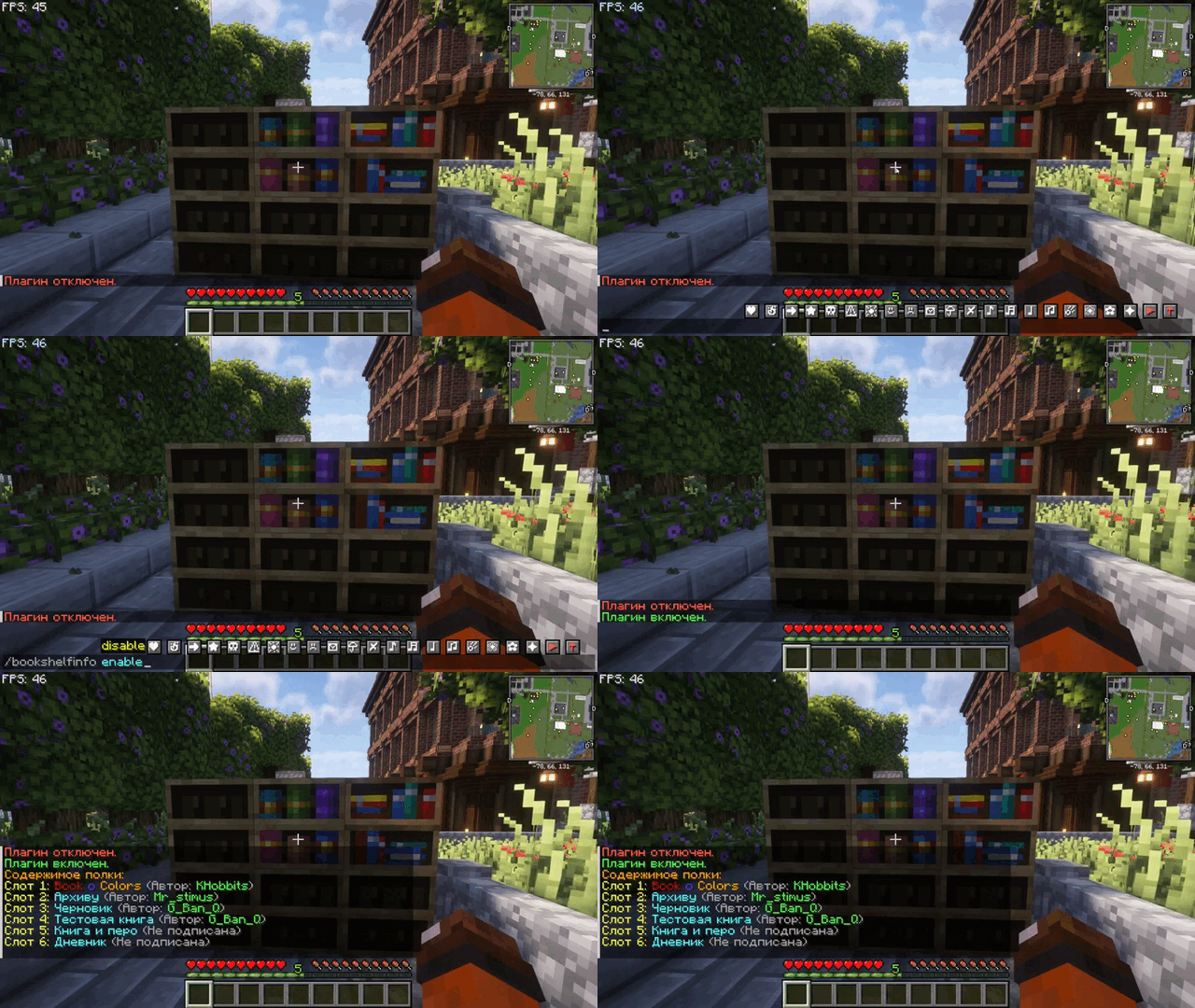
BookShelfInfo 是一款 Minecraft 插件,允许玩家以更详细的方式与切石书架(Chiseled Bookshelves)进行交互和检查。通过此插件,玩家只需与书架互动,即可轻松查看书架中的内容,包括书名和作者。服务器管理员可以使用简单的命令来开启或关闭该插件的功能。
? 功能特性
- 查看书架内容:玩家可以检查切石书架,查看其中存储的书名和作者。
- 书籍元数据显示:插件会显示详细的元数据,包括书籍是否已签名。
- 管理员控制:管理员可以使用简单的命令启用或禁用插件功能。
- 自定义消息:当玩家与书架互动时,插件会发送一条格式整齐的消息,显示书架的内容。
?️ 命令
BookShelfInfo 插件提供简单的命令来控制其功能:
| 命令 |
描述 |
用法 |
权限 |
| /bookshelfinfo enable |
启用插件。 |
/bookshelfinfo enable |
bookshelfinfo.command |
| /bookshelfinfo disable |
禁用插件。 |
/bookshelfinfo disable |
bookshelfinfo.command |
? 权限
该插件使用一个简单的权限系统来管理对其命令的访问:
| 权限 |
描述 |
默认值 |
bookshelfinfo.command |
允许使用 /bookshelfinfo 相关命令。 |
OP |
⚙️ 配置文件
插件会生成一个配置文件(config.yml),允许管理员切换插件的状态。
配置示例:
enabled: true
? 快速入门指南
- 安装插件:下载
.jar 文件并将其放入服务器的 plugins 文件夹中。
- 启动或重启服务器:启动服务器以启用插件。
- 启用或禁用:使用
/bookshelfinfo enable 或 /bookshelfinfo disable 来控制插件的功能。
使用鼠标右键点击切石书架——聊天栏将显示该书架上书籍的书名和作者。
? Project Overview
BookShelfInfo is a Minecraft plugin that allows players to interact with and inspect Chiseled Bookshelves in a more detailed manner. With this plugin, players can easily see the contents of bookshelves, including book titles and authors, by simply interacting with them. Server administrators can toggle the plugin's functionality on or off using simple commands.
? Features
- View Bookshelf Contents: Players can inspect Chiseled Bookshelves to view the titles and authors of books stored inside.
- Book Metadata Display: The plugin displays detailed metadata, including whether a book is signed or unsigned.
- Admin Control: Administrators can enable or disable the plugin's functionality with simple commands.
- Custom Messages: When a player interacts with a bookshelf, the plugin sends a neatly formatted message displaying the contents of the shelf.
?️ Commands
The BookShelfInfo plugin provides simple commands to control its functionality:
| Command |
Description |
Usage |
Permission |
| /bookshelfinfo enable |
Enables the plugin. |
/bookshelfinfo enable |
bookshelfinfo.command |
| /bookshelfinfo disable |
Disables the plugin. |
/bookshelfinfo disable |
bookshelfinfo.command |
? Permissions
The plugin uses a straightforward permission system to manage access to its commands:
| Permission |
Description |
Default |
bookshelfinfo.command |
Allows use of the /bookshelfinfo commands. |
OP |
⚙️ Configuration File
The plugin generates a configuration file (config.yml) that allows administrators to toggle the plugin's status.
Example configuration:
enabled: true
? Quick Start Guide
- Install the Plugin: Download the
.jar file and place it in your server's plugins folder.
- Start or Restart the Server: Start the server to enable the plugin.
- Enable or Disable: Use
/bookshelfinfo enable or /bookshelfinfo disable to control the plugin’s functionality.
Using the right mouse button, click on the chiseled bookshelf — the chat will display the titles and authors of the books on that shelf.
评论 0
登录后参与评分
还没有评论,来抢沙发吧