

玩家可以在商店中发布他们撰写的书籍,供其他玩家购买。 创建 BookShop 有两种方式:
- 当玩家手持书与笔物品并点击告示牌时,书中的文本会被复制。
- 当玩家在告示牌下方的箱子里放入一些书籍时,插件会在每次售出时自动复制箱中的物品。因此,无需重复编写书籍。
请注意:
- 管理员商店(AdminShops)总是会自动复制书籍!
其工作原理类似于出版商:它会复制箱子中的书籍并将其出售给玩家。
功能特性
- 发布已撰写的书籍
- 将书籍备份到文件中
- 恢复书籍
- 为每位新玩家提供默认书籍
- 为所有之前加入服务器的玩家提供书籍
- 向特定玩家提供书籍
- 每本书的统计数据(销售次数)
- 管理员可以设定税收
- 玩家只能发布已撰写的书籍
- 管理员可以创建管理员商店,无论配置文件中的设置如何,该商店都会始终复制书籍
依赖项
- iConomy 5 或 iConomy6 或 Vault 或 Register
- PermissionsEX 或 bPermissions 或 GroupManager 或 BukkitPermissions
商店
要创建商店,您必须先放置一个空箱子。然后您可以使用以下内容创建告示牌:
请注意:每个商店仅允许放置一种书籍!
| 行 | 文本 |
|---|---|
| 1 | [BookShop] |
| 2 | |
| 3 | 书籍的名称(在关闭装有书籍的箱子后会自动添加,但您也可以留空 ;) |
| 4 | 书籍的价格 |
或者:
| 行 | 文本 |
|---|---|
| 1 | [BookShop] |
| 2 | |
| 3 | 书籍的名称(在关闭装有书籍的箱子后会自动添加,但您也可以留空 ;) |
| 4 | 书籍价格:如果玩家手中持有书与笔时的书籍价格 |
要创建管理员商店(AdminShop):
| 行 | 文本 |
|---|---|
| 1 | [BookShop] |
| 2 | AdminShop |
| 3 | 书籍的名称(在关闭装有书籍的箱子后会自动添加,但您也可以留空 ;) |
| 4 | 书籍的价格 |
要创建报纸(Newspaper)商店:
| 行 | 文本 |
|---|---|
| 1 | [BookShop] |
| 2 | Newspapers |
| 3 | 书籍的名称(在关闭装有书籍的箱子后会自动添加,但您也可以留空 ;) |
| 4 | 报纸的价格 |
通过报纸商店,您可以一次性出售多本书籍。例如,一本规则书和一本插件介绍书。当玩家点击告示牌时,他将收到这两本书。
如果您不喜欢告示牌上的关键词,您可以在 Shopconfig.yml 文件中进行编辑!
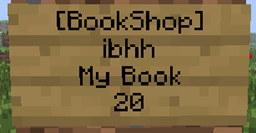
最终效果应如下所示:

权限节点
| 操作 | 权限节点 |
|---|---|
| 创建商店 | BookShop.create |
| 创建其他玩家的商店 | BookShop.create.other |
| 售卖其他玩家的书籍 | BookShop.sell.other |
| 创建管理员商店 | BookShop.create.admin |
| 使用商店 | BookShop.use |
| 销毁自己的商店 | BookShop.create |
| 销毁他人的商店或管理员商店 | BookShop.create.admin |
| 向管理员发送有人创建商店的消息 | BookShop.admin |
| 命令 | 权限节点 | 说明 |
|---|---|---|
| /BookShop setwelcomebook | BookShop.setwelcomebook | 设置一本进入库存的新手欢迎书籍 |
| /BookShop removewelcomebook | BookShop.removewelcomebook | 取消设置新手欢迎书籍 |
| /BookShop giveall | BookShop.giveall | 向所有之前加入服务器的玩家提供书籍 |
| /BookShop give | BookShop.give | 向指定玩家提供书籍 |
| /BookShop backupbook | BookShop.backupbook | 备份书籍 |
| /BookShop loadbook | BookShop.loadbook | 加载书籍 |
| /BookShop reload | BookShop.reload | 重载插件 |
| /BookShop debugfile | BookShop.debugfile | 开启或关闭调试文件 |
| /BookShop internet | BookShop.internet | 开启或关闭互联网访问 |
| /BookShop version | BookShop.version | 显示 BookShop 的当前版本 |
| /BookShop update | BookShop.admin | 更新插件至 dev.bukkit.org 上的最新版本 |
| /BookShop deletedebug | BookShop.admin | 删除调试文件以释放硬盘空间 |
| /BookShop log | BookShop.admin | 返回当前调试文件的大小 |
| /BookShop toggle | BookShop.admin | 立即关闭 BookShop |
| /BookShop language <language> | BookShop.admin | 选择游戏内语言(默认为英文) |
Players can publish their written books in a shop, so other players can buy the written books. There are two ways of creating a BookShop:
- When the player holds a book and quill item while hitting the sign, the text in the book is copied.
- When the player places some books in the chest beneath the sign, the plugin will duplicate the item in the chest every time it is sold. Thus nobody has to write books more than once.
Please note:
- AdminShops always duplicate the book!
It works the same way than a publisher: It copies the book in the chest and sells it to the player.
Features
- Publication of written books
- backup of books into a file
- Restoring books
- Give a default book to every new player
- Give a book to every player who joined the server before.
- Give a book to a player
- Statistics for every book (how often it was sold)
- Admins can impose taxes.
- Player can only publish written books.
- Admins can create AdminShops that always duplicate the book regardless of the settings in the config file.
Dependencies
- iConomy 5 or iConomy6 or Vault or Register
- PermissionsEX or bPermissions or GroupManager or BukkitPermissions
The shop
To create a shop, you have to place an empty chest first. Then you can create a sign with following content
Please note: Only ONE book per shop is allowed!
| Line | Text |
|---|---|
| 1 | [BookShop] |
| 2 | |
| 3 | The books name (automatically added after closing the chest with the book), but you can let it empty ;) |
| 4 | price of the book |
OR:
| Line | Text |
|---|---|
| 1 | [BookShop] |
| 2 | |
| 3 | The books name (automatically added after closing the chest with the book), but you can let it empty ;) |
| 4 | price of the book:price of the book if the player has a book and quill in the hand |
To create an AdminShop:
| Line | Text |
|---|---|
| 1 | [BookShop] |
| 2 | AdminShop |
| 3 | The books name (automatically added after closing the chest with the book), but you can let it empty ;) |
| 4 | price of the book |
To create a Newspaper shop:
| Line | Text |
|---|---|
| 1 | [BookShop] |
| 2 | Newspapers |
| 3 | The books name (automatically added after closing the chest with the book), but you can let it empty ;) |
| 4 | price of the newspapers |
With the newspaper shop you are able to sell several books at a time. E.g. a book with rules and a book with a plugin info. If the player hits the sign he receives the two books.
If you don't like the keywords on the sign, you can edit them in the Shopconfig.yml´file!
At the end it should look like this:
Permission nodes
| Action | Permission node |
|---|---|
| Create a shop | BookShop.create |
| Create a shop of an other player | BookShop.create.other |
| Sell books of other players | BookShop.sell.other |
| Create a Adminshop | BookShop.create.admin |
| Use the shop | BookShop.use |
| Destroy own shop | BookShop.create |
| Destroy shop of someone else or AdminShop | BookShop.create.admin |
| Message to admins that someone created a shop | BookShop.admin |
| Command | Permission node | Explanation |
|---|---|---|
| /BookShop setwelcomebook | BookShop.setwelcomebook | Sets a book which has every new player in the inventory |
| /BookShop removewelcomebook | BookShop.removewelcomebook | Unsets a book which has every new player in the inventory |
| /BookShop giveall | BookShop.giveall | Gives a book to every player who joined the server before |
| /BookShop give | BookShop.give | Gives a book to a player |
| /BookShop backupbook | BookShop.backupbook | Backups a book |
| /BookShop loadbook | BookShop.loadbook | Loads a book |
| /BookShop reload | BookShop.reload | Reloads the plugin |
| /BookShop debugfile | BookShop.debugfile | Turn the debugfile on and off |
| /BookShop internet | BookShop.internet | Turns the internet access on and off |
| /BookShop version | BookShop.version | Shows the current version of BookShop |
| /BookShop update | BookShop.admin | Updates the plugin to the latest vesrsion on dev.bukkit.org |
| /BookShop deletedebug | BookShop.admin | Deletes the debugfile to give you free space on the hdd |
| /BookShop log | BookShop.admin | Returns the current size of the debugfile |
| /BookShop toggle | BookShop.admin | Turns BookShop immediately off |
| /BookShop language <language> | BookShop.admin | Select the ingame language (by default english) |
| /BookShop help | BookShop.help | Returns all command which the player can execute |
| /BookShop showdebug | BookShop.showdebug | Shows you console messages ingame |
下载 BookShop
下载 BookShop
需要联机服务器吗?
稳定流畅、一键部署,几分钟即可和朋友联机开服
最低仅需 8 元/月 即可畅快联机
下载 BookShop
需要联机服务器吗?
稳定流畅、一键部署,几分钟即可和朋友联机开服
最低仅需 8 元/月 即可畅快联机
下载 BookShop
需要联机服务器吗?
稳定流畅、一键部署,几分钟即可和朋友联机开服
最低仅需 8 元/月 即可畅快联机
下载 BookShop
需要联机服务器吗?
稳定流畅、一键部署,几分钟即可和朋友联机开服
最低仅需 8 元/月 即可畅快联机
下载 BookShop
需要联机服务器吗?
稳定流畅、一键部署,几分钟即可和朋友联机开服
最低仅需 8 元/月 即可畅快联机
下载 BookShop
需要联机服务器吗?
稳定流畅、一键部署,几分钟即可和朋友联机开服
最低仅需 8 元/月 即可畅快联机
下载 BookShop
下载 BookShop
下载 BookShop
- 修复了 giveall 漏洞
Bug追踪器:
关于这个资源的讨论、问题反馈与使用心得
还没有讨论,来发第一帖吧
你是这个资源的作者?登录后可认领此资源。
相似资源
 插件
用于绘制游戏内地图或在浏览器中随探索实时进行地图绘制的实时地图。
 插件
一个高度兼容、功能完善且稳定的 TPA 模组
 插件
在 Minecraft 中加入“最后一击”、“第二次机会”和“最后喘息”机制!从高处坠落时,你将拥有 0.5 HP 而不是直接死亡;当生命值较低时,增强你的能力。
 插件

更快速的直线轨道矿车、链式连接列车、熔炉机车,以及原版红石信号!
 插件

城镇现在可以要求建造具有特定功能的建筑
 插件
一个功能丰富、完全动画化的箱子插件,适用于 Paper 1.21.x,支持 IA、Vault、PlaceholderAPI 和 Citizens
评论 0
登录后参与评分
还没有评论,来抢沙发吧