ChatBubblePlugin
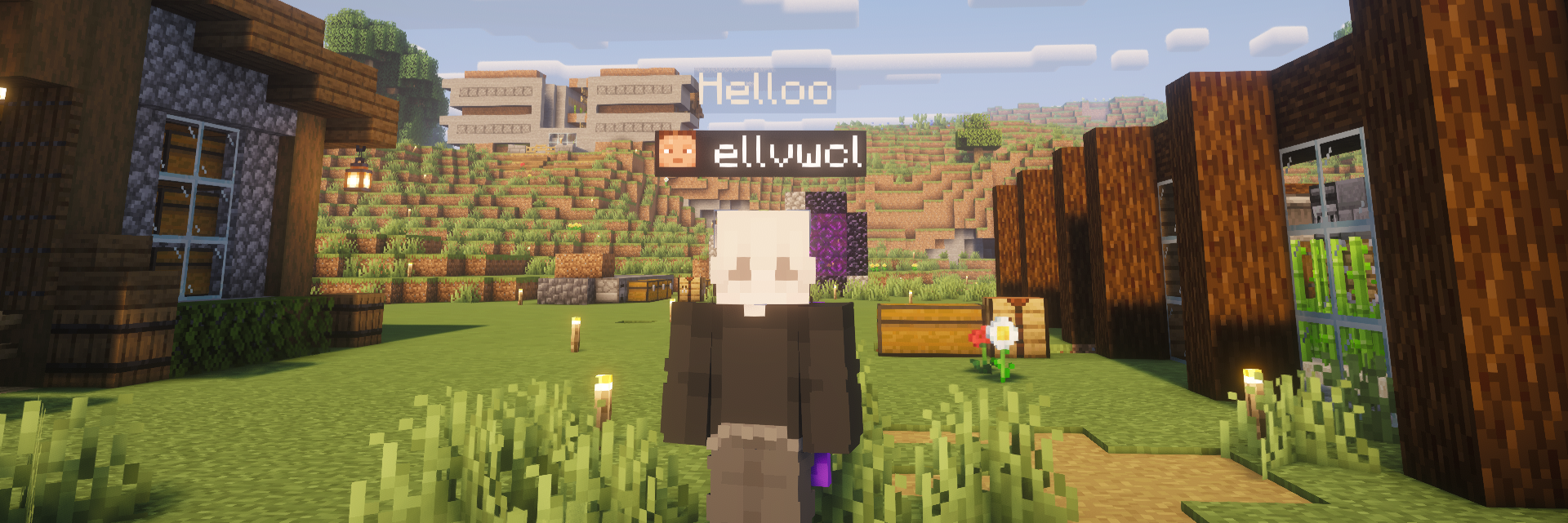
每当玩家发送消息时,在其头顶显示一个浮动聊天气泡——这是一种轻量级的原生方案,作为基于全息图的聊天插件的替代,完全基于 Paper 自身的 Display 实体 API 构建。

功能说明
当玩家发送聊天消息时,该插件可以同时以两种方式显示,或仅选择其中一种:
- 在头顶上方 —— 一个
TextDisplay 气泡会在玩家头顶生成,随玩家移动自动跟随,并在短暂延迟后自行消失。
- 在普通聊天框中 —— 正常的聊天消息,与原版一致。
两者相互独立且均可单独切换。可以关闭普通聊天框而仅保留气泡,同时保留两者,或关闭气泡而仅保留原版聊天——这完全由服务器管理员决定,玩家也可以 individually 选择退出自己的气泡显示。
特性
- ?️ 头顶上的浮动聊天气泡,实时跟随玩家移动
- ✅ 可全局通过命令或配置文件独立切换 普通聊天 和 气泡聊天
- ? 支持按玩家个体退出(使用
/bubbletoggle)——永久保存,无需数据库
- ? 可配置文本颜色、背景颜色和背景透明度
- ? 可调整气泡高度,确保不会被名字标签遮挡
- ⏱️ 可配置显示时长和字符限制
- ? 支持通过
/chatbubble reload 动态重载设置——无需重启服务器
- ? 玩家退出/死亡及插件禁用时自动清理实体——无残留实体
命令
| 命令 |
权限 |
描述 |
/chatbubble reload |
chatbubble.admin |
重新加载 config.yml |
/chatbubble bubble <on|off> |
chatbubble.admin |
全局切换气泡聊天 |
/chatbubble chat <on|off> |
chatbubble.admin |
全局切换普通聊天 |
/chatbubble height <number> |
chatbubble.admin |
调整气泡头顶上方的距离 |
/chatbubble status |
chatbubble.admin |
查看当前设置 |
/bubbletoggle |
chatbubble.toggle (默认:所有玩家) |
切换自己的气泡显示开关 |
配置
所有设置均位于 config.yml 文件中,首次运行时自动生成——无需编辑任何代码:
settings.normal-chat.enabled — 在普通聊天框中显示消息
settings.bubble-chat.enabled — 在头顶上方以气泡形式显示消息
settings.bubble-chat.height-offset — 头顶上方的距离
settings.bubble-chat.duration-seconds — 气泡保持可见的时间长度
settings.bubble-chat.max-characters — 截断过长的消息
settings.bubble-chat.text-color / background.color / background.opacity — 外观设置
settings.bubble-chat.scale — 气泡文本大小
要求
备注
该插件使用 Paper 原生的 TextDisplay 实体而非盔甲架(ArmorStand),因此保持轻量级并与现代客户端渲染兼容。无需外部依赖。
ChatBubblePlugin
Displays a floating chat bubble above a player's head whenever they type a message — a lightweight, native alternative to hologram-based chat plugins, built entirely on Paper's own Display entity API.

What it does
When a player sends a chat message, the plugin can show it two ways at once, or just one:
- Above their head — a
TextDisplay bubble spawns above the player, automatically follows them while they move, and disappears on its own after a short delay.
- In the normal chat box — the regular chat message, exactly like vanilla.
Both are independent and fully toggleable. Turn off the normal chat box and keep only bubbles, keep both, or turn off bubbles and keep vanilla chat — it's entirely up to the server owner, and players can also opt out of their own bubble individually.

Features
- ?️ Floating chat bubble above the head, following the player in real time
- ✅ Toggle normal chat and bubble chat independently, globally, via command or config
- ? Per-player opt-out with
/bubbletoggle — saved permanently, no database needed
- ? Configurable text color, background color, and background opacity
- ? Adjustable bubble height, so it never gets hidden behind nametags
- ⏱️ Configurable display duration and character limit
- ? Reload settings on the fly with
/chatbubble reload — no restart required
- ? Automatic cleanup on player quit/death and plugin disable — no leftover entities
Commands
| Command |
Permission |
Description |
/chatbubble reload |
chatbubble.admin |
Reload config.yml |
/chatbubble bubble <on|off> |
chatbubble.admin |
Toggle bubble chat globally |
/chatbubble chat <on|off> |
chatbubble.admin |
Toggle normal chat globally |
/chatbubble height <number> |
chatbubble.admin |
Adjust bubble height above the head |
/chatbubble status |
chatbubble.admin |
View current settings |
/bubbletoggle |
chatbubble.toggle (default: all players) |
Toggle your own bubble on/off |
Configuration
All settings live in config.yml, generated on first run — no need to edit any code:
settings.normal-chat.enabled — show messages in the normal chat box
settings.bubble-chat.enabled — show messages as a bubble above the head
settings.bubble-chat.height-offset — distance above the head
settings.bubble-chat.duration-seconds — how long a bubble stays visible
settings.bubble-chat.max-characters — truncates long messages
settings.bubble-chat.text-color / background.color / background.opacity — appearance
settings.bubble-chat.scale — bubble text size
Requirements
- Paper (or a Paper fork) 1.26.1.2
Notes
The plugin uses Paper's native TextDisplay entities rather than ArmorStands, so it stays lightweight and compatible with modern client rendering. No external dependencies are required.
评论 0
登录后参与评分
还没有评论,来抢沙发吧