简介
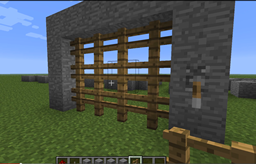
BuildAssist 是一组实用的工具合集,旨在让在 Minecraft 中建造变得更加轻松有趣。它提供了简便的机制,帮助你更快地构建复杂的结构,甚至实现一些原本无法存在的建筑(例如闸门)。本模组的设计初衷是充满乐趣,并为建造提供合理的资源消耗,同时去除建造过程中的一些繁琐重复操作。
更新日志
在 v2.0 版本中,闸门功能已完全重做,引入了全新的游戏内机制:制作一种可合成的“闸门石”(Portcullis Gate Stone),用于建造闸门。v2.1 版本允许将红石中继器和红石火把与闸门关联,从而控制其开启。这赋予玩家对闸门开启方式更大的控制权——任何能点亮红石的逻辑电路现在都可以打开或关闭闸门。例如,将日光探测器连接到两个非门,并将红石火把关联到第二个非门上的闸门,你就能打造一个在夜间自动关闭的闸门!
v2.2 版本增加了对更多石材类型的支持,如砂岩(包括切纹砂岩和光滑砂岩)等。如果你想要炫耀财富,甚至可以制作金质或钻石质的闸门。
v2.3 版本更新了敲击功能,使闸门在打开后立即关闭。这保持了控制闸门的红石电路(如日光探测器)的状态同步;否则,敲击操作会反转红石激活器的含义。
v2.4 版本通过 mcstats.org 添加了统计数据收集功能;请参阅配置部分的说明。
功能特性
目前 BuildAssist 允许你:
- 建造可工作的闸门,并具备敲击开启的功能
- 快速用你选择的方块填充空白区域(适用于墙壁、地板、天花板、道路、栅栏等)
- 向上扩展自定义的方块布局
- 快速清除已填充的空间(仅限创造模式)
- 听到脚下矿石的声音提示
- 返回床铺位置停留六十秒
- 根据光照等级自动放置火把
命令与功能
闸门 (Portcullis)
要建造闸门,首先需制作“闸门石”:在基岩左侧或右侧环绕放置红石粉(两格红石粉,一格基岩)。放置该方块后,选中一个空的物品栏槽位并右键点击它。随后,将所需数量的栅栏方块投入弹出的物品栏中。之后,用拉杆右键点击闸门石,并将拉杆放置在你想要的任何位置。现在,拉杆即可控制闸门的开合。
这意味着你可以创建任意形状的闸门,并从任何地方对其进行控制!请参见下方的最新视频以获取概览。
/baportcullisknockallow [player] 和 /baportcullisknockdeny [player]
在建造好闸门后,运行其中一个命令,然后左击一个闸门栅栏,授予另一名玩家通过左击打开闸门的权限(任何人仍可使用拉杆打开或关闭闸门)。此功能非常有用,因为拉杆通常只有一侧可以访问。这实际上就是你的“钥匙”,允许你从另一侧打开闸门。
/bafill [hollow]
放置两个方块,如果你有足够的材料且路径畅通,/bafill 将用相同的材料填充由这两个方块定义的体积空间。这对于快速建造大型墙壁、地板、道路等非常有用。v0.6 新增功能:指定 hollow 参数将使内部空间保持未填充状态。
一旦你放置了两个方块,只需输入 "/bafill",由这两个方块定义的体积空间将被填充,所需的材料将从你的物品栏中扣除。如果该体积空间中部分方块已被填充,则不会对这些方块收费。
自 v0.6 版本起,在创造模式下此命令不会扣除物品栏中的材料。
/baclear
v0.6 新增。清除由最后两个放置的方块所定义体积内的空间;目前仅适用于创造模式,因为这是一个相当强大且具有破坏性的命令,没有合适的成本函数来平衡它。
/bareset
v0.8 新增。重置被追踪的方块,这些方块用于所有使用“已放置的所有方块”的命令,例如 /baextend。(在 v0.7 中曾称为 /bastart。)
/baextend [up|north|east|west|south] [count]
v0.8 新增。将所有已放置的方块沿指定方向延伸 [count] 个方块(默认为 /baextend up 1)。这使你能够设计自定义布局,特别是非直线墙壁,并快速将其建造出来。与 /bafill 兼容(即,如果你使用 /bafill 填充方块,它们也会通过 /baextend 进行延伸)。延伸时会从物品栏中扣除材料。
目前,此命令的使用可能有些棘手,因为它并不十分清晰地显示正在追踪哪些方块,而且很容易以某种方式建造导致无法延伸,因为中间有方块阻挡。如果遇到困难,只需输入 /bareset,然后重新建造并再次尝试 /baextend。
/basound [full]
发射声波探测弹,可检测你脚下 9x9 网格范围内地下有多少矿石,中心点为你发射声波探测弹时站立的位置。声波向下传播和处理回声需要一定时间,因此你距离基准面(Y=0)每高二十格大约需要一秒。
如果需要更高的精度,请运行 "/basound full"(这将消耗一个火药,耗时约为普通模式的两倍),它将告诉你下方每种矿石的具体数量。
/baquickreturn
立即将你传送回床铺的出生点位置,持续六十秒,代价是一个指南针。六十秒后,你将传回起始位置。这对于快速补给、卸下挖掘到的方块以及照料花园非常有用。
/baautotorch
在低光照条件下自动放置火把(你所在位置的方块光照等级 = 7)。输入 /baautotorch 可再次禁用此功能。每放置一个火把消耗一个火把。
视频
以下是 v2.0 版本中引入的吊闸新游戏机制的介绍:
以下是如何使用该功能构建在白天打开的吊闸的演示:
更多视频请查看 Videos 页面。
权限
自 v1.0 版本起,所有命令均具备权限控制。权限格式为 buildassist.<command>。例如,buildassist.bafill 用于控制玩家是否可以使用 /bafill 命令。注意:目前建造吊闸不再需要特定权限,因为它已完全作为游戏内机制实现。未来将重新添加相应的权限控制。
配置
自 v2.4 版本起,本插件通过 MCStats.org 收集统计数据。如需退出统计,请在 plugins/PluginMetrics/config.yml 中添加或编辑 "opt-out: true"。
未来版本可能会提供配置选项,例如对建造成本的控制、建造时机(如即时建造 vs. 根据结构大小按比例分多个刻进行建造),或限制条件(如吊闸高度或可放置方块数量)等。
安装/服务器说明
只需将 .jar 文件放入你的 plugins 文件夹,然后重载插件或重启服务器即可。在重载或重启时,所有现有的吊闸将被保存到一个名为 "BuildPortcullis.save" 的文件中。该文件的内容当前不可读且不可编辑。
注意:本插件已在 CB 1.6.4 和 CB 1.7.9 上测试,在这两个版本上均可正常运行。
反馈与建议
非常感谢你试用我的插件!如果你喜欢它,欢迎留言评论。我希望让插件尽可能灵活以满足大多数需求,因此如果你发现其工作方式与预期不同,或有扩展或增强功能的请求,请告诉我(请提交工单)!
Introduction
BuildAssist is a collection of useful tools that make building things in Minecraft easier and more fun. It offers easy mechanics to build complicated structures more quickly, as well as structures that cannot otherwise exist (such as a portcullis). It is meant to be fun, and offer realistic costs for constructing things, but to remove some of the tedium of construction.
What's new?
In v2.0, the portcullis has been completely redone with a fully in-game mechanic, introducing a craftable "Portcullis Gate Stone" that can be used to build a portcullis. v2.1 lets redstone repeaters and redstone torches also be associated with a portcullis to open it. This gives players the ability to have much more control over what opens a gate (any logic that you can build that lights up redstone can now open or close the gate). For example, hook up a daylight sensor to two not gates with the torch on the second not gate associated to the portcullis, and you have a portcullis that closes at night!
v2.2 adds support for more stone types, such as Sandstone (and chiseled and smooth varieties), etc. You can even make yourself a portcullis of Gold or Diamond if you're feeling like showing off your wealth.
v2.3 updates knocking so that the gate closes right after it opens. This maintains sync between any redstone controlling the gate, such as a daylight sensor, as otherwise knocking had the effect of reversing the meaning of the redstone activator.
v2.4 adds stats collection via mcstats.org; please see notes in Configuration section.
Features
Currently BuildAssist lets you:
- build a working portcullis with the ability to knock to open it
- quickly fill empty space with blocks of your choice (useful for walls, floors, ceilings, roads, fences, etc.)
- extend custom layouts of blocks upwards
- quickly clear filled space (creative mode only)
- sound for ore beneath you
- return to your bed for sixty seconds
- automatically place torches based on the light level
Commands and Features
Portcullis
To build a portcullis, first craft "Portcullis Gate Stone" by surrounding a Stone on the left or right with Redstone (two blocks Redstone, one block Stone). Place it, and then right-click it while you have an empty inventory slot selected. Then drop as many fence blocks as are needed into the inventory that pops up. After that, right-click the gate stone with a lever, and place the lever anywhere you want. Now the lever opens or closes the portcullis.
This means you can create arbitrarily-shaped portcullises, and control them from anywhere! See the latest video below for an overview.
/baportcullisknockallow [player] and /baportcullisknockdeny [player]
Having built a portcullis, run one of these commands and then left-click a portcullis fence to grant another player the permission to open the portcullis by left-clicking it (anyone can open or close using the lever). Useful, because the lever is only on one side. This is essentially your "key" to open the portcullis from the other side.
/bafill [hollow]
Place two blocks, and if you have enough material and there's nothing in the way, /bafill will fill the volume described by those two blocks with the same material. Useful for quickly building large walls, floors, roads, etc. New in v0.6: specifying hollow will leave the interior space unfilled.
Once you place two blocks, just type "/bafill" and the volume described by those two blocks will be filled, and the required materials deducted from your inventory. If some of the blocks in that volume are already filled, you won't be charged for those blocks.
As of v0.6, this will not deduct inventory in creative mode.
/baclear
New in v0.6. Clears the space enclosed by the volume defined by the last two placed blocks; only works in creative mode for now since this is a rather powerful and destructive command with no appropriate cost function.
/bareset
New in v0.8. Resets the blocks that are tracked for the commands that use all blocks placed, such as /baextend. (Used to be called /bastart in v0.7).
/baextend [up|north|east|west|south] [count]
New in v0.8. Extends all blocks that have been placed [count] blocks in the specified direction (defaults to /baextend up 1). This lets you design custom layouts, especially non-straight walls, and build them up quickly. Compatible with /bafill (that is, if you fill blocks using /bafill, they are also extended by /baextend). Deducts from inventory as it extends.
Right now this can be a bit tricky to work with, because it's not super clear what blocks are being tracked, and it's easy to build in a way that it won't let you extend because there are blocks in the way. If you get stuck, just type /bereset and then build again and try /baextend again.
/basound [full]
Fires off a sounding charge which can detect how much ore is in the ground beneath you in a 9x9 grid centered on where you were standing when you fired the sounding charge. The charge takes some time to propagate down and process the echo, so it takes about one second for every twenty blocks you are above level 0.
If more accuracy is desired, run "/basound full" (which costs one gunpowder and takes about twice as long), and it will tell you how much of each ore is sitting below you.
/baquickreturn
Instantly returns you to your bed spawn location for 60 seconds, at the cost of one compass. After sixty seconds, you're teleported back to where you started. Useful for a quick restocking trip, dropping off mined blocks, and maybe tending the garden.
/baautotorch
Automatically place torches in low-light conditions (the block you're at is <= 7). Type /baautotorch to disable again. Consumes one torch per torch placed.
Video
Here's a tour of the new in-game mechanic for portcullises introduced in v2.0:
Here's a demonstration of how to use that to build a portcullis that opens during the day:
More videos found in the Videos page.
Permissions
As of v1.0 all commands have permissions. The permission is simply buildassist.<command>. For example, buildassist.bafill controlls whether a player can use the /bafill command. Note: building a portcullis currently no longer has a permission, as it is fully an in-game mechanic. One will be added back soon.
Configuration
As of v2.4 this plugin collects stats via MCStats.org. To opt-out, add or edit plugins/PluginMetrics/config.yml to have "opt-out: true" in it.
Future releases may offer configuration options, such as more control over the cost of building, or the timing of building (e.g. instant build vs. building the structure over a number of ticks proportional to the size of the structure), or limits (e.g. height of portcullis or number of blocks that can be placed).
Installation/Server notes
Just drop the .jar file into your plugins folder and reload plugins or restart your server. When reloading or restarting, all existing portcullises will be saved in a file called "BuildPortcullis.save". The contents of this file are not currently human-readable or editable.
Note: plugin is tested on CB 1.6.4 and CB 1.7.9, and works fine on both.
Comments, Suggestions
Thanks a bunch for trying out my plugin! If you like it, feel free to drop a comment. I'd like to make this flexible to meet most desires, so especially if it works in a way different than what you would expect or if you have a request to extend or enhance the functionality, let me know (please file a ticket)!

 插件
 插件
 插件

 插件
 插件

 插件
评论 0
登录后参与评分
还没有评论,来抢沙发吧