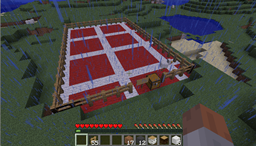
是否曾希望在实际收集材料之前,先规划好你的建筑或结构?BuildingPlanner 允许你指定一个规划区域,在该区域内你将拥有无限资源。随后你可以提交计划,将所需材料放入补给箱,然后看着你的设计逐渐成型。
它不仅让你可以放置无限数量的方块,而且当你犯错时,只需一拳即可在规划区域内瞬间清除一个方块。
0.6.0 新增功能
- 在计划列表和报告中包含世界名称。
- 使水和熔岩在规划区域内不流动。
- 添加了对规划区域方块的黑名单/白名单功能(白名单优先于黑名单)
- 禁用在规划区域内放置沙子和砾石(目前无法在计划中正确处理它们)
- 修复:创建和销毁计划时的箱子复制问题。
- 修复:默认高度计算不完全正确的问题。
- 修复:当物体从其附着位置脱落时,计划会相应更新。
- 修复:计划中的可附着物确保其附着的物体在尝试放置前先被构建。
- 改进了提交/取消提交的工作方式。现在速度更慢且对服务器更友好。
- 添加了 buildingplanner.*, buildingplanner.architect 和 buildingplanner.planner 权限组
- 修复:提交/取消提交时,可附着物未正确移除
- 修复:无论是否实际拾取,补给箱中始终存在一根栅栏。
- 修复:破坏告示牌会破坏区域但因锁留而保留告示牌。
- 禁用使用已规划的箱子、床、工作台和熔炉。
- 初步(即:有缺陷地)支持切换到创造模式 - 切换 useCreativeMode 配置选项。
- 修复:销毁区域时的并发问题
- 使楼层切换变慢,希望能帮助提交/取消提交时的服务器负载。
- 修复:当指定高度正好等于世界高度时的问题。
- 修复:先将新保存写入临时文件,如果服务器崩溃,不会完全损坏区域
问题与建议
请在 The BuildingPlanner GitHub 项目 上记录问题和提出建议
请尽可能提供详细的描述
- 对于错误报告 - 请包含服务器日志、插件列表并详细说明如何重现该问题。
- 对于建议 - 请包含你能想到的所有细节。你的想法越完善,我就能越好地实现它。
下载
当前发布版本:
在此下载文件
开发版本:
最新开发版本在此
使用方法
Mentioum 写了一篇关于如何使用 BuildingPlanner 的精彩文章:
BuildingPlanner 说明 - LPMinecraft Wiki
此外,如果你想快速了解它的外观,请务必查看图片:
介绍图片
权限
- buildingplanner.create:允许玩家定义建筑区域
- buildingplanner.destroy:允许玩家取消建筑区域(通过破坏告示牌)
- buildingplanner.use:允许玩家在规划区域内建造或破坏方块
- buildingplanner.commit:允许玩家提交规划区域
- buildingplanner.uncommit:允许玩家取消提交规划区域
- buildingplanner.list:允许玩家列出所有区域
- buildingplanner.report:允许玩家使用 /plan report 命令报告区域的建筑材料
- buildingplanner.send:允许玩家使用 /plan send 命令发送区域建筑材料报告
- buildingplanner.invite:允许玩家邀请协作者加入他们的计划
- buildingplanner.give:允许玩家转让他们的计划区域。
即将推出的功能构想
以下是我想让这个插件发展的方向——请给我大量的反馈。我需要知道你们想要什么。
权限系统(已在 v0.2.0 中完成)
- 配置
- 将所有语言文本外部化到配置文件中
在创建计划区域时直接将栅栏放入箱子
在计划区域内启用可选的飞行模式
仅通过告示牌指定区域大小,无需栅栏
- 脚手架
- 将计划保存为“蓝图”并可多次重复使用
- 通过 Spoutcraft 界面支持撤销/重做
- 计划共享(上传)
- 自动下载计划并将排名最高的填充到世界生成中
Ever want to plan your building or structure before actually gathering the materials for it? BuildingPlanner lets you designate a planning zone where you have infinite resources while inside that zone, then you can commit the plan, add the materials to the supply chest and watch your plan take shape.
Not only does it let you place infinite blocks, but when you make mistakes, a single punch will clear a block instantly inside the planning zone.
New in 0.6.0
- In plan list and reports, include world name.
- Make water & lava not flow in planning areas.
- Added blacklisting/whitelisting of blocks for planning area (whitelisting overrides blacklisting)
- Disable placing sand and gravel in planning areas (no way of properly handling them in plans currently)
- FIX: Chest dup issue when creating and destroying plans.
- FIX: Issue with default height not calculating quite correctly.
- FIX: When things pop off from their attached locations, plan updates accordingly.
- FIX: Attachables in the plan makes sure their attached things are built before attempting placement.
- Improved the way committing/uncommitting works. Now much slower and server friendly.
- Added buildingplanner.*, buildingplanner.architect and buildingplanner.planner permission groups
- FIX: Attachables didn't get removed properly when committing/uncommitting
- FIX: Always one fence in supply chest, regardless whether any were actually lifted.
- FIX: Destroying a sign destroyed the area but left the sign due to lock.
- Disable use of planned chests, beds, crafting tables and furnaces.
- Preliminary (read: buggy) support for switching to creative mode - switch the useCreativeMode config option.
- FIX: concurrency problem with destroying areas
- Made the floor switching slower, hopefully to help server load when committing/uncommitting.
- FIX: Problem when specified height is exactly the world height.
- FIX: Write new save to temp file first, if server dies, it won't entirely corrupt the area
Issues & Suggestions
Please log issues and suggestions at The BuildingPlanner GitHub project
Include as much detail as you can
- For bugs - include server logs, plugin lists and explain exactly how to reproduce the issue.
- For suggestions - include as much nitty gritty detail as you can think of. The more your idea is fleshed out, the better I can implement it.
Download
Current released files:
Download files here
Dev builds:
Latest Dev Builds Here
How to use
Mentioum wrote a great article on how to use the BuildingPlanner here :
BuildingPlanner Instructions - LPMinecraft Wiki
Also, be sure to check out the pictures if you want to just have a quick idea of what it looks like:
Intro Images
Permissions
- buildingplanner.create: Allows player to define a building area
- buildingplanner.destroy: Allows player to cancel a building area (by breaking the sign)
- buildingplanner.use: Allows player to build or destroy blocks in planning areas
- buildingplanner.commit: Allows player to commit planning areas
- buildingplanner.uncommit: Allows player to uncommit planning areas
- buildingplanner.list: Allow a player to list all areas
- buildingplanner.report: Allow a player to report on area building materials with /plan report command
- buildingplanner.send: Allow a player to send a report on area building materials with /plan send command
- buildingplanner.invite: Allow a player to invite collaborators to their plan
- buildingplanner.give: Allow a player to give away their plan areas.
Upcoming Feature Ideas
These are some places I'd like to take this plugin - please give me loads of feedback. I need to know what you'd like.
Permissions (Done in v0.2.0)
- Configuration
- Externalize all language into configuration
Pop fence straight into chest on creation of plan area
Optional flight mode while inside plan area
Specify area size from just the sign, no fences required
- Scaffolding
- Save plans as 'blueprints' and reuse them as many times as you like
- Undo/redo support via Spoutcraft interface
- Plan sharing (uploading)
- Automatic plan downloading and populating highest ranking into world generation

 插件
 插件
 插件

 插件
 插件

 插件
评论 0
登录后参与评分
还没有评论,来抢沙发吧