BungeeViaProxy
TL;DR
BungeeViaProxy 是一款 BungeeCord 插件,用于修复与 ViaProxy 的兼容性问题,使你能够使用单个 ViaProxy 实例来管理运行不同 Minecraft 版本的多个后端服务器。
-
为什么需要?
ViaBungee 已在 Minecraft 1.20.2 中停止维护。为了继续使用 BungeeCord 并支持最新的 Minecraft 版本,你需要改用 ViaProxy。
然而,将 ViaProxy 与 BungeeCord 结合使用时会遇到一些挑战,例如主机名转发不正确以及重复服务器错误等问题。
-
它是如何提供帮助的?
BungeeViaProxy 通过确保正确的主机名转发并避免重复服务器错误,解决了上述问题,从而实现了 ViaProxy 和 BungeeCord 的无缝集成。
-
谁应该使用它?
适用于运行包含 BungeeCord 和多个后端服务器的网络的管理员,这些后端服务器需要支持包括 1.20.2 及更高版本的 Minecraft 版本,但希望避免在每个后端服务器上单独管理 ViaVersion 的复杂性。

目录
概述
BungeeViaProxy 是一款专为解决在使用 ViaProxy 与 BungeeCord 时的兼容性问题而设计的 BungeeCord 插件。
该插件对于拥有多个运行不同 Minecraft 版本的后端服务器的网络尤为有用,因为它可以最大限度地减少在每个后端服务器上维护 ViaVersion 插件的工作量。
自 Minecraft 1.20.2 起,ViaBungee 的支持已停止,因此必须迁移到 ViaProxy 以与新游戏版本保持兼容。
本指南对于那些希望继续使用 BungeeCord 并支持最新 Minecraft 版本,同时又不愿承担在每个后端服务器上单独更新 ViaVersion 负担的用户来说非常有价值。
通过利用带有通配符域名处理功能的 ViaProxy,单个 ViaProxy 实例即可支持多个后端服务器,从而简化了更新流程并降低了资源消耗。
用例
BungeeViaProxy 非常适合以下场景:
- 使用 BungeeCord 管理多个运行不同 Minecraft 版本的后端服务器的网络。
- 希望借助 ViaProxy 和 Bungeecord 保持与最新 Minecraft 版本兼容性的管理员。
- 希望通过 ViaProxy 集中进行版本转换,从而减少在单个后端服务器上更新 ViaVersion 插件的运维开销。
重要提示: 在此类设置中使用 ViaProxy 时,必须将其放置在 BungeeCord 和后端服务器之间。此外,在 ViaProxy 的配置中:
proxy-online-mode 必须禁用(设为 false)。auth-method 必须设置为 NONE。wildcard-domain-handling 必须设置为 PUBLIC。- 当使用
wildcard-domain-handling 时,target-address 被忽略(任何值均可)。
工作原理
通常情况下,每个后端服务器都需要一个单独的 ViaProxy 实例。
但这会导致内存消耗增加以及额外的更新工作。
为了解决这个问题,ViaProxy 支持 wildcard-domain-handling 功能,允许单个 ViaProxy 实例处理连接到多个后端服务器的请求。
这是通过使用特定地址格式来实现的,每个后端服务器对应一个地址:
address.<backend-ip>.port.<backend-port>.version.<backend-version>.f2.viaproxy.<viaproxy-ip>.nip.io:<viaproxy-port>
然后将这些地址列在 BungeeCord 的 config.yml 中,从而实现通过单个 ViaProxy 实例进行无缝连接管理。
然而,这种设置引入了一些挑战,而 BungeeViaProxy 正是为了解决这些问题而生。
功能特性
-
正确的主机名转发:
当 ViaProxy 中启用 wildcard-domain-handling: PUBLIC 时,它可能无法获取 BungeeCord 配置中指定的主机名,从而导致服务器路由失败。BungeeViaProxy 确保任何包含 .viaproxy. 的地址都能正确转发到后端服务器。
-
避免重复服务器错误:
如果具有不同主机名的服务器解析到相同的 IP 地址,BungeeCord 会将其视为同一台服务器,从而导致出现错误:You are already connected to this server!(你已连接到此服务器!)。BungeeViaProxy 通过使用未解析的 InetSocketAddress 对象来解决此问题,确保具有不同主机名的服务器具有唯一的标识。
安装
- 下载 BungeeViaProxy 的最新发布版本。
- 将插件
.jar 文件放入你的 BungeeCord plugins 目录中。
- 重启你的 BungeeCord 服务器。
注意事项
注意:你需要从 Jenkins 下载并使用最新版本的 ViaProxy,该版本目前尚未正式发布(截至 2025/1/16,它将包含在 ViaProxy 3.3.8 的发布版中)。
这使得可以使用 f2 格式,该格式可用于 BungeeCord 配置。
address.<ip>.port.<port>.version.<version>.f2.viaproxy.hostname
配置
无需额外配置。BungeeViaProxy 会自动处理 .f2.viaproxy. 地址并确保正确的服务器路由。
示例配置
以下是如何使用通配符域名处理功能配置 BungeeCord 以与 ViaProxy 配合工作的示例:
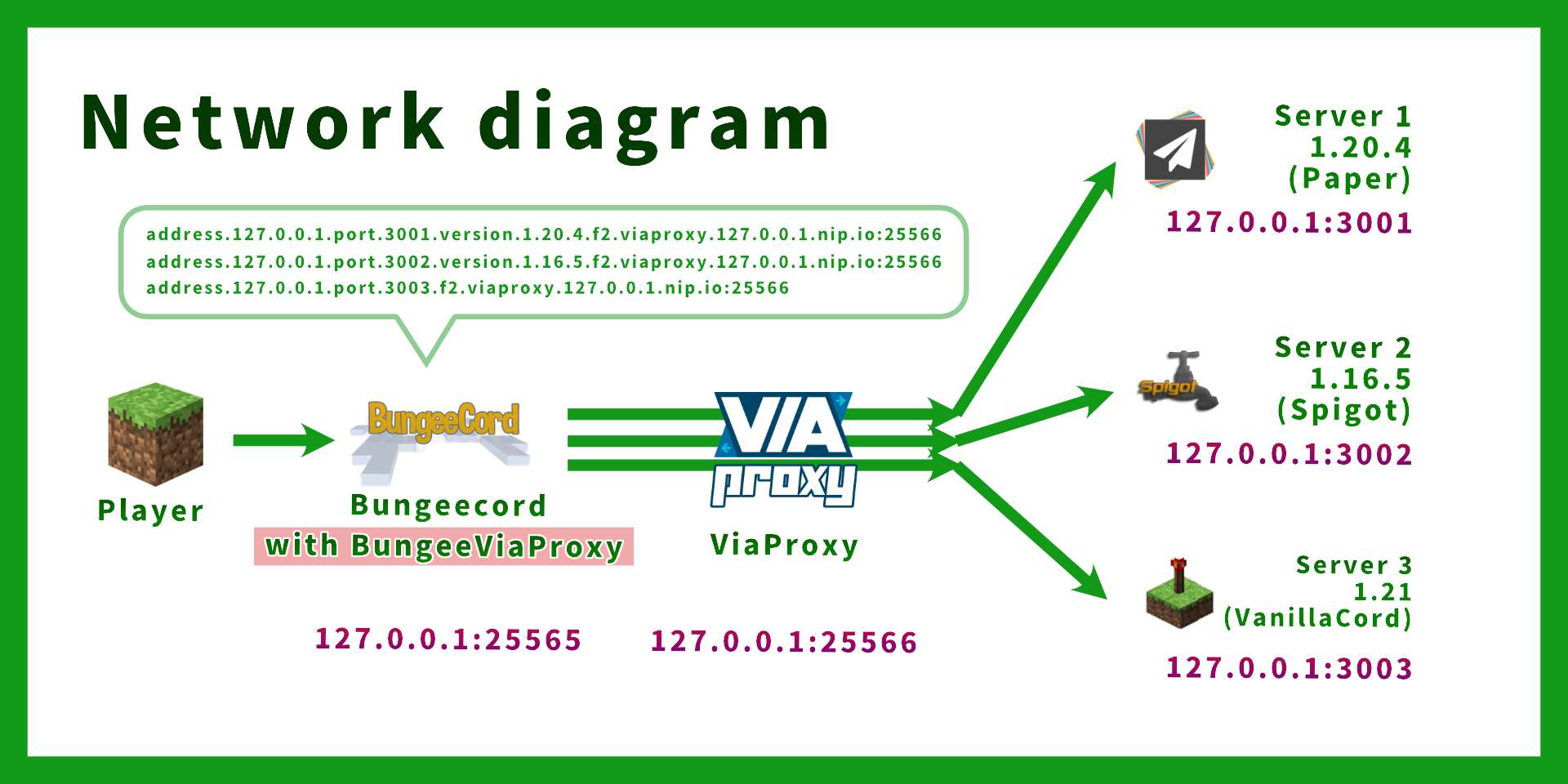
假设以下配置:
| 服务器 |
IP:端口 |
Minecraft 版本 |
| BungeeCord |
127.0.0.1:25565 |
N/A |
| ViaProxy |
127.0.0.1:25566 |
N/A |
| 后端服务器 1 |
127.0.0.1:3001 |
1.20.4 |
| 后端服务器 2 |
127.0.0.1:3002 |
1.16.5 |
| 后端服务器 3 |
127.0.0.1:3003 |
1.21 |
BungeeCord config.yml(仅显示相关选项):
online_mode: true
servers:
  server1:
    # ViaProxy 地址格式:address.<后端IP>.port.<后端端口>.version.<后端版本>.f2.viaproxy.<代理IP>.nip.io:<代理端口>
    address: address.127.0.0.1.port.3001.version.1.20.4.f2.viaproxy.127.0.0.1.nip.io:25566
    motd: '&1Example Server 1'
    restricted: false

server2:
    # 在此示例中,

# 后端服务器 IP:127.0.0.1:25566
    # ViaProxy IP:127.0.0.1:3002
    address: address.127.0.0.1.port.3002.version.1.16.5.f2.viaproxy.127.0.0.1.nip.io:25566
    motd: '&1Example Server 1'
    restricted: false
  server3:
    # 如果不需要可以省略版本(ViaProxy 会自动检测版本)
    address: address.127.0.0.1.port.3003.f2.viaproxy.127.0.0.1.nip.io:25566

motd: '&1Example Server 3(“.version.1.20.4”可以省略)'

```yaml
restricted: false
listeners:
- host: 0.0.0.0:25565
prevent_proxy_connections: false
ip_forward: true
ViaProxy config.yml(仅显示相关选项):
# ViaProxy 配置文件

# ViaProxy 应监听连接的地址。
# 此选项不可热重载。
bind-address: 0.0.0.0:25566

# ViaProxy 应连接的服务器的地址。
target-address: AnythingIsOK.ThisFieldIsIgnored.example.com
Proxy Online Mode 允许你在在线模式服务器中查看皮肤,并使用已签名的聊天功能。
启用 Proxy Online Mode 需要你的客户端拥有有效的 Minecraft 账户。
proxy-online-mode: false
用于加入目标服务器的身份验证方法。
none:无身份验证(离线模式)
openauthmod:需要安装 OpenAuthMod 客户端模组
account:使用账户加入目标服务器。(需在 ViaProxy GUI 中进行配置)
auth-method: NONE
允许客户端使用通配符域名指定目标服务器和版本。
none:不处理通配符域名。
public:公开通配符域名处理。适用于外部客户端使用。(示例:address..port.<port>.version.<version>.f2.viaproxy.127.0.0.1.nip.io(版本可选))
internal:内部通配符域名处理。适用于自定义客户端的本地使用。(示例:original-handshake-address\7address:port\7version\7classic-mppass)
wildcard-domain-handling: PUBLIC
后端服务器 `server.properties`(仅显示相关选项):
```properties
server-port=3001
online-mode=false
后端服务器 spigot.yml(仅显示相关选项):
settings:
  bungeecord: true
注意:
- 后端服务器上不需要 ViaVersion 插件。(因为版本转换由 ViaProxy 处理)
- 请勿使用 ViaProxyAuthHook,因为 ViaProxy 位于 BungeeCord 和后端服务器之间。
bStats
BungeePteroPower 使用 bStats 收集匿名统计数据。
你可以在这里找到统计数据。
bStats 用于了解插件的使用情况,并帮助对其进行改进。
要禁用统计数据的收集,请在 plugins/bStats/config.yml 中将 enabled 设置为 false。
BungeeViaProxy
TL;DR
BungeeViaProxy is a BungeeCord plugin that fixes compatibility issues with ViaProxy, enabling you to manage multiple backend servers running different Minecraft versions using a single ViaProxy instance.
-
Why?
ViaBungee was discontinued in Minecraft 1.20.2. To continue using BungeeCord with the latest Minecraft versions, you need ViaProxy.
However, ViaProxy introduces challenges when combined with BungeeCord, such as improper hostname forwarding and duplicate server errors.
-
How does it help?
BungeeViaProxy resolves these issues by ensuring correct hostname forwarding and avoiding duplicate server errors, allowing seamless integration of ViaProxy and BungeeCord.
-
Who should use this?
Minecraft server administrators running networks with BungeeCord and multiple backend servers that need support for Minecraft versions including 1.20.2 and later, but want to avoid the complexity of managing ViaVersion on each backend server.
Table of Contents
Overview
BungeeViaProxy is a BungeeCord plugin designed to address compatibility issues when using ViaProxy with BungeeCord.
This plugin is especially useful for networks with multiple backend servers running different Minecraft versions, where you want to minimize the overhead of maintaining ViaVersion plugins on each backend server.
ViaBungee support was discontinued as of Minecraft 1.20.2, making it necessary to migrate to ViaProxy for compatibility with newer versions of the game.
This guide is valuable for those who wish to continue using BungeeCord with the latest Minecraft versions while avoiding the burden of individually updating ViaVersion on each backend server.
By leveraging ViaProxy with wildcard-domain-handling, a single ViaProxy instance can support multiple backend servers, simplifying updates and reducing resource usage.
Use Case
BungeeViaProxy is ideal for:
- Networks using BungeeCord to manage multiple backend servers running different Minecraft versions.
- Administrators who want to maintain compatibility with the latest Minecraft versions using ViaProxy and Bungeecord.
- Reducing the operational overhead of updating ViaVersion plugins on individual backend servers by centralizing version translation via ViaProxy.
Important: When using ViaProxy in such a setup, it must be placed between BungeeCord and the backend servers. Additionally, in ViaProxy's configuration:
proxy-online-mode must be disabled.auth-method must be set to NONE.wildcard-domain-handling must be set to PUBLIC.target-address is ignored (anything is OK) while using wildcard-domain-handling.
How It Works
Normally, each backend server would require a separate ViaProxy instance.
However, this can lead to increased memory consumption and additional update efforts.
To address this, ViaProxy supports the wildcard-domain-handling feature, allowing a single ViaProxy instance to handle connections to multiple backend servers.
This is achieved by using a specific address format for each backend server:
address.<backend-ip>.port.<backend-port>.version.<backend-version>.f2.viaproxy.<viaproxy-ip>.nip.io:<viaproxy-port>
These addresses can then be listed in the config.yml of BungeeCord, enabling seamless connection management through a single ViaProxy instance.
However, this setup introduces certain challenges, which BungeeViaProxy resolves.
Features
-
Correct Hostname Forwarding:
When wildcard-domain-handling: PUBLIC is enabled in ViaProxy, it may fail to retrieve the hostname specified in BungeeCord's configuration, preventing proper server routing. BungeeViaProxy ensures that any address containing .viaproxy. is forwarded correctly to the backend server.
-
Avoiding Duplicate Server Errors:
BungeeCord treats servers with different hostnames as identical if they resolve to the same IP address, resulting in the error: You are already connected to this server!. BungeeViaProxy resolves this by using unresolved InetSocketAddress objects, ensuring unique identification for servers with different hostnames.
Installation
- Download the latest release of BungeeViaProxy.
- Place the plugin
.jar file into your BungeeCord plugins directory.
- Restart your BungeeCord server.
Note
Note: You will need to download and use the latest version of ViaProxy from Jenkins, which is not yet released at this time (2025/1/16, to be included in ViaProxy 3.3.8 release).
This allows the use of the f2 format which can be used in BungeeCord config.
address.<ip>.port.<port>.version.<version>.f2.viaproxy.hostname
Configuration
No additional configuration is required. BungeeViaProxy automatically handles .f2.viaproxy. addresses and ensures proper server routing.
Example Configuration
Here is an example of how to configure BungeeCord to work with ViaProxy using wildcard-domain-handling
Assuming the following setup:
| Server |
IP:Port |
Minecraft Version |
| BungeeCord |
127.0.0.1:25565 |
N/A |
| ViaProxy |
127.0.0.1:25566 |
N/A |
| Backend Server 1 |
127.0.0.1:3001 |
1.20.4 |
| Backend Server 2 |
127.0.0.1:3002 |
1.16.5 |
| Backend Server 3 |
127.0.0.1:3003 |
1.21 |
BungeeCord config.yml (only relevant options are shown):
online_mode: true
servers:
  server1:
    # ViaProxy address format: address.<backend-ip>.port.<backend-port>.version.<backend-version>.f2.viaproxy.<viaproxy-ip>.nip.io:<viaproxy-port>
    address: address.127.0.0.1.port.3001.version.1.20.4.f2.viaproxy.127.0.0.1.nip.io:25566
    motd: '&1Example Server 1'
    restricted: false
  server2:
    # In this example,
    # Backend server IP: 127.0.0.1:25566
    # ViaProxy IP: 127.0.0.1:3002
    address: address.127.0.0.1.port.3002.version.1.16.5.f2.viaproxy.127.0.0.1.nip.io:25566
    motd: '&1Example Server 1'
    restricted: false
  server3:
    # Version can be omitted if not needed (version is automatically detected by ViaProxy)
    address: address.127.0.0.1.port.3003.f2.viaproxy.127.0.0.1.nip.io:25566
    motd: '&1Example Server 3 (".version.1.20.4" can be omitted)'
    restricted: false
listeners:
- host: 0.0.0.0:25565
prevent_proxy_connections: false
ip_forward: true
ViaProxy config.yml (only relevant options are shown):
# ViaProxy configuration file

# The address ViaProxy should listen for connections.
# This option is not reloadable.
bind-address: 0.0.0.0:25566

# The address of the server ViaProxy should connect to.
target-address: AnythingIsOK.ThisFieldIsIgnored.example.com

# Proxy Online Mode allows you to see skins on online mode servers and use the signed chat features.
# Enabling Proxy Online Mode requires your client to have a valid minecraft account.
proxy-online-mode: false

# The authentication method to use for joining the target server.
# none: No authentication (Offline mode)
# openauthmod: Requires the OpenAuthMod client mod (https://modrinth.com/mod/openauthmod)
# account: Use an account for joining the target server. (Has to be configured in ViaProxy GUI)
auth-method: NONE

# Allows clients to specify a target server and version using wildcard domains.
# none: No wildcard domain handling.
# public: Public wildcard domain handling. Intended for usage by external clients. (Example: address.<address>.port.<port>.version.<version>.f2.viaproxy.127.0.0.1.nip.io (version is optional))
# internal: Internal wildcard domain handling. Intended for local usage by custom clients. (Example: original-handshake-address\7address:port\7version\7classic-mppass)
wildcard-domain-handling: PUBLIC
Backend Server server.properties (only relevant options are shown):
server-port=3001
online-mode=false
Backend Server spigot.yml (only relevant options are shown):
settings:
  bungeecord: true
Note:
- No ViaVersion plugin is required on the backend servers. (Because version translation is handled by ViaProxy)
- Do not use ViaProxyAuthHook as ViaProxy is placed between BungeeCord and the backend servers.
bStats
BungeePteroPower collects anonymous statistical data using bStats.
You can find the statistics data here.
bStats is used to understand the usage of the plugin and help improve it.
To disable the collection of statistical data, please set enabled to false in plugins/bStats/config.yml


 插件

 插件
 插件
 插件
 插件
 插件
评论 0
登录后参与评分
还没有评论,来抢沙发吧