
ChestFinder - Minecraft 寻箱插件
ChestFinder 是一款适用于 Minecraft(Spigot/Paper)的插件,可帮助玩家在 10 格半径内寻找箱子。当玩家靠近箱子时,插件会触发声音和视觉效果,并允许管理员授予或撤销使用寻箱功能的权限。
? 功能特性
? 箱子搜索:玩家可以激活持续 5 分钟的箱子搜索功能。
? 特殊箱子搜索:插件仅检测在神殿、废弃矿井、地牢、堡垒和沉船中发现的箱子。
⏳ 限时使用:权限有效期为 3 天,但玩家只能使用一次搜索功能。
⏳ 禁用自动授予:你可以禁用加入服务器时的自动授予权限,改为手动分配权限。
? 声音与视觉效果:检测到箱子时,玩家会听到开箱声并看到闪电粒子效果。
⚙ 管理员命令:通过命令灵活管理权限。
 ✨✨✨✨✨✨✨✨✨✨✨✨✨✨✨✨✨✨✨✨✨✨✨✨
在此测试我们的所有插件
? 服务器地址: javarangers.falixsrv.me:22707
?
(请注意,服务器版本为 1.21.4)
✨✨✨✨✨✨✨✨✨✨✨✨✨✨✨✨✨✨✨✨✨✨✨✨
✨✨✨✨✨✨✨✨✨✨✨✨✨✨✨✨✨✨✨✨✨✨✨✨
? 安装方法
- 下载 ChestFinder.jar。
- 将其放入服务器的 plugins 文件夹中。
- 重启服务器。

⌨ 命令列表
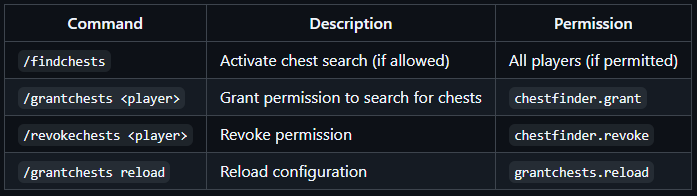
? 访问提醒
当玩家进入游戏时,如果拥有有效权限但尚未使用,他们将收到一条包含剩余时间的消息。
? 操作示例
- 玩家登录游戏并获得为期 3 天的箱子搜索权限。
- 他们执行 /findchests 命令,拥有 5 分钟的时间进行搜索。
- 当靠近箱子时,他们会听到开箱声并看到闪电效果。
- 如果玩家未使用 /findchests,下次登录时将收到关于其权限的提醒。
⚠ 重要提示
- 在权限有效期内,玩家只能使用一次 /findchests 命令。
- 仅特定结构中的箱子会被识别(普通箱子无效)。
享受游戏!?
如需任何调整,请告诉我!
免责声明:这些图片仅供参考,并不代表实际的游戏画面。最终外观可能因 Minecraft 的视觉风格和服务器设置而异。
ChestFinder - Chest Finding Plugin for Minecraft
ChestFinder is a plugin for Minecraft (Spigot/Paper) that helps players find chests within a 10-block radius. The plugin triggers sound and visual effects when approaching a chest and allows administrators to grant or revoke access to the chest search feature.
? Features
? Chest Search: Players can activate chest search for 5 minutes.
? Special Chest Search Only: The plugin only considers chests found in temples, abandoned mines, dungeons, fortresses, and sunken ships.
⏳ Limited Usage Time: Access is valid for 3 days, but players can use the search only once.
⏳ Disabling Auto-Grant: You can disable auto-grant when joining the server and assign permissions manually.
? Sound and Visual Effects: Upon detecting a chest, players hear the chest-opening sound and see a lightning particle.
⚙ Admin Commands: Flexible permission management through commands.
✨✨✨✨✨✨✨✨✨✨✨✨✨✨✨✨✨✨✨✨✨✨✨✨
✨✨✨✨✨✨✨✨✨✨✨✨✨✨✨✨✨✨✨✨✨✨✨✨
TEST ALL OUR PLUGINS HERE
? SERVER: javarangers.falixsrv.me:22707
?
(PLEASE NOTE, server version 1.21.4)
✨✨✨✨✨✨✨✨✨✨✨✨✨✨✨✨✨✨✨✨✨✨✨✨
✨✨✨✨✨✨✨✨✨✨✨✨✨✨✨✨✨✨✨✨✨✨✨✨
? Installation
- Download ChestFinder.jar.
- Place it in your server's plugins folder.
- Restart the server.
⌨ Commands
? Access Reminder
When a player enters the game, if they have active access but haven’t used it, they will receive a message with the remaining time.
? Example of Operation
- A player logs in and receives permission to search for chests for 3 days.
- They activate /findchests and have 5 minutes to search.
- When approaching a chest, they hear the chest-opening sound and see lightning.
- If the player hasn’t used /findchests, they will receive a reminder about their access on their next login.
⚠ Important
- Players can use /findchests only once during the permission period.
- Only chests in specified structures are considered (not regular chests).
Enjoy the game! ?
Let me know if you need any adjustments!
Disclaimer: These images are illustrative and do not represent actual in-game graphics. The final appearance may vary based on Minecraft's visual style and server settings.


 插件

 插件
 插件
 插件
 插件
 插件
评论 0
登录后参与评分
还没有评论,来抢沙发吧