ChestLockLite
一款适用于 Spigot/Paper 1.21+ 服务器的简单且功能强大的容器锁定插件。通过所有者保护、密码保护或信任玩家系统来锁定你的箱子、桶、漏斗和熔炉。无需 MySQL - 使用轻量级的 SQLite 存储。
锁定容器
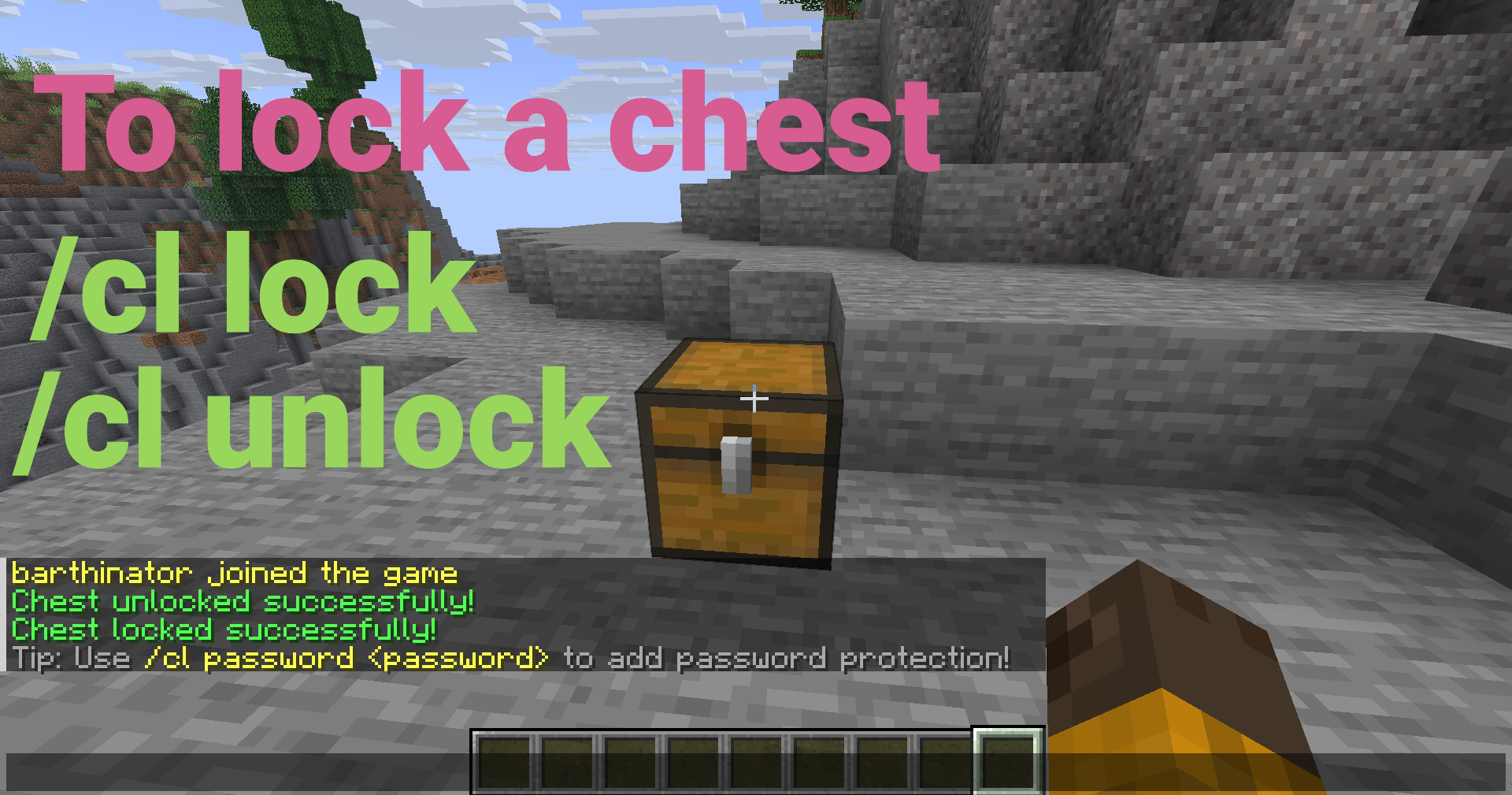
注视一个箱子、桶、漏斗或熔炉,然后运行:
/cl lock
现在只有你可以打开它了!
主要特性
核心保护
- 所有者锁定 - 锁定容器,使其仅允许你自己访问
- 密码保护 - 通过密码(SHA-256 哈希)共享访问权限
- 信任玩家 - 授予特定玩家访问权限,而无需密码
- 容器保护 - 防止破坏、爆炸、火焰和活塞移动
容器支持
- 箱子 - 所有类型的箱子(普通、陷阱箱、铜质等)
- 桶 - 完全支持桶的锁定
- 漏斗 - 锁定漏斗并控制物品提取(可配置)
- 熔炉 - 锁定熔炉、高炉和烟熏炉(可配置)
- 每个容器的漏斗控制 - 通过 GUI 针对每个容器切换漏斗访问权限
用户界面
- GUI 菜单 - 易于使用的可视化界面(手持空手时 Shift + 右键点击)
- 密码输入 GUI - 交互式字符选择
- Tab 补全 - 所有命令均支持完整的自动补全
- 容器特定消息 - 消息会显示正确的容器类型
高级功能
- 双层箱子支持 - 自动处理单层和双层箱子
- 放置时自动锁定 - 可选在放置容器时自动锁定
- 密码冷却时间 - 防止恶意尝试(可配置)
- 管理工具 - 清除锁定、重载配置、绕过权限
- 管理员通知 - 管理员在打开被锁定的容器时会收到通知
- SQLite 存储 - 快速、轻量级,无需外部数据库
- 自动备份 - 自动数据库备份
- 自动迁移 - 无缝数据库升级
快速设置
- 下载
ChestLockLite.jar 文件
- 将其放入服务器的
plugins 文件夹中
- 启动服务器
- 根据需要配置
plugins/ChestLockLite/config.yml(可选)
就这样!插件已准备就绪。
使用示例
密码保护
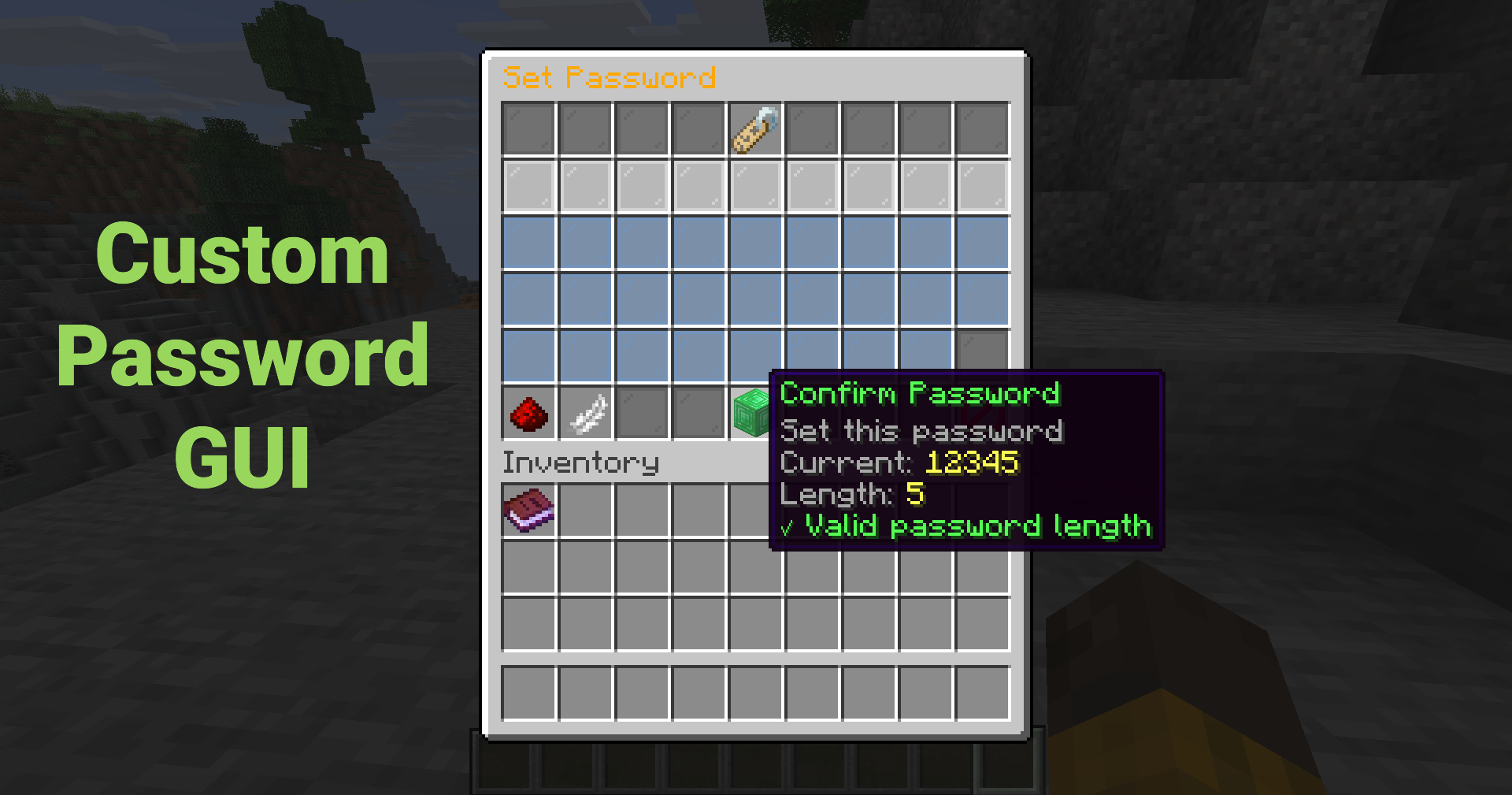
设置一个密码,以便任何拥有该密码的人都可以解锁容器:
/cl password mypassword123
或者使用 GUI(Shift + 右键点击 → “设置密码”)进行交互式密码输入!
信任玩家
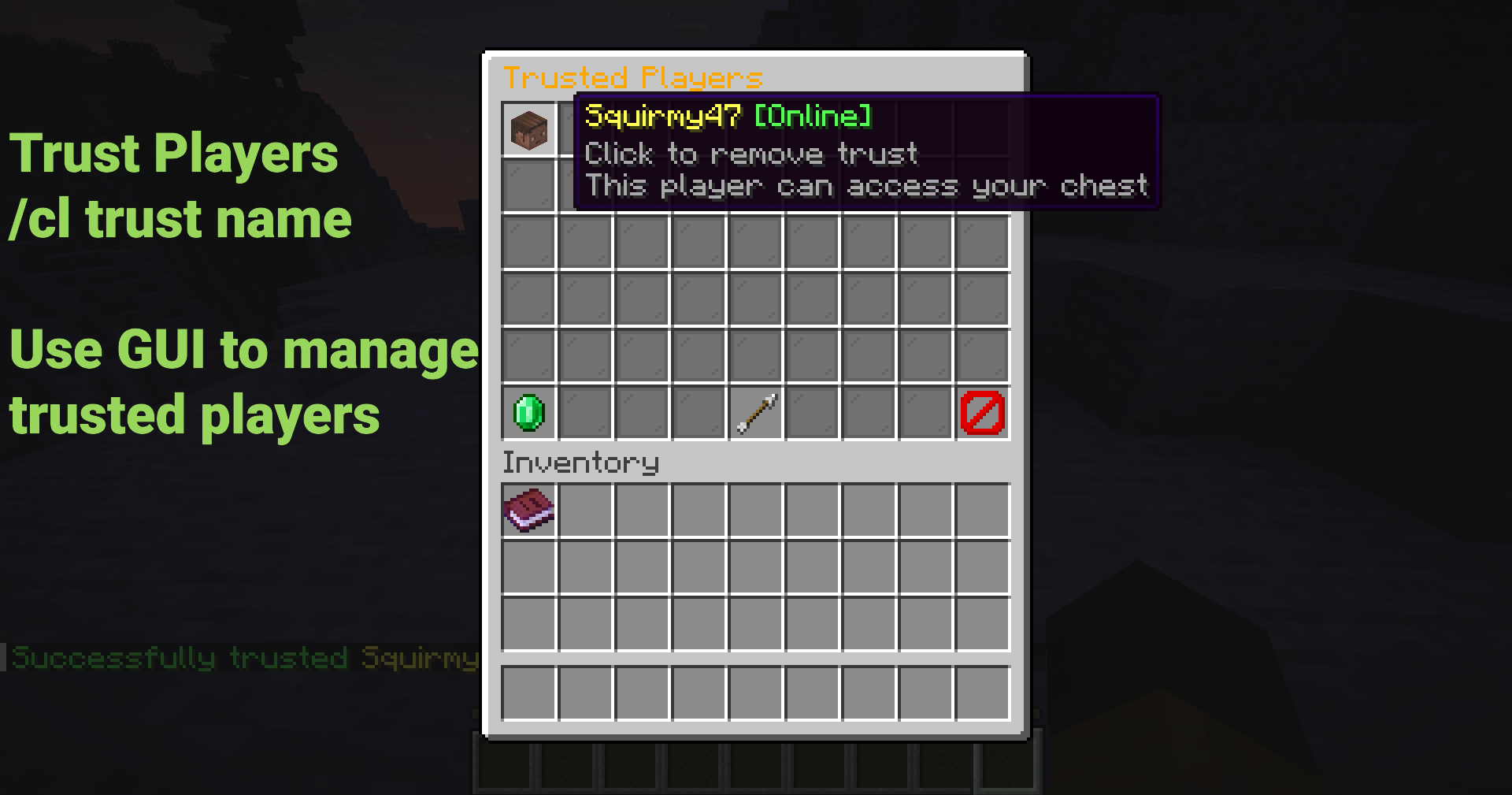
授予玩家访问权限而无需分享密码:
/cl trust FriendName
受信任的玩家将收到通知,现在可以访问你的容器了!
使用 GUI
Shift + 右键点击 任意容器以打开菜单(必须手持空手)
点击按钮以:
- 锁定/解锁容器
- 设置或删除密码
- 管理受信任的玩家
- 切换漏斗访问权限(按每个容器)
- 查看锁定信息
无需记忆任何命令!
常用命令
| 命令 |
描述 |
/cl lock |
锁定你正在注视的容器 |
/cl unlock |
解锁你的容器 |
/cl password <pass> |
设置或输入密码 |
/cl trust <player> |
在你的容器上信任一名玩家 |
/cl untrust <player> |
移除对某玩家的信任 |
/cl trustedlist |
列出受信任的玩家 |
/cl gui |
打开 GUI 菜单 |
/cl info |
查看锁定信息 |
别名: /chestlock, /lockchest
安全功能
- SHA-256 密码哈希 - 密码永远不会以明文形式存储
- 每个密码的唯一盐值 - 防止彩虹表攻击
- 容器防破坏保护 - 防止未经授权破坏
- 防爆保护 - 防护苦力怕、TNT 等
- 防火/岩浆保护 - 防护火焰和岩浆伤害
- 活塞保护 - 防止活塞移动被锁定的容器
- 漏斗控制 - 防止漏斗从被锁定的容器中提取物品
配置
v1.1.0 新增:
locks:
  # 支持漏斗(允许锁定漏斗)
  allow-hoppers: true

  # 支持熔炉(允许锁定熔炉、高炉、烟熏炉)
  allow-furnaces: true

  # 当管理员打开被锁定的容器时显示通知
  admin-notification: true
完美适用场景
- 生存服务器 - 保护玩家容器免受恶意破坏
- SMP 服务器 - 确保共享存储区域的安全
- 经济服务器 - 保护商店箱子和储物空间
- Towny/Factions - 基于团队的容器保护
- 任何服务器 - 简单、轻量的容器保护方案
文档
管理员命令
管理员可以使用强大的管理工具:
| 命令 |
描述 |
权限节点 |
/cl clear |
清除目标容器上的锁定 |
chestlocklite.admin.clear |
/cl clearall <player> |
清除某玩家的所有锁定 |
chestlocklite.admin.clearall |
/cl cleararea [radius] |
清除区域内的锁定 |
chestlocklite.admin.cleararea |
/cl reload |
重载配置 |
chestlocklite.admin.reload |
性能
- 轻量级 - 对服务器性能影响极小
- SQLite 存储 - 快速高效,无需外部数据库支持
- 索引查询 - O(log n) 查找时间复杂度
- 经过测试 - 可稳定处理超过 10,000 个锁
- 全面测试 - 39 个单元测试确保可靠性
v1.1.0 更新内容
- ? 桶、漏斗与熔炉支持 - 锁定所有容器类型!
- ?️ 单个漏斗控制 - 可通过 GUI 切换漏斗访问权限
- ? 管理员通知 - 管理员打开被锁定的容器时会收到通知
- ? 容器专属消息 - 提示信息会正确显示对应的容器类型
- ? Bug 修复 - 修复了密码 GUI 漏洞及持有物品时无法访问 GUI 的问题
- ? 测试套件 - 完善的测试基础设施(共 39 项测试)
许可证
本项目采用 MIT 许可证 授权。
链接
为 Minecraft 社区 ❤️ 打造
完美适用于生存服、多人联机服和经济型服务器。配置简单,拥有全面的权限系统,并附带完整文档。
ChestLockLite
A simple, powerful container locking plugin for Spigot/Paper 1.21+ servers. Lock your chests, barrels, hoppers, and furnaces with owner protection, password protection, or trusted players system. No MySQL required - uses lightweight SQLite storage.
Lock a Container
Look at a chest, barrel, hopper, or furnace and run:
/cl lock
Only you can open it now!
Key Features
Core Protection
- Owner Locks - Lock containers so only you can access them
- Password Protection - Share access with passwords (SHA-256 hashed)
- Trusted Players - Grant access to specific players without passwords
- Container Protection - Prevents breaking, explosions, fire, and pistons
Container Support
- Chests - All chest types (regular, trapped, copper, etc.)
- Barrels - Full locking support for barrels
- Hoppers - Lock hoppers and control item extraction (configurable)
- Furnaces - Lock furnaces, blast furnaces, and smokers (configurable)
- Per-Container Hopper Control - Toggle hopper access per container via GUI
User Interface
- GUI Menu - Easy-to-use visual interface (Shift + Right-click with empty hand)
- Password Input GUI - Interactive character selection
- Tab Completion - Full autocomplete support for all commands
- Container-Specific Messages - Messages show the correct container type
Advanced Features
- Double Chest Support - Automatically handles single and double chests
- Auto-Lock on Place - Optional automatic locking when placing containers
- Password Cooldown - Prevents spam attempts (configurable)
- Admin Tools - Clear locks, reload config, bypass permissions
- Admin Notifications - Admins see notifications when opening locked containers
- SQLite Storage - Fast, lightweight, no external database needed
- Auto-Backup - Automatic database backups
- Automatic Migration - Seamless database upgrades
Quick Setup
- Download the
ChestLockLite.jar file
- Place it in your server's
plugins folder
- Start your server
- Configure as needed in
plugins/ChestLockLite/config.yml (optional)
That's it! The plugin is ready to use.
Usage Examples
Password Protection
Set a password so anyone with the password can unlock the container:
/cl password mypassword123
Or use the GUI (Shift + Right-click → "Set Password") for an interactive password input!
Trust a Player
Grant a player access without sharing passwords:
/cl trust FriendName
The trusted player will receive a notification and can now access your container!
Using the GUI
Shift + Right-click any container to open the menu (Must have empty hand)
Click buttons to:
- Lock/unlock containers
- Set or remove passwords
- Manage trusted players
- Toggle hopper access (per container)
- View lock information
No commands to remember!
Common Commands
| Command |
Description |
/cl lock |
Lock the container you're looking at |
/cl unlock |
Unlock your container |
/cl password <pass> |
Set or enter password |
/cl trust <player> |
Trust a player on your container |
/cl untrust <player> |
Remove trust from a player |
/cl trustedlist |
List trusted players |
/cl gui |
Open GUI menu |
/cl info |
View lock information |
Aliases: /chestlock, /lockchest
Security Features
- SHA-256 Password Hashing - Passwords are never stored in plain text
- Unique Salt Per Password - Prevents rainbow table attacks
- Container Break Protection - Prevents unauthorized breaking
- Explosion Protection - Protects from creepers, TNT, etc.
- Fire/Lava Protection - Protects from fire and lava damage
- Piston Protection - Prevents pistons from moving locked containers
- Hopper Control - Prevent hoppers from extracting items from locked containers
Configuration
New in v1.1.0:
locks:
  # Support for hoppers (allow locking hoppers)
  allow-hoppers: true

  # Support for furnaces (allow locking furnaces, blast furnaces, smokers)
  allow-furnaces: true

  # Show notification to admins when they open locked containers
  admin-notification: true
Perfect For
- Survival Servers - Protect player containers from griefing
- SMP Servers - Secure shared storage areas
- Economy Servers - Protect shop chests and storage
- Towny/Factions - Team-based container protection
- Any Server - Simple, lightweight container protection
Documentation
Admin Commands
Admins have access to powerful management tools:
| Command |
Description |
Permission |
/cl clear |
Clear lock on targeted container |
chestlocklite.admin.clear |
/cl clearall <player> |
Clear all locks by player |
chestlocklite.admin.clearall |
/cl cleararea [radius] |
Clear locks in area |
chestlocklite.admin.cleararea |
/cl reload |
Reload configuration |
chestlocklite.admin.reload |
Performance
- Lightweight - Minimal server impact
- SQLite Storage - Fast, no external database needed
- Indexed Queries - O(log n) lookup time
- Tested - Handles 10,000+ locks without issues
- Comprehensive Testing - 39 unit tests ensure reliability
What's New in v1.1.0
- ? Barrel, Hopper & Furnace Support - Lock all container types!
- ?️ Per-Container Hopper Control - Toggle hopper access via GUI
- ? Admin Notifications - Admins see notifications when opening locked containers
- ? Container-Specific Messages - Messages show correct container type
- ? Bug Fixes - Fixed password GUI bug and GUI access with items
- ? Test Suite - Comprehensive testing infrastructure (39 tests)
License
This project is licensed under the MIT License.
Links
Made with ❤️ for the Minecraft community
Perfect for survival, SMP, and economy servers. Simple configuration, comprehensive permissions system, and full documentation included.


 插件

 插件

 插件
 插件
 插件
 插件
评论 0
登录后参与评分
还没有评论,来抢沙发吧