Chestpack - 胸前的背包,提供额外的存储空间!
旅行时需要额外的存储空间吗?把箱子穿在胸前吧!Chestpack 允许玩家制作各种尺寸的背包,以扩充正常的玩家物品栏空间。它旨在让玩家能够更真实地携带额外物品,同时不会过于强大。
功能:
- 无需安装客户端模组
- 包含用于制作背包的合成配方
- 三种不同类型,可配置材质和尺寸
- 可选的集成工作台
- 背包具有唯一标识符,管理员可通过 ID 打开
- 可将背包作为胸甲装备用于存储(可选)
- 拾取时背包会出现在手中(可选)
- 防止背包嵌套(可选)
- 支持权限系统
- 具有一定的真实性
论坛帖子
使用方法
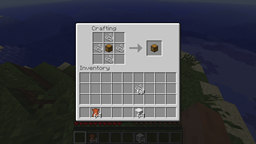
通过将箱子被以下材料包围来合成背包:
- 4 根线 = 9 格背包(日用背包)
- 8 块羊毛 = 27 格背包 + 集成工作台(工匠背包)
- 8 张皮革 = 45 格背包(探险家背包)
手持生成的箱子(外观与普通箱子相同,但实际上是一个特殊的可穿戴箱子),点击即可打开背包。你可以像在普通物品栏中一样将物品拖入或拖出背包。
如果你的背包带有集成工作台,按住 Shift 键并点击即可打开合成区域。
当背包不在手中时,它会自动移动到胸甲盔甲槽位,表示背包被背在背上(或以你的偏好理解为穿在胸前)。这是背包通常所在的位置。
要再次访问背包内容,请将其从背上卸下并放入手中。左键点击即可打开。
配置
verbose:启用不同事件的日志记录到控制台(用于调试)
checkForUpdates:控制插件是否通知玩家(拥有 chestpack.admin 权限)有新更新。
allowNesting:如果启用,背包可以存放在其他背包内。如果禁用(默认设置),尝试嵌套背包的行为会将它们掉落至地面。
autoEquip:如果启用,背包将自动装备到你的盔甲槽位,模拟穿戴 Chestpack 的状态,并主动阻止你将背包存储在其他物品栏位置。
autoHold:如果启用,如果背包被放置在快捷栏或从地面拾起,它将自动出现在手中。结合 autoEquip,此选项旨在模拟一个你既可以拿在手里也可以背在背上,但不能放在“口袋”(其他物品栏槽位)里的背包。如果你希望背包表现得像普通物品一样以便携带多个背包(真实性较低),请与 autoEquip 一起禁用此项。
allowOpenContainers:允许你通过右键点击仍然打开容器(如箱子等),而不是打开背包。
equipSlot:如果启用 autoEquip,玩家在物品栏中穿戴 Chestpack 的槽位。3 = 头盔,2 = 胸甲,1 = 护腿,0 = 靴子。
maxSlots:使用 /chestpack 命令显示的格子数量。
chestpackItem:合成后用于代表 Chestpack 的物品
packTypes:允许合成的背包列表。每个项目有多个字段:
packTypes base_material:用作替代箱子的材质(可选)
packTypes material:除了基础材质外,用于合成背包的材质。
packTypes material_count:合成所需材质物品的数量。
packTypes size:最终生成的箱子的格子数。参考值:27 为小箱子,54 为大箱子。
packTypes hasWorkbench:如果为 true,背包可以通过按住 Shift 键点击来打开集成的合成台。
默认配置如下:
verbose: false
allowNesting: false
autoEquip: true
autoHold: true
allowOpenContainers: true
equipSlot: 2
maxSlots: 54
chestpackItem: chest
packTypes:
    - {base_material: chest, material: leather, material_count: 8, size: 45}
    - {base_material: chest, material: wool, material_count: 8, size: 27, hasWorkbench: true}
    - {base_material: chest, material: string, material_count: 4, size: 9}
对于 base_material 和 chestpackItem 的值,您必须使用此处列出的值。
或者,您可以禁用 Chestpack 的配方,并使用其他插件来添加更复杂的自定义配方。只需添加一个制作带有以下附魔的箱子的配方:
- 时运 I - 标识空包(较高等级用作唯一标识符)
- 效率 # - 等级为槽位数量取反
- 击退 - 如果存在,则包内集成工作台
Chestpack 的物品栏数据存储在单独的文件中,文件名为 pack<id>.yml。
此外,此插件使用 Hidendra 开发的 PluginMetrics 来追踪插件使用情况。所有收集的数据均为匿名,并可在此处查看。
对于有顾虑的用户,可以通过编辑 plugins/PluginMetrics/config.yml 并将 opt-out 的值更改为 true 来禁用该功能。
权限与命令
chestpack.admin (op): 允许您使用 /chestpack 命令打开任意箱子包
chestpack.open.size.9 (true): 允许您打开大小为 9 格的箱子包
chestpack.open.size.18 (true): 允许您打开大小为 18 格的箱子包
chestpack.open.size.27 (true):允许打开大小为 27 的箱子包
chestpack.open.size.45 (true):允许打开大小为 45 的箱子包
chestpack.open.size.54 (true):允许打开大小为 54 的箱子包
chestpack.open.size.any (false):允许打开任意大小的箱子包
chestpack.open.workbench (true):允许打开集成工作台
/chestpack id:打开具有指定 ID 的箱子包,ID 需大于等于 2(别名:/pack、/cp)。
注意事项
箱子包物品在玩家背包中显示为普通的“箱子”。但其行为应能清晰体现其差异(它会自动装备、可以打开、且不能与其他箱子堆叠)。
参见
其他值得关注的模组或插件:
Fork me on GitHub
原作者 mushroomhostage 的 GitHub
Chestpack - extra storage in a backpack on your chest!
Need extra storage while traveling? Wear a chest on your chest! Chestpack enables players to craft backpacks of various sizes for augmenting their normal player inventory space. It is designed to enable carrying additional items realistically without being too overpowered.
Features:
- No client mods required
- Crafting recipes to create packs
- Three different types, with configurable material and size
- Optional integrated workbench
- Packs are uniquely identified, and can be opened by id as an admin
- Equip pack as chestplate for storage (optional)
- Hold pack in your hand when picked up (optional)
- Nesting packs within packs is prevented (optional)
- Permissions support
- Somewhat realistic
Forum thread
Usage
Craft a pack by surrounding a chest with one of:
- 4 string = 9-slot pack (daypack)
- 8 wool = 27-slot pack + integrated workbench (craftsman's backpack)
- 8 leather = 45-slot pack (explorer's backpack)
When holding the resulting chest (it appears the same as a normal chest, but is actually a special wearable chest), click to open the pack. You can drag items to/from the pack and your inventory, as you would expect.
If your pack has an integrated workbench, shift-click to open the crafting area.
When it isn't held in your hand, the pack will move itself to your chestplate armor slot, representing the pack being worn on your back as a backpack (or on your chest as a chestpack, whatever interpretation you prefer). This is where the pack normally resides.
To get back into your pack, take it off your back and move it into your hand. Left-click to open it.
Configuration
verbose: Enable logging of different events to console (used for debugging)
checkForUpdates: Control whether the plugin notifies players (with the chestpack.admin permission) of new updates.
allowNesting: If enabled, packs can be stored within packs. When disabled (the default), attempts to nest packs will drop them to the ground.
autoEquip: If enabled, packs will automatically equip in your armor slot, simulating wearing a chestpack, actively preventing you from storing the pack elsewhere in your inventory.
autoHold: If enabled, packs will automatically be held in your hand if placed in your hotbar or picked up from the ground. Along with autoEquip, this option is meant to simulate a pack you can either hold in your hands or wear on your back, but not keep in your "pockets" (other inventory slots). Disable along with autoEquip if you want the pack to (less realistically) behave as a normal item so you can carry multiple packs.
allowOpenContainers: Allows you to still open containers (chests, etc.) by right-clicking, instead of opening the pack.
equipSlot: Player inventory slot to wear the chestpack on if autoEquip enabled. 3 = helmet, 2 = chestplate, 1 = leggings, 0 = boots.
maxSlots: Number of slots to show with /chestpack command.
chestpackItem: The item used to represent a chestpack once crafted
packTypes: A list of the packs to allow crafting for. Each item has several fields:
packTypes base_material: The material used in place of a chest (optional)
packTypes material: The material to craft the pack from (in addition to the base material).
packTypes material_count: Number of material items to require to craft.
packTypes size: Number of slots in the resulting chest. For reference 27 is a small chest, 54 is a large chest.
packTypes hasWorkbench: If true, the pack can be shift-clicked to open an integrated crafting table.
The default configuration is:
verbose: false
allowNesting: false
autoEquip: true
autoHold: true
allowOpenContainers: true
equipSlot: 2
maxSlots: 54
chestpackItem: chest
packTypes:
    - {base_material: chest, material: leather, material_count: 8, size: 45}
    - {base_material: chest, material: wool, material_count: 8, size: 27, hasWorkbench: true}
    - {base_material: chest, material: string, material_count: 4, size: 9}
For the values of base_material and chestpackItem, you must use the values listed here.
Alternatively you can disable Chestpack's recipes and use another plugin to add more complex custom recipes. Simply add a recipe to craft a chest with the following enchantments:
- Fortune I - identifies an empty pack (higher levels are used as unique identifiers)
- Efficiency # - level is number of slots, negated
- Punch - if present, pack has an integrated workbench
Chestpack inventories are stored in separate files, named pack<id>.yml.
Also, this plugin uses PluginMetrics by Hidendra to track plugin usage. All data collected is anonymous and may be viewed here.
For the paranoid, this may be disabled by editing plugins/PluginMetrics/config.yml and changing the value of opt-out to true.
Permissions and Commands
chestpack.admin (op): Allows you to open any chestpack with the /chestpack command
chestpack.open.size.9 (true): Allows you to open chestpacks of size 9
chestpack.open.size.18 (true): Allows you to open chestpacks of size 18
chestpack.open.size.27 (true): Allows you to open chestpacks of size 27
chestpack.open.size.45 (true): Allows you to open chestpacks of size 45
chestpack.open.size.54 (true): Allows you to open chestpacks of size 54
chestpack.open.size.any (false): Allows you to open chestpacks of any size
chestpack.open.workbench (true): Allows you to open integrated workbenches
/chestpack id: Opens chestpack with the given id, 2 or greater (aliases: /pack, /cp).
Caveats
The chest pack item shows up as a normal "Chest" in the player inventory. But its behavior should make it clear how it differs (it auto-equips, can be opened, doesn't stack with other chests).
See also
Other mods or plugins worth checking out:
- Backpack - client/server mod with wearable backpacks, magic backpacks
- Forestry - client/server mod with several item-specific backpacks
Fork me on GitHub
GitHub of original author, mushroomhostage

 插件
 插件
 插件

 插件
 插件

 插件
评论 0
登录后参与评分
还没有评论,来抢沙发吧