一款用于 Minecraft Spigot 的模组,增强了箱子和漏斗的功能,支持 ChestLinks(箱子链接)、自动合成和漏斗过滤!
注意:加入 Discord 以获取快速便捷的帮助!
欢迎所有捐赠,这将有助于改进该插件!我为此投入了数月的心血才使其达到现在的状态!感谢您的支持!:) 捐赠链接
功能特性:
- 能够跨服务器将多个箱子连接在一起,从任何地方即可访问!
- 使用漏斗通过过滤器从箱子中筛选物品!
- 设置自动合成台,自动合成上方背包中的物品!
- 精准采集可以拾取 ChestLinks 和 AutoCraft 站!
- 在箱子正面显示其中最常见的物品!
- 构建酷炫的自动熔炼/分拣系统!
- 通过友好的菜单界面远程打开箱子!
- 派对系统,带有用户界面,可与其他玩家分享所有的 ChestLinks 和 AutoCrafters!
- 支持多语言
如何创建链接箱子:
- 使用 /chestlink add <group> 添加一个箱子,或者直接在放置在箱子上的告示牌上编写 ChestLink 格式文本!

- 像平常一样打开箱子!或者使用 /chestlink open 或 /chestlink menu 远程打开箱子!
- 添加到该组的每个箱子都将与该组中的所有其他箱子共享相同的库存!
注意 /chestlink 命令为了方便可以替换为 /cl。
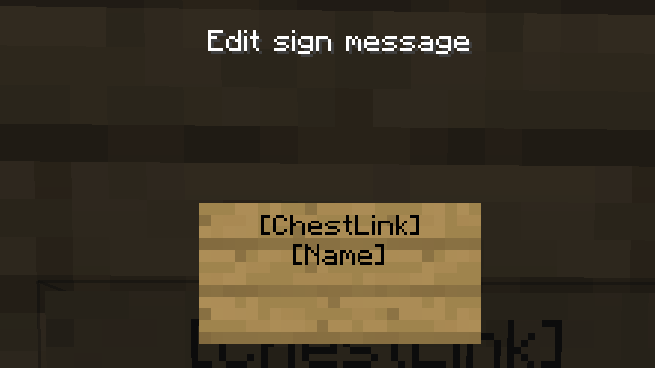
如何创建自动合成站:
- 使用 /autocraft add <group> 添加一个工作台,或者直接在放置在工作台上的告示牌上编写 AutoCraft 格式文本!

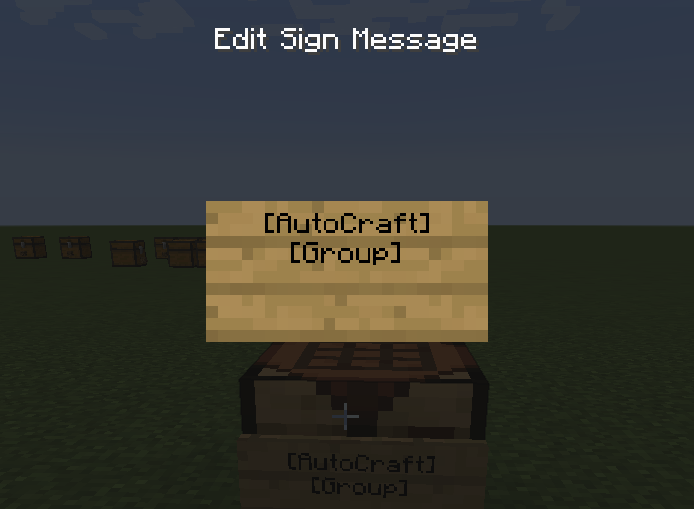
- 打开工作台并制作你的配方(这需要每种物品至少各有一个,并且不会消耗掉这些物品!)
- 一旦拥有有效的配方,工作台会通过铃声通知你;此时如果配方有不同的变体(例如木材类型),它们将在合成网格中开始动画演示。
- 要开始合成,必须将箱子(或任何其他具有有效库存的方块,如熔炉、 barrels、潜影盒、漏斗等)放置在工作台的顶部或除正面外的任意一侧。
- 接下来,在工作台下方放置一个漏斗,自动合成就将自动开始。
- 或者,将箱子或其他任何库存方块放置在工作台下方,并对其施加红石信号。
火把自动合成示例:
以下配置可用于在漏斗或箱子位于下方时自动合成火把!
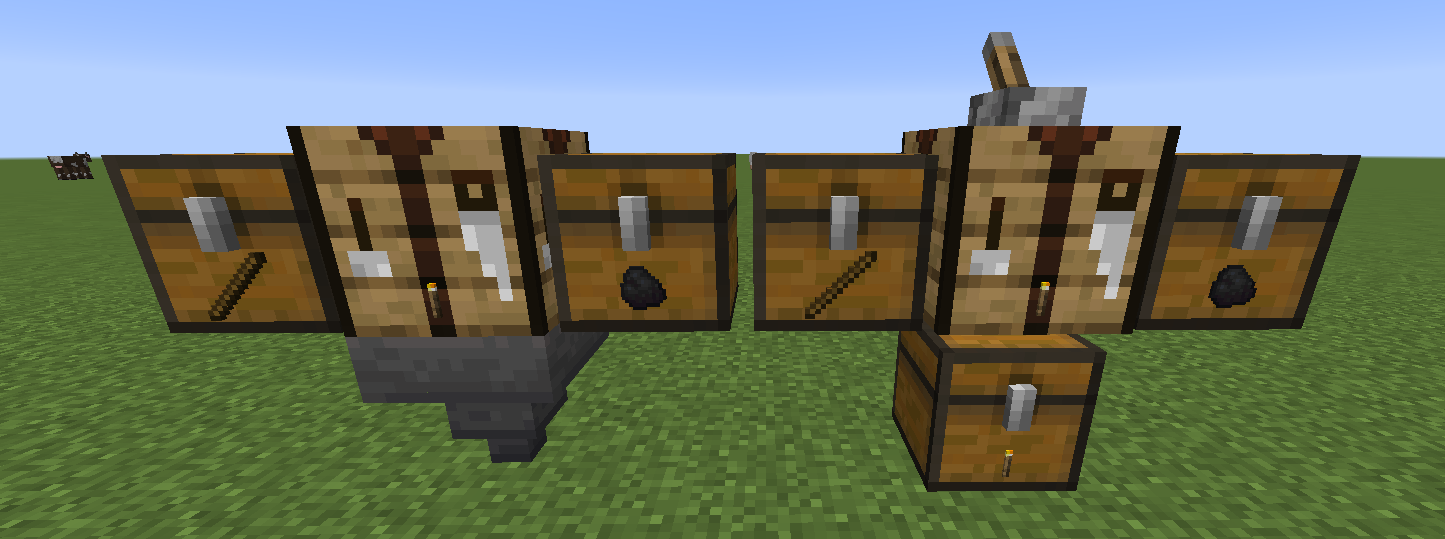

漏斗过滤器
- 可以为漏斗应用过滤器,使其仅接受或拒绝特定物品。
- 要为漏斗添加过滤器,只需在其顶部或任意侧面放置一个物品展示框,然后将你想要过滤的物品放入其中即可。
- 目前可以通过旋转物品展示框中的物品来启用四种类型的过滤器。
- 0° 默认模式 - 漏斗将仅接受此物品。(注意:一个漏斗上可以使用多个过滤器。)
- 45° 拒绝模式 - 漏斗将阻止接受此物品,但会接受其他物品。
- 90° 类型接受 - 漏斗将接受相同类型的物品,例如附魔书、附魔武器、药水等。
- 135° 类型拒绝 - 漏斗将拒绝所有在上述过滤器中通常会被接受的物品,因此相似类型的物品会被拒绝。

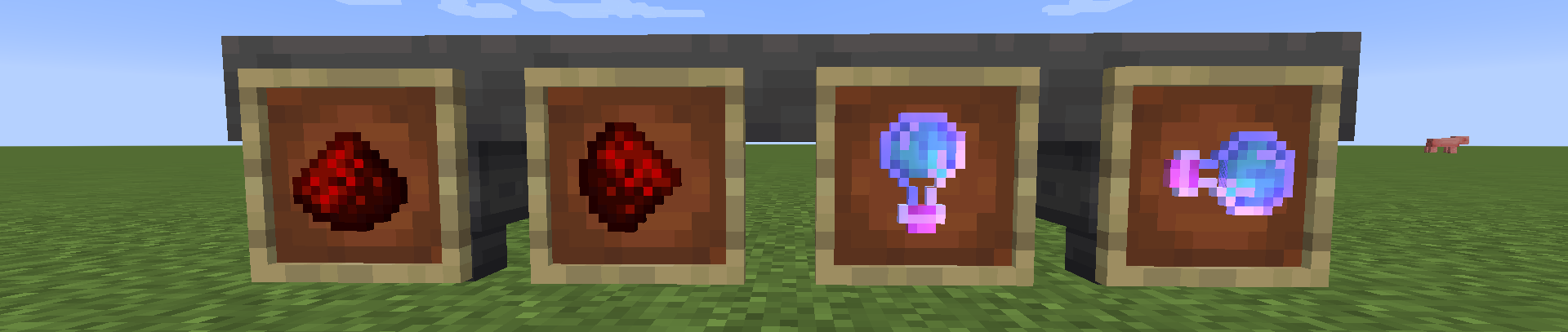
示例分拣系统:
分拣多种物品:
物品栏菜单:
队伍界面
如何创建队伍
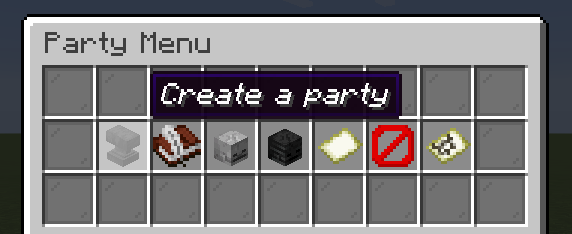
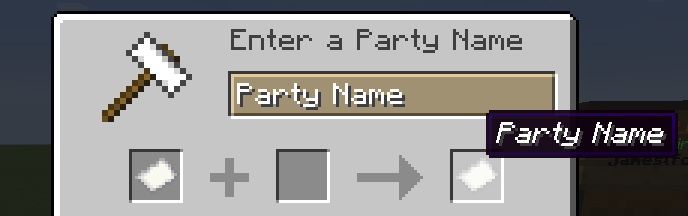
如何邀请玩家加入队伍
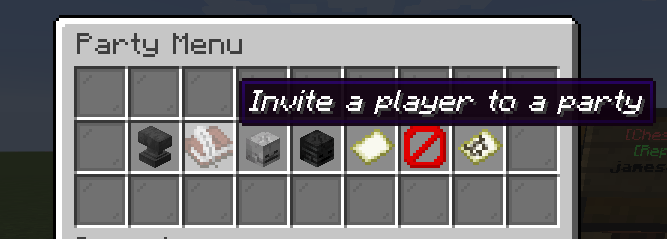
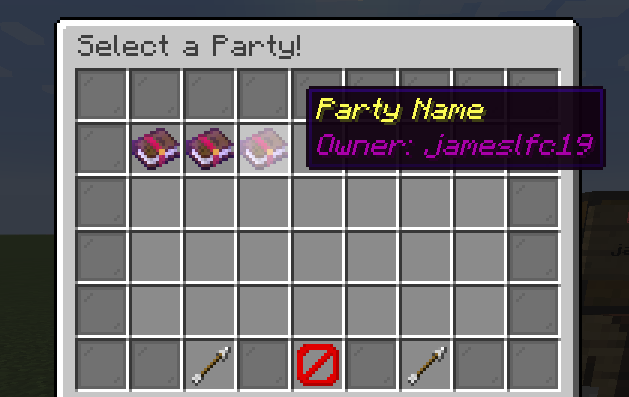
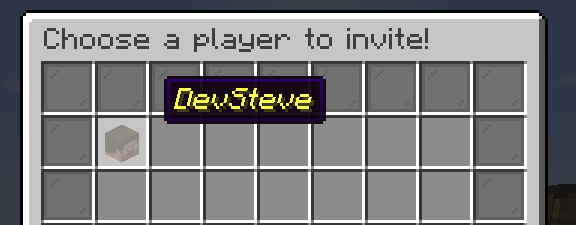
如何接受邀请

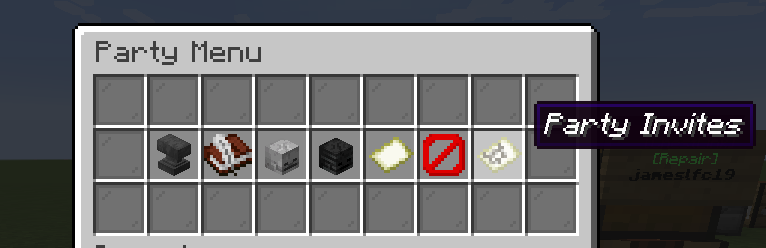
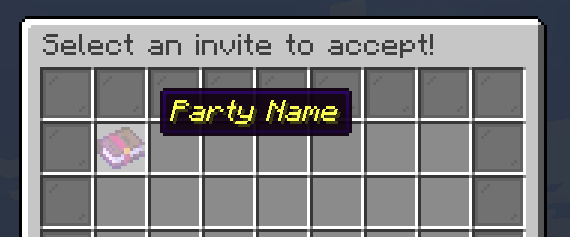
命令:
ChestLink 命令 - 支持使用 /chestlink 或 /cl。
-
/chestlink add "向 ChestLink 组添加/创建一个箱子"
-
/chestlink remove "删除一个 ChestLink 并将其物品栏内容掉落至你脚下!"
-
/chestlink open "打开 ChestLink 组的物品栏"
-
/chestlink menu "打开 ChestLink 菜单以显示所有组!"
-
/chestlink help "列出所有命令及其用途!"
-
/chestlink list "列出你拥有的所有 ChestLink!"
-
/chestlink member [add/remove ] 或 [list ] "添加、移除或列出组的成员"
-
/chestlink member [add-to-all/remove-from-all] "将玩家添加/移除到你所有的 ChestLink 中"
-
/chestlink setpublic <true/false> "设置 ChestLink 是否对所有人开放访问。"
-
/chestlink rename "重命名一个 ChestLink。"
-
/chestlink sort "为指定的 ChestLink 设置排序选项。"
- /chestlink party "打开队伍菜单,允许其他玩家访问你所有的箱子和自动合成器。"
AutoCraft 命令 - /autocraft 或 /ac 均可使用。
-
/autocraft add "Create/add a Crafting Table to an AutoCraft group"
-
/autocraft remove "Delete an AutoCraft group and drop all the Crafting Tables!"
-
/autocraft open "Open the workbench of an AutoCraft group"
-
/autocraft help "List of commands and their uses!"
-
/autocraft list "Lists all AutoCraft groups that you own!"
-
/autocraft member [add/remove ] or [list ] "Add, remove or list members of a group"
-
/autocraft member [add-to-all/remove-from-all] "Add/Remove a player to all of your AutoCraft groups"
-
/autocraft setpublic <true/false> "Set an AutoCraft group to be accessible by anyone."
-
/autocraft rename "Rename an AutoCraft group."
- /autocraft party "Open the party menu, to allow other players to access all your Chests and AutoCrafters."
ChestsPlusPlus 命令 - /chestsplusplus 或 /c++ 均可使用。
- /chestsplusplus party "Open the party menu, to allow other players to access all your Chests and AutoCrafters."
- /chestsplusplus version
重点推荐:
教程:
安装方法:
只需将 .jar 文件放入 /plugins 文件夹即可!
权限:
chestlink.add:
Gives permission to add ChestLinks!
default: true
chestlink.open:
Gives permission to open ChestLinks!
default: true
chestlink.menu:
Gives permission to open the ChestLink menu!
default: true
chestlink.remove:
Gives permission to remove a ChestLink!
default: true
chestlink.openall:
description: Gives permission to open all chests, for admin use.
default: op
chestlink.member:
description: Gives permission to add/remove a member to/from their chestlink.
default: true
chestlink.sort:
description: Gives permission to sort ChestLinks.
default: true
chestlink.autocraft.add:
description: Gives permission to add AutoCraft Stations!
default: true
chestlink.autocraft.open:
description: Gives permission to open AutoCraft Stations!
default: true
chestlink.autocraft.remove:
description: Gives permission to remove AutoCraft Stations!
default: true
chestlink.party.create:
description: Gives permission to create Chests++ parties.
default: true
chestlink.party.invite:
description: Gives permission to invite players to Chests++ parties.
default: true
chestlink.party.accept_invite:
description: Gives permission to accept Chests++ party invites.
default: true
捐赠!:
Minecraft Spigot mod that enhances chests and hoppers, with ChestLinks, Auto-Crafting and Hopper filters!
NOTE: Join the Discord for quick and easy help!
All donations are welcome and help to improve the plugin! I have put months of work into this to get it to where it is now! Thanks for your support! :) Donation Link
Features:
- Ability to link multiple chests together across the entire server to be accessed from anywhere!
- Use Hoppers to filter items from chests using hoppers!
- Setup Auto-Crafting Tables to automatically craft items from the inventory above!
- Silk Touch can pick up ChestLinks and AutoCraft stations!
- Displays the most common item in a chest on the front of it!
- Build cool auto smelting/sorting systems!
- Remotely open chests with a nice menu system!
- Party system with a UI to share all your ChestLinks & AutoCrafters with other players!
- Language support
How to Create Linked Chests:
- Add a Chest using /chestlink add <group> or simply write the ChestLink format on a sign placed on a Chest!
- Open a chest as you normally would! or use /chestlink open or /chestlink menu to open the chest remotely!
- Each chest that gets added to that group will share the same inventory with all other chests in that group!
Note the /chestlink command can be replaced with /cl for convenience.
How to Create Auto-Crafting Stations:
- Add a Crafting Table using /autocraft add <group> or simply write the AutoCraft format on a sign placed on a Crafting Table!
- Open the Crafting Table and create your recipe (This requires at least one of each item and it won't use that item up!)
- Once you have a valid recipe the table will notify you with a chime, at this point if the recipe has different variations such as wood type they will start to animate in the crafting grid.
- To start crafting, a Chest (or any block with a valid inventory such as Furnaces, Barrels, Shulker Boxes, Hoppers etc) must be placed either on top or on any of the 3 sides not including the front.
- Next, place a hopper underneath the Crafting Table and AutoCrafting will start automatically.
- Alternatively, place a Chest or any other inventory block underneath the Crafting Table and apply a redstone signal to it.
Torch AutoCraft Example:
The following configurations work to AutoCraft torches with either a Hopper, or a chest underneath!
Hopper Filters
- Hoppers can have filters applied to them so that they only accepted or reject certain items.
- To add a filter to a Hopper you simply place an item frame on top or on any of its sides, and then place the item you would like to filter in it.
- Currently there are four types of filters that can be enabled by rotating the item in the Item Frame.
- 0° Default - The Hopper will only accept this item. (Note multiple filters can be used on a hopper.)
- 45° Rejection Mode - The Hopper will prevent this item from being accepted but will accept other items.
- 90° Type-Acceptance - The Hopper will accept items that are of the same type, e.g Enchanted Books, Enchanted weapons, Potions etc.
- 135° Type-Rejection - The Hopper will reject all items that would normally be accepted in the filter above, so similar types are rejected.
Example Sorting System:
Sorting Multiple Items:
Inventory Menu:
Party UI
How to create a party
How invite a player to a party
How to accept an invite
Commands:
ChestLink Commands - /chestlink or /cl are accepted.
-
/chestlink add "Create/add a chest to a ChestLink group"
-
/chestlink remove "Delete a ChestLink and drop its inventory at your feet!"
-
/chestlink open "Open the inventory of a ChestLink group"
-
/chestlink menu "Open the ChestLink menu to display all groups!"
-
/chestlink help "List of commands and their uses!"
-
/chestlink list "Lists all ChestLinks that you own!"
-
/chestlink member [add/remove ] or [list ] "Add, remove or list members of a group"
-
/chestlink member [add-to-all/remove-from-all] "Add/Remove a player to all of your ChestLinks"
-
/chestlink setpublic <true/false> "Set a ChestLink to be accessible by anyone."
-
/chestlink rename "Rename a ChestLink."
-
/chestlink sort "Set the sorting option for the given ChestLink."
- /chestlink party "Open the party menu, to allow other players to access all your Chests and AutoCrafters."
AutoCraft Commands - /autocraft or /ac are accepted.
-
/autocraft add "Create/add a Crafting Table to an AutoCraft group"
-
/autocraft remove "Delete an AutoCraft group and drop all the Crafting Tables!"
-
/autocraft open "Open the workbench of an AutoCraft group"
-
/autocraft help "List of commands and their uses!"
-
/autocraft list "Lists all AutoCraft groups that you own!"
-
/autocraft member [add/remove ] or [list ] "Add, remove or list members of a group"
-
/autocraft member [add-to-all/remove-from-all] "Add/Remove a player to all of your AutoCraft groups"
-
/autocraft setpublic <true/false> "Set an AutoCraft group to be accessible by anyone."
-
/autocraft rename "Rename an AutoCraft group."
- /autocraft party "Open the party menu, to allow other players to access all your Chests and AutoCrafters."
ChestsPlusPlus Commands - /chestsplusplus or /c++ are accepted.
- /chestsplusplus party "Open the party menu, to allow other players to access all your Chests and AutoCrafters."
- /chestsplusplus version
Spotlights:
Tutorial:
How to install:
Simply drop the .jar file into the /plugins folder!
Permissions:
chestlink.add:
Gives permission to add ChestLinks!
default: true
chestlink.open:
Gives permission to open ChestLinks!
default: true
chestlink.menu:
Gives permission to open the ChestLink menu!
default: true
chestlink.remove:
Gives permission to remove a ChestLink!
default: true
chestlink.openall:
description: Gives permission to open all chests, for admin use.
default: op
chestlink.member:
description: Gives permission to add/remove a member to/from their chestlink.
default: true
chestlink.sort:
description: Gives permission to sort ChestLinks.
default: true
chestlink.autocraft.add:
description: Gives permission to add AutoCraft Stations!
default: true
chestlink.autocraft.open:
description: Gives permission to open AutoCraft Stations!
default: true
chestlink.autocraft.remove:
description: Gives permission to remove AutoCraft Stations!
default: true
chestlink.party.create:
description: Gives permission to create Chests++ parties.
default: true
chestlink.party.invite:
description: Gives permission to invite players to Chests++ parties.
default: true
chestlink.party.accept_invite:
description: Gives permission to accept Chests++ party invites.
default: true
Donate!:

 插件
 插件

 插件
 插件

 插件
 插件
评论 0
登录后参与评分
还没有评论,来抢沙发吧