ClickSort
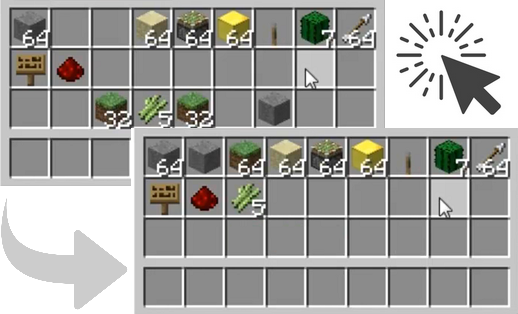
ClickSort 是一款 Bukkit 插件,让玩家只需单击或双击鼠标即可轻松整理自己的物品栏(玩家/箱子/发射器)。玩家可以按物品 ID、物品名称进行排序,切换单击与双击模式,或完全禁用排序功能。所有这些设置均针对每个玩家单独生效,无需使用任何命令——全部通过物品栏窗口中的鼠标点击完成。
最新版本
上述所有版本均应在 Spigot 上兼容运行。
视频
v1.0.0 版本的评测视频,感谢 VariationVault:
安装
- 将 ClickSort.jar 复制到
bukkit/plugins 文件夹中,然后重载或重启你的 CraftBukkit 服务器。
bukkit/plugins/ClickSort 文件夹将被自动创建,其中包含一个 config.yml 文件。
- 你可以随意编辑该文件,并运行
/clicksort reload 以重新加载配置。详情请参阅 Configuration。
从 v1.3.2 版本开始,如果你希望按物品名称排序,则需要手动将物品名称添加到 items.yml 文件中。
使用方法
ClickSort 的操作方式如下:
- 在中键模式下(默认模式,自 ClickSort v1.5.1 起交换键为 'F'),玩家可以通过中键点击目标物品栏中的任意槽位来整理自己的物品栏、箱子/发射器/漏斗/投掷器的物品栏(包括含有物品的槽位)。
- 在双击模式下,玩家可以通过左键双击目标物品栏中的任意槽位来进行排序(包括含有物品的槽位)。
- 在单击模式下,玩家可以通过左键单击目标物品栏中的任意空槽位来整理物品栏。
- 默认情况下,物品按物品 ID 排序(完整 ID 列表请参阅 ),且点击模式为中键 (在 v1.1 及更早版本中,默认点击模式为双击)。
- 玩家可以 Shift+左键点击任意空的物品栏槽位,循环切换按物品 ID、物品名称、物品组或物品值排序(每种排序模式的更多详情请参阅 Sort Modes)。
- 玩家可以 Shift+右键点击任意空的物品栏槽位,循环切换双击模式和单击模式,或禁用排序功能。
任何模式更改都会向玩家发送一条反馈消息,指示新的排序或点击模式。玩家的排序/点击模式设置会在服务器重启后保持不变。
从 v1.1.0 版本开始,玩家还可以禁止自己更改 Shift 点击模式(针对每个玩家单独设置);部分玩家可能会因意外 Shift 点击空物品栏槽位而感到困扰。为避免这种情况,玩家可以使用 /clicksort shiftclick 命令来切换自身的 Shift 点击功能。
同样从 v1.1.0 版本开始,新增了两个命令,允许玩家直接设置其排序或点击模式;如果已禁用 Shift 点击模式切换,这些命令将非常有用:
/clicksort sort <id|name|group|value>
/clicksort click <middle|double|single|swap|none>
保护机制
ClickSort 会尝试尊重那些通过取消 InventoryClickEvent 来提供保护的插件。它会在尽可能晚的阶段运行自身的事件处理器,并忽略已被取消的事件。
文档
计划中
- 可能的排序模式:合并同类物品?例如 9 个铁锭 → 铁块,9 个钻石 → 钻石块等。这可能要求玩家在物品栏中拥有工作台,或者站在附近。
- 或许可以添加一种排序“法杖”,以便在不打开物品栏的情况下整理箱子?例如一根设置了适当元数据的木棍。
源代码
更新日志
使用统计
使用 bStats 收集完全匿名的使用统计数据。
ClickSort
ClickSort is a Bukkit plugin which makes it very easy for players to sort their inventories (player/chest/dispenser) with a single or double click of the mouse. Players can sort by item ID, item name, switch between single- and double-clicking, or disable sorting entirely, all on a per-player basis and without needing any commands; it's all done with mouse clicks in inventory windows.

Latest Version
All versions above should work on Spigot.
Video
A review of v1.0.0, with thanks to VariationVault :
Installation
- Copy ClickSort.jar into your
bukkit/plugins folder and reload/restart your CraftBukkit server.
- The
bukkit/plugins/ClickSort folder will be automatically created, containing a config.yml file.
- You may edit this file as you please, and run
/clicksort reload to reload. See Configuration for details.
As of v1.3.2, you'll have to put your item names into items.yml manually if you want to sort by item names.
Usage
ClickSort operates as follows:
- In middle-click mode (the default, or swap key 'F' since ClickSort v1.5.1) players can sort their own inventory, a chest/dispenser/hopper/dropper inventory by middle-clicking any slot in that inventory (including slots with items in).
- In double-click mode, players can sort by double-left-clicking any slot in that inventory (including slots with items in).
- In single-click mode, players can sort inventories by single-left-clicking any empty slot in that inventory.
- By default, items are sorted by item ID (see for a full list of ID's) and the click mode is middle-click (in v1.1 and earlier, the default click mode was double-click).
- Players can Shift-left-click any empty inventory slot to cycle through sorting by item ID, item name, item group, or item value (see Sort Modes for more detail on each sort mode).
- Players can Shift-right-click any empty inventory slot to cycle between double-click and single-click mode, or disabled sorting.
Any mode changes will give the player a feedback message indicating the new sort or click mode. Player sort/click modes are persistent across server restarts.
As of v1.1.0, it is also possible for players to disable shift-click mode changing (on a per-player basis); some players may find themselves annoyed by accidentally shift-clicking empty inventory slots. To avoid this, players can use the /clicksort shiftclick command to toggle shift-clicking for themselves.
Also as of v1.1.0, two commands have been added to allow players to set their sort or click modes directly; these are most useful if shift-click mode changing has been disabled:
/clicksort sort <id|name|group|value>
/clicksort click <middle|double|single|swap|none>
Protection
ClickSort attempts to respect protection plugins which cancel InventoryClickEvent by running its own event handler as late as possible and ignoring cancelled events.
Documentation
Planned
- Possible sort mode to compact items? E.g. 9 iron ingot -> iron block, 9 diamond -> diamond block etc. Might require the player to have a crafting table in their inventory, or be standing near one.
- Maybe a sorting "wand" to have the option of sorting chests without having the inventory open? A stick with some appropriate metadata set on it, for example.
Source
Changelog
Usage Statistics
Fully anonymous usage statistics are collected using bStats.
评论 0
登录后参与评分
还没有评论,来抢沙发吧