Coffres — 你的箱子里的一切,随处可查
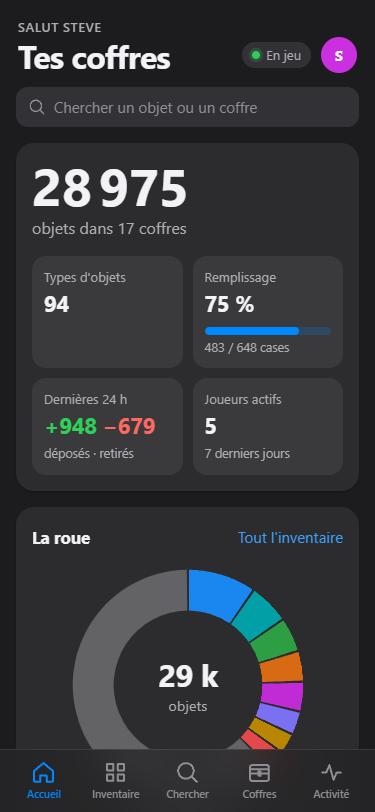
Coffres 是一款 Paper 插件,用于追踪服务器中箱子、 barrels(桶)和潜影盒里的物品,并在网站上展示,方便手机和电脑访问。你可以像安装应用一样在 iPhone、Android 或 PC 上安装该网站。
再也不用为了找那一组红石而跑遍整个基地了:打开网站,搜索一下,插件就会告诉你它在哪里。正在规划大型建筑?上传其结构图,Coffres 会告诉你已经放置了什么、箱子里有什么以及还缺什么。
✨ 功能特性
游戏中
- 选择要追踪的容器: 运行
/coffres,开启添加模式,然后右键点击箱子、桶或潜影盒。一旦添加,它们即为私有。
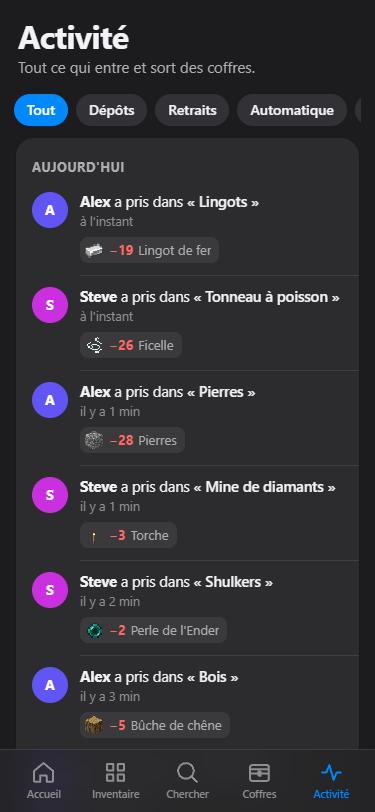
- 完整历史记录: 每次存入和取出都会记录玩家名称。漏斗、铜傀儡和其他机器被视为自动操作进行记录。被破坏或炸毁的容器也会被记录。
- 嵌套内容统计: 存储在已追踪容器内的潜影盒和包裹中的物品也会被计入。
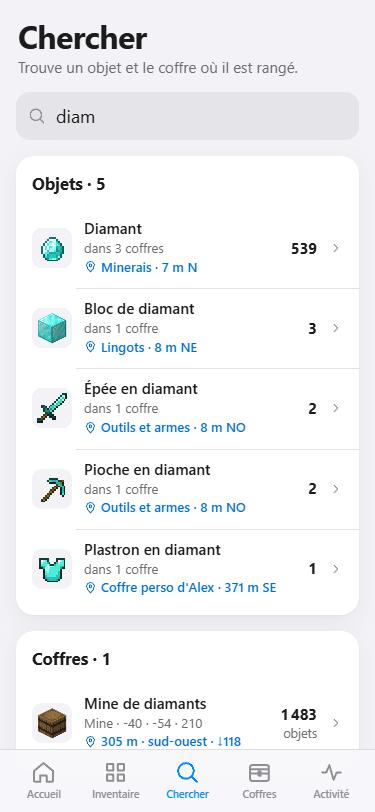
- 物品搜索: 使用
/coffres chercher <item> 查看物品位置并高亮显示最近的容器。
- 建筑项目:
/coffres projet 显示每个项目的进度条。通过 /coffres projet lier <name> 和右键点击链接箱子,或者使用 /coffres projet placer <name> 在世界中放置蓝图。
网站上
- 两个独立空间: Mes coffres(我的箱子)和 Communs(共享)。它们永远不会混合。管理员还可以获得 All(全部)视图。
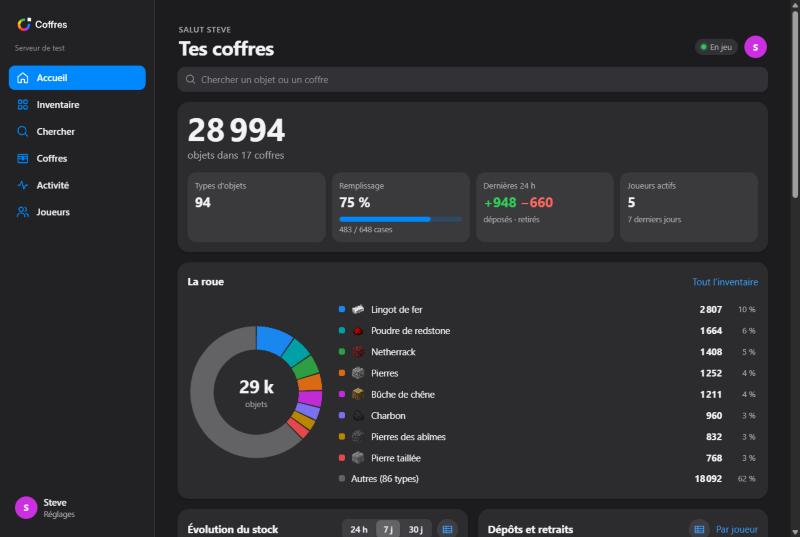
- 仪表盘: 总量、分布图表、24小时/7天/30天的趋势、顶级玩家和最近的活动。
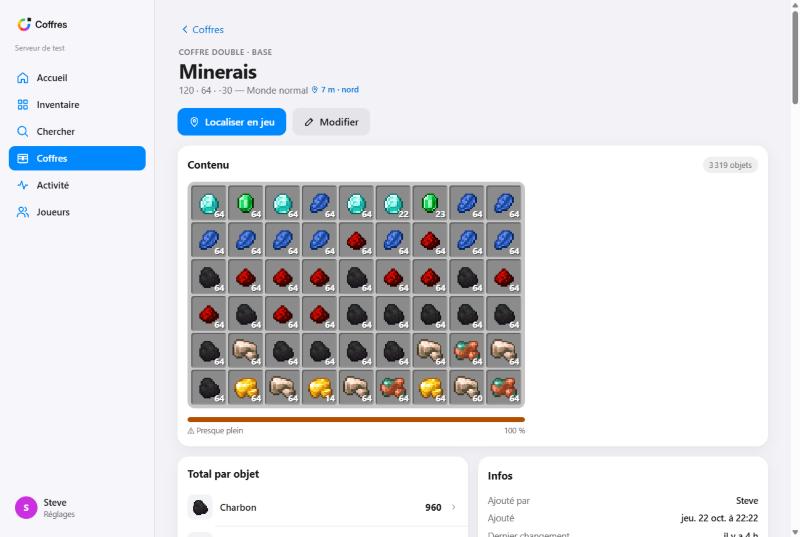
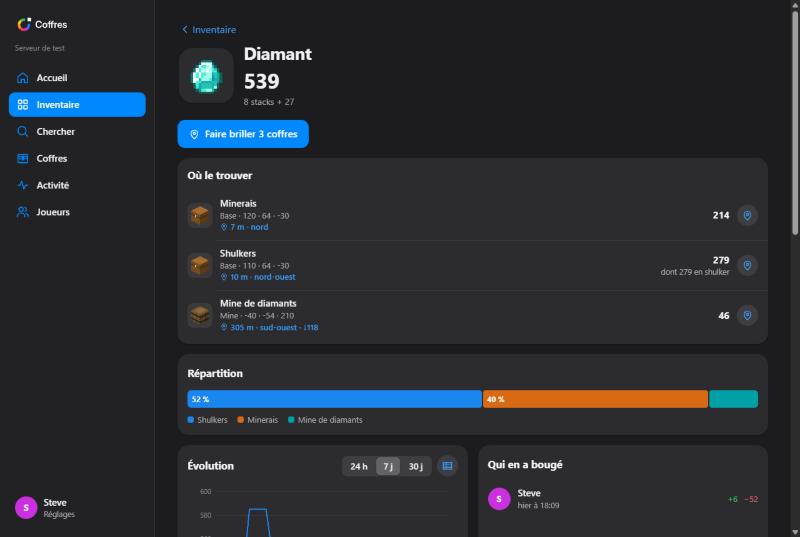
- 库存、搜索(含距你距离)、物品页面、按区域分组的箱子,以及一个类似游戏中的箱子视图,带有历史、重命名和分享功能。
- 在游戏中定位: 使箱子穿透墙壁发光,并有光束和箭头指引方向。只有你能看到发光效果,且在你打开箱子后立即关闭(最长60秒)。
- 支持明暗主题,每5秒实时更新,图表可切换为表格。
- 简单登录: 输入你的 Minecraft 用户名并输入聊天中发送给你的6位验证码,或使用
/coffres web 链接。无需密码,会话持续180天。
🏗️ 建筑项目
上传你的城堡、农场或基地的蓝图,Coffres 会生成购物清单。
- 支持的文件格式: Litematica
.litematic、Sponge .schem(WorldEdit 7+、FAWE,版本1至3)、旧版 .schematic(MCEdit、旧版 WorldEdit)和结构 .nbt(结构方块、Create)。
- 你需要放置的每种方块: 材料图表、总数、组数和潜影盒数量。门和床计为一次,双层台阶计为两个台阶,墙火把计为一个火把,依此类推。
- 关联箱子: 在网站或游戏中链接你存放材料的箱子。它们的库存会实时计算,包括潜影盒。
- 已放置的方块: 使用与 Litematica 相同的原点、旋转和镜像在世界中放置项目。Coffres 会检查哪些方块已经建成,并在放置或破坏方块时保持实时更新。不检查方块朝向,因此你永远可以达到100%完成度。
- 库存也会计入: 在线项目成员携带的方块会被计入,即使是在潜影盒和包裹中。
- 一目了然的进度: 已放置(绿色)+ 在箱子里(蓝色)+ 在玩家身上(橙色)+ 缺失(灰色)。一键复制缺失方块的列表以便粘贴到 Discord。
- 方块详情: 点击方块可查看已放置的数量、谁携带了部分方块以及哪些箱子有该方块,并提供按钮使这些箱子在游戏中发光。
- 共享、好友组或个人: 创建一次群组(“The crew”),然后将其用于任意数量的项目。成员可以链接他们的箱子;只有项目创建者(或管理员)可以编辑、放置或删除该项目。
- 仅存储方块列表和方块位置,不存储上传的文件。
在手机端
🔒 隐私保护
- 每个箱子在添加时即为私有:只有其所有者和管理员可以看到它(内容包括位置和历史记录)。游戏中没有“公开”选项,因此秘密基地将保持秘密。
- 只有所有者可以共享 箱子,通过其页面上的 Rendre commun(设为共享)按钮。管理员不能共享他人的箱子。
- 私有箱子不会出现在其他玩家的搜索、活动或玩家统计中。
- 项目: 共享项目对所有人可见,群组项目对群组成员可见,个人项目仅对项目创建者可见(管理员可以看到所有项目)。链接到项目的私有箱子仅为其所有者(和管理员)计数。
- 尊重区域保护(claims):你只能添加你有权限打开的容器。
📦 安装
- 将
.jar 文件放入 plugins/ 文件夹并启动服务器。
- 打开 Web 端口(默认为 8125)。此端口与 Minecraft 端口分开,因此请在路由器上转发它或在主机的控制面板中添加它。
- 在
plugins/Coffres/config.yml 中设置 web.public-url 为玩家将要使用的地址。
- 运行
/coffres reload。
首次启动时,插件会下载官方的 Mojang 纹理和物品名称。你可以通过设置
assets.download-from-mojang: false 来关闭此功能,站点将使用简化的图标代替。
对于 HTTPS,请在 Caddy、Nginx 或 Cloudflare Tunnel 后面运行站点,并将 web.bind 设置为 127.0.0.1。
更新: 替换旧的 .jar 文件并重启服务器;你的箱子、历史记录和项目都会被保留。
1.3.0 版本之前创建的项目需要重新上传一次文件(Modifier → Remplacer le fichier)以检查已放置的方块。
⌨️ 命令
| 命令 |
描述 |
/coffres |
主菜单 |
/coffres ajouter |
切换添加模式 |
/coffres web |
网站链接和登录代码 |
/coffres chercher <item> |
查找物品 |
/coffres liste |
列出你追踪的箱子 |
/coffres projet [name] |
列出项目或显示缺失的方块 |
/coffres projet lier <name> |
将箱子链接到项目 |
/coffres projet placer <name> [rotation] [mirror] |
在你站立的位置开始在世界中放置项目(仅限项目创建者或管理员) |
/coffres projet verifier <name> |
重新检查项目的已放置方块 |
/coffres nom / zone / info / retirer |
重命名、设置区域、信息、停止追踪 |
/coffres prive [tout] |
将一个或多个共享箱子设为私有 |
/coffres deconnexion |
注销所有设备 |
/coffres reload |
重载配置(管理员) |
别名:/coffre, /stock
🔑 权限
coffres.use(默认所有人):追踪自己的箱子并使用站点coffres.admin(默认 OP):查看和管理所有箱子以及重载配置
ℹ️ 注意
- 需要 Paper 26.1+(基于 26.2 构建)和 Java 25。无需其他插件:Web 服务器已内置。
- 界面为法语:包括命令、游戏内消息和网站。站点上的物品名称默认为法语;如需英文,请更改
assets.language(例如 en_us)。
- 源代码:GitHub
Coffres — everything in your chests, anywhere
Coffres is a Paper plugin that tracks what's inside your server's chests, barrels and shulker boxes, and shows it
on a website for phone and PC. You can install the site on iPhone, Android or PC like an app.
No more running across the base to find that one stack of redstone: open the site, search, and the plugin tells you
where it is. Planning a big build? Upload its schematic and Coffres tells you what's placed, what's in your chests and
what's still missing.
✨ Features
In game
- Choose which containers to track: run
/coffres, turn on add mode, then right-click chests, barrels or shulker
boxes. They are private as soon as you add them.
- Full history: every deposit and withdrawal is logged with the player's name. Hoppers, copper golems and other
machines are logged as automatic. Broken or blown-up containers are recorded too.
- Nested contents counted: items inside shulker boxes and bundles stored in tracked containers are included.
- Item search:
/coffres chercher <item> tells you where it is and highlights the nearest containers.
- Build projects:
/coffres projet shows every project with a progress bar. Link chests with
/coffres projet lier <name> and a right-click, or place the plan in the world with /coffres projet placer <name>.
On the website
- Two separate spaces: Mes coffres (my chests) and Communs (shared). They are never mixed. Admins also get an
All view.
- Dashboard: totals, distribution chart, trends over 24h / 7d / 30d, top players and recent activity.
- Inventory, search (with distance from you), item pages, chests grouped by zone, plus a chest view that shows the
slots like in game, with history, renaming and sharing.
- Locate in game: makes a chest glow through walls, with a light beam and an arrow to guide you. Only you can see
the glow, and it turns off as soon as you open the chest (60 seconds max).
- Light and dark themes, live updates every 5 seconds, and charts you can switch to tables.
- Simple login: type your Minecraft name and enter the 6-digit code sent to you in chat, or use the
/coffres web
link. No password, and sessions last 180 days.
🏗️ Build projects
Upload the plan of your castle, farm or base, and Coffres makes the shopping list.
- Supported files: Litematica
.litematic, Sponge .schem (WorldEdit 7+, FAWE, versions 1 to 3), legacy
.schematic (MCEdit, old WorldEdit) and structure .nbt (structure blocks, Create).
- Every block you need to place: material chart, total, stacks and shulker boxes. Doors and beds count once, a
double slab counts as two slabs, a wall torch counts as a torch, and so on.
- Linked chests: link the chests where you store materials, on the site or in game. Their contents are counted
live, shulker boxes included.
- Blocks already placed: place the project in the world with the same origin, rotation and mirror as in Litematica.
Coffres checks which blocks are already built, then keeps it up to date live as blocks are placed or broken. Block
orientation isn't checked, so you can always reach 100%.
- Inventories count too: blocks carried by online project members are included, even inside shulker boxes and
bundles.
- Progress at a glance: placed (green) + in chests (blue) + on players (orange) + missing (grey). Copy the
missing-blocks list in one click to paste it on Discord.
- Block details: click a block to see how many are placed, who is carrying some, and which chests have it, with a
button to make those chests glow in game.
- Shared, friend group or solo: create a group once ("The crew") and pick it for as many projects as you want.
Members can link their chests; only the project's creator (or an admin) can edit, place or delete it.
- Only the block list and block positions are stored, not the uploaded file.
On your phone
🔒 Privacy
- Every chest is private when added: only its owner and admins can see it (contents, position and history). There
is no "public" option in game, so a secret base stays secret.
- Only the owner can share a chest, with the Rendre commun (make shared) button on its page. Admins can't share
someone else's chest.
- Private chests never show up in other players' search, activity or player stats.
- Projects: shared projects are visible to everyone, group projects to the group's members, and solo projects only
to their creator (admins can see all of them). A private chest linked to a project only counts for its owner (and
admins).
- Region protections (claims) are respected: you can only add a container you are allowed to open.
📦 Installation
- Put the
.jar in your plugins/ folder and start the server.
- Open the web port (8125 by default). This port is separate from the Minecraft port, so forward it on your router
or add it in your host's panel.
- Set
web.public-url in plugins/Coffres/config.yml to the address players will use.
- Run
/coffres reload.
On first start, the plugin downloads the official Mojang textures and item names once. You can turn this off with
assets.download-from-mojang: false, and the site will use simplified icons instead.
For HTTPS, run the site behind Caddy, Nginx or Cloudflare Tunnel and set web.bind to 127.0.0.1.
Updating: replace the old .jar and restart the server; your chests, history and projects are kept. Projects
created before 1.3.0 need their file uploaded once more (Modifier → Remplacer le fichier) to check placed blocks.
⌨️ Commands
| Command |
Description |
/coffres |
Main menu |
/coffres ajouter |
Toggle add mode |
/coffres web |
Website link and login code |
/coffres chercher <item> |
Find an item |
/coffres liste |
List your tracked chests |
/coffres projet [name] |
List projects or show missing blocks |
/coffres projet lier <name> |
Link chests to a project |
/coffres projet placer <name> [rotation] [mirror] |
Place a project in the world, starting where you stand (project creator or admin) |
/coffres projet verifier <name> |
Recheck the placed blocks of a project |
/coffres nom / zone / info / retirer |
Rename, set zone, info, stop tracking |
/coffres prive [tout] |
Make one or all shared chests private |
/coffres deconnexion |
Log out all devices |
/coffres reload |
Reload config (admin) |
Aliases: /coffre, /stock
🔑 Permissions
coffres.use (everyone by default): track your own chests and use the sitecoffres.admin (ops by default): see and manage all chests and reload the config
ℹ️ Notes
- Requires Paper 26.1+ (built for 26.2) and Java 25. No other plugin needed: the web server is built in.
- The interface is in French: commands, in-game messages and the website. Item names on the site are French by
default; change
assets.language (e.g. en_us) for English.
- Source code: GitHub


 插件

 插件
 插件
 插件
 插件
 插件
评论 0
登录后参与评分
还没有评论,来抢沙发吧