
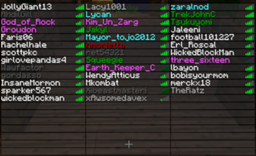
一个非常简单的插件,可为你的玩家列表上色!
支持我的工作,并访问我的 主页!
法语翻译 
适用于 Sponge 的 ColoredTablist
常见问题解答:提问前请点击我!
工作原理:
- 安装 Vault
- 安装该插件。(将 coloredtablist.jar 文件放入 /plugins 文件夹中)
- 选择一个以颜色命名的权限节点。
示例:'coloredtablist.blue' 代表蓝色 :)
或者在配置中将 'UserPermissions' 设置为 false,然后选择颜色代码 !向下滚动! - 向用户(或组)授予特定的权限节点。
或者在 配置文件中 向组授予特定的颜色代码。
现在,当用户加入时,他们会在玩家列表(按 Tab 键)中自动着色。
命令:
你可以使用 /ctl 代替 /coloredtablist
- /coloredtablist help = 显示包含可用命令的帮助页面。
- /coloredtablist reload = 重新加载配置和玩家列表
- /coloredtablist colors = 查看颜色代码列表。
- /coloredtablist nick <昵称> = 更改你在标签页中的名称,直到你重新连接或服务器重新加载。
配置命令:
- /coloredtablist set usepermissions <true/false>
- /coloredtablist set usechatnames <true/false>
- /coloredtablist set prefix<1> <colors>
- /coloredtablist set groups <group> <prefix/suffix> <value>
配置:
版本:2.1.0
#是否应使用权限而不是组: UsePermissions: true#是否应使用显示名称 UseChatNames: false
#如果应每 15 秒更新一次玩家名称 UpdateEvery15Seconds: true
#将组名填入此处。使用 "" 作为前缀即可不显示前缀。可以使用 & 来设置颜色,例如 &4 表示红色。 Groups: Member: prefix: '&e' suffix: '[M]' Admin: prefix: '&a' suffix: '[A]'
#在此设置 coloredtablist.prefix1 的文本: prefix1: '&b' #在此设置 coloredtablist.prefix2 的文本: prefix2: exp #在此设置 coloredtablist.prefix3 的文本: prefix3: mod #在此设置 coloredtablist.prefix4 的文本: prefix4: admin #在此设置 coloredtablist.prefix5 的文本:
prefix5: 首领
#在此处为 coloredtablist.prefix6 设置文本: prefix6: idk
权限:
颜色代码:
在配置文件中使用时,用 "&" 代替 "#",并在 权限 中使用全称

| 符号 | 效果/名称 |
|---|---|
| k | 魔法/随机 |
| l | 加粗 |
| m | |
| n | 下划线 |
| o | 斜体 |
视频:
英文
<p>
德文
<p>
法语
已知问题:
- 标签页列表中最多显示 14 个字符,更长的名称会被截断为 14 个字符(否则会因为超过最大限制 16 个字符而报错。由于我们使用了颜色代码,实际可用字符数为 16 - 2 = 14 O.o)
Very Simple Plugin to color your Playerlist!
Support my Work and visit my Homepage!
French translation
ColoredTablist for Sponge
FAQ Click me before you ask something!
How it works:
- Install Vault
- Install the Plugin. (Drop the coloredtablist.jar file into your /plugins folder)
- Choose a Permissions Node named by the color.
Example: 'coloredtablist.blue' stands for blue :)
OR set 'UserPermissions' to false in the config and choose a color-code !scroll down! - Give a User (or a Group) the specifc Permissions Node.
OR give a Group the specific Color Code in the Config
Now when the User joins he automatically gets colored in the Playerlist (press Tab).
Commands:
You can use /ctl instead of /coloredtablist
- /coloredtablist help = Shows a help Page with available Commands.
- /coloredtablist reload = Reloads Config and Playerlist
- /coloredtablist colors = View List of Color-Codes.
- /coloredtablist nick <nickname> = Changes your Name in the Tablist until you reconnect or the Server reloads.
Config Commands:
- /coloredtablist set usepermissions <true/false>
- /coloredtablist set usechatnames <true/false>
- /coloredtablist set prefix<1> <colors>
- /coloredtablist set groups <group> <prefix/suffix> <value>
Configuration:
Version: 2.1.0
#Whether or not Permissions should be used instead of Groups: UsePermissions: true#Whether or not Displaynames should be used UseChatNames: false
#If it should update a player name every 15 seconds UpdateEvery15Seconds: true
#Write the Groups in, like here. Use "" as Prefix to dont have one. You can use Colors in Prefix using & so &4 would be red. Groups: Member: prefix: '&e' suffix: '[M]' Admin: prefix: '&a' suffix: '[A]' #Set text for coloredtablist.prefix1 here: prefix1: '&b' #Set text for coloredtablist.prefix2 here: prefix2: exp #Set text for coloredtablist.prefix3 here: prefix3: mod #Set text for coloredtablist.prefix4 here: prefix4: admin #Set text for coloredtablist.prefix5 here: prefix5: boss #Set text for coloredtablist.prefix6 here: prefix6: idk
Permissions:
Color Codes:
Use them in Config with "&" instead of "#" and as Fullname in Permissions
| Symbol | Effect/Name |
|---|---|
| k | Magic/Random |
| l | Bold |
| m | |
| n | Underlined |
| o | Italic |
Videos:
English
<p>
German
<p>
French
Known Bugs:
- Max 14 Characters are shown in the Tablist, longer Names are shortened to 14 (Otherwise it would show an Error because 16 Characters is max. (and we are using Colors so its 16 -2 = 14 O.o)
Dont forget to Subscribe for File Updates!
Visit my Homepage!
This Plugin collects anonymous datas about your Server for mcstats.org
下载 ColoredTablist
下载 ColoredTablist
下载 ColoredTablist
下载 ColoredTablist
下载 ColoredTablist
下载 ColoredTablist
下载 ColoredTablist
需要联机服务器吗?
稳定流畅、一键部署,几分钟即可和朋友联机开服
最低仅需 8 元/月 即可畅快联机
下载 ColoredTablist
下载 ColoredTablist
需要联机服务器吗?
稳定流畅、一键部署,几分钟即可和朋友联机开服
最低仅需 8 元/月 即可畅快联机
下载 ColoredTablist
2.1.4
- 更新了代码以支持 MC 1.9(“getOnlinePlayers()”):D
- 禁用了隐身功能
2.1.3
- 更新了 Metrics 以支持 MC 1.9
2.1.2
- 更新到最新版本的 CraftBukkit
- 更新到最新版本的 Vault (1.4.1)
2.1.1
- 修复了前缀权限问题
- 重新添加了 metrics
点击此处查看完整变更日志!
- 在更新到 ColoredTablist 2.1.2 之前,你需要先更新 Vault 到 1.4.1
- 最大字符数为 16。一个颜色占用 2 个字符,因此长度为 16 个字符的彩色名称会被自动缩短。
关于这个资源的讨论、问题反馈与使用心得
还没有讨论,来发第一帖吧
你是这个资源的作者?登录后可认领此资源。
相似资源
 插件
ExyliaPlugins 的库。
 插件
自定义你的Minecraft头像!
 插件
重新定义服务器上的生物运输方式。使用高度可定制的口袋道具,安全地捕获、存储和释放任何实体。
 插件
一个在游戏内运行的 Minecraft 地图编辑器! 支持选区、蓝图、复制粘贴、笔刷和脚本。 可在创造模式中使用,也可在生存模式中临时使用。
 插件

创建用户友好的菜单以前往不同的世界
 插件
专为 Velocity 打造的自制聊天插件,功能丰富——支持跨服群组/全局/私聊消息,并集成 LibertyBans 的禁言功能。
评论 0
登录后参与评分
还没有评论,来抢沙发吧