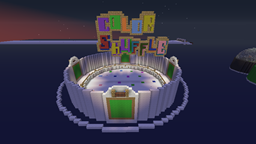
等等,什么?真的吗?RSMV.net 要发布他们的插件了?是的!没错。这就是 ColorShuffle,那个经典的游戏:在时间耗尽、地板崩塌之前,跑向指定的颜色。
功能特性
- 变色地毯
- 每局游戏支持无限玩家
- 游戏结束后恢复玩家状态/物品栏
- 可创建告示牌以加入竞技场,并查看谁在竞技场内
- 经验条倒计时显示距离地板崩塌的时间
- 自定义每局的初始时间和掉落延迟
- 交互式设置向导,不会阻塞常规聊天
- 重命名竞技场
- 备份/恢复你的竞技场配置
- 创建竞技场时自动备份新的竞技场配置
- 关闭竞技场进行维护
权限节点
- colorshuffle.setup - 允许你设置一个竞技场
- colorshuffle.delete - 允许你删除一个竞技场
- colorshuffle.close - 允许你关闭一个竞技场
- colorshuffle.open - 允许你打开一个已关闭的竞技场
- colorshuffle.rename - 允许你重命名一个竞技场
- colorshuffle.start - 允许你强制启动一个竞技场
- colorshuffle.backup - 允许你备份一个竞技场
- colorshuffle.restore - 允许你恢复一个竞技场
- colorshuffle.list - 允许你列出所有竞技场
命令
- /color setup - 启动竞技场设置向导
- /color delete <arena> - 删除指定名称的竞技场(你需要先关闭该竞技场才能删除它)
- /color close <arena> - 关闭指定名称的竞技场
- /color open <arena> - 重新打开一个已关闭的竞技场
- /color rename <oldName> <newName> - 重命名竞技场
- /color start <arena> - 强制启动一个竞技场
- /color backup <arena> - 将竞技场备份到 ColorShuffleFolder 中的单独文件里
- /color restore <arena> - 从文件中恢复竞技场
- /color list - 列出所有竞技场及其状态
- /color join <arena> - 加入指定的竞技场
- /color togglefallingblocks - 设置方块是在每轮结束时掉落还是直接消失
创建与设置竞技场
创建一个 ColorShuffle 竞技场并不难,但在放置方面有一些特殊注意事项。
- 竞技场地板下方应该是虚空,你可以掉入其中。越接近虚空越好。
- 竞技场地板由1层冰制成,上面覆盖地毯。
- 地板可以是任何颜色。
- 要设置地毯的位置,只需在主地板颜色之外放置另一种颜色的地毯。如果你想要两个相互接触的地毯,请使用不同颜色以保持分离。地毯应为正方形,但其他形状也可能有效。欢迎自由尝试。
- 要创建带有当前颜色的告示牌,只需在你希望其变为当前羊毛颜色的位置放置棕色黏土块。
- 所有竞技场必须至少包含11个普通地板方块、2个颜色地毯和3个告示牌方块,才能成功创建竞技场。
完成竞技场创建后,执行 /color setup 并按照游戏内说明操作即可!
创建加入/状态告示牌
要创建 colorshuffle 告示牌,你需要拥有 colorshuffle.setup 权限节点。加入告示牌的格式如下:
- [csarena]
- arenaname
-
-
要在告示牌上显示竞技场内的玩家或排队等待的玩家,请在告示牌上放置以下文本:
- [csstatus]
- arenaname
- sign#
-
示例:
- [csstatus]
- test
- 1
-
这将显示4名玩家。你可以使用数字1-4,最多显示16名玩家。
成功创建加入告示牌后,它将显示当前游戏的状态统计。状态告示牌通常在没有玩家在该竞技场活动过的情况下(自上次服务器重启后)会保持空白。
保护你的竞技场
尽管该插件会阻止当前游戏中的玩家破坏/放置方块,但我们选择不包含主要的竞技场保护功能,以保持插件轻量级。如果玩家能够在非游戏状态下进入竞技场,我们建议使用 WorldGuard 或 GriefPrevention 对其进行保护,以防止恶意破坏。
常见问题
问:为什么我听不到任何声音?我在 RSMV.net 上放置音符盒的方式与此相同。
答:虽然此插件基于与 RSMV.net 相同的代码库,但某些功能已被移除,包括声音、作弊保护和 Enjin Points 集成。
问:有没有办法让我获得 RSMV.net 上那种具有全部功能的版本?
答:目前不行。那些功能将仅保留在 RSMV.net 上。
问:我可以为你 guys 制作一个竞技场,并将其放在 RSMV.net 上吗?
答:非常欢迎你制作一个竞技场并提交给我们!请发送私信给我,附上世界文件或 WorldEdit 示意图的链接。如果我们喜欢并把它放到我们的服务器上,我们将给予你100个 Enjin Points 供你在网站上消费。
还有其他问题吗?请在下方的评论区提交!
Wait, what? Can it be? RSMV.net is releasing one of their plugins? Yes! It's true. This is ColorShuffle, the original game where you run to the selected color before the time runs out and the floor falls out from beneath you.
Features
- Color changing mats
- Unlimited players per game
- Restores player stats/inventory after the game
- Create signs to join the arenas as well as who's in the arena
- XP bar counts down the time until the floor falls
- Customize the starting time and the decay for each round
- Interactive setup wizard that doesn't block regular chatting
- Rename arenas
- Backup/restore your arena configs
- Automatically backs up new arena config upon creation of arena
- Close arenas for maintenance
Permissions
- colorshuffle.setup - Allows you to setup an arena
- colorshuffle.delete - Allows you to delete an arena
- colorshuffle.close - Allows you to close an arena
- colorshuffle.open - Allows you to open a closed arena
- colorshuffle.rename - Allows you to rename an arena
- colorshuffle.start - Allows you to force start an arena
- colorshuffle.backup - Allows you to backup an arena
- colorshuffle.restore - Allows you to restore an arena
- colorshuffle.list - Allows you to list the arenas
Commands
- /color setup - Starts the arena setup wizard
- /color delete <arena> - Deletes the arena with that name (you need to close an arena before you can delete it)
- /color close <arena> - Closes the arena with that name
- /color open <arena> - Reopens a closed arena
- /color rename <oldName> <newName> - Renames the arena
- /color start <arena> - Force starts an arena
- /color backup <arena> - Backs up the arena to a separate file in the ColorShuffleFolder
- /color restore <arena> - Restores the arena from the file
- /color list - Lists all the arenas and their statuses
- /color join <arena> - Joins the specified arena
- /color togglefallingblocks - Sets whether the blocks fall at the end of each round or just disappear
Creating an Arena and Setting it Up
Creating a ColorShuffle arena isn't hard, but it does require some special considerations as far as placement is concerned.
- Below the floor of the arena you should be able to drop into the void. the closer you are to the void the better.
- The floor of the arena is constructed with 1 layer of ice with carpet on top of it.
- The floor can be any color.
- In order to set the position of the mats just place carpet in another color than the main floor color. If you want two mats that are touching each other then do them in different colors to keep them separate. Mats should be square, however, some other shapes may work as well. Feel free to experiment.
- In order to create the sign with the current color on it just place brown clay blocks where you want it to change to the current wool color.
- All arenas must have at least 11 plain floor blocks, 2 color mats, and 3 sign blocks in order to successfully create the arena.
Once you are done creating your arena just do /color setup and follow the in game instructions!
Creating Join/Status Signs
To create a colorshuffle sign you need the colorshuffle.setup permission node. The format of the join sign goes like this:
- [csarena]
- arenaname
-
-
To display the players in an arena or are in the queue for an arena place a sign with this text on it:
- [csstatus]
- arenaname
- sign#
-
Example:
- [csstatus]
- test
- 1
-
Would show 4 players on the sign. You can use the numbers 1-4 for a total of 16 players being displayed.
Upon successful creation of a join sign it will show you stats about the current game. With the status signs they usually go blank unless players have used that arena after the last server restart.
Protecting Your Arenas
Although the plugin does prevent players who are in the current game from breaking/placing blocks, we have opted not to include any major arena protection in order to keep the plugin light. If players are going to be able to get to the arena outside of being in a game we suggest protecting it with WorldGuard or GriefPrevention in order to prevent griefing.
FAQ
Q: Why can't I hear any sounds? I placed note blocks just like in RSMV.net
A: Although this plugin is based on the current code base as the one on RSMV.net some features have been removed, including sounds, cheat protection, and the Enjin Points integration.
Q: Is there any way for me to get the version with all the features that is on RSMV.net?
A: At this current time: no. Those features are staying exclusive to RSMV.net
Q: Can I make an arena for you guys and have you put it on RSMV.net?
A: You are more than welcome to create an arena and submit it to us! Just send me a PM with a link to either the world file or the worldedit schematic. If we like it and put it on our server we'll give you 100 enjin points to spend on our website.
Any other questions? Submit them in the comments section below!

 插件

 插件
 插件
 插件
 插件
 插件
评论 0
登录后参与评分
还没有评论,来抢沙发吧