CoordinateOffset
一款 Minecraft Paper 插件,可按配置混淆玩家的坐标。

Minecraft 提供了一个有用的调试菜单(F3),允许任何人轻松查看他们在世界中的坐标。
这使得保存兴趣点和与朋友(或敌人)共享位置变得很容易。
然而,并非所有多人服务器都希望坐标如此容易获取。/gamerule reducedDebugInfo 可以
在管理层面隐藏 F3 菜单中的坐标,但玩家只需添加一个客户端模组即可轻易显示它们。
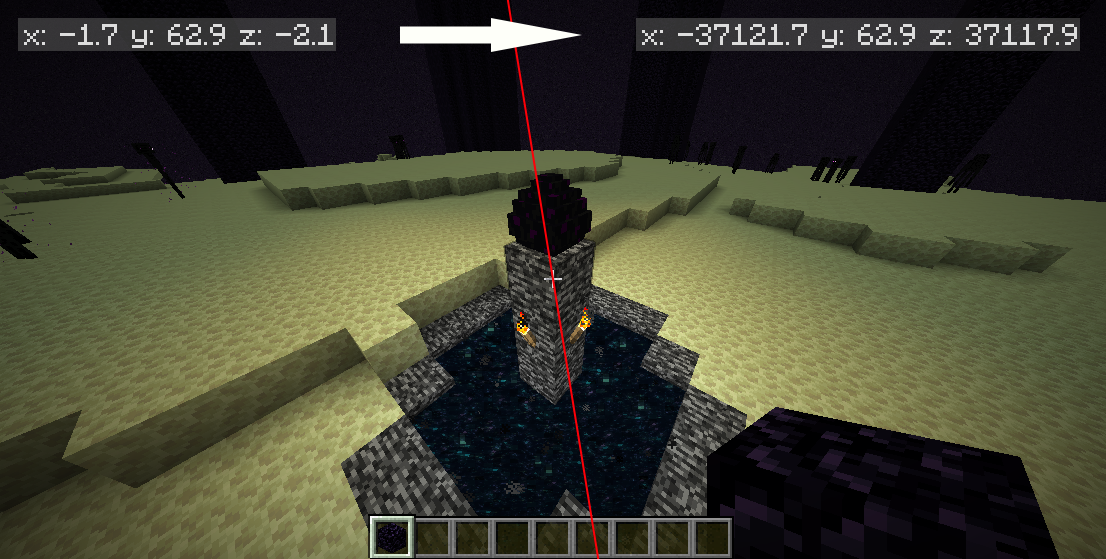
CoordinateOffset 是一款用于基于 Paper 的 Minecraft 服务器的插件,它修改服务器和客户端之间数据包中的每一个坐标。玩家仍然会看到他们通常看到的完全相同的世界。但是无论他们安装哪些模组,都无法看到他们的真实坐标。
为什么?
本插件并非适用于所有服务器。以下是一些可能使 CoordinateOffset 有用的想法:
- 防止超游戏行为(Metagaming):如果你认为坐标的使用和分享属于超游戏行为,这可以阻止它。
- 增强游戏内物品价值:当坐标不一致时,坐标不再压倒指南针、锚点、死亡回归指南针和地图的优势。
- 防止坐标泄露:如果每个人看到的坐标都不同,玩家就无法从截图中的意外泄露中推导出彼此的坐标。
- 保护世界种子:任何未知的偏移量都会使破解种子的策略变得更加困难。
- 居中原点:将 (0, 0) 坐标放置在你想要的任何地方。
功能
- 完全可配置、灵活的方法来确定如何应用偏移量
- 为每个玩家随机生成偏移量,或为多个玩家使用固定偏移量
- 将偏移量与玩家的位置匹配,使他们看到自己靠近世界原点
- 可选地根据各种玩家操作重新生成偏移量,包括死亡、世界切换、传送和加入服务器
- 通过命令立即重新生成和设置偏移量
- 配置针对不同玩家、不同世界以及权限的不同偏移量
- 自动缩放偏移量以确保在使用下界传送门时坐标仍然对齐
- 可扩展 API 以灵活获取和设置偏移量
- 兼容 Distant Horizons、ViaVersion 和 Velocity (必须安装在 Paper 上,而不是 Velocity 本身)
要求和安装
一些已知的不兼容插件包括:大多数反作弊插件、Geyser。
在确保满足要求后,只需下载最新的
发行版并将其放入服务器的 plugins
文件夹中。然后按照以下步骤配置如何为每个玩家偏移坐标。
配置
主文章:配置指南
主配置文件会在首次运行后自动生成,位于 plugins/CoordinateOffset/config.yml。
defaultOffsetProvider: random
默认配置包含五个预定义的“偏移提供程序”。“偏移”指的是玩家的坐标应相对于其实际位置显示的位移量。首先选择一种与你想要实现的偏移类型相匹配的策略:
constant - 指定你希望玩家拥有的确切偏移量。disabled - 玩家将看到他们的真实坐标。random - 为每个玩家单独随机化其偏移量。可选地在玩家执行操作时重新掷骰子生成偏移量。zeroAtLocation - 基于玩家的起始位置使用偏移量,使他们看到自己位于 (0, 0) 附近。可选地在玩家执行操作时重新居中偏移量。permission - 为玩家分配权限(例如 coordinateoffset.offset.160.-240),以控制其偏移量。
你可以进一步自定义这些提供程序,为不同的玩家/世界/组使用不同的提供程序,并定义你自己的提供程序。请参阅完整的
配置指南。
命令与权限
有关详细信息,请参阅 命令与权限指南。
API
你可以使用 API 在自有插件中使用或扩展 CoordinateOffset。请参阅
API 指南。
支持
- 在 GitHub 上提交 issue 以报告错误或请求新功能。
- 加入 Chips's Mods Discord 服务器寻求帮助。
致谢
特别感谢 Cavallium 开发了
CoordinatesObfuscator,CoordinateOffset 即为其分支。
CoordinateOffset 的数据包翻译逻辑大量借鉴了 CoordinatesObfuscator 所做的工作。
使用的库:
CoordinateOffset
A Minecraft Paper plugin that configurably obfuscates players' coordinates.
Minecraft offers a useful debug menu (F3) that allows anyone to easily see their coordinates in the world.
This makes it easy to save points of interest and share locations with friends (or enemies).
However, not all multiplayer servers want coordinates to be so easily accessible. /gamerule reducedDebugInfo can
administratively hide coordinates from the F3 menu, but it is trivial for a player to add a client-side mod that
shows them.
CoordinateOffset is a plugin for Paper-based Minecraft servers that modifies every coordinate in packets between the
server and client. The player still sees the exact same world they would normally see. But no matter which mods they
install, they cannot see their real coordinates.
Why?
This plugin isn't intended for all servers. Here are a few ideas that might make CoordinateOffset useful:
- Prevent metagaming: If you consider coordinate usage and sharing to be metagaming, this prevents it.
- Amplify in-game items: Coordinates no longer outclass compasses, lodestones, recovery compasses, and maps
when those coordinates are inconsistent.
- Prevent coordinate leaks: If everyone sees different coordinates, players cannot derive each other's coordinates
from an accidental leak in a screenshot.
- Guard the world seed: Any unknown offset makes seed-cracking tactics harder.
- Center the origin: Put the (0, 0) coordinate anywhere you'd like.
Features
- Fully-configurable, flexible methods of determining how to apply offsets
- Generate offsets randomly for each player, or use fixed offsets for multiple players
- Match offsets to the player's position, so they see themselves near the world's origin
- Optionally regenerate offsets based on various player actions, including death, world change, teleport, and server
join
- Regenerate and set offsets immediately with commands
- Configure different offsets per-player, per-world, and with permissions
- Automatic scaling for offsets to ensure coordinates still align when using a nether portal
- Extensible API to flexibly get and set offsets
- Compatible with Distant Horizons, ViaVersion, and Velocity (must be installed on Paper, not Velocity itself)
Requirements and Installation
Some known incompatible plugins are: Most anticheats, Geyser.
After ensuring that you meet the requirements, just grab the latest
release and drop it in your server's plugins
folder. Then follow the steps below to configure how coordinates are shifted for each player.
Configuration
Main article: Configuration Guide
The main configuration file is automatically generated after the first run at plugins/CoordinateOffset/config.yml.
defaultOffsetProvider: random
The default configuration contains five predefined "offset providers". An "offset" refers to the amount that the
player's coordinates should appear to be shifted from their real location. Get started by picking a strategy that
matches the type of offsetting you're trying to achieve:
constant - Specify the exact offset you want players to have.disabled - Players will see their real coordinates.random - Individually randomize each player's offset. Optionally re-roll offsets upon player actions.zeroAtLocation - Use an offset based on the player's starting location, so they see themselves near (0, 0).
Optionally re-center offsets upon player actions.permission - Assign permissions to players, like coordinateoffset.offset.160.-240, to control their offset.
You can customize these providers further, use different providers for different players/worlds/groups, and define your
own providers. See the complete
Configuration Guide.
Commands and Permissions
See the Commands and Permissions Guide
for details.
API
You can use or extend CoordinateOffset in your own plugin by using the API. Please see the
API Guide.
Support
- Open an issue on GitHub to report a bug or request a feature.
- Join the Chips's Mods Discord for help.
Credits
Special thanks to Cavallium for developing
CoordinatesObfuscator, which CoordinateOffset is a fork of.
CoordinateOffset's packet translation logic was heavily modeled after the work done by CoordinatesObfuscator.
Libraries used:

 插件

 插件
 插件
 插件
 插件
 插件
评论 0
登录后参与评分
还没有评论,来抢沙发吧