项目演进与品牌重塑
- 继任者: CraftGuard 是 FlameAntiCraft 的官方继任者。
- 即将进行的品牌重塑: CraftGuard 将在 VOMLabs organization 旗下更名为 ServerGuard*。此次过渡包括一次专注于性能和可靠性的完全重写,并且 Maven 支持将被弃用,转而使用带有 Kotlin DSL 的 Gradle。
功能特性
按世界保护
为每个世界配置独立的规则。针对生存世界、创造地块、大厅和小游戏实例定制交互体验。
工作台控制
单独管理工作台的访问权限,包括:
anvil(铁砧)、furnace(熔炉)、blast-furnace(高炉)、smoker(烟熏炉)、enchanting(附魔台)、brewing(酿造台)、smithing(锻造台)、loom(织布机)、cartography(制图台)、grindstone(砂轮)和 stonecutter(切石机)。
容器安全
限制对箱子、陷阱箱、末影箱、铜箱和潜影盒的交互。
传送门管理
独立启用或禁用每个世界的下界和末地传送门转换。
灵活存储
支持多种存储后端,包括 YAML、H2、MySQL、MariaDB、PostgreSQL、MongoDB 和 Redis。
交互式管理 GUI
通过 /cg 界面管理设置,提供快速切换、显式配置、导入、导出和世界迁移的命令。
集成与本地化
支持 PlaceholderAPI 以实现动态占位符,可选的 WorldGuard 基于区域的绕过功能,以及多种语言。
支持的功能
| 类别 |
功能类型 |
| 核心机制 |
crafting(合成)、nether-portal(下界传送门)、end-portal(末地传送门)、lockdown(锁定模式) |
| 工作台 |
anvil(铁砧)、furnace(熔炉)、blast-furnace(高炉)、smoker(烟熏炉)、enchanting(附魔台)、brewing(酿造台)、smithing(锻造台)、loom(织布机)、cartography(制图台)、grindstone(砂轮)、stonecutter(切石机) |
| 容器 |
chest(箱子)、trapped-chest(陷阱箱)、ender-chest(末影箱)、copper-chest(铜箱)、shulker-box(潜影盒) |
安装
要求
- 服务器: Paper 1.21.x 或兼容的分叉版本,如 Purpur 和 Folia
- Java: 21 或更高版本
- 可选: PlaceholderAPI 用于动态占位符,WorldGuard 用于基于区域的绕过
[!WARNING]
版本支持: CraftGuard 目前正式不支持 26.x.x 或更早的版本。官方支持和可靠性改进计划将在即将到来的 ServerGuard 品牌重塑和重写中实现。
设置
- 从 Modrinth 下载最新的
craftguard-X.X.X.jar。
- 将 JAR 文件放入服务器的
plugins/ 目录中。
- 重启服务器以生成配置文件。
- 在
plugins/CraftGuard/config.yml 中配置插件。
- 使用
/cg 打开管理界面。
快速命令
# 在大厅世界中禁用合成
/cg lobby crafting off

# 在生存世界中启用下界传送门
/cg survival nether-portal on

# 打开管理 GUI
/cg
命令与权限
命令
| 命令 |
描述 |
权限 |
/cg |
打开管理 GUI |
craftguard.admin |
/cg help |
显示帮助菜单 |
craftguard.admin |
/cg <world> <feature> <on/off> |
更改世界中某功能的开关状态 |
craftguard.admin |
/cg reload |
重新加载插件配置和本地化文件 |
craftguard.admin |
/cg export |
将设置导出到备份文件 |
craftguard.admin |
/cg import |
从文件导入设置 |
craftguard.admin |
/cg migrate [copy] |
在世界之间复制或移动配置 |
craftguard.admin |
权限
| 权限 |
描述 |
默认值 |
craftguard.admin |
完全访问 CraftGuard 命令和 GUI |
OP |
craftguard.bypass.* |
绕过所有世界限制 |
false |
craftguard.bypass.<feature> |
绕过特定功能限制 |
false |
配置
设置存储在 plugins/CraftGuard/ 下的 YAML 文件中。
示例配置:
settings:
  enabled: true
  language: en-us
  default-state: true

item-blockability:
  enabled: true
  blocked-items:
    CRAFTING:
      - DIAMOND_SWORD
      - NETHERITE_*
PlaceholderAPI 集成
使用 PlaceholderAPI 占位符在记分板、标签页列表和全息图中显示实时的功能状态和交互统计信息。
将 <world> 和 <feature> 替换为相关的世界名称或功能类型。
世界状态
| 占位符 |
描述 |
%craftguard_world_state% |
当前世界的状态(enabled 启用 或 disabled 禁用) |
%craftguard_world_state_<feature>% |
当前世界中某功能的开关状态 |
%craftguard_world_<world>_<feature>% |
特定世界中某功能的开关状态 |
统计
| 占位符 |
描述 |
%craftguard_stats_global_total% |
整个网络中拦截的交互总数 |
%craftguard_stats_type_<feature>_total% |
特定功能类型被拦截的交互总数 |
%craftguard_stats_world_<world>_total% |
特定世界中被拦截的交互总数 |
开发者 API
使用 CraftGuard 的 API 构建集成。
[!NOTE]
即将发生的变更: ServerGuard 的过渡将包含插件的全面重写,API 也将在此过程中重新设计。过渡后可能需要更新现有的集成。
Maven 配置
<repositories>
    <repository>
        <id>jitpack.io</id>
        <url>https://jitpack.io</url>
    </repository>
</repositories>

<dependencies>
    <dependency>
        <groupId>com.github.itzzjustmateo</groupId>
        <artifactId>CraftGuard</artifactId>
        <version>VERSION</version>
        <scope>provided</scope>
    </dependency>
</dependencies>
从源码构建
或者,克隆仓库并在本地构建。
git clone https://github.com/itzzjustmateo/CraftGuard.git
cd CraftGuard
mvn clean package
API 使用示例
CraftGuard plugin = CraftGuard.getInstance();
ConfigManager configManager = plugin.getConfigManager();

// 检查生存世界中是否启用了合成
boolean isCraftingEnabled =
    configManager.isFeatureEnabled("survival", "crafting");

// 禁用生存世界中的熔炉交互
configManager.setFeatureEnabled("survival", "furnace", false);
支持与社区
CraftGuard 与 ServerGuard 嵌入组件
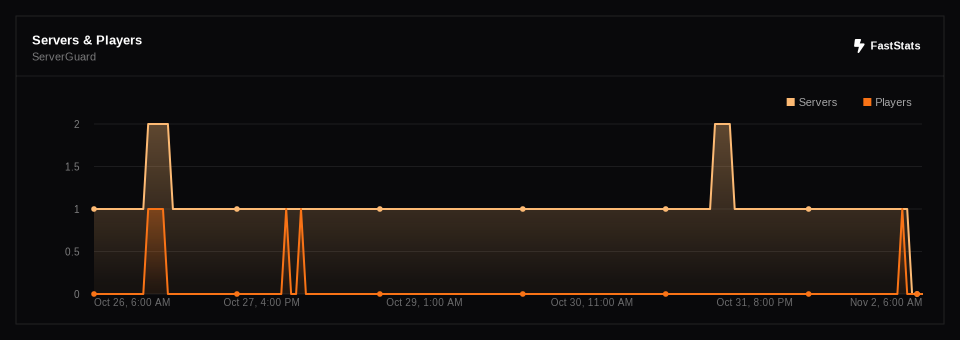
VOMLabs · Advanced Server Solutions
由 ItzzMateo* 和 VOMLabs 团队精心打造。
* 开发与开源声明: ServerGuard 仓库* 和 Modrinth 项目已作为草稿存在并正在积极开发中。然而,该项目目前尚未开源或发布。源代码将在插件完整重新正式发布后才会公开可用。在此之前,仓库的存在并不意味着源代码可供公众使用。
Project Evolution & Rebranding
- Successor: CraftGuard is the official successor to FlameAntiCraft.
- Upcoming Rebrand: CraftGuard will transition to ServerGuard* under the VOMLabs organization. The transition includes a complete rewrite focused on performance and reliability, with Maven support being deprecated in favor of Gradle with Kotlin DSL.
Features
Per-World Protection
Configure independent rules for every world. Tailor interactions to survival worlds, creative plots, lobbies, and minigame instances.
Workstation Control
Manage workstation access individually, including:
anvil, furnace, blast-furnace, smoker, enchanting, brewing, smithing, loom, cartography, grindstone, stonecutter.
Container Security
Restrict interactions with chests, trapped chests, ender chests, copper chests, and shulker boxes.
Portal Management
Enable or disable Nether and End portal transitions independently for each world.
Flexible Storage
Supports multiple storage backends, including YAML, H2, MySQL, MariaDB, PostgreSQL, MongoDB, and Redis.
Interactive Management GUI
Manage settings through the /cg interface, with commands for quick toggles, explicit configuration, imports, exports, and world migration.
Integrations & Localization
Supports PlaceholderAPI for dynamic placeholders, optional WorldGuard region-based bypasses, and multiple languages.
Supported Features
| Category |
Feature Types |
| Core mechanics |
crafting, nether-portal, end-portal, lockdown |
| Workstations |
anvil, furnace, blast-furnace, smoker, enchanting, brewing, smithing, loom, cartography, grindstone, stonecutter |
| Containers |
chest, trapped-chest, ender-chest, copper-chest, shulker-box |
Installation
Requirements
- Server: Paper 1.21.x or compatible forks such as Purpur and Folia
- Java: 21 or higher
- Optional: PlaceholderAPI for dynamic placeholders and WorldGuard for region-based bypasses
[!WARNING]
Version support: CraftGuard does not officially support versions 26.x.x or older at this time. Official support and reliability improvements are planned for the upcoming ServerGuard rebrand and rewrite.
Setup
- Download the latest
craftguard-X.X.X.jar from Modrinth.
- Place the JAR in your server's
plugins/ directory.
- Restart your server to generate the configuration files.
- Configure the plugin in
plugins/CraftGuard/config.yml.
- Open the management interface using
/cg.
Quick Commands
# Disable crafting in the lobby world
/cg lobby crafting off

# Enable Nether portals in the survival world
/cg survival nether-portal on

# Open the management GUI
/cg
Commands & Permissions
Commands
| Command |
Description |
Permission |
/cg |
Open the management GUI |
craftguard.admin |
/cg help |
Display the help menu |
craftguard.admin |
/cg <world> <feature> <on/off> |
Change a feature's state in a world |
craftguard.admin |
/cg reload |
Reload plugin configuration and locales |
craftguard.admin |
/cg export |
Export settings to a backup file |
craftguard.admin |
/cg import |
Import settings from a file |
craftguard.admin |
/cg migrate [copy] |
Copy or move configuration between worlds |
craftguard.admin |
Permissions
| Permission |
Description |
Default |
craftguard.admin |
Full access to CraftGuard commands and GUI |
OP |
craftguard.bypass.* |
Bypass all world restrictions |
false |
craftguard.bypass.<feature> |
Bypass a specific feature restriction |
false |
Configuration
Settings are stored in YAML files under plugins/CraftGuard/.
Example configuration:
settings:
  enabled: true
  language: en-us
  default-state: true

item-blockability:
  enabled: true
  blocked-items:
    CRAFTING:
      - DIAMOND_SWORD
      - NETHERITE_*
PlaceholderAPI Integration
Use PlaceholderAPI placeholders to display live feature states and interaction statistics in scoreboards, tablists, and holograms.
Replace <world> and <feature> with the relevant world name or feature type.
World States
| Placeholder |
Description |
%craftguard_world_state% |
State of the current world (enabled or disabled) |
%craftguard_world_state_<feature>% |
State of a feature in the current world |
%craftguard_world_<world>_<feature>% |
State of a feature in a specific world |
Statistics
| Placeholder |
Description |
%craftguard_stats_global_total% |
Total blocked interactions across the network |
%craftguard_stats_type_<feature>_total% |
Total blocked interactions for a feature type |
%craftguard_stats_world_<world>_total% |
Total blocked interactions in a specific world |
Developer API
Build integrations against CraftGuard using its API.
[!NOTE]
Upcoming changes: The ServerGuard transition will include a complete plugin rewrite, and the API will be redesigned as part of that process. Integrations may need to be updated after the transition.
Maven Setup
<repositories>
    <repository>
        <id>jitpack.io</id>
        <url>https://jitpack.io</url>
    </repository>
</repositories>

<dependencies>
    <dependency>
        <groupId>com.github.itzzjustmateo</groupId>
        <artifactId>CraftGuard</artifactId>
        <version>VERSION</version>
        <scope>provided</scope>
    </dependency>
</dependencies>
Build from Source
Alternatively, clone the repository and build locally.
git clone https://github.com/itzzjustmateo/CraftGuard.git
cd CraftGuard
mvn clean package
API Usage
CraftGuard plugin = CraftGuard.getInstance();
ConfigManager configManager = plugin.getConfigManager();

// Check whether crafting is enabled in the survival world
boolean isCraftingEnabled =
    configManager.isFeatureEnabled("survival", "crafting");

// Disable furnace interactions in the survival world
configManager.setFeatureEnabled("survival", "furnace", false);
Support & Community
CraftGuard AND ServerGuard Embed
VOMLabs · Advanced Server Solutions
Built with care by ItzzMateo* and the VOMLabs team.
* Development & Open-Source Notice: The ServerGuard repository* and Modrinth project already exist as drafts and are actively being developed. However, the project is not currently open-source or released. The source code will become publicly available again only when the complete plugin is officially re-released. Until then, the repository's existence does not imply that the source code is available for public use.


 插件

 插件

 插件
 插件
 插件
 插件
评论 0
登录后参与评分
还没有评论,来抢沙发吧