由于物品描述文本格式的更改,从 Minecraft 1.16 起不再可能隐藏脚本
顾名思义,此插件允许您创建自己的菜单。这些菜单基于容器界面构建,每个槽位包含一个可点击的菜单项。当玩家点击菜单项时,它会以类似命令方块的方式执行该物品描述(即名称下方的文本)中列出的所有命令。您可以在游戏内通过选择任意物品、在铁砧中为其命名、使用命令修改其描述,并使用命令创建和打开用于编辑的菜单来设计菜单,以便将其放置在您希望的容器槽位中。您可以随时修改您的菜单。
感谢 TheMobCave 提供视频教程。请点赞并订阅!
该视频教程展示的是 CreateYourOwnMenus v0.2 版本,因此最新版本拥有更多功能!一项重大更改是 /menu script 命令现在具有子命令。例如 /menu script add [文本],而不是 /menu script [文本]。此外还包括:insert(插入)、delete(删除)、replace(替换)、clear(清除)、show(显示)和 hide(隐藏)。
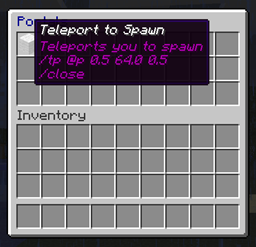
请参阅图库查看截图。
“这看起来太棒了,会让我的角色扮演服务器对玩家来说容易得多,因为他们不需要记住很多命令。” - Ccamm
“这看起来太棒了!我相信我们能在我的新服务器项目中使用它。” - parrothead1337
“很棒的插件。” - Bobbinkin
“这个插件允许做很多事情 :o” - TheNemesisA5
- 使用命令管理所有菜单
- 使用任何游戏内物品作为菜单项
- 使用容器在游戏内编辑菜单
- 使用命令、命令方块或其他菜单打开菜单
- 只需在打开的菜单中点击即可激活任何菜单项
- 或者,手持物品并右键单击以激活菜单项(可用于打开菜单等)
- 使用 /menu script clear 和 /menu script [注释/命令] 命令修改任何物品的描述
- 使用 "plugins/CreateYourOwnMenus/menus" 文件夹中的 .yml 文件添加、移除、修改和共享菜单
- 可选地通过使用 /sudo 命令以玩家身份而非控制台运行命令,例如 /sudo @p kill
- 使用 /menu script show 和 /menu script hide 命令显示或隐藏菜单脚本命令
- 使用 /delay [刻] 菜单脚本命令延迟执行脚本中的命令
- 使用 {花括号} 为命令添加动态参数(会提示点击的玩家输入)
- 如果您安装了 Vault,可以使用 /requirecurrency 检查玩家是否拥有指定数量的货币
- 使用 LanguageAPI 翻译成其他语言
- 这不打算包含一个完整的脚本语言。它只是按顺序执行命令并在失败时中断。对于更复杂的操作、条件和程序流程,您应该使用像 Skript 这样的插件来在菜单项点击时运行脚本。
- 它无法以具有“提升权限”的玩家身份运行命令。目前,在不引入错误、兼容性问题以及每次 Minecraft、CraftBukkit 甚至 Bukkit 更新都需要更新的情况下,Bukkit API 中没有安全的方法可以做到这一点。您可以通过授予权限、执行操作然后撤销它们来解决这个问题,或者调用支持此功能的另一个插件。在找到安全实现方法之前,我不打算添加此功能。
以下是与 CreateYourOwnMenus 配合良好的插件列表。
- 对于 BungeeCord 用户,使用 MicroJump 插件以获得对 BungeeCord /server 命令的支持
- 使用 Skript 插件,在玩家加入或触发其他各种事件时打开菜单,并创建高级脚本,以便在点击菜单项时运行
- 使用 Vault 插件,通过 /requirecurrency 菜单脚本命令提供货币支持
完整的命令和权限列表请参阅 Commands and Permissions 页面。
在游戏内输入 /menu 可获得详细的命令帮助
在我们的 forums 上查找并分享已创建的菜单!
基础脚本指南请参阅 Basic Command Scripting 帖子。
其他教程和指南可在 forum 找到。
菜单脚本始终以控制台身份运行。默认情况下这不是问题,因为只有管理员(operators)才能创建菜单项和修改菜单;但如果你赋予其他玩家这些权限,请注意这也将使他们能够以控制台身份执行任何他们想要的命令。
源代码托管在 GitHub:
Ideas
- 添加国际化支持
- 添加 "cyom.menu.edit.[menu id]" 权限,允许仅编辑特定菜单
- 添加 "cyom.script.allow.all" 权限,允许向菜单脚本添加任意命令,除非被明确禁止(默认仅对 op 生效)
- 添加 "cyom.script.allow.[command name]" 权限,允许向菜单脚本添加特定命令(作为 cyom.script.allow.all 的子权限)
- 添加 /menu script import [file] 和 /menu script export [file],用于快速将菜单项的描述文本导入或导出到简单的文本文件中
- 添加 "cyom.slot.lock.#" 以锁定玩家物品栏中的特定槽位,并将其视为菜单的一部分
- 修改 /menu grab 命令,使物品尽可能放入玩家物品栏中对应的槽位,若该槽位已有物品则将其挤开,否则寻找任意空闲槽位
- 当菜单项被用于攻击或破坏方块时触发相应效果
- 添加 /use 特殊命令,允许将该物品作为普通物品使用(此功能不适用于带有延迟或提示的情况)
- 将菜单组织为文件夹形式,并通过 "folder.menu" 的形式访问
- 采用更易于手动编辑的格式存储菜单项,无需到处使用节符号即可标记隐藏行
- 为非 op 的创造模式玩家提供一种伪创造模式,以便服务器所有者可以在不引入安全风险的情况下赋予非 op 玩家创造能力
- 支持命令的 Tab 自动补全
- 为 {input prompts} 添加转义字符,以便仍可使用数据标签(datatags)
Bugs
- 锁定槽位中的物品在死亡时仍会掉落,而不是保留在原槽位中
- 使用 /consume 命令的物品仅在堆叠数量为 1 时才会被移除
Deprecated Features
- 为了减少特殊的菜单项命令数量,/GiveChest、/TakeChest 和 /CountChest 命令将被移除,并提供更简单、更易理解的 Skript 替代方案
This plugin uses Java 7
如果在安装此插件启动服务器时出现以下错误:“Unsupported major.minor version 51.0”,这意味着你使用的 Java 版本已过时。如果你不知道如何升级,请联系你的服务器托管提供商请求帮助升级到 Java 7,或联系 Oracle 客户支持。Mac OS X 用户需要 JDK 7 而非 JRE 7。
Very wide text boxes on menu items
由于 Minecraft 客户端的一个格式化错误,第一行上的不可见字符可能导致lore文本框宽度增加,即使在同一行有可见文本时它们并不占用空间。可以通过使用 /menu script insert 0 &a 保持第一行为空来缓解这一问题。当显示命令时,可能会导致阅读困难。
Non-op Creative Players spawning menu items without permission
警告: 在 Minecraft 服务器中发现了一个新的安全漏洞。拥有某些修改版客户端的玩家,只要处于创造模式下,就可以为自己创建包含任意自定义描述文本的物品。这不需要管理员权限或任何特殊许可,仅需处于创造模式即可。如果您的服务器上有非管理员的创造模式玩家,请注意:如果他们使用修改版客户端,则有可能无需任何权限即可创建他们想要的任何菜单物品。
您可以通过在 config.yml 中的 "blacklist-commands:"(黑名单命令)部分添加命令来缓解此问题。这将阻止除管理员以外的任何人使用带有这些命令的菜单物品。例如:
blacklist-commands:
  - op
  - stop
  - kick
  - grantperms etc etc
另一种选择是让这些玩家保持在生存模式中,但使用其他插件赋予他们类似创造模式的能力,如无限资源、快速破坏和飞行。
点击菜单物品时出现幽灵物品
如果您在使用此插件时在 1.7.2 版本中遇到幽灵物品问题,这是由于客户端端的 Minecraft 错误导致的()。这仅影响 1.7.2 版本,并在 1.7.4 中得到修复。该错误并不危险,因为它不是真实的物品。任何尝试将该物品移出背包、放置它或填充相同格子的操作都会导致其消失。由于这是一个仅客户端的错误,建议敦促玩家尽快从 1.7.2 升级到 1.7.4。注意:可以使用 Minecraft 1.7.4 客户端在 CB 1.7.2 R0.1 beta 上游玩。
重启后,我的菜单中所有隐藏命令或颜色的位置都出现了乱码字符
这是由某些 CraftBukkit 服务器默认以错误的文本编码读取菜单文件引起的文本编码问题。您可以通过告诉 Java 为 CraftBukkit 默认使用 UTF-8 来解决此问题。
对于 McMyAdmin、MultiCraft 和其他服务器启动器的用户,您的设置中应该有一个指定文本编码的选项,并将其切换为 UTF-8。如果没有,您应该有办法添加可选的命令行参数,并遵循以下针对启动脚本的建议。
如果您使用的是启动脚本,您可能会有类似以下内容:
java -Xmx1024m -jar CraftBukkit.jar
您需要在 java 之后和 -jar 之前的某个位置添加以下选项。例如:
java -Xmx1024m -Dfile.encoding=UTF8 -jar CraftBukkit.jar
更新 CraftBukkit(构建 #3009+)后,我的 Skript 自定义命令不再能从菜单物品触发
CraftBukkit 构建 #3009 (1.7.2-R0.3-SNAPSHOT) 中的更改更新了 Bukkit 插件命令系统,破坏了 Skripts 的自定义命令处理器。这导致 Skript 无法接收由其他插件直接分发的命令。此问题已在 Skript 2.1.1+ 中修复,因此下载最新版本的 Skript 应能解决该问题。
显示 @a 或 @w 而不是玩家名称
如果 @a 或 @w 目标选择器是命令中的最后一个字符,目前它不会被正确替换。这将在下一个开发构建中修复。在此期间,请尝试确保最后一个目标选择器后面有一个非空白字符。
每次我点击背包中的物品,它都会像菜单物品一样被激活
您可能误用了 '*' 权限节点,从而无意中锁定了所有背包槽位。这将授予您所有权限,包括 'cyom.slot.lock.*',该权限用于锁定背包槽位以便将其用作菜单。最好的解决方案是停止使用 '*' 节点,改为只授予您所需的具体额外权限。但是,如果您坚持使用 '*' 节点,则需要授予自己否定权限 '-cyom.slot.lock.*',以防止您的槽位被锁定。
每次重启服务器,我对菜单所做的所有更改都会被撤销
早期版本的 CYOM 存在一个与时间相关的错误,阻止文件保存。要修复此问题,您必须更新到最新的开发构建:
我无法在命令中使用 {NBT 数据标签}
不幸的是,我们已经将 {}(花括号)用作动态参数,这一用法早于它们在 Minecraft 中的使用,因此您不能在菜单命令中使用 NBT 数据标签。不过,您可以通过以下几种方式绕过此限制:
任何需要赋予玩家带有数据标签物品的情况,您可以预先创建并将它们放入菜单中,然后使用 /menu grab 命令将它们交给玩家。由于您可以一次抓取多个物品,并且可以直观地编辑菜单,这使得在服务器上设置物品套件变得相当方便。
你也可以使用像 Skript 这样的自定义脚本插件来设置一个 自定义命令,以便为你 运行这些命令。以这种方式在菜单脚本中使用 Skript 可以通过添加逻辑、变量、持久化和程序流程来实现更高的灵活性;如果你需要帮助,他们的 论坛 上有很多友好的人总是乐意提供帮助。
如果你想为这个项目的持续开发、支持和维护做出贡献,请考虑加入我的 Patreon,并做出一次性或定期承诺。
支持渠道
如果你需要帮助,你可以在下面留言,我会尽快回复你。你也可以通过以下链接加入 Gitter 聊天室,但请先阅读教程。
我很乐意提供支持,但反复回答插件页面上用粗体红色说明过的问题是非常令人厌倦的。请不要懒惰,先阅读再提问。这是礼貌的做法。
Hiding scripts is no longer possible from Minecraft 1.16 due to changes in item lore formatting
As the name suggests, this plugin allows you to create your own menus. The menus are based on inventories, with each slot holding a clickable menu item. When a player clicks on a menu item, it performs all of the commands listed in the item's lore (the text underneath its name) in a similar manner to command blocks. You can design the menu in-game by selecting any item, naming it in an anvil, modifying its lore using a command, and using commands to create and open a menu for editing to place it anywhere in the inventory that you wish. You can modify your menus any time you want.
Thanks to TheMobCave for providing the video tutorial. Please like and subscribe!
The video tutorial was of CreateYourOwnMenus v0.2, so the latest version has even more features! One major change is that the /menu script command now has sub-commands. E.g. /menu script add [text] instead of /menu script [text]. As well as: insert, delete, replace, clear, show and hide.
See the gallery for screenshots.
"This looks amazing and would make my role playing server a lot easier for players so they don't have to remember a lot of commands." - Ccamm
"This looks amazing! I'm sure that we'll be able to use this in my new server project." - parrothead1337
"Awesome plugin." - Bobbinkin
"This plugin allow so much things :o" - TheNemesisA5
- Use commands to manage all of your menus
- Use any in-game item as a menu item
- Edit menus in-game using inventories
- Open menus using commands, command blocks or other menus
- Activate any menu item simply by clicking it in an open menu
- Alternatively, activate menu items by holding in hand and right-clicking (can be used to open menus and more)
- Modify the lore of any item using commands /menu script clear and /menu script [comment/command] commands
- Add, remove, modify and share menus using their .yml files in the "plugins/CreateYourOwnMenus/menus" folder
- Optionally run the command as the player instead of console by using the /sudo command E.g. /sudo @p kill
- Show/hide menu script commands using the /menu script show and /menu script hide commands
- Delay execute of commands in a script using the /delay [ticks] menu script command
- Use {curly braces} to add dynamic arguments to commands (prompts the clicking player)
- If you have Vault installed you can use /requirecurrency to check if a player has a given amount of currency
- Translate into other languages using LanguageAPI
- This is not intended to include a full-fledged scripting language. It simply executes commands in series and is interrupted on failure. For more complex actions, conditions and program flow you should be using a plugin like Skript to run scripts on menu item clicks.
- It cannot run commands as a player with "elevated permissions". There is currently no safe way to do this within the Bukkit API without introducing errors, compatibility issues and/or require updates every build of Minecraft, CraftBukkit or even Bukkit. You can work around this by granting the permissions, performing the actions and then revoking them again, or by calling out to another plugin that supports this. I do not intend to add this feature until there is a safe way to achieve it.
This is a list of plugins that work well with CreateYourOwnMenus.
- Use the MicroJump plugin for BungeeCord /server command support for BungeeCord users
- Use the Skript plugin to open menus on player joining, or various other events, and create advanced scripts that you can run when clicking a menu item
- Use the Vault plugin to provide currency support using the /requirecurrency menu script command
A full list of commands and permissions is available on the Commands and Permissions page.
Detailed command help is available in-game by typing /menu
Find and share pre-created menus on our forums!
A basic scripting guide is available on the Basic Command Scripting thread.
Other tutorials and guides are available on the forum
The menu scripts always run as console. By default, this is not a problem as only operators have the ability to create menu items and modify menus, however if you give other players permissions to do this, be aware that it will also give them the ability to effectively run any command they wish as console.
Sources are available on GitHub:
Ideas
- Add internationalisation support
- Add a "cyom.menu.edit.[menu id]" permission to allow editing of a specific menu only
- Add "cyom.script.allow.all" permission to allow adding any command to a menu script, except those specifically denied (Default op)
- Add "cyom.script.allow.[command name]" permission to allow adding specific commands to menu scripts (child of cyom.script.allow.all)
- Add /menu script import [file] and /menu script export [file] for quickly importing or exporting the lore of a menu item to a simple text file
- Add "cyom.slot.lock.#" to lock specific inventory slots in a player's inventory and treat it as a menu
- Modify /menu grab command to place items into the same slots in a player's inventory where applicable, displacing other items, and otherwise finding any free slot
- Trigger a menu item when it is used to attack or break blocks with
- Add /use special command to allow the item to be used as a normal item (this cannot be used after a delay or prompt)
- Organise menus into folders, and accessed in the form "folder.menu"
- Store menu items in a format that is easier to edit manually, marking lines as hidden without the section symbols all over it
- Provide a faux creative mode for non-op creative players so that server owners can grant creative abilities to non-op players without introducing security risks
- Command support for tab-autocompletion
- Add escape character for {input prompts} so you can still use datatags
Bugs
- Items in locked slots are still dropped on death instead of remaining in their slots
- Items with the /consume command will only be removed if the stack size is 1
Deprecated Features
- To reduce the number of special menu item commands, the /GiveChest, /TakeChest and /CountChest commands will be removed and less complex and easier to understand Skript alternatives will be provided in their place
This plugin uses Java 7
If you get the followed error on starting up the server with this plugin installed "Unsupported major.minor version 51.0". This means you are using an out of date version of Java. If you don't know how to upgrade, please contact your server hosting provider and ask them for help in upgrading to Java 7, or contact Oracle customer support. Mac OS X users require JDK 7 instead of JRE 7.
Very wide text boxes on menu items
Due to a Minecraft client formatting error, the invisible characters on the first line can cause the lore text box width to be increased despite taking up no space when there is visible text on the same line. This can be mitigated when hidden by keeping the first line empty using /menu script insert 0 &a. When commands are shown, it may become difficult to read them.
Non-op Creative Players spawning menu items without permission
Warning: A new security loop-hole has been discovered in the Minecraft server. It is possible for players with certain modified clients to create items for themselves that contain any lore that they want so long as they are in Creative Mode. This does not require operator status or permissions, only Creative Mode. If you have Non-operator creative players on your server be advised that if they use a modified client, it is possible for them to create any menu item that they want without needing permissions.
You can alleviate this somewhat by adding commands to the "blacklist-commands:" section in the config.yml. This will stop anyone but operators from using menu items with those commands on them. E.g.
blacklist-commands:
  - op
  - stop
  - kick
  - grantperms etc etc
Another option is to keep those players in Survival mode, but use other plugins to give them creative-like powers such as infinite resources, fast breaking and flight.
Ghost items appearing on clicking a menu item
If you are experiencing ghost items in 1.7.2 using this plugin, it is due to the client-side Minecraft bug (). This only affects 1.7.2 and is fixed in 1.7.4. The bug is not dangerous as it is not a real item. Any attempts to move the item out of the inventory, place it, or fill the same slot will result in it disappearing. Since this is a client-side only bug, it is recommended that players be urged to update from 1.7.2 to 1.7.4 as soon as possible. Note: it is possible to play on CB 1.7.2 R0.1 beta using a Minecraft 1.7.4 client.
After restart, my menus all have weird characters wherever there were hidden commands or colours
This is a text-encoding issue caused by the some CraftBukkit servers attempting to read menu files in the wrong text encoding by default. You can fix this by telling Java to use UTF-8 by default for CraftBukkit.
For users of McMyAdmin, MultiCraft and other server launchers, there should be an option to specify text-encoding in your settings and switch to UTF-8. If not, you should have a way to add optional command line arguments, and follow the advice below for a startup script.
If you are using a startup script you will have something along the lines of:
java -Xmx1024m -jar CraftBukkit.jar
You need to add the following option somewhere after java and before -jar. E.g.
java -Xmx1024m -Dfile.encoding=UTF8 -jar CraftBukkit.jar
After updating CraftBukkit (build #3009+), my Skript custom commands aren't working from menu items
Changes in CraftBukkit build #3009 (1.7.2-R0.3-SNAPSHOT) have updated the Bukkit plugin command system that broke Skripts custom command handler. This prevented Skript from receiving commands that had been directly dispatched by other plugins. This issue was fixed in Skript 2.1.1+, so downloading the latest version of Skript should correct the problem.
It says @a or @w instead of the player's name
If a @a or @w target selector is the last character in a command, it is not currently replaced correctly. This will be fixed in the next dev build. In the meantime, attempt to ensure there is a non-whitespace character after the last target selector.
Every time I click an item in my inventory it activates it like it was a menu item
You may have inadvertently locked all of your inventory slots by misuse of the '*' permission node. This will grant you all permissions, including 'cyom.slot.lock.*' which is used for locking inventory slots so that they can be used as menus. The best solution for this is to stop using the '*' node and instead only grant yourself the specific extra permissions that you need. However if you insist on using the '*' node you will need to grant yourself the negative permission '-cyom.slot.lock.*' in order to prevent your slots from getting locked.
Every time I restart my server, all changes I made to my menus are undone
There is a time-related bug with previous builds of CYOM that prevent file saving. To fix this you must update to the latest dev build:
I can't use {NBT data tags} in my commands
Unfortunately, we already have a use for the {curly braces} as dynamic arguments that predate their use in Minecraft, so you can't use NBT data tags in your menu commands. However, you can get around this in a couple of ways:
Any items that you need to be given to a player with data tags can be pre-created and placed in a menu, then you can use the /menu grab command to give them to the player. Since you can grab multiple items at once, and edit the menu visually, it makes for a rather convenient way of setting up item kits on a server.
You can also use a custom scripting plugin like Skript to set up a custom command to run the commands for you. Using Skript in this way allows a great deal more flexibility for your menu scripts by adding logic, variables, persistence and program flow, and if you need help with them they have a lot of friendly people on their forums who are always happy to help.
If you'd like to contribute towards the continued development, support and maintenance of this project, please consider joining me on Patreon, and making a one-time or recurring pledge.
Support Channel
If you need help you can leave a comment below and I will get back to you as soon as I can. You can also join the Gitter chatroom using the following link, but please read the tutorial first.
I am happy to give support, but repeatedly answering the same question that is explained in bold red on the plugin page is highly tedious. Don't be lazy, read first, then ask questions. It's the polite thing to do

 插件
 插件
 插件
 插件

 插件
 插件
评论 0
登录后参与评分
还没有评论,来抢沙发吧