创造力
Creativity 是一款独特的 Paper 插件,它为玩家提供了一种创意风格的建造模式,而无需授予完整的创造模式权限。它专为希望让受信任的玩家自由建造,同时保持游戏平衡的生存服务器设计。
与普通创造模式不同,Creativity 包含可配置的限制,以防止滥用行为,同时允许玩家飞行并访问建筑方块。
功能
- 将创造力模式与原版创造模式分离。
- 独立的背包系统,与生存模式分开。
- 允许访问建筑方块,而不提供无限制的创造模式权限。
- 阻止获取武器、工具、盔甲、矿石、附魔书和其他受限物品。
- 在创造力模式下启用飞行。
- 当玩家处于战斗状态时,自动禁用飞行。
- 玩家仍会受到伤害,并非无敌状态。
- 防止丢弃通过创造力模式获得的物品。
- 阻止访问容器(如箱子)。
- 支持权限控制,只有授权玩家才能使用创造力模式。
- 可配置的设置,允许自定义服务器的限制。
为什么使用 Creativity?
对于生存服务器来说,创造模式往往过于强大。玩家可以生成任何物品、变得无敌,并绕过许多游戏机制。
Creativity 提供了一种更安全的替代方案,允许受信任的建造者进行项目构建,同时防止常见的滥用行为。它非常适合生存社区、SMP 以及希望在鼓励创意的同时保护其经济系统的服务器。
兼容性
安装
- 停止你的服务器。
- 将插件 JAR 文件放入
plugins 文件夹中。
- 启动服务器。
- 根据需要编辑配置文件以自定义插件。
- 重启或重新加载服务器以应用任何配置更改。
权限
可以使用权限来控制哪些玩家被允许进入创造力模式。
命令
有关可用命令和配置选项,请参阅插件文档。
计划中的功能
- 更多的可配置物品限制。
- 按世界设置。
- 额外的权限节点。
- 为服务器所有者提供更多自定义选项。
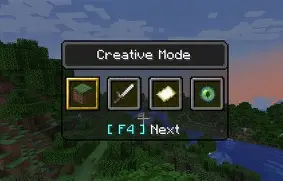
Creativity
Creativity is a unique Paper plugin that gives players a creative-style building mode without granting full Creative Mode. It is designed for survival servers that want to let trusted players build freely while still keeping gameplay balanced.
Unlike normal Creative Mode, Creativity includes configurable restrictions to prevent abuse while allowing players to fly and access building blocks.
Features
- Separate Creativity mode from vanilla Creative Mode.
- Independent inventory that is separate from Survival.
- Access to building blocks without giving unrestricted Creative Mode.
- Prevents access to weapons, tools, armor, ores, enchanted books, and other restricted items.
- Flight is enabled while in Creativity mode.
- Automatically disables flight while the player is in combat.
- Players still take damage and are not invincible.
- Prevents dropping items obtained through Creativity.
- Blocks access to containers such as chests.
- Supports permissions so only authorized players can use Creativity.
- Configurable settings to customize restrictions for your server.
Why use Creativity?
Creative Mode is often too powerful for survival servers. Players can spawn any item, become invincible, and bypass many gameplay mechanics.
Creativity provides a safer alternative by allowing trusted builders to construct projects while preventing common forms of abuse. It is ideal for survival communities, SMPs, and servers that want to protect their economy while still encouraging creativity.
Compatibility
Installation
- Stop your server.
- Place the plugin JAR into your
plugins folder.
- Start the server.
- Edit the configuration file to customize the plugin if desired.
- Restart or reload the server to apply any configuration changes.
Permissions
Permissions can be used to control which players are allowed to enter Creativity mode.
Commands
See the plugin documentation for available commands and configuration options.
Planned Features
- More configurable item restrictions.
- Per-world settings.
- Additional permission nodes.
- More customization options for server owners.
评论 0
登录后参与评分
还没有评论,来抢沙发吧