
如何安装插件
前置要求
- Java 21
- Paper 1.21.4 或更新的兼容 Paper 版本
- Folia 1.21.4 或更新的兼容 Folia 版本
- 如果你使用自定义物品、方块、家具、模型或字形,则需要一个受支持的资源包提供者
不支持 Spigot。Purpur 可能可用,但它不在认证的测试矩阵中。
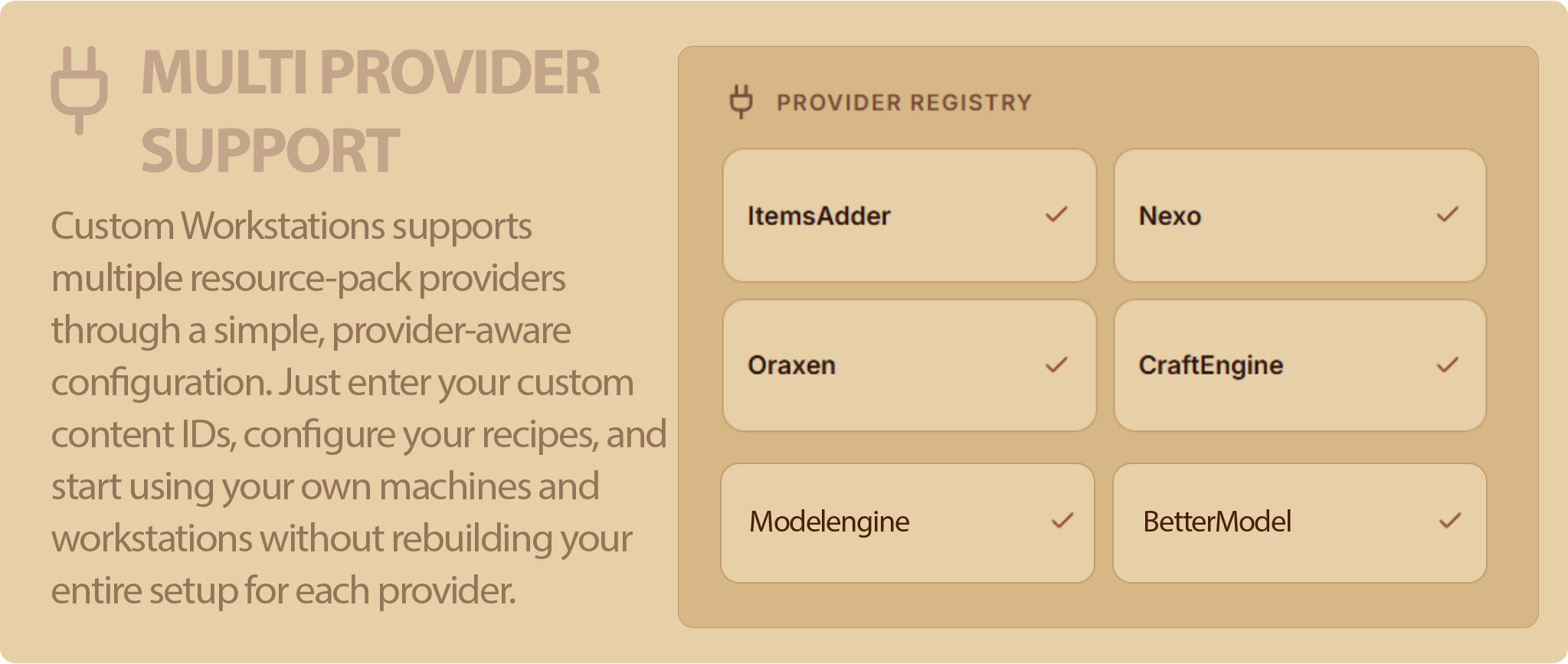
受支持的提供者包括 ItemsAdder、Nexo、Oraxen、CraftEngine 和 ModelEngine。ModelEngine 用于实体触发器,并不通过 pack-provider 进行选择。
安装步骤
- 停止服务器。
- 将
CustomWorkstations-<version>.jar 放入服务器的 plugins/ 文件夹中。
- 如果尚未安装,请安装你的服务器所使用的资源包提供者。
- 启动服务器一次,然后再次停止。
- 打开
plugins/CustomWorkstations/provider-packs/。
- 将与你的提供者匹配的文件夹复制到该提供者的文件夹中。
- 启动服务器并重新加载或重建提供者的资源包。
- 对于使用单个提供者的常规设置,请保持
pack-provider: auto。
- 运行
/cw reload。
- 获取包含的工作站:
/cw give YourPlayer wood_workbench
- 放置工作站并右键点击它以测试安装。
请勿使用 Bukkit 的 /reload。更改提供者插件后请重启服务器。对于 CustomWorkstations 配置更改,请使用 /cw reload。
有关特定提供者的资源包安装,请参阅完整安装指南。
配置预览
# 当捆绑的配置格式更改时递增。
config-version: 2
installation:
# 内部安装状态。请勿更改此项。
default-content-installed: true
provider-pack-version: '1'
# 未带前缀的自定义内容 ID 使用的资源包提供者。
# 仅当启用零个或一个受支持的资源包提供者时才接受 Auto。
# ModelEngine 仅用于触发器,在此处不予考虑。
pack-provider: auto
# 当为 true 时,任何无效机器或配方文件都会拒绝启动或重载。
# 失败的重载后,上一个有效的定义集仍将处于活动状态。
fail-on-invalid-definition: true
# 将提供者生命周期和定义刷新详细信息写入服务器日志。
debug: false
# 从 plugins/CustomWorkstations/lang/<language>.yml 加载的语言文件。
language: en_US
menu:
# 防止同一玩家、工作站和确切锚点重复打开。
# 这会过滤重复的主手/副手提供者事件。
open-cooldown-millis: 250
# 制作时距离方块、家具或实体锚点的最大距离。
# 便携式物品触发器由其原始快捷栏槽位保护。
max-use-distance: 8.0
tag-preview:
# 目录物品标签预览中两个材质图标之间的时间间隔。
# Minecraft 每秒运行 20 刻:30 刻 = 1.5 秒。
# 为了保护服务器/客户端流量,接受的最小值为 10 刻。
interval-ticks: 30
命令
主命令是 /workstation。/cw、/workstations 和 /customworkstation 是别名。
| 命令 |
玩家 |
控制台 |
权限 |
/cw wiki |
是 |
是 |
customworkstations.admin |
/cw help |
是 |
是 |
customworkstations.admin |
/cw reload |
是 |
是 |
customworkstations.command.reload |
/cw inspect |
是 |
否 |
customworkstations.command.inspect |
/cw give <player> <machine> [silent] |
是 |
是 |
customworkstations.command.give |
/cw open <machine> |
是 |
否 |
customworkstations.command.open |
/cw open <player> <machine> |
是 |
是 |
customworkstations.command.open |
/cw items category create <category> |
是 |
是 |
customworkstations.command.items |
/cw items category delete <category> |
是 |
否 |
customworkstations.command.items |
/cw items import <id> <category> |
是 |
否 |
customworkstations.command.items |
/cw items update <imported-id> |
是 |
否 |
customworkstations.command.items |
/cw items delete <imported-id> |
是 |
是 |
customworkstations.command.items |
权限
命令权限
| 权限 |
默认值 |
用途 |
customworkstations.admin |
操作员 |
访问帮助、绕过内容限制并使用管理命令 |
customworkstations.command.reload |
操作员 |
重载定义和语言文件 |
customworkstations.command.inspect |
操作员 |
识别手持的提供者物品 |
customworkstations.command.give |
操作员 |
给予工作站物品 |
customworkstations.command.open |
操作员 |
直接打开工作站 |
customworkstations.command.items |
操作员 |
管理导入的物品类别和快照 |
工作站与配方权限
每个加载的工作站都会获得:
customworkstations.machine.use.<machine-id>
配方的可见性和制作使用单独的权限:
customworkstations.recipe.view.<machine-id>.<recipe-id>.<output-id>
customworkstations.recipe.craft.<machine-id>.<recipe-id>.<output-id>
将 view 设置为 false 以隐藏结果。将 craft 设置为 false 以保持其可见但禁止制作。
搜索权限
每个可搜索的工作站视图都会获得:
customworkstations.search.use.<machine-id>.workstation
customworkstations.search.use.<machine-id>.catalog
customworkstations.search.use.<machine-id>.details
父级权限
| 权限 |
作用范围 |
customworkstations.machine.use |
所有工作站 |
customworkstations.recipe.view |
所有配方菜单项 |
customworkstations.recipe.craft |
所有合成事务 |
customworkstations.search.use |
所有搜索视图 |
customworkstations.* |
所有 CustomWorkstations 权限 |
添加或移除工作站或配方后,请运行 /cw reload,以确保生成的权限与实际配置保持一致。

How to install the plugin
Requirements
- Java 21
- Paper 1.21.4 or a newer compatible Paper build
- Folia 1.21.4 or a newer compatible Folia build
- A supported resource-pack provider if you use custom items, blocks, furniture, models, or glyphs
Spigot is not supported. Purpur may work, but it is not part of the certified test matrix.
Supported providers include ItemsAdder, Nexo, Oraxen, CraftEngine, and ModelEngine. ModelEngine is used for entity triggers and is not selected through pack-provider.

Installation steps
- Stop the server.
- Put
CustomWorkstations-<version>.jar in the server's plugins/ folder.
- Install the resource-pack provider used by your server, if needed.
- Start the server once, then stop it again.
- Open
plugins/CustomWorkstations/provider-packs/.
- Copy the folder matching your provider into that provider's folder.
- Start the server and reload or rebuild the provider's resource pack.
- Keep
pack-provider: auto for a normal setup using one provider.
- Run
/cw reload.
- Give yourself the included workstation:
/cw give YourPlayer wood_workbench
- Place the workstation and right-click it to test the installation.
Do not use Bukkit's /reload. Restart the server after changing a provider plugin. Use /cw reload for CustomWorkstations configuration changes.
For provider-specific pack installation, see the full installation guide.
Configuration preview
# Incremented when the bundled configuration format changes.
config-version: 2
installation:
# Internal installation state. Don't change this.
default-content-installed: true
provider-pack-version: '1'
# Pack provider used by unprefixed custom content IDs.
# Auto is accepted only when zero or one supported pack provider is enabled.
# ModelEngine is trigger-only and is never considered here.
pack-provider: auto
# When true, any invalid machine or recipe file rejects startup or reload.
# The previous valid definition set remains active after a failed reload.
fail-on-invalid-definition: true
# Write provider lifecycle and definition refresh details to the server log.
debug: false
# Language file loaded from plugins/CustomWorkstations/lang/<language>.yml.
language: en_US
menu:
# Debounce repeated opens for the same player, workstation and exact anchor.
# This filters duplicate main-hand/off-hand provider events.
open-cooldown-millis: 250
# Maximum distance from a block, furniture or entity anchor while crafting.
# Portable item triggers are guarded by their original hotbar slot instead.
max-use-distance: 8.0
tag-preview:
# Time between two material icons in a catalog item-tag preview.
# Minecraft runs at 20 ticks per second: 30 ticks = 1.5 seconds.
# The minimum accepted value is 10 ticks to protect server/client traffic.
interval-ticks: 30
Commands
The main command is /workstation. /cw, /workstations, and /customworkstation are aliases.
| Command |
Player |
Console |
Permission |
/cw wiki |
Yes |
Yes |
customworkstations.admin |
/cw help |
Yes |
Yes |
customworkstations.admin |
/cw reload |
Yes |
Yes |
customworkstations.command.reload |
/cw inspect |
Yes |
No |
customworkstations.command.inspect |
/cw give <player> <machine> [silent] |
Yes |
Yes |
customworkstations.command.give |
/cw open <machine> |
Yes |
No |
customworkstations.command.open |
/cw open <player> <machine> |
Yes |
Yes |
customworkstations.command.open |
/cw items category create <category> |
Yes |
Yes |
customworkstations.command.items |
/cw items category delete <category> |
Yes |
No |
customworkstations.command.items |
/cw items import <id> <category> |
Yes |
No |
customworkstations.command.items |
/cw items update <imported-id> |
Yes |
No |
customworkstations.command.items |
/cw items delete <imported-id> |
Yes |
Yes |
customworkstations.command.items |
Permissions
Command permissions
| Permission |
Default |
Purpose |
customworkstations.admin |
Operator |
Access help, bypass content restrictions, and use administrative commands |
customworkstations.command.reload |
Operator |
Reload definitions and language files |
customworkstations.command.inspect |
Operator |
Identify the held provider item |
customworkstations.command.give |
Operator |
Give a workstation item |
customworkstations.command.open |
Operator |
Open a workstation directly |
customworkstations.command.items |
Operator |
Manage imported item categories and snapshots |
Workstation and recipe permissions
Every loaded workstation receives:
customworkstations.machine.use.<machine-id>
Recipe visibility and crafting use separate permissions:
customworkstations.recipe.view.<machine-id>.<recipe-id>.<output-id>
customworkstations.recipe.craft.<machine-id>.<recipe-id>.<output-id>
Set view to false to hide a result. Set craft to false to keep it visible but prevent crafting.
Search permissions
Each searchable workstation view receives:
customworkstations.search.use.<machine-id>.workstation
customworkstations.search.use.<machine-id>.catalog
customworkstations.search.use.<machine-id>.details
Parent permissions
| Permission |
Scope |
customworkstations.machine.use |
Every workstation |
customworkstations.recipe.view |
Every recipe menu entry |
customworkstations.recipe.craft |
Every crafting transaction |
customworkstations.search.use |
Every search view |
customworkstations.* |
All CustomWorkstations permissions |
After adding or removing workstations or recipes, run /cw reload so the generated permissions match the active configuration.
评论 0
登录后参与评分
还没有评论,来抢沙发吧