
DialogWindow
将任意指令转化为整洁的游戏内 GUI —— 无需编写代码。
DialogWindow 允许服务器管理员使用简单的 YAML 文件为 Minecraft 构建完全自定义的对话框菜单。该插件基于 Minecraft 原生的 Dialog API(1.21.6+)构建,为原本仅在聊天栏显示文本的指令提供了真正的图形界面:按钮、复选框、下拉菜单、滑块、文本输入框以及自定义物品展示。
非常适合用于传送菜单、规则接受屏幕、商店确认、设置面板、权限等级选择、PvP 开关或任何值得拥有比一墙聊天文字更优雅界面的管理工具。
功能特性
- 在 YAML 中定义整个 GUI —— 无需进行插件开发
- 添加标签、按钮、复选框、选择菜单、滑块和文本输入框
- 展示带有名称、描述、头颅纹理、发光效果等的自定义物品
- 根据用户的选择触发控制台命令和玩家命令
- 支持在任何地方插入 PlaceholderAPI 占位符 —— 标题、标签、物品描述、命令等
- 通过子文件夹组织数十个菜单,井井有条
- 兼容 Paper 和 Spigot
示例
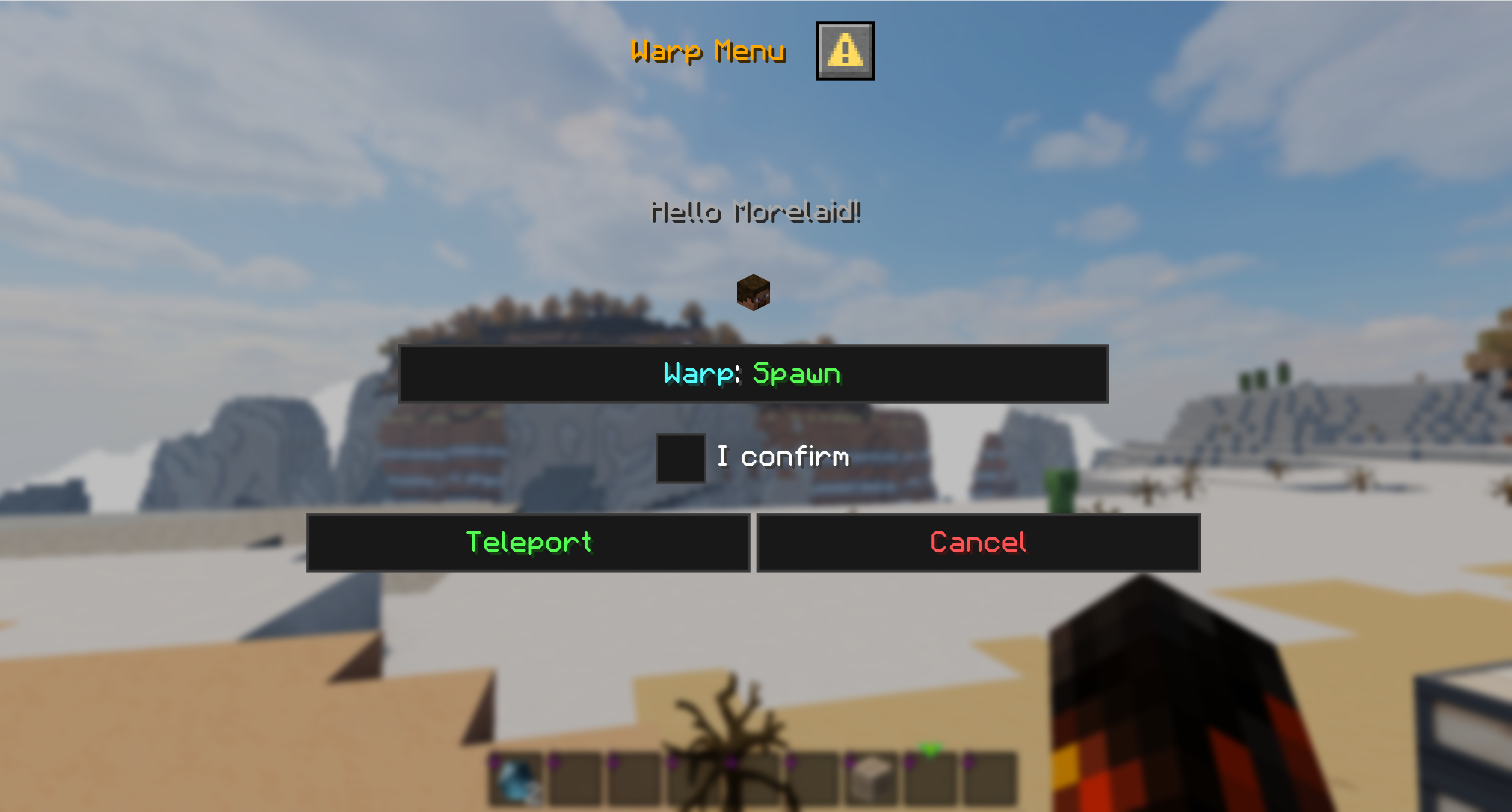


前置要求
- Minecraft 1.21.6 或更高版本
- Java 17 或更高版本
- PlaceholderAPI(可选,但推荐安装)
由于该插件依赖 Minecraft 内置的 Dialog API,因此不支持旧版本。
快速开始
- 将 jar 文件放入
plugins文件夹 - 重启服务器
- DialogWindow 会生成
config.yml、messages.yml以及包含可用示例的interfaces/文件夹 - 编辑或添加您自己的接口文件
- 运行
/dwreload—— 完成,无需重启服务器
指令
| 指令 | 功能 | 权限节点 |
|---|---|---|
/dw reload |
动态重载配置、消息和所有接口 | dialogwindow.reload |
/dw open |
手动打开一个已配置的对话接口 | dialogwindow.open |
/dw close |
关闭当前打开的对话框 | dialogwindow.close |
/dw icons [filter] |
显示图标列表(并非全部受支持) | dialogwindow.icons |
/dw report |
生成诊断报告以用于技术支持请求 | dialogwindow.report |
手动打开与关闭
除了从您的接口文件中生成的自定义指令外,DialogWindow 还包含了 /dw open 和 /dw close。
当您希望在不运行其注册命令的情况下直接打开某个接口时,请使用 /dw open。这对于命令方块、NPC、其他插件、加入动作、管理工具或脚本化的服务器流程非常有用。
使用 /dw close 可以再次关闭活跃的对话框。这在切换菜单、清理脚本化流程或为管理员提供直接关闭玩家当前对话框的方式时非常有用。
快捷菜单与 ESC 菜单
DialogWindow 可以选择通过 Minecraft 的快捷菜单(Quick Menu)和 ESC 菜单(ESC Menu)暴露已配置的接口。
这使得重要的服务器菜单无需玩家记住指令即可访问。可用于枢纽导航、规则、设置、玩家资料、支持菜单、传送菜单或其他应始终易于访问的接口。
快捷菜单和 ESC 菜单条目是可选的,因此您可以决定哪些接口应出现在其中,而哪些接口仅保留为指令调用。
接口样式示例
interfaces/ 中的每个 YAML 文件定义一个指令及其对应的对话框。一个简单的传送菜单如下所示:
command:
  name: "warpui"
  description: "Warp selection menu"
  permission: "dialogwindow.warpui"

dialog:
  title: "<gold>Warp Menu</gold>"
  can-close-with-escape: false

ui:
  - label: "<yellow>Select your destination:</yellow>"

  - item:
      type: item
      material: PLAYER_HEAD
      name: "<gold>%playername%</gold>"
      skull-owner: "%playername%"
      glow: true

  - input:
      type: checkbox
      key: confirm
      label: "<green>Confirm teleport</green>"

  - buttons:
      - label: "<green>Teleport</green>"
        console-commands:
          - "warp ${destination}"
元素按从上到下的顺序渲染,与列出的顺序完全一致:标签、物品、输入框、按钮 —— 可以自由混合搭配。
可用的输入类型
- text – 自由文本输入框
- checkbox – 带自定义返回值的开/关切换
- single_option – 选择菜单 / 下拉菜单
- number_range – 带最小值/最大值/步长的滑块
物品展示(仅限 Paper)
材质、数量、名称、描述、头颅所有者、发光效果、自定义模型数据、附魔、物品标志、不可破坏性 —— 均可配置,且均支持占位符。
占位符
内置:%playername%、%uuid%、%world%
此外,如果在标题、标签、物品名称/描述、输入默认值、按钮命令和悬停文本中安装了 PlaceholderAPI,则完全支持 PAPI 的所有功能 —— 只要安装了 PAPI,它就能正常工作。
使用场景
传送菜单 · 商店确认 · 规则接受对话框 · PvP 开关 · 权限等级选择 · 设置面板 · 指令配置 UI · 管理工具
Web 编辑器
以可视化方式构建您的 YAML,而非手动编写:morelaid.com/dwe
支持
Discord:
在联系我们之前,请先运行 /dwreport 并将结果一并带来 —— 这将大大加快故障排除的速度。欢迎使用德语或英语提问。
DialogWindow
Turn any command into a clean in-game GUI — no code required.
DialogWindow lets server admins build fully custom dialog menus for Minecraft using simple YAML files. Built on top of Minecraft's native Dialog API (1.21.6+), it gives commands that normally just print text in chat a proper graphical interface instead: buttons, checkboxes, dropdowns, sliders, text fields, and custom item displays.
Perfect for warp menus, rule acceptance screens, shop confirmations, settings panels, rank pickers, PvP toggles, or any admin tool that deserves more than a wall of chat text.
What it does
- Define entire GUIs in YAML — no plugin development needed
- Add labels, buttons, checkboxes, select menus, sliders, and text inputs
- Show custom items with names, lore, skull textures, glow effects, and more
- Trigger console and player commands based on what the user picks
- Plug in PlaceholderAPI placeholders anywhere — titles, labels, item lore, commands
- Organize dozens of menus in subfolders without losing track of anything
- Works on both Paper and Spigot
Examples
Requirements
- Minecraft 1.21.6 or newer
- Java 17+
- PlaceholderAPI (optional, but recommended)
Older versions aren't supported since the plugin relies on Minecraft's built-in Dialog API.
Getting started
- Drop the jar into your
pluginsfolder - Restart the server
- DialogWindow generates
config.yml,messages.yml, and aninterfaces/folder with working examples - Edit or add your own interface files
- Run
/dwreload— done, no restart needed
Commands
| Command | What it does | Permission |
|---|---|---|
/dw reload |
Reloads config, messages, and all interfaces on the fly | dialogwindow.reload |
/dw open |
Opens a configured dialog interface manually | dialogwindow.open |
/dw close |
Closes the currently open dialog | dialogwindow.close |
/dw icons [filter] |
Show a list of icons (not all supported) | dialogwindow.icons |
/dw report |
Generates a diagnostic report for support requests | dialogwindow.report |
Manual opening and closing
Besides the custom commands generated from your interface files, DialogWindow also includes /dw open and /dw close.
Use /dw open when you want to open an interface directly without running its registered command. This is useful for command blocks, NPCs, other plugins, join actions, admin tools, or scripted server flows.
Use /dw close to close an active dialog again. This is useful when switching between menus, cleaning up scripted flows, or giving admins a direct way to close a player's current dialog.
Quick Menu and ESC Menu
DialogWindow can optionally expose configured interfaces through Minecraft's Quick Menu and ESC Menu.
This makes important server menus available without players having to remember commands. Use it for hub navigation, rules, settings, player profiles, support menus, warp menus, or other interfaces that should always be easy to reach.
Quick Menu and ESC Menu entries are optional, so you can decide which interfaces should appear there and which ones should stay command-only.
How an interface looks
Each YAML file in interfaces/ defines one command and its dialog. A minimal warp menu:
command:
  name: "warpui"
  description: "Warp selection menu"
  permission: "dialogwindow.warpui"

dialog:
  title: "<gold>Warp Menu</gold>"
  can-close-with-escape: false

ui:
  - label: "<yellow>Select your destination:</yellow>"

  - item:
      type: item
      material: PLAYER_HEAD
      name: "<gold>%playername%</gold>"
      skull-owner: "%playername%"
      glow: true

  - input:
      type: checkbox
      key: confirm
      label: "<green>Confirm teleport</green>"

  - buttons:
      - label: "<green>Teleport</green>"
        console-commands:
          - "warp ${destination}"
Elements render top to bottom, exactly as listed: labels, items, inputs, buttons — mix and match freely.
Inputs you can use
- text – free text field
- checkbox – on/off toggle with custom return values
- single_option – select menu / dropdown
- number_range – slider with min/max/step
Item display (Paper only)
Material, amount, name, lore, skull owner, glow, custom model data, enchantments, item flags, unbreakable — all configurable, all support placeholders.
Placeholders
Built-in: %playername%, %uuid%, %world%
Plus full PlaceholderAPI support in titles, labels, item names/lore, input defaults, button commands, and hover text — if PAPI is installed, it just works.
Use cases
Warp menus · shop confirmations · rule acceptance dialogs · PvP toggles · rank selection · settings panels · command configuration UIs · admin tools
Web Editor
Build your YAML visually instead of by hand: morelaid.com/dwe
Support
Discord:
Before reaching out, please run /dwreport and bring the result with you — it speeds up troubleshooting a lot. Questions are welcome in German or English.

下载 DialogWindow
需要联机服务器吗?
稳定流畅、一键部署,几分钟即可和朋友联机开服
最低仅需 8 元/月 即可畅快联机
下载 DialogWindow
需要联机服务器吗?
稳定流畅、一键部署,几分钟即可和朋友联机开服
最低仅需 8 元/月 即可畅快联机
下载 DialogWindow
需要联机服务器吗?
稳定流畅、一键部署,几分钟即可和朋友联机开服
最低仅需 8 元/月 即可畅快联机
下载 DialogWindow
需要联机服务器吗?
稳定流畅、一键部署,几分钟即可和朋友联机开服
最低仅需 8 元/月 即可畅快联机
下载 DialogWindow
需要联机服务器吗?
稳定流畅、一键部署,几分钟即可和朋友联机开服
最低仅需 8 元/月 即可畅快联机
下载 DialogWindow
需要联机服务器吗?
稳定流畅、一键部署,几分钟即可和朋友联机开服
最低仅需 8 元/月 即可畅快联机
下载 DialogWindow
需要联机服务器吗?
稳定流畅、一键部署,几分钟即可和朋友联机开服
最低仅需 8 元/月 即可畅快联机
下载 DialogWindow
需要联机服务器吗?
稳定流畅、一键部署,几分钟即可和朋友联机开服
最低仅需 8 元/月 即可畅快联机
下载 DialogWindow
下载 DialogWindow
- 命令结构:将主命令重构为子命令。 用法:/dw [open|close|icons|reload|report|help]
- Floodgate 支持:添加了可选的 Floodgate 支持(由于技术限制,功能有限)
- 列支持:为所有部分添加了列支持
关于这个资源的讨论、问题反馈与使用心得
还没有讨论,来发第一帖吧
你是这个资源的作者?登录后可认领此资源。
相似资源
 插件

PacketEvents 是一款专为 Minecraft Java 版打造的协议库,旨在简化数据包的处理与传输。
 插件
ExyliaPlugins 的库。
 插件
通过对话框或铁砧界面帮助你的 Anthme
 插件
重新定义服务器上的生物运输方式。使用高度可定制的口袋道具,安全地捕获、存储和释放任何实体。
 插件
为基于 Spigot/Paper/Folia 的服务器添加对 Vivecraft 的支持
 插件
用于绘制游戏内地图或在浏览器中随探索实时进行地图绘制的实时地图。
评论 0
登录后参与评分
还没有评论,来抢沙发吧