? DiscordSupport v2.0
最完整且专业的 Discord/Minecraft 支持系统
通过互动式 Discord 工单、私有频道和即时双向通信,提升你的服务器支持体验!
✨ 主要功能
? 两种工单模式
? 公共工单
- 所有工单集中在一个 Discord 频道中
- 适合小型服务器
- 配置极其简单
? 私有工单 ⭐ 新增!
- 每个工单拥有专用的 Discord 频道
- 仅工作人员可见(基于角色权限)
- 关闭后自动删除
- 私密且安全的沟通方式
? 双向通信
Discord → Minecraft
- 工作人员在 Discord 中的消息直接发送给游戏内的玩家
- “发送消息”按钮,带有集成弹窗
- 支持长消息(500 个字符)
Minecraft → Discord
- 使用
/commandsend <message> 从游戏中回复
- 仅在存在活跃工单时有效
- 格式化并带时间戳的消息
? 互动按钮
点击即可立即执行操作:
- ? TP Spawn - 传送玩家到出生点
- ?️ Clear Inventory - 清空物品栏
- ❤️ Heal - 恢复生命值和饥饿值
- ? Give Food - 立即给予 64 个牛排
- ? Moderator Arriving - 通知玩家工作人员正在赶来
- ? Ban Player - 带确认和理由的封禁
- ? Send Message - 自定义消息弹窗
- ? Close Ticket - 归档/删除工单
所有操作均为临时显示:只有点击者能看到确认信息!
? 多语言支持
- ?? English (complete version)
? 截图
Private Discord Ticket
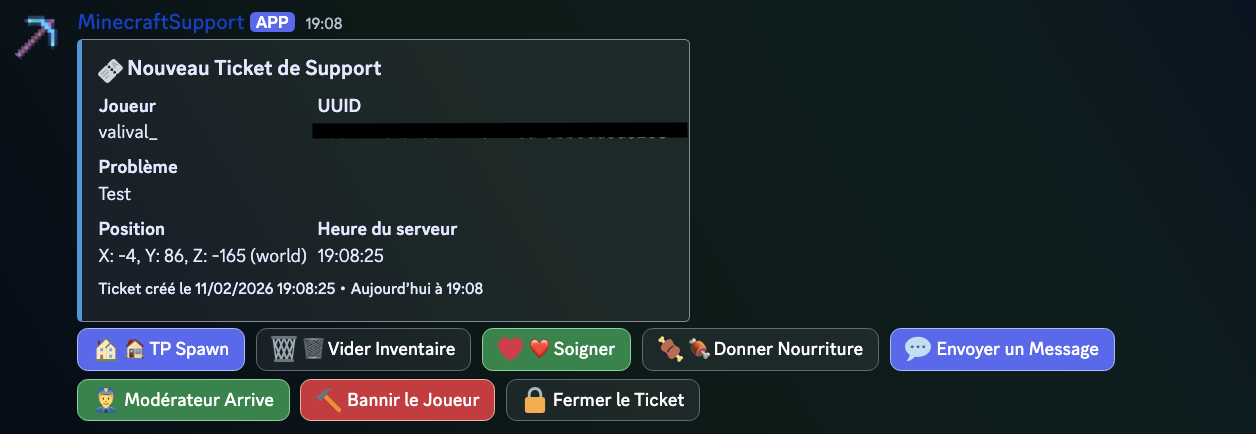 带有操作按钮的自动私有频道
Real-Time Communication
 工作人员 ↔ 玩家即时通讯
⚡ 快速安装
1️⃣ 创建 Discord Bot
- 访问
- 创建应用程序 → Bot
- 复制 Token
- 重要:在“Bot”设置中启用以下意图:
- ✅ MESSAGE CONTENT INTENT
- ✅ SERVER MEMBERS INTENT
- OAuth2 → URL Generator:
- 勾选
bot 和 applications.commands
- 权限:查看频道、发送消息、管理频道、管理权限
- 邀请 Bot 到你的服务器
2️⃣ 安装插件
- 下载
DiscordSupport-v2.0.jar
- 放入
/plugins/ 目录
- 重启服务器
- 编辑
plugins/DiscordSupport/config.yml
- 运行
/supportreload
3️⃣ 最小化配置
公共工单(简单):
discord:
  bot-token: "YOUR_TOKEN_HERE"
  public-tickets:
    enabled: true
    channel-id: "123456789012345678"  # 你的 #support 频道 ID
私有工单(推荐):
discord:
  bot-token: "YOUR_TOKEN_HERE"
  private-tickets:
    enabled: true
    category-id: "123456789012345678"  # 你的分类 ID
    allowed-roles: "987654321098765432,111222333444555666"  # 工作人员、管理员
    delete-on-close: true
? 命令
| 命令 |
描述 |
权限 |
/support <problem> |
创建工单 |
discordsupport.use |
/commandsend <message> |
回复支持请求 |
discordsupport.use |
/supportreload |
重载配置 |
discordsupport.admin |
/supportsend <test> |
测试连接 |
discordsupport.admin |
? 高级配置
自定义按钮
action-buttons:
  teleport-spawn:
    enabled: true
    label: "? TP Spawn"
    command: "tp %player% 0 100 0"

  heal-player:
    enabled: true
    label: "❤️ Heal"
    command: "heal %player%"
防刷屏冷却
cooldown:
  enabled: true
  time: 60  # 每次工单之间的秒数
自定义消息
messages:
  support-sent: "&a&l✔ &aTicket sent successfully!"
  no-active-ticket: "&c&l✘ &cYou don't have an active ticket."
? 使用示例
玩家创建工单
Player: /support I'm stuck in a wall
Discord - 创建私有频道
? New Support Ticket

Player: Valival_
UUID: 123e4567-e89b-12d3-a456-426614174000
Problem: I'm stuck in a wall
Location: X: 150, Y: 64, Z: -230 (world)
Time: 18:30:42

[Buttons] ? TP Spawn | ?️ Clear | ❤️ Heal | ? Food | ? Message | ? Arriving | ? Ban | ? Close
工作人员回复
Staff (Discord): Clicks "Send Message"
→ Popup: "I'll teleport you to spawn"
Player (Minecraft): Receives "[Support] I'll teleport you to spawn"
工作人员点击“TP Spawn”
Player: [Teleported to spawn]
Staff sees (only them): "✅ Action TP Spawn executed for Valival_"
玩家回复
Player: /commandsend Thanks, it's fixed!
Discord: "? Message from Valival_: Thanks, it's fixed!"
工作人员关闭工单
Staff: Clicks "Close Ticket"
Player: Receives "Your ticket has been closed"
Discord Channel: Deleted after 5 seconds
?️ 安全与性能
✅ 线程安全 - 使用 ConcurrentHashMap
✅ 异步处理 - 无服务器卡顿
✅ Discord 权限 - 基于角色的访问控制
✅ 防刷屏 - 可配置的冷却时间
✅ 完整日志 - 追踪所有操作
✅ 验证机制 - Bot 状态验证
? 兼容性
- Minecraft: 1.20.5 - 1.21.4+
- Server: Paper, Spigot, Purpur
- Java: 17+
- Discord: JDA 5.0 (included)
? 下载
French Version: Configuration and messages in French
English Version: Configuration and messages in English
Both versions are 100% functional and identical in terms of features.
? 支持与联系
- ? Bugs: Use the "Issues" tab on Modrinth
- ? Suggestions: Share your ideas!
- ⭐ Reviews: Leave a review if you like the plugin
? Changelog v2.0
主要新功能:
- ✨ 带有专用频道的私有票务系统
- ? Discord ↔ Minecraft 双向通信
- ? “管理员即将到达”按钮,用于通知玩家
- ? “封禁”按钮,支持确认和填写原因
- ? 完整的法语/英语支持
- ⚡ 异步初始化(无卡顿)
- ?️ 创建前验证机器人状态
改进项:
- 临时消息(仅点击者可见)
- 改进了错误处理
- 更清晰、信息更丰富的日志
- 完整的文档
修复项:
- 修复了初始化期间的服务器卡死问题
- 修复了“公会没有自成员 (self member)”的问题
- 修复了 Discord Intents 的处理逻辑
? 为什么选择 DiscordSupport?
之前
玩家:“我被卡住了!”
→ 工作人员必须进入游戏
→ 浪费时间
→ 玩家需要等待很长时间
使用 DiscordSupport 后
玩家:/support I'm stuck
→ 即时生成 Discord 工单
→ 工作人员查看位置、问题和信息
→ 点击“传送至出生点”
→ 玩家在 2 秒内被传送
→ 问题解决!
节省时间:90%
玩家满意度:+200%
员工开心:无价 ?
? 许可证
MIT 许可证 - 可免费使用和修改
由 Valival_ ❤️ 制作
如果此插件对您有帮助,请留下 ⭐ 评论!
? DiscordSupport v2.0
The most complete and professional Discord/Minecraft support system
Transform your server support with interactive Discord tickets, private channels, and instant two-way communication!
✨ Main Features
? Two Ticket Modes
? Public Tickets
- All tickets in a single Discord channel
- Perfect for small servers
- Ultra-simple configuration
? Private Tickets ⭐ NEW!
- Dedicated Discord channel for each ticket
- Visible only by staff (role-based permissions)
- Automatic deletion after closure
- Private and secure communication
? Two-Way Communication
Discord → Minecraft
- Staff messages in Discord arrive directly to the player in-game
- "Send Message" button with integrated popup
- Support for long messages (500 characters)
Minecraft → Discord
/commandsend <message> to reply from the game- Only works with an active ticket
- Formatted and timestamped messages
? Interactive Buttons
Click to act instantly:
- ? TP Spawn - Teleport player to spawn
- ?️ Clear Inventory - Clear inventory
- ❤️ Heal - Restore health and hunger
- ? Give Food - 64 steaks instantly
- ? Moderator Arriving - Notify player that staff is coming
- ? Ban Player - Ban with confirmation and reason
- ? Send Message - Popup for custom message
- ? Close Ticket - Archive/delete the ticket
All actions are ephemeral: only the person who clicks sees the confirmation!
? Multilingual
- ?? English (complete version)
? Screenshots
Private Discord Ticket
Automatic private channel with action buttons
Real-Time Communication
Staff → Player and Player → Staff instant
⚡ Quick Installation
1️⃣ Create the Discord Bot
- Go to
- Create an application → Bot
- Copy the token
- IMPORTANT: Enable these intents in "Bot":
- ✅ MESSAGE CONTENT INTENT
- ✅ SERVER MEMBERS INTENT
- OAuth2 → URL Generator:
- Check
bot and applications.commands
- Permissions: View Channels, Send Messages, Manage Channels, Manage Permissions
- Invite the bot to your server
2️⃣ Install the Plugin
- Download
DiscordSupport-v2.0.jar
- Place in
/plugins/
- Restart the server
- Edit
plugins/DiscordSupport/config.yml
/supportreload
3️⃣ Minimal Configuration
Public Tickets (easy):
discord:
  bot-token: "YOUR_TOKEN_HERE"
  public-tickets:
    enabled: true
    channel-id: "123456789012345678"  # Your #support channel ID
Private Tickets (recommended):
discord:
  bot-token: "YOUR_TOKEN_HERE"
  private-tickets:
    enabled: true
    category-id: "123456789012345678"  # Your category ID
    allowed-roles: "987654321098765432,111222333444555666"  # Staff, Admin
    delete-on-close: true
? Commands
| Command |
Description |
Permission |
/support <problem> |
Create a ticket |
discordsupport.use |
/commandsend <message> |
Reply to support |
discordsupport.use |
/supportreload |
Reload config |
discordsupport.admin |
/supportsend <test> |
Test connection |
discordsupport.admin |
? Advanced Configuration
Customize Buttons
action-buttons:
  teleport-spawn:
    enabled: true
    label: "? TP Spawn"
    command: "tp %player% 0 100 0"

  heal-player:
    enabled: true
    label: "❤️ Heal"
    command: "heal %player%"
Anti-Spam Cooldown
cooldown:
  enabled: true
  time: 60  # seconds between each ticket
Custom Messages
messages:
  support-sent: "&a&l✔ &aTicket sent successfully!"
  no-active-ticket: "&c&l✘ &cYou don't have an active ticket."
? Usage Example
Player creates a ticket
Player: /support I'm stuck in a wall
Discord - Private Channel Created
? New Support Ticket

Player: Valival_
UUID: 123e4567-e89b-12d3-a456-426614174000
Problem: I'm stuck in a wall
Location: X: 150, Y: 64, Z: -230 (world)
Time: 18:30:42

[Buttons] ? TP Spawn | ?️ Clear | ❤️ Heal | ? Food | ? Message | ? Arriving | ? Ban | ? Close
Staff responds
Staff (Discord): Clicks "Send Message"
→ Popup: "I'll teleport you to spawn"
Player (Minecraft): Receives "[Support] I'll teleport you to spawn"
Staff clicks "TP Spawn"
Player: [Teleported to spawn]
Staff sees (only them): "✅ Action TP Spawn executed for Valival_"
Player responds
Player: /commandsend Thanks, it's fixed!
Discord: "? Message from Valival_: Thanks, it's fixed!"
Staff closes the ticket
Staff: Clicks "Close Ticket"
Player: Receives "Your ticket has been closed"
Discord Channel: Deleted after 5 seconds
?️ Security & Performance
✅ Thread-safe - Uses ConcurrentHashMap
✅ Asynchronous - No server lag
✅ Discord Permissions - Role-based access control
✅ Anti-spam - Configurable cooldown
✅ Complete Logs - All actions tracked
✅ Validation - Bot status verification
? Compatibility
- Minecraft: 1.20.5 - 1.21.4+
- Server: Paper, Spigot, Purpur
- Java: 17+
- Discord: JDA 5.0 (included)
? Download
French Version: Configuration and messages in French
English Version: Configuration and messages in English
Both versions are 100% functional and identical in terms of features.
? Support & Contact
- ? Bugs: Use the "Issues" tab on Modrinth
- ? Suggestions: Share your ideas!
- ⭐ Reviews: Leave a review if you like the plugin
? Changelog v2.0
Major New Features:
- ✨ Private ticket system with dedicated channels
- ? Two-way Discord ↔ Minecraft communication
- ? "Moderator Arriving" button to notify players
- ? "Ban" button with confirmation and reason
- ? Complete FR/EN support
- ⚡ Asynchronous initialization (no lag)
- ?️ Bot status verification before creation
Improvements:
- Ephemeral messages (visible only to the person who clicks)
- Improved error handling
- Clearer and more informative logs
- Complete documentation
Fixes:
- Fixed server freeze during initialization
- Fixed "Guild does not have a self member"
- Fixed Discord intents handling
? Why DiscordSupport?
Before
Player: "I'm stuck!"
→ Staff must go in-game
→ Wastes time
→ Player waits a long time
After with DiscordSupport
Player: /support I'm stuck
→ Instant Discord ticket
→ Staff sees position, problem, info
→ Clicks "TP Spawn"
→ Player teleported in 2 seconds
→ Problem solved!
Time saved: 90%
Player satisfaction: +200%
Happy staff: Priceless ?
? License
MIT License - Free to use and modify
Made with ❤️ by Valival_
If this plugin helps you, leave a ⭐ review!


 插件

 插件
 插件
 插件
 插件
 插件
评论 0
登录后参与评分
还没有评论,来抢沙发吧