DrawerShelves - 专业级存储与整理模组!
受够了凌乱的箱子房?DrawerShelves 将标准的 Minecraft 架子转变为高容量、专业化的存储单元!无论你需要存储成千上万种单一物品、自动压缩矿石,还是将多个单元链接到中央控制器,此插件都能提供流畅、无延迟的解决方案,并配备完整的 3D HUD 视觉效果。
? 联系我 & 支持信息
? 主要支持渠道(推荐)
所有常规问题、功能请求和非紧急的错误报告都应发布在我们 Discord 服务器 的相关频道中。 我们会积极监控服务器,并尽快回复。这确保了整个社区都能从讨论和解决方案中受益。
? 紧急私聊 (PM) 政策
虽然我们倾向于所有问题都先通过 Discord 服务器处理,但在特定紧急情况下,欢迎您直接私聊我:
- 允许原因: 您的服务器因本插件而崩溃或出现关键的、破坏游戏平衡的错误。
- 要求: 您必须是服务器的所有者。
- 时区: 我位于 (CET/CEST) 时区。
- 私聊时间: 请仅在 上午 10:00 至晚上 10:00(布鲁塞尔时间) 之间发送私聊消息。
我会尽力尽快回复您的私聊。私聊是一种职业礼仪,而非理所当然的权利。谢谢!
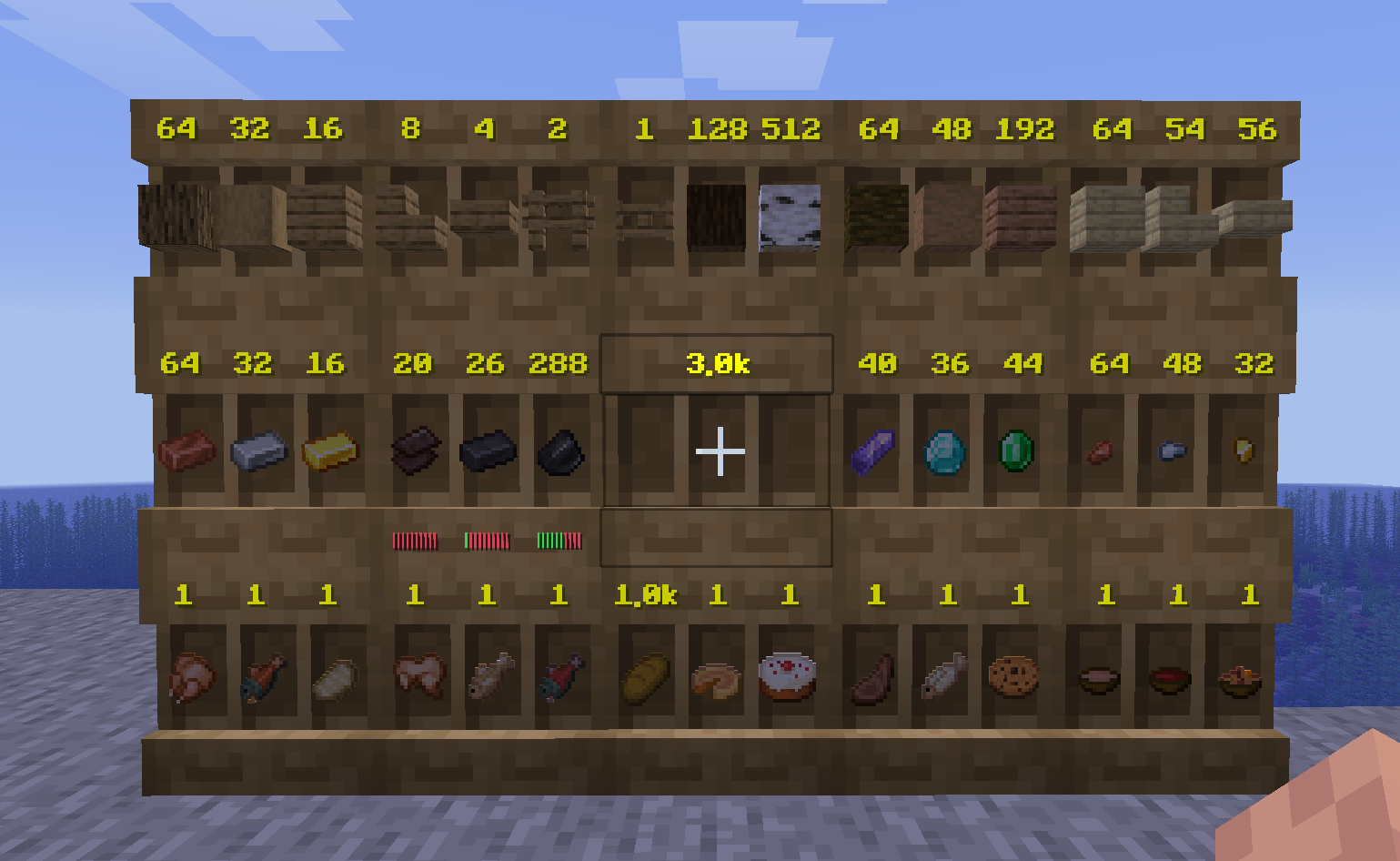
? 核心抽屉类型
每个抽屉都是基于标准的架子方块构建,但针对不同的需求进行了专业化定制。
- 大型抽屉(1槽位): 将所有能力集中于一种物品类型。非常适合大量存放圆石或泥土。
- 中型抽屉(2槽位): 容量分为两部分,用于存放两种不同的物品。
- 小型抽屉(3槽位): 拥有三个独立槽位,实现最高程度的整理。
- 压缩机: 自动在物品的不同形态之间进行转换(例如:金粒 ⇋ 金锭 ⇋ 金块)。
- 控制器: 您存储系统的“大脑”。将附近的抽屉(默认最多 16 个)链接起来,一次性向整个网络存入物品。
?️ 升级系统
您可以通过多达 9 个升级槽位来自定义您的抽屉。按住 Shift + 右键点击 抽屉的前面即可访问升级菜单。
? 存储与容量
- 存储升级(等级 1-5): 将基础容量乘以 x2, x4, x8, x16 或 x32。
- 无限升级: 完全移除容量限制,适用于创造模式风格的存储。
- 单堆叠升级: 将抽屉限制为恰好 64 个物品(适用于商店展示)。
? 自动化与实用工具
- 漏斗升级(拉/推/双向): 允许抽屉自动从上方/后方的容器中抽取物品,或推送到下方/后方的容器中。
- 虚空升级: 当抽屉达到最大容量时,自动删除多余的物品。
- 清洁升级: 专门用于工具和盔甲。它会剥离自定义 NBT 数据,并将“磨损度”合并到一个共享池中,以便批量存储装备。
? 视觉与手感
- 填充计量表: 在 HUD 中添加一个可视化的进度条,显示每个槽位的填充程度。
- 明亮升级: 使 3D HUD 发光,使其在完全黑暗中也能清晰可见。
⚡ 主要机制
?️ 3D 文本 HUD
无需再打开 GUI 来检查数量了!高性能的文本显示直接在方块表面上显示物品数量。
- 单模式: 将相同的物品合并为一个总计数。
- 三模式: 显示每个独立槽位的单独计数。
? 控制器网络
使用横向 BFS 发现(±3 个方块)将控制器链接到您的抽屉。
- 右键点击控制器: 将您手持的物品插入网络中第一个匹配的抽屉。
- 双击右键: 立即将您整个库存中所有匹配的物品存入已链接的网络。
? 压缩逻辑
压缩机将存储视为单个“单位”池。如果您放入 9 个铁锭,您可以立即取出 1 个铁块或 81 个铁粒。
? 权限与访问
通过内置的朋友与访问菜单控制谁能触碰您的物品。
- 访问模式: 在所有人、仅限好友或私有之间切换。
- 信任级别: 添加具有不同权限的特定玩家(物品访问、升级编辑或完整管理)。
? 命令
/drawers help - 查看帮助菜单。/drawers give [player] - 打开抽屉目录以浏览和获取物品(管理员)。/drawers recipe - 浏览每种抽屉和升级的制作配方。/drawers compact - 浏览或创建自定义压缩配方。/drawers mode <SINGLE/TRIPLE/TOP/BOTTOM> - 自定义您的个人 HUD 偏好。/drawers reload - 重新加载所有配置并同步显示。
? 权限节点
⚙️ 核心权限
drawershelves.command - 访问基础 /drawers 命令。(默认:true)drawershelves.admin - 绕过所有限制和权限检查。(默认:op)drawershelves.reload - 重新加载插件配置。(默认:op)drawershelves.give - 通过 /drawers give 给予抽屉物品。(默认:op)
? 放置限制
在 config.yml 中设置服务器范围的默认值。# = 最大数量。
drawershelves.drawer.# - 最大小型/中型/大型抽屉数量。drawershelves.compactor.# - 最大压缩机数量。drawershelves.controller.# - 最大控制器数量。
⚒️ 升级制作
drawershelves.upgrade.<type> - 允许制作特定的升级(例如 clean, infinit, fill_meter, hopper_pull, hopper_push, hopper_both, bright, stack, trash, inv_1 到 inv_5)。
? 升级放置
drawershelves.place.<type> - 允许将升级插入到抽屉中。- 注意:
drawershelves.place.infinit 和 drawershelves.place.inv_5 默认为 OP。
?️ 管理员专用
- 高度优化: HUD 使用原生的显示实体系统,避免盔甲架导致的卡顿。
- SQLite 持久化: 所有 HUD 数据和计数均保存在本地数据库中,以确保最大可靠性。
- 自定义配方: 完全可配置的
recipes.yml 允许你修改每一个合成要求。
- 防卡顿: 自动清理“幽灵”显示实体,并为抽屉结构提供方块物理保护。
DrawerShelves - Professional Grade Storage & Organization!
Tired of messy chest rooms? DrawerShelves transforms standard Minecraft shelves into high-capacity, specialized storage units! Whether you need to store thousands of a single item, compact your ores automatically, or link multiple units to a central controller, this plugin provides a sleek, lag-free solution with full 3D HUD visuals.
? Contact Me & Support Information
? Primary Support Channel (Preferred)
All general questions, feature requests, and non-urgent bug reports should be posted in the appropriate channels on our Discord Server. We actively monitor the server and will respond as soon as possible. This ensures that the whole community can benefit from the discussion and solutions.
? Urgent Private Messaging (PM) Policy
While we prefer all issues to be handled via the Discord server first, you are welcome to PM me directly under specific urgent circumstances:
- Allowed Reason: Your server is crashing or experiencing critical, game-breaking errors directly related to this plugin.
- Requirement: You must be the owner of the server.
- Time Zone: I am operating in the (CET/CEST) Time Zone.
- PM Hours: Please only send private messages between 10:00 AM and 10:00 PM (Brussels Time).
I will endeavor to answer your PM as soon as I can. Private messaging is a professional courtesy, not an entitlement. Thank you!
? Core Drawer Types
Every drawer is built from a standard Shelf block but specialized for different needs.
- Large Drawer (1-Slot): Concentrates all its power into one item type. Perfect for massive quantities of cobble or dirt.
- Medium Drawer (2-Slot): Split capacity for two different item types.
- Small Drawer (3-Slot): Maximum organization with three distinct slots.
- Compactor: Automatically converts items between their forms (e.g., Nuggets ⇋ Ingots ⇋ Blocks).
- Controller: The "brain" of your storage. Link nearby drawers (up to 16 by default) to deposit items into the entire network at once.
?️ The Upgrade System
Customize your drawers with up to 9 upgrade slots. Access the upgrade menu by Shift + Right-Clicking the front face of a drawer.
? Storage & Capacity
- Storage Upgrades (Tier 1-5): Multiplies base capacity by x2, x4, x8, x16, or x32.
- Infinite Upgrade: Removes capacity limits entirely for creative-style storage.
- One Stack Upgrade: Limits the drawer to exactly 64 items (useful for shop displays).
? Automation & Utility
- Hopper Upgrades (Pull/Push/Both): Allows drawers to automatically pull from containers above/behind or push to containers below/behind.
- Void Upgrade: Automatically deletes excess items once the drawer reaches maximum capacity.
- Clean Upgrade: Specifically for tools and armor. It strips custom NBT and "merges" durability into a shared pool for bulk storage of equipment.
? Visuals & Feel
- Fill Meter: Adds a visual progress bar to the HUD showing how full each slot is.
- Bright Upgrade: Makes the 3D HUD glow, making it perfectly visible in total darkness.
⚡ Main Mechanics
?️ 3D Text HUD
No more opening GUIs to check counts! High-performance Text Displays show item counts directly on the block face.
- Single Mode: Merges identical items into one total count.
- Triple Mode: Shows separate counts for every individual slot.
? Controller Networking
Link a Controller to your drawers using a lateral BFS discovery (±3 blocks).
- Right-Click Controller: Insert your held item into the first matching drawer in the network.
- Double Right-Click: Instantly deposit all matching items from your entire inventory into the linked network.
? Compaction Logic
Compactors treat storage as a single pool of "units." If you put in 9 Iron Ingots, you can pull out 1 Iron Block or 81 Iron Nuggets instantly.
? Permissions & Access
Control who can touch your stuff with the built-in Friends & Access menu.
- Access Modes: Toggle between Everyone, Friends-Only, or Private.
- Trust Levels: Add specific players with varying permissions (Item Access, Upgrade Editing, or Full Management).
? Commands
/drawers help - View the help menu./drawers give [player] - Open the Drawer Catalog to browse and take items (Admins)./drawers recipe - Browse crafting recipes for every drawer and upgrade./drawers compact - Browse or create custom compaction recipes./drawers mode <SINGLE/TRIPLE/TOP/BOTTOM> - Customize your personal HUD preferences./drawers reload - Reload all configurations and sync displays.
? Permission Nodes
⚙️ Core Permissions
drawershelves.command - Access to the base /drawers command. (Default: true)drawershelves.admin - Bypass all limits and permission checks. (Default: op)drawershelves.reload - Reload plugin configurations. (Default: op)drawershelves.give - Give drawer items via /drawers give. (Default: op)
? Placement Limits
Set server-wide defaults in config.yml. # = max amount.
drawershelves.drawer.# - Max Small/Medium/Large Drawers.drawershelves.compactor.# - Max Compactors.drawershelves.controller.# - Max Controllers.
⚒️ Upgrade Crafting
drawershelves.upgrade.<type> - Allows crafting specific upgrades (e.g., clean, infinit, fill_meter, hopper_pull, hopper_push, hopper_both, bright, stack, trash, inv_1 to inv_5).
? Upgrade Placement
drawershelves.place.<type> - Allows inserting upgrades into a drawer.- Note:
drawershelves.place.infinit and drawershelves.place.inv_5 default to OP.
?️ For Admins
- Highly Optimized: HUDs use the native Display entity system; no armor stand lag.
- SQLite Persistence: All HUD data and counts are saved in a local database for maximum reliability.
- Custom Recipes: Fully configurable
recipes.yml allows you to change every crafting requirement.
- Anti-Lag: Automatic cleanup of "ghost" displays and block-physics protection for drawer structures.


 插件

 插件
 插件
 插件
 插件
 插件
评论 0
登录后参与评分
还没有评论,来抢沙发吧