CrateManager 旨在让创建和管理宝箱变得简单。无需复杂的配置文件,也无需冗长的设置流程,只需添加奖励即可开始使用。
大多数宝箱插件需要编辑配置文件或运行多个设置命令,而 Easy Crate Manager 将所有操作保留在游戏内,使宝箱的创建快速且直观。
功能
- 简单的游戏内宝箱创建
- 可配置的奖励权重
- 自动显示百分比
- 宝箱预览菜单
- 自定义宝箱名称
- 极易上手
- 开箱效果包含粒子与音效
如何使用该插件
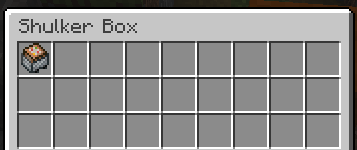
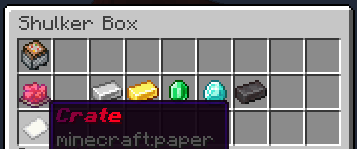
1. 要创建一个宝箱,首先放置任意颜色的潜影盒,并在其物品栏左上角槽位放入一个命令方块矿车。这作为一个安全保护机制,确保只有拥有创造模式权限的玩家才能创建宝箱。
2. 将希望玩家能够获得的物品放入潜影盒中,注意排除每行的第一个和最后一个槽位。这些物品将以你放置时的相同方式显示在预览中。默认情况下,每个物品的权重为 1。若要更改此设置,请按住该物品并运行命令:/setweight <weight>
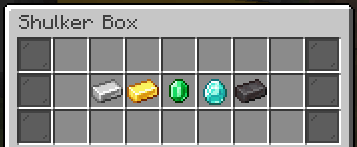
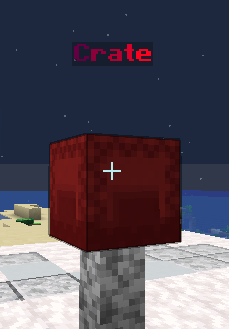
完成后,关闭物品栏。潜影盒将自动转换为宝箱,你可以点击它以打开宝箱的预览 GUI。管理员将在预览菜单底部看到一个编辑按钮,点击它会重新打开原始的潜影盒以便你进行编辑。
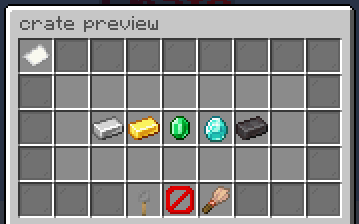
3. 要为宝箱添加自定义钥匙,请按住你想用作钥匙的物品并运行命令 /setcratekey,然后在编辑菜单中将物品直接放置在命令方块矿车的下方。现在玩家需要持有匹配的钥匙才能打开宝箱。预览界面中会有一个按钮供管理员给自己发放一组该宝箱的钥匙。
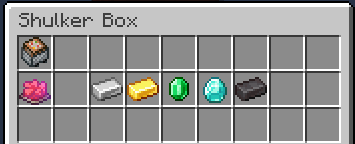
4. 要为宝箱自定义名称,请在铁砧上重命名一张纸,并将其直接放置在钥匙槽位的下方。纸张的名称将作为宝箱的显示名称,并在交互后显示在宝箱上方。
常见问题
这个插件会影响性能吗? - 不会,它对性能几乎没有影响,你可能根本不会察觉任何卡顿。
你有计划在未来改进它吗? - 是的,我计划增加更多自定义选项,包括宝箱菜单、开箱动画以及不同类型的宝箱(例如允许玩家选择奖励而非随机抽取的选项)。
这个插件会支持新版本吗? - 我会尽力保持该插件的最新状态并确保其正常运行,尽管有时更新可能会稍慢一些。
其他注意事项
- 在我完成开发之前,该插件仍有大量工作要做
- 我的更新速度可能会较慢
- 如果你遇到任何问题或有建议,可以通过 Discord 联系我 @lucaart
允许与禁止的操作
你可以:
- 在自己的 Minecraft 服务器上使用此插件。
- 通过此插件获利,前提是不通过出售实际代码(包括源文件或 jar 包,即使经过修改)来获利。
你不可以:
- 重新分发此插件。
- 出售此插件。
- 修改并重新分发此插件。
- 将此插件据为己有。
CrateManager is designed to make creating and managing crates simple. No complicated configuration files, no lengthy setup process, just add rewards, and you're ready to go.
Most crate plugins require editing configuration files or running multiple setup commands, Easy Crate Manager keeps everything in-game, making crate creation quick and intuitive.
Features
- Easy in-game crate creation
- Configurable reward weights
- Automatic percentage display
- Crate preview menu
- Custom crate names
- really easy to use
- opening effect including particles and sounds
How to use the plugin
1. to create a crate first place down a shulker of any colour and put a command block minecart in the top-left slot of the inventory. This acts as a safeguard so that only players with access to Creative mode can create crates.
2. Place the items you want players to be able to win into the shulker box excluding the first and last slots per row, they will show up in the preveiw the same way you placed them. An item automatically has a weight of 1 by default, to change this hold your item and run the command: /setweight <weight>
When you're finished, close the inventory. The shulker box will automatically be converted into a crate and you will be able to punch it to open the preview gui for the crate and operators will see an edit button at the bottom of the preview menu, clicking it reopens the original shulker so you can edit it
3. To add a custom key to a crate, hold the item you want to use for your crate and run the command /setcratekey then place the item directly below the command block minecart in the edit menu, Players will now need a matching item in order to open the crate. there will be a button for operators to give themselves a stack of that crate key in the preveiw
4. To give your crate a custom name, rename a piece of paper in an anvil and place it directly below the key slot. The paper's name will be used as the crate's display name and will appear above the crate after it has been interacted with.
FAQ
does this plugin impact performance? - no it has little to no impact on performance, you probably wont notice any lag using this.
do you have plans to improve this in the future? - yes I do, I plan to add more customization in terms of the crate menus, the opening animations and diffrent crate types like an option to let people select the reward rather than it be random.
will this plugin support newer versions? - Ill try my best to keep this plugin up to date and working, although I might be alittle slow sometimes
other things to keep in mind
- This plugin is still has a long way to go before Im finished with it
- I might be slow to update
- you can message me on discord if you have any problems with this plugin or suggestions @lucaart
what you are and are not allowed to do
you may:
- Use this plugin on your own Minecraft servers.
- make money from this plugin aslong as its not through selling the actual code, including the source or jar, even if edited.
You may not:
- Redistribute the plugin.
- Sell the plugin.
- Modify and redistribute the plugin.
- Claim the plugin as your own.


 插件

 插件
 插件
 插件
 插件
 插件
评论 0
登录后参与评分
还没有评论,来抢沙发吧