Easy Camera
在 Minecraft 中查看好友的真实面容!
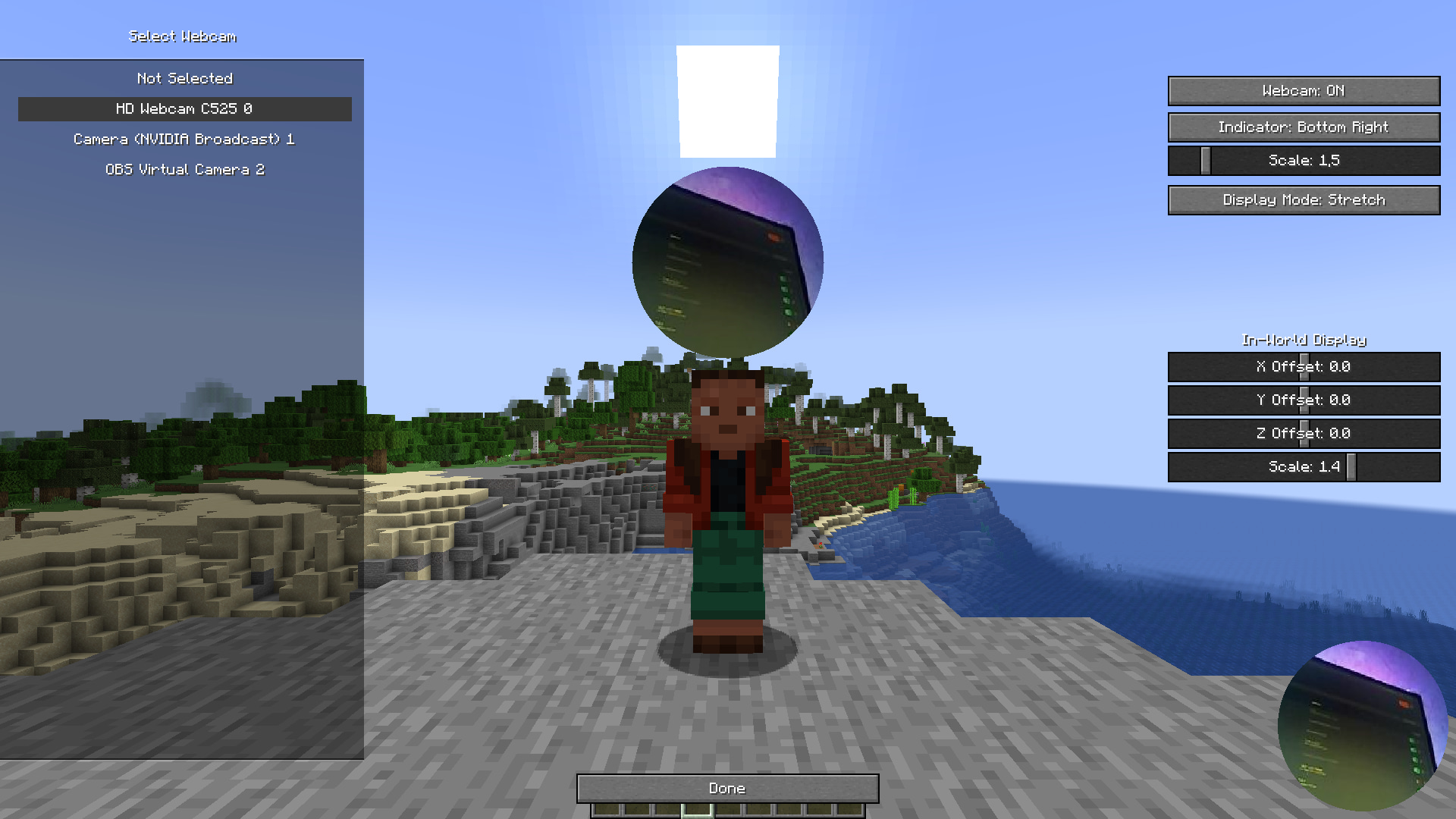
是否曾想过为你的 Minecraft 服务器增添一层新的互动体验?Easy Camera Mod(简易相机模组)让你能够在游戏内直接看到好友摄像头的实时视频流!一个小型、可自定义的圆形窗口会出现在每个玩家头顶上方,展示他们的实时反应,让你的冒险之旅更加有趣和个性化。
这是主播、好友联机游玩或任何希望营造更紧密社区氛围的服务器的完美模组。
本项目深受 FreakLand 服务器上独特摄像头功能的启发。我们的目标是重现并改进这一精彩创意,使其能够供所有人在自己的 Fabric 和 Spigot 服务器上享受。
功能特性
- 实时摄像头直播:在游戏中实时看到好友的面容。模组经过优化,具有低延迟和对性能影响极小的特点。
- 游戏内与 HUD 指示器:摄像头画面在游戏世界中显示为玩家头顶上方的圆形,同时在 HUD 上作为一个小型指示器存在。
- 完全可定制:
- 位置与缩放:可根据喜好调整玩家头顶上方摄像头圆形的大小和位置。
- 显示模式:可选择
Stretch/Fill(拉伸/填充)以将完整视频适配到圆形中,或选择 Crop(裁剪)以放大特定区域。
- HUD 指示器:启用或禁用屏幕上的指示器,并可调整其位置(左上角、右上角、右下角)及缩放比例。
- 水平翻转:如果需要,可以翻转你自己的摄像头画面。
- 静音系统:不想看某人的摄像头?你可以轻松通过简单的游戏内菜单静音任何玩家。该玩家的摄像头画面将从你的视野中隐藏。
- 服务端控制(Spigot/Paper 插件):配套的 Spigot 插件确保网络使用流畅且公平。它防止玩家发送过多数据,从而保障服务器的稳定性。
- 性能优化:模组设计为轻量级。它使用高效的压缩和节流机制,以最小化网络和客户端端的卡顿。
快捷键
默认情况下,你可以使用以下按键访问模组的菜单(这些按键可以在 Minecraft 的键位绑定设置中更改):
- '. PERIOD':打开主设置屏幕。
- ', COMMA':打开玩家静音屏幕。
使用方法
对于玩家(客户端 - Fabric)
- 安装 Fabric:确保已安装 Fabric Loader。
- 安装 Fabric API:下载 Fabric API 并将其放入你的
mods 文件夹中。
- 下载 Easy Camera Mod:下载 Easy Camera Mod 的最新版本,并将
.jar 文件放入 .minecraft/mods 文件夹中。
- 配置:启动游戏。在主菜单或暂停菜单中,你会找到 Easy Camera Mod 的设置屏幕。在这里你可以选择摄像头、启用它以及自定义所有视觉设置。
对于服务器管理员(服务端 - Spigot/Paper)
- 下载插件:下载 Easy Camera Plugin 的最新版本。
- 安装:将
.jar 文件放入你的 Spigot、Paper 或 Purpur 服务器的 plugins 文件夹中。
- 重启:重启服务器。插件即可开箱即用,无需进行配置。
该插件对多人游戏至关重要。它在玩家之间中继摄像头数据,并保护服务器免于过载。
为什么使用这个模组?
- 增强社交互动:看到实时反应,让每一刻都更加难忘。非常适合合作建造、激烈的 PvP 战斗,或者只是闲聊放松。
- 内容创作者的理想选择:无需复杂的 OBS 设置即可轻松向观众展示你的面部。你的观众将看到你看到的一切。
- 易于设置:凭借用户友好的游戏内菜单,上手非常简单。
技术说明: 客户端模组适用于 Fabric,服务端插件适用于基于 Spigot 的服务器(如 Spigot、Paper、Purpur 等)。多人游戏中需要两者同时安装才能正常工作。
Easy Camera
See your friends' real faces in Minecraft!
Ever wanted to add a new layer of interaction to your Minecraft server? Easy Camera Mod allows you to see a real-time video stream from your friends' webcams right inside the game! A small, customizable circle appears above each player's head, showing their live reaction and making your adventures even more fun and personal.
This is the perfect mod for streamers, friends playing together, or any server that wants to foster a closer community.
This project was heavily inspired by the unique webcam feature seen on the FreakLand server. Our goal was to recreate and improve upon that amazing idea, making it available for everyone to enjoy on their own Fabric and Spigot servers.
Features
- Real-Time Webcam Streaming: See your friends' faces live in the game. The mod is optimized for low latency and minimal performance impact.
- In-World & HUD Indicators: The webcam view appears as a circle above the player's head in the world and as a small indicator on your HUD.
- Fully Customizable:
- Position & Scale: Adjust the size and position of the webcam circle above the player's head to your liking.
- Display Mode: Choose between
Stretch/Fill to fit the whole video in the circle or Crop to zoom in on a specific area.
- HUD Indicator: Enable or disable the on-screen indicator and adjust its position (top-left, top-right, bottom-right) and scale.
- Horizontal Flip: Flip your own camera view if you need to.
- Mute System: Don't want to see someone's camera? You can easily mute any player from a simple in-game menu. Their camera view will be hidden from you.
- Server-Side Control (Spigot/Paper Plugin): The companion Spigot plugin ensures smooth and fair network usage. It prevents players from sending too much data, ensuring server stability.
- Performance Optimized: The mod is designed to be lightweight. It uses efficient compression and throttling to minimize network and client-side lag.

Keybinds
By default, you can access the mod's menus with these keys (they can be changed in Minecraft's keybind settings):
- '. PERIOD': Opens the main settings screen.
- ', COMMA': Opens the player mute screen.
How to Use
For Players (Client-Side - Fabric)
- Install Fabric: Make sure you have the Fabric Loader installed.
- Install Fabric API: Download the Fabric API and place it in your
mods folder.
- Download Easy Camera Mod: Download the latest version of Easy Camera Mod and place the
.jar file in your .minecraft/mods folder.
- Configure: Launch the game. In the main menu or pause menu, you will find a settings screen for Easy Camera Mod. Here you can select your webcam, enable it, and customize all visual settings.
For Server Admins (Server-Side - Spigot/Paper)
- Download the Plugin: Download the latest version of Easy Camera Plugin.
- Install: Place the
.jar file into the plugins folder of your Spigot, Paper, or Purpur server.
- Restart: Restart your server. The plugin will work out of the box. No configuration is needed.
The plugin is crucial for multiplayer. It relays webcam data between players and protects the server from being overloaded.
Why use this mod?
- Enhanced Social Interaction: See live reactions, making every moment more memorable. Perfect for cooperative builds, intense PvP battles, or just hanging out.
- Great for Content Creators: Easily show your face to your audience without complex OBS setups. Your viewers will see what you see.
- Easy to Set Up: With a user-friendly in-game menu, getting started is a breeze.
Technical Note: The client mod is for Fabric, and the server plugin is for Spigot-based servers (Spigot, Paper, Purpur, etc.). Both are required for the mod to work in multiplayer.
评论 0
登录后参与评分
还没有评论,来抢沙发吧