? 适用于 Minecraft 1.21.5 的现代高效电梯系统
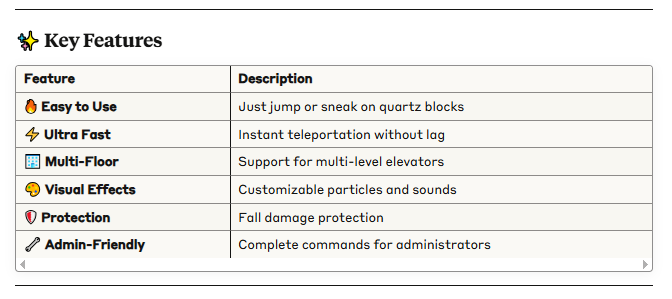
使用石英块构建功能性电梯。跳跃即可上升,潜行即可下降!
? 快速安装
? 要求
Minecraft: 1.21.5
服务器: Paper, Spigot 或分支版本
Java: 21+
? 安装步骤
从 Modrinth 下载 .jar 文件
将文件放入服务器的 /plugins/ 文件夹中
重启服务器
完成!插件已激活
? 电梯使用方法
?️ 建造电梯
所需材料
? 石英块 (QUARTZ_BLOCK)
? 支撑方块(任意实心方块)
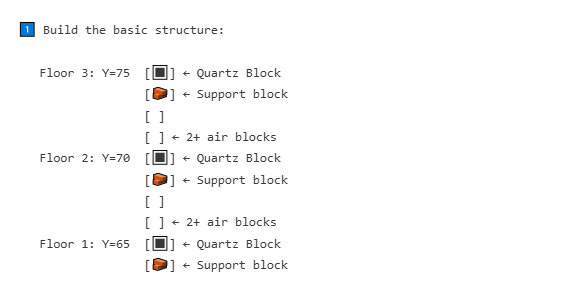
? 逐步建造指南
⚠️ 重要要求
✅ 精确对齐:所有石英块必须具有相同的 X,Z 坐标
✅ 空间充足:每个楼层上方至少保留 2 个空气方块
✅ 最小间距:楼层之间至少相隔 2+ 个方块
✅ 正确材质:仅限使用石英块 (QUARTZ_BLOCK)
?️ 使用电梯
⬆️ 向上移动
-
站在石英块上 ?
-
跳跃(空格键)?
-
你将被传送到上层楼层!✨
⬇️ 向下移动
-
站在石英块上 ?
-
潜行(Shift 键)?
-
你将被传送到下层楼层!✨
-
? 视觉指示器
? 操作栏:显示电梯状态
✨ 粒子效果:传送期间的视觉效果
? 声音:传送音效
? 使用示例
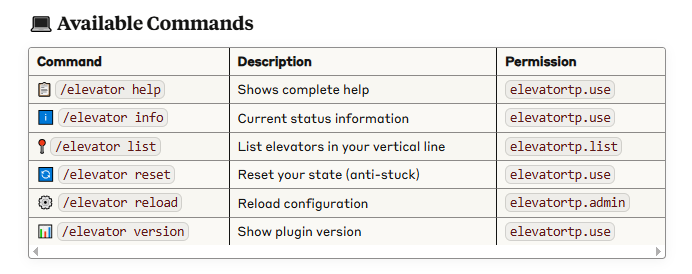
/elevator info ← 检查你是否在电梯上
/elevator list ← 查看所有可用楼层
/elevator reset ← 如果电梯卡住时使用
? 权限系统
? 玩家权限
yamlelevatortp.use:
description: "允许使用电梯"
default: true # ✅ 默认所有玩家
elevatortp.list:
description: "允许列出附近的电梯"
default: true # ✅ 默认所有玩家
? 管理员权限
yamlelevatortp.admin:
description: "完全访问管理命令"
default: op # ? 默认仅 OP 拥有
elevatortp.*:
description: "所有插件权限"
default: op # ? 默认仅 OP 拥有
⚙️ 配置
? config.yml 文件
?️ 基本配置
yaml# 用于电梯的方块
elevator-block: QUARTZ_BLOCK
最大搜索距离(以方块为单位)
max-search-distance: 256
使用间隔冷却时间(以秒为单位)
cooldown-seconds: 1
? 视觉效果
yamleffects:
enabled: true # ✅ 启用效果
particles: true # ✨ 传送粒子效果
sound: true # ? 传送音效
? 高级配置
yamladvanced:
strict-alignment: true # ? 需要精确对齐
min-floor-distance: 2 # ? 楼层间最小距离
fall-damage-protection: true # ?️ 坠落伤害保护
max-elevator-height: 30 # ? 每个电梯的最大楼层数
? 许可与致谢
开发者:DeLaRosaPlay
? Modern and efficient elevator system for Minecraft 1.21.5
Create functional elevators with quartz blocks. Jump to go up, sneak to go down!

? Quick Installation
? Requirements
Minecraft: 1.21.5
Server: Paper, Spigot, or forks
Java: 21+
? Installation Steps
Download the .jar file from Modrinth
Place the file in your server's /plugins/ folder
Restart the server
Done! The plugin is active
? How to Use Elevators
?️ Building Elevators
Required Materials
? Quartz Blocks (QUARTZ_BLOCK)
? Support blocks (any solid block)
? Step-by-Step Construction

⚠️ Important Requirements
✅ Exact alignment: All quartz blocks must have the same X,Z coordinates
✅ Free space: Minimum 2 air blocks above each floor
✅ Minimum distance: 2+ blocks between floors
✅ Correct material: Only quartz blocks (QUARTZ_BLOCK)
?️ Using the Elevator
⬆️ To Go Up
-
Stand on the quartz block ?
-
Jump (Spacebar) ?
-
You'll be teleported to the upper floor! ✨
⬇️ To Go Down
-
Stand on the quartz block ?
-
Sneak (Shift) ?
-
You'll be teleported to the lower floor! ✨
-
? Visual Indicators
? Action Bar: Shows elevator status
✨ Particles: Visual effects during teleportation
? Sounds: Teleportation audio

? Usage Examples
/elevator info ← Check if you're on an elevator
/elevator list ← See all available floors
/elevator reset ← Use if elevator gets stuck
? Permission System
? Player Permissions
yamlelevatortp.use:
description: "Allows using elevators"
default: true # ✅ All players by default
elevatortp.list:
description: "Allows listing nearby elevators"
default: true # ✅ All players by default
? Administrator Permissions
yamlelevatortp.admin:
description: "Full access to administration commands"
default: op # ? OPs only by default
elevatortp.*:
description: "All plugin permissions"
default: op # ? OPs only by default
⚙️ Configuration
? config.yml File
?️ Basic Configuration
yaml# Block used for elevators
elevator-block: QUARTZ_BLOCK
Maximum search distance (in blocks)
max-search-distance: 256
Cooldown between uses (in seconds)
cooldown-seconds: 1
? Visual Effects
yamleffects:
enabled: true # ✅ Enable effects
particles: true # ✨ Teleportation particles
sound: true # ? Teleportation sounds
? Advanced Configuration
yamladvanced:
strict-alignment: true # ? Exact alignment required
min-floor-distance: 2 # ? Minimum distance between floors
fall-damage-protection: true # ?️ Fall damage protection
max-elevator-height: 30 # ? Maximum floors per elevator
? License and Credits
Developed by: DeLaRosaPlay
评论 0
登录后参与评分
还没有评论,来抢沙发吧