
?Emojify?
一个表情符号面板插件,允许玩家使用内置资源包字体功能在聊天中使用表情符号。
输入 /emoji 即可打开面板。
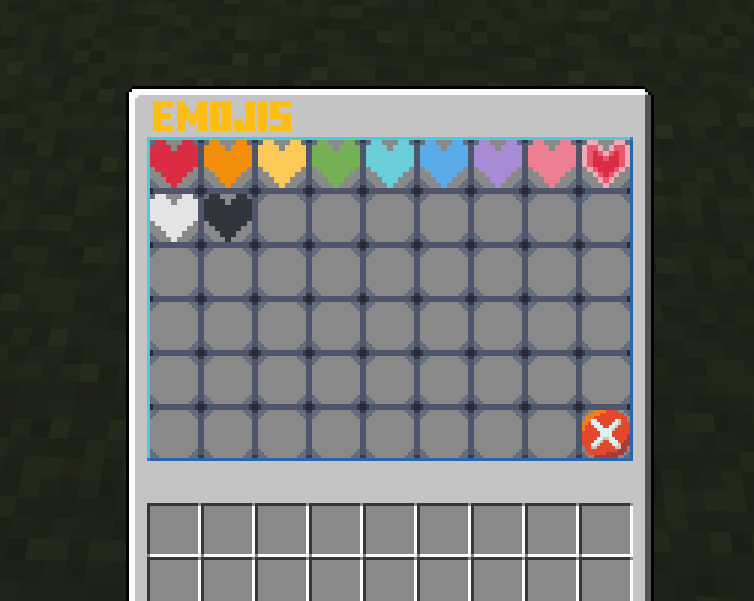
功能
- ?自定义表情?
- 自定义用户界面
- 自动下载资源包
设置
- 要创建你自己的表情,首先你需要一个
.png格式的表情图片文件。 - 然后我建议基于已内置的表情来制作你的表情,你可以从 这里 的 GitHub 获取这些基础素材。接着解压
Emojify.zip中的资源包,并用你喜欢的编辑器打开它,我将使用 VSCode。你应该会看到类似这样的结构:
资源包
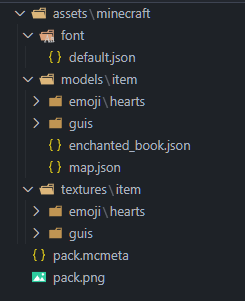
- 我将添加一个史瑞克(Shrek)的表情:
Shrek

-
首先将你的
image.png放入assets/minecraft/textures/item/emoji/[你的文件夹]/image.png。警告:你的image.png文件名应全部为小写 -
之后,前往
assets/minecraft/font/default.json并为任意 Unicode 字符创建一个新的位图映射,你可以从 这里 获取字符。
示例
{
    "providers": [
      {"type": "bitmap", "file": "minecraft:item/guis/pixel.png","ascent": -2000,"height": -3,"chars": ["七"]},
      {"type": "bitmap", "file": "minecraft:item/guis/upper_section.png","ascent": 13,"height": 222,"chars": ["ㇺ"]},
      {"type": "bitmap", "file": "minecraft:item/emoji/hearts/red_heart.png", "ascent": 8, "height": 10, "chars": ["媀"]},
      {"type": "bitmap", "file": "minecraft:item/emoji/hearts/orange_heart.png", "ascent": 8, "height": 10, "chars": ["鬣"]},
      {"type": "bitmap", "file": "minecraft:item/emoji/hearts/yellow_heart.png", "ascent": 8, "height": 10, "chars": ["觮"]},
      {"type": "bitmap", "file": "minecraft:item/emoji/hearts/green_heart.png", "ascent": 8, "height": 10, "chars": ["継"]},
      {"type": "bitmap", "file": "minecraft:item/emoji/hearts/light_blue_heart.png", "ascent": 8, "height": 10, "chars": ["佃"]},
      {"type": "bitmap", "file": "minecraft:item/emoji/hearts/blue_heart.png", "ascent": 8, "height": 10, "chars": ["青"]},
      {"type": "bitmap", "file": "minecraft:item/emoji/hearts/purple_heart.png", "ascent": 8, "height": 10, "chars": ["橙"]},
      {"type": "bitmap", "file": "minecraft:item/emoji/hearts/pink_heart.png", "ascent": 8, "height": 10, "chars": ["紫"]},
      {"type": "bitmap", "file": "minecraft:item/emoji/hearts/heartpulse.png", "ascent": 8, "height": 10, "chars": ["梾"]},
      {"type": "bitmap", "file": "minecraft:item/emoji/hearts/white_heart.png", "ascent": 8, "height": 10, "chars": ["白"]},
      {"type": "bitmap", "file": "minecraft:item/emoji/hearts/black_heart.png", "ascent": 8, "height": 10, "chars": ["黒"]},
      {"type": "bitmap", "file": "minecraft:item/emoji/shrek/pepe_shrek.png", "ascent": 8, "height": 10, "chars": ["ࢢ"]}
    ]
  }

你可以修改 "ascent"(上升高度)和 "height"(高度)来改变其显示效果
- 然后创建新的 JSON 文件
assets/minecraft/models/item/emoji/[你的文件夹]/[你的表情名称].json并将以下内容粘贴进去:
示例
{
    "parent": "minecraft:item/generated",
    "textures": {
        "layer0": "minecraft:item/emoji/shrek/pepe_shrek"
    }
  }
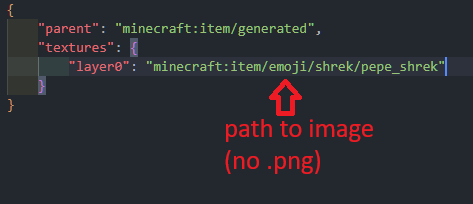
警告:不要在文件路径末尾使用 .png 扩展名
- 接着前往
assets/minecraft/models/item/enchanted_book.json并添加你之前创建的模型:
enchanted_book.json 示例
{
  "parent": "minecraft:item/generated",
  "textures": {
    "layer0": "minecraft:item/enchanted_book"
  },
  "overrides": [
    {"predicate": {"custom_model_data": 101}, "model":"minecraft:item/emoji/hearts/red_heart"},
    {"predicate": {"custom_model_data": 102}, "model":"minecraft:item/emoji/hearts/orange_heart"},
    {"predicate": {"custom_model_data": 103}, "model":"minecraft:item/emoji/hearts/yellow_heart"},
    {"predicate": {"custom_model_data": 104}, "model":"minecraft:item/emoji/hearts/green_heart"},
    {"predicate": {"custom_model_data": 105}, "model":"minecraft:item/emoji/hearts/light_blue_heart"},
    {"predicate": {"custom_model_data": 106}, "model":"minecraft:item/emoji/hearts/blue_heart"},
    {"predicate": {"custom_model_data": 107}, "model":"minecraft:item/emoji/hearts/purple_heart"},
    {"predicate": {"custom_model_data": 108}, "model":"minecraft:item/emoji/hearts/pink_heart"},
    {"predicate": {"custom_model_data": 109}, "model":"minecraft:item/emoji/hearts/heartpulse"},
    {"predicate": {"custom_model_data": 110}, "model":"minecraft:item/emoji/hearts/white_heart"},
    {"predicate": {"custom_model_data": 111}, "model":"minecraft:item/emoji/hearts/black_heart"},
    {"predicate": {"custom_model_data": 201}, "model":"minecraft:item/emoji/shrek/shrek"}
  ]
}
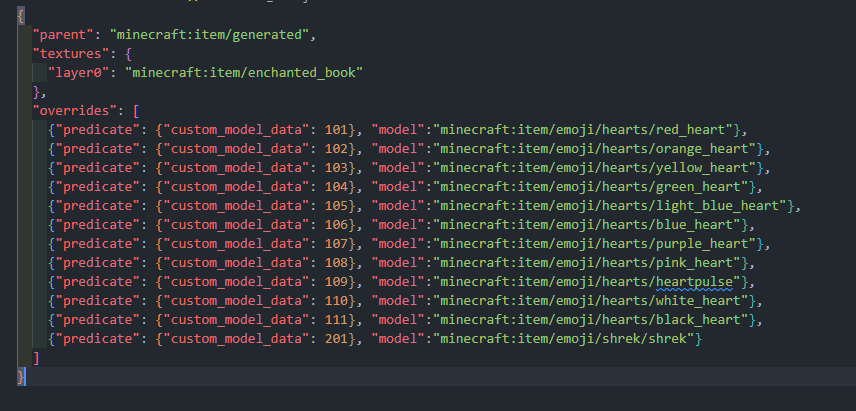
警告:不要在文件路径末尾使用 .json 扩展名,并确保 custom_model_data 按数字顺序递增,否则自定义物品将无法显示
- 最后,只需进入你的服务器并修改
plugins/Emojify/config.yml,如下所示:
config.yml 示例
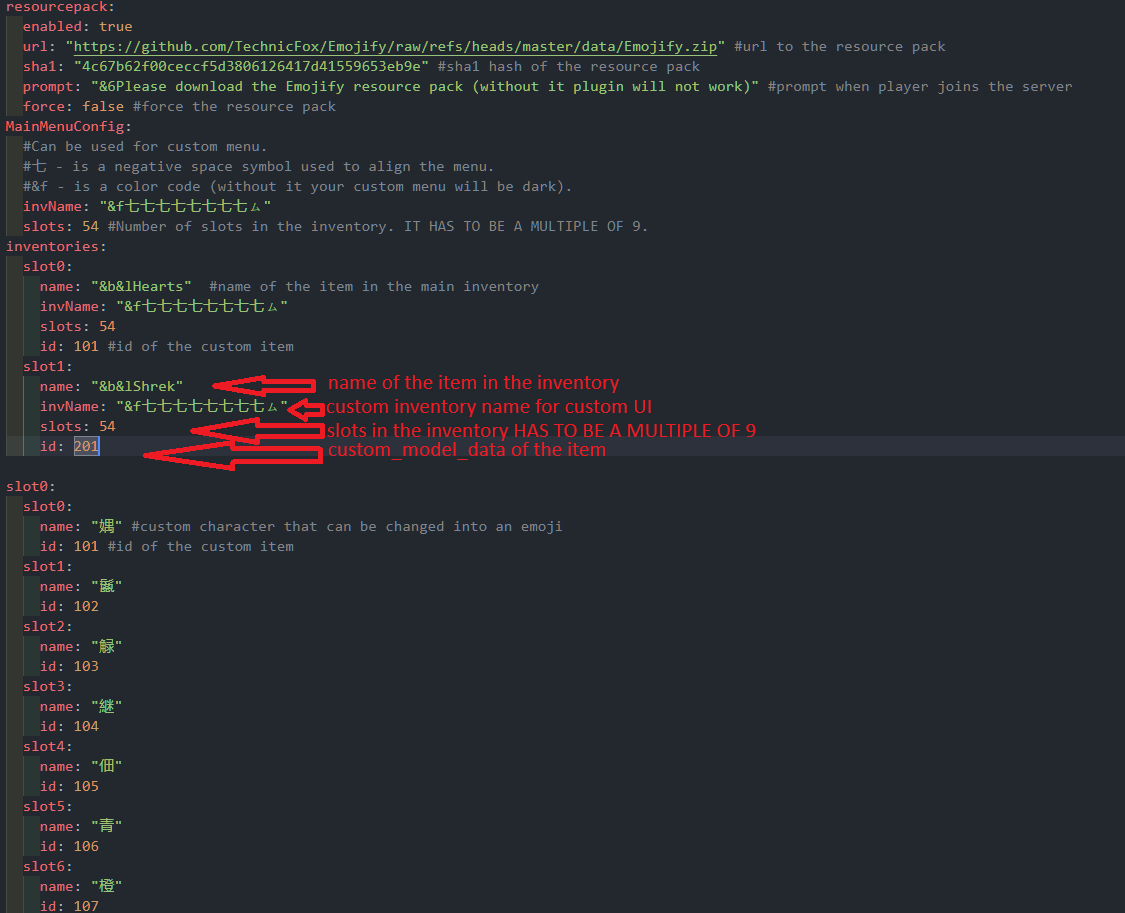
inventories:
  slot0:
    name: "&b&lHearts"  #主物品栏中物品的名称
    invName: "&f七七七七七七七七ㇺ"
    slots: 54
    id: 101 #自定义物品的ID
  slot1:
    name: "&b&lShrek"
    invName: "&f七七七七七七七七ㇺ"
    slots: 54
    id: 201
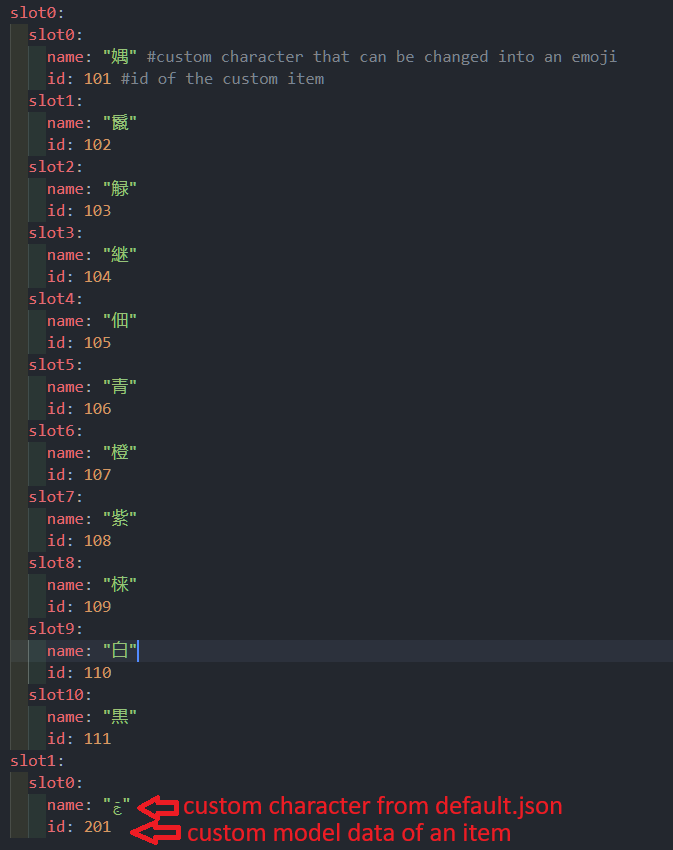
slot1:
  slot0:
    name: "ࢢ"
    id: 201
- 最后一步,将你的资源包压缩为
.zip格式,并上传至 mc-packs.net,然后将 URL 和哈希值填入plugins/Emojify/config.yml中。
上传资源包
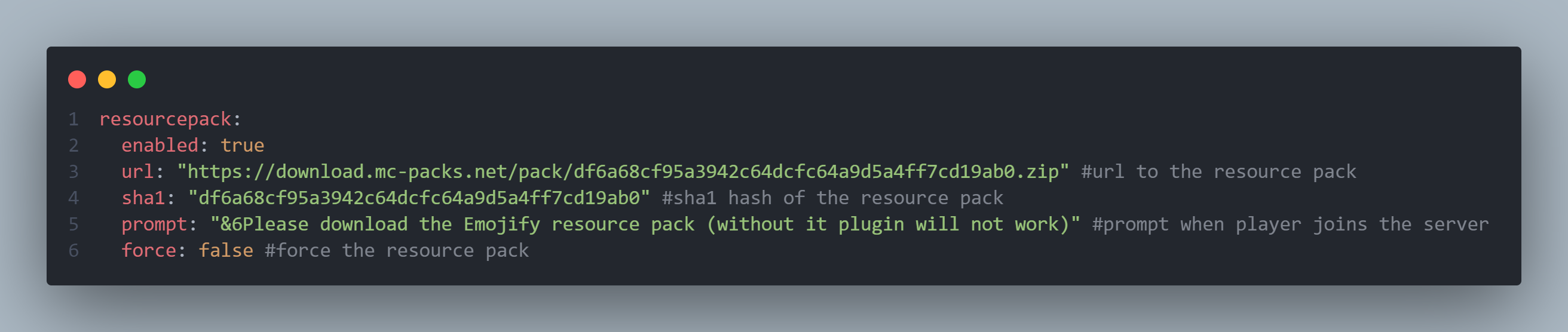
resourcepack:
  enabled: true
  url: "https://download.mc-packs.net/pack/df6a68cf95a3942c64dcfc64a9d5a4ff7cd19ab0.zip" #资源包的URL
  sha1: "df6a68cf95a3942c64dcfc64a9d5a4ff7cd19ab0" #资源包的SHA1哈希值
  prompt: "&6请下载 Emojify 资源包(否则插件将无法正常工作)" #玩家加入服务器时显示的提示
  force: false #强制应用资源包
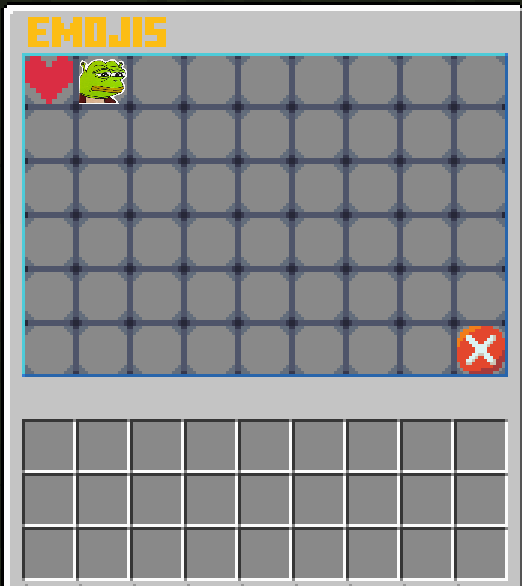
效果展示

常见问题
为什么创建表情符号需要这么长时间?
我知道,我计划开发某种自动化工具来实现这一功能。
我发现了一些错误或故障,或者我有建议!!!
欢迎在 Discord 上通过 TechnicFox 与我分享建议、错误和问题反馈。
你说有自定义界面
我仍在尝试此功能,但目前你可以尝试修改 assets/minecraft/textures/item/guis/upper_section.png

你是这个资源的作者?登录后可认领此资源。
相似资源
 插件

数据包事件PacketEvents
retrooper
PacketEvents 是一款专为 Minecraft Java 版打造的协议库,旨在简化数据包的处理与传输。
前置科技
46
 插件

Beds Always Explode
rabiesland
使床在所有维度中爆炸的模组
诅咒玩法机制
30
 插件
ExyliaLib
ExyliaServices
ExyliaPlugins 的库。
前置实用
26
 插件
ProAuthMeLogin
3623813757
通过对话框或铁砧界面帮助你的 Anthme
实用
16
 插件
可自定义玩家模型
tom5454
自定义你的Minecraft头像!
装饰社交
16
 插件
Vessel
muhdfdeen
重新定义服务器上的生物运输方式。使用高度可定制的口袋道具,安全地捕获、存储和释放任何实体。
生物存储
13
评论 0
登录后参与评分
还没有评论,来抢沙发吧