? Emotify
一种在聊天消息显得过于迟缓时的可视化表达语言。
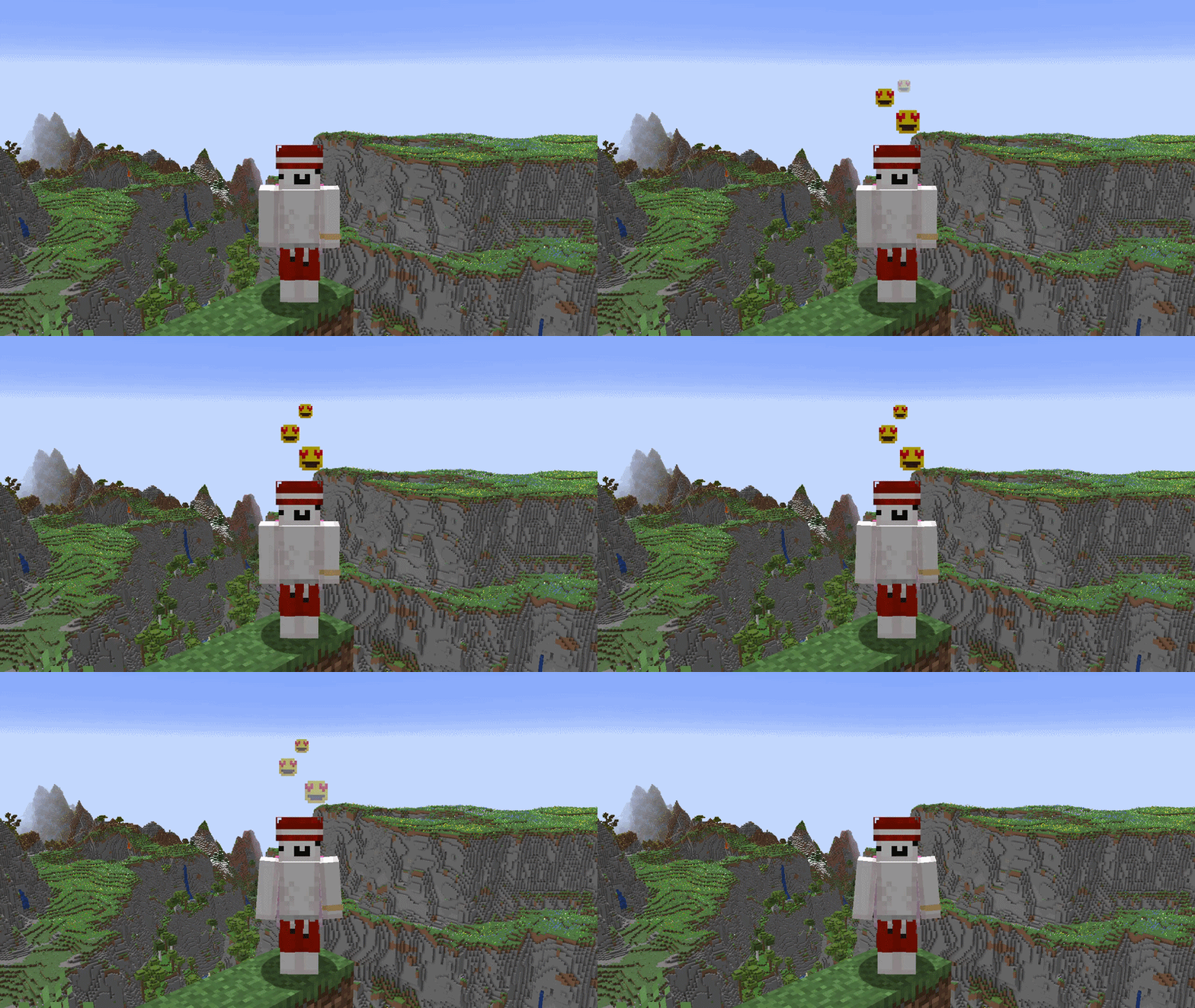
Emotify 会在 Minecraft 玩家头顶添加动画表情,作为发送额外聊天消息或全身动作的快捷、静音替代方案。
NeoForge 和 Fabric 玩家可通过相同的受服务器权威约束的系统,在 NeoForge、Fabric、Paper 和 Purpur 服务器之间共享内置表情和自定义表情。
✨ 功能特性
- 162 种内置表情符号,支持持久收藏。
- 完整的 英文和俄文 本地化支持。
- 支持对表情名称和别名进行本地化搜索。
- 快捷栏表情指示器 — 当发送表情时,一个轻量级且平滑动画的 16×16 预览会出现在你的快捷栏正上方,并与你头顶表情的生命周期同步。
- 九个持久快捷槽,通过拖放分配,并使用顶行数字键或小键盘
1–9 激活。
- 支持来自 PNG、JPG、JPEG 和动态 GIF 文件的 个人自定义表情。
- 在所有支持的客户端和服务器组合间实现 多人自定义表情共享。
- 按住 Shift 并右键点击,可 本地保存 其他玩家的自定义表情。
- 可读性良好的保存文件名,并提供稳定的重复文件血缘保护。
- 四种独特的动画呈现效果:弹性弹出、丝带编织、灯笼释放 和 回声绽放。
- 统一的三秒表情生命周期,包含平滑入场、稳定展示和淡出阶段。
- 平滑的世界空间渲染,跟随站立、蹲下、游泳、睡觉、骑乘和滑翔的玩家。
- 表情会保持在方块后方,并遵循第一人称视角、隐身、旁观者和可见性规则。
- 友好的移动选择器,不会剥夺玩家的控制权。
- 自动刷新:当添加、更改或删除自定义表情文件时自动更新。
- 客户端设置项包括:接收表情、自定义表情、快捷栏反馈指示器、忽略列表玩家、音量以及 减少动态效果。
- 版本化的客户端和服务端配置,具备受限的迁移和备份保护机制。
- 服务端控制的冷却时间、自定义表情限制、可见性过滤、受限负载以及防滥用保护。
Emotify 的视觉风格贴近 Minecraft:可读性强的像素精灵、流畅的动作,以及不会与游戏画面冲突的粒子特效。
?️ 自定义表情符号
将自定义表情符号文件直接放入以下目录:
<游戏目录>/emoji
也可以通过情绪选择器旁边的文件夹按钮打开该文件夹。
支持的静态图片尺寸:
8×816×1632×3264×64128×128
支持的动态 GIF 尺寸:
每个文件大小不得超过 512 KiB。图片不会被缩放,因此不支持的尺寸会被忽略,而不会损失画质。
GIF 文件会自动进行优化。Emotify 可检查最多 300 个源帧,合并冗余帧,保留可见的时间间隔,并生成最多包含 30 个传输帧、15 FPS 以及三秒呈现周期的动画。对于更长的动画,系统会截取部分内容,但不会加速保留的部分。
自定义表情符号会在独立的选取器标签页中显示,支持搜索、添加至收藏夹或分配到九个快捷槽位中的任意一个。兼容的服务器会自动将这些表情符号共享给附近的 Emotify 玩家。
仅传输内容寻址的解码像素、帧持续时间、有限的显示名称以及稳定的来源 ID。原始图像容器、本地路径和图像元数据永远不会离开客户端。
要保存另一位玩家当前使用的自定义表情,按住 Shift 键并在该玩家上方的交互区域右键点击。命中检测使用 Minecraft 正常的方块交互距离,会考虑方块的遮挡,并且无需将准星直接对准移动的精灵动画。
保存操作会复用客户端已缓存的自定义资源,不会发送额外的网络数据包。静态资源以无损 PNG 文件形式存储,动态资源则以标准化循环 GIF 文件格式存储。保存成功时会播放原版拾取音效,并遵循客户端的声音音量设置。
服务器管理员可以禁用自定义表情,或降低允许的最大静态和动态分辨率。
? 兼容性
| 组件 |
支持版本 |
| Minecraft |
1.21.1、1.21.8、1.21.11 以及 26.2 |
| NeoForge |
1.21.1 上为 21.1.234+;1.21.8 上为 21.8.54+;1.21.11 上为 21.11.45+;26.2 上为 26.2.0.59+ |
| Fabric Loader |
0.19.3 或更高版本 |
| Fabric API |
1.21.1 上为 0.116.15+1.21.1;1.21.8 上为 0.129.0+1.21.8;1.21.11 上为 0.141.6+1.21.11;26.2 上为 0.157.0+26.2,或更新且兼容的版本 |
| Fabric Language Kotlin |
1.13.12+kotlin.2.4.0 或更新且兼容的版本 |
| Paper / Purpur |
1.21.1、1.21.8、1.21.11 以及 26.2 |
| Java |
1.21.1–1.21.11 上使用 21;26.2 上使用 25 |
| Kotlin for Forge |
1.21.1 和 1.21.8 上为 5.12.0+;1.21.11 和 26.2 上为 6.3.0+ |
所有支持的平台均使用相同的 Emotify 协议。NeoForge 和 Fabric 客户端可以连接到模组服务端平台,也可以运行插件的 Paper 和 Purpur 服务器。
没有安装 Emotify 客户端的玩家仍然可以正常加入服务器,但他们无法发送或查看表情动作。
重要提示: Emotify 提供独立的 NeoForge、Fabric 和 Paper 版本文件。请仅安装适用于其运行平台的对应文件。
? 安装方法
NeoForge
将 NeoForge 版的 Emotify 文件放入 mods 文件夹。
- 在 1.21.1 与 1.21.8 版本中:需要 Kotlin for Forge
5.12.0 或更高兼容的 5.x 版本。
- 在 1.21.11 与 26.2 版本中:需要 Kotlin for Forge
6.3.0 或更高兼容的 6.x 版本。
同一文件同时支持 NeoForge 客户端、单人游戏以及 NeoForge 专用服务器。
Fabric
将 Fabric 版的 Emotify 文件连同以下模组一起放入 mods 文件夹:
- Fabric API;
- Fabric Language Kotlin。
同一文件同时支持 Fabric 客户端、单人游戏以及 Fabric 专用服务器。
Mod Menu 为可选安装。即使未安装,玩家仍可通过表情选择器访问 Emotify 设置。
Paper 或 Purpur
将 Paper 版的 Emotify 文件放入服务器的 plugins 文件夹。
无需任何额外的服务端依赖。玩家可使用 NeoForge 或 Fabric 版的 Emotify 客户端进行连接。
单个 Paper/Purpur JAR 文件支持 Minecraft 版本 1.21.1、1.21.8、1.21.11 和 26.2。
请勿在同一游戏实例或服务器中安装多个不同平台的 Emotify 文件。
⚙️ 客户端设置
通过表情选择器旁边的齿轮按钮可打开共享设置界面。在安装 Mod Menu 后,也可从 NeoForge 的模组列表或 Fabric 的模组菜单中进入该设置界面。
可用设置包括:
- 显示或隐藏其他玩家的表情;
- 独立显示或隐藏自定义表情;
- 切换快捷栏表情反馈指示器;
- 管理持久的已忽略玩家列表;
- 启用“减少动态效果”(Reduced Motion);
- 调整保存表情的确认提示及后续表情音效的音量。
当禁用接收表情时,您自己发送的表情依然可见。
收藏表情和快捷栏直接在表情选择器中管理。将任意内置或自定义表情卡片拖拽至某个快捷槽位,或在打开选择器时按下对应的数字键即可使用;右键点击已占用的槽位可清空它。
快捷栏与收藏列表是独立存储的。内置表情和自定义表情的分配会在游戏重启后保留。如果本地自定义表情文件被移除,则在完成一次稳定的库刷新后,其对应分配将被清除。若扫描不完整、解码失败、容量限制或目录限制导致加载中断,则现有分配保持不变。
?️ 服务端管理
服务端设置存储在以下位置:
| 平台 |
配置文件 |
| NeoForge |
<world>/serverconfig/emotify-server.toml |
| Fabric |
config/emotify-server.properties |
| Paper / Purpur |
plugins/Emotify/config.yml |
服务器管理员可以配置:
- 是否启用 Emotify;
- 是否允许使用自定义表情;
- 静态与动画自定义表情的最大分辨率;
- 表情冷却时间;
- 表情的允许与禁止名单;
- 可见半径;
- 广播范围与网络入站流量限制。
默认表情冷却时间为 3000 毫秒,对应完整的三秒展示生命周期。
所有服务端格式均使用带版本号的配置架构 1。早期版本中无版本号的合法配置将在启动时自动备份并迁移。未来的配置架构不会被旧版 Emotify 构建覆盖。
NeoForge 和 Fabric 在服务端启动时应用服务端设置。
Paper 和 Purpur 的设置可在不重启服务的情况下应用:
/emotify reload
无效的 Paper 或 Purpur 重载操作将被拒绝,且不会替换当前生效的服务端策略。无效的配置在 Fabric 启动时即会被拒绝。NeoForge 则使用其标准的配置修正行为。
Paper 和 Purpur 权限
| 权限节点 |
默认赋予对象 |
用途 |
emotify.use |
所有人 |
发送表情 |
emotify.receive |
所有人 |
接收表情 |
emotify.admin.reload |
操作员 (Operators) |
重载插件配置 |
该插件使用标准的 Bukkit 权限 API,无需直接集成 LuckPerms。
? 错误报告
请通过 GitHub Issue 追踪器 报告问题。
请包含以下信息:
- Emotify 与 Minecraft 的版本号;
- 客户端加载器与服务端平台类型;
- 相关的客户端和服务端
latest.log 日志片段;
- 清晰的复现步骤;
- 对于视觉类问题,请附带截图或简短录屏。
上传日志前,请移除私人服务器地址、访问令牌及个人隐私信息。
? 素材致谢
捆绑提供的 162 个 8×8 表情素材来自 Happy's Better Emojis,由 Happy_AlexRO 制作。
这些 artwork 未经视觉修改即被采用,仍遵循 Creative Commons Attribution 4.0 International 许可协议。
Emotify 提供了自己的目录、稳定标识符、分类、图集坐标、本地化、动画、用户界面以及多人联机系统。
? 许可证
Emotify 的源代码及原创项目内容基于 MIT License 发布。
捆绑的 Happy's Better Emojis 美术资源仍受 CC BY 4.0 许可约束。
Emotify 是一个独立项目,与 Mojang Studios、Microsoft、NeoForge、Fabric、PaperMC、Purpur、Kotlin for Forge、Happy_AlexRO 或 Happy's Better Emojis 项目无任何隶属关系。
? Emotify
A small visual language for the moments when chat is one message too slow.
Emotify adds animated emotions above Minecraft players: a fast and quiet alternative to another chat message or a full-body emote.
NeoForge and Fabric players can share built-in and custom emotions across NeoForge, Fabric, Paper, and Purpur servers through the same bounded server-authoritative system.
✨ Features
- 162 built-in emojis with persistent favorites.
- Complete English and Russian localization.
- Localized search across emoji names and aliases.
- Hotbar emoji indicator — a lightweight, smoothly animated 16×16 preview appears right above your hotbar when sending an emoji, synchronized with your overhead emotion lifecycle.
- Nine persistent quick slots assigned through drag and drop and activated with the top-row or Numpad
1–9 keys.
- Personal custom emojis from PNG, JPG, JPEG, and animated GIF files.
- Multiplayer custom emoji sharing across all supported client and server combinations.
- Local saving of another player's custom emoji using Shift and right-click.
- Readable saved filenames with stable duplicate-lineage protection.
- Four distinct animated presentations: Elastic Pop, Ribbon Weave, Lantern Release, and Echo Bloom.
- A unified three-second emotion lifecycle with smooth entrance, steady presentation, and fade-out phases.
- Smooth world-space rendering that follows standing, crouching, swimming, sleeping, riding, and gliding players.
- Emotions remain behind blocks and respect first-person, invisibility, spectator, and visibility rules.
- Movement-friendly picker that does not take control away from the player.
- Automatic refresh when custom emoji files are added, changed, or removed.
- Client settings for incoming emotions, custom emotions, hotbar feedback indicator, ignored players, sound volume, and Reduced Motion.
- Versioned client and server configuration with bounded migration and backup protection.
- Server-controlled cooldowns, custom emoji limits, visibility filtering, bounded payloads, and abuse protection.
Emotify keeps its visual language close to Minecraft: readable pixel sprites, smooth motion, and no particle noise competing with gameplay.
?️ Custom emojis
Place custom emoji files directly in:
<game directory>/emoji
The folder can also be opened using the folder button beside the emotion picker.
Supported static image sizes:
8×816×1632×3264×64128×128
Supported animated GIF sizes:
Each file must be no larger than 512 KiB. Images are never resized, so unsupported dimensions are ignored instead of losing quality.
GIF files are optimized automatically. Emotify can inspect up to 300 source frames, merge redundant frames, preserve visible timing, and prepare an animation with up to 30 transmitted frames, 15 FPS, and a three-second presentation cycle. Longer animations are clipped without accelerating the retained portion.
Custom emojis appear in their own picker tab and can be searched, added to favorites, or assigned to any of the nine quick slots. Compatible servers share them automatically with nearby Emotify players.
Only content-addressed decoded pixels, frame durations, a bounded display name, and a stable origin ID are transferred. Original image containers, local paths, and image metadata never leave the client.
To save another player's active custom emotion, hold Shift and right-click the interaction area above the player. The hit test uses the normal Minecraft block-interaction distance, respects block occlusion, and does not require aiming directly at a moving sprite.
Saving reuses the custom asset already cached by the client and sends no additional network packet. Static assets are stored losslessly as PNG files and animated assets as normalized looping GIF files. A vanilla pickup sound confirms successful saving and follows the client sound-volume setting.
Server owners can disable custom emojis or reduce the maximum accepted static and animated resolutions.
? Compatibility
| Component |
Supported version |
| Minecraft |
1.21.1, 1.21.8, 1.21.11, and 26.2 |
| NeoForge |
21.1.234+ on 1.21.1; 21.8.54+ on 1.21.8; 21.11.45+ on 1.21.11; 26.2.0.59+ on 26.2 |
| Fabric Loader |
0.19.3 or newer |
| Fabric API |
0.116.15+1.21.1 on 1.21.1; 0.129.0+1.21.8 on 1.21.8; 0.141.6+1.21.11 on 1.21.11; 0.157.0+26.2 on 26.2, or newer compatible releases |
| Fabric Language Kotlin |
1.13.12+kotlin.2.4.0 or newer compatible release |
| Paper / Purpur |
1.21.1, 1.21.8, 1.21.11, and 26.2 |
| Java |
21 on 1.21.1–1.21.11; 25 on 26.2 |
| Kotlin for Forge |
5.12.0+ on 1.21.1 and 1.21.8; 6.3.0+ on 1.21.11 and 26.2 |
All supported platforms use the same Emotify protocol. NeoForge and Fabric clients can connect to either modded server platform or to Paper and Purpur servers running the plugin.
Players without the Emotify client can still join normally, but they cannot send or see emotions.
Important: Emotify uses separate NeoForge, Fabric, and Paper files. Install only the file intended for the platform on which it runs.
? Installation
NeoForge
Install the NeoForge Emotify file in the mods folder.
- On 1.21.1 & 1.21.8: requires Kotlin for Forge
5.12.0 or a newer compatible 5.x release.
- On 1.21.11 & 26.2: requires Kotlin for Forge
6.3.0 or a newer compatible 6.x release.
The same file supports NeoForge clients, singleplayer, and NeoForge dedicated servers.
Fabric
Install the Fabric Emotify file in the mods folder together with:
- Fabric API;
- Fabric Language Kotlin.
The same file supports Fabric clients, singleplayer, and Fabric dedicated servers.
Mod Menu is optional. Emotify settings remain available through the emotion picker without it.
Paper or Purpur
Install the Paper Emotify file in the server's plugins folder.
No additional server dependencies are required. Players connect using either the NeoForge or Fabric Emotify client.
A single Paper/Purpur JAR supports Minecraft versions 1.21.1, 1.21.8, 1.21.11, and 26.2.
Do not install multiple Emotify platform files in the same game or server instance.
⚙️ Client settings
The shared settings screen is available from the gear button beside the emotion picker. It can also be opened from the NeoForge Mods screen or Fabric Mod Menu when installed.
Available settings include:
- show or hide emotions from other players;
- independently show or hide custom emotions;
- toggle the hotbar emoji feedback indicator;
- manage a persistent ignored-player list;
- enable Reduced Motion;
- adjust the saved-emoji confirmation and future emotion-sound volume.
Your own emotions remain visible when incoming emotions are disabled.
Favorites and quick slots are managed directly in the emotion picker. Drag any built-in or custom emoji card onto a slot, press its number while the picker is open to use it, or right-click a filled slot to clear it.
Quick slots are stored independently from favorites. Built-in and custom assignments persist across game restarts. When a local custom-emoji file is removed, its assignment is cleared after a complete stable library refresh. Incomplete scans, decoding failures, capacity limits, and directory limits preserve existing assignments.
?️ Server administration
Server settings are stored in:
| Platform |
Configuration file |
| NeoForge |
<world>/serverconfig/emotify-server.toml |
| Fabric |
config/emotify-server.properties |
| Paper / Purpur |
plugins/Emotify/config.yml |
Server owners can configure:
- whether Emotify is enabled;
- whether custom emojis are allowed;
- maximum static and animated custom emoji resolutions;
- emotion cooldown;
- emotion allow and deny lists;
- visibility radius;
- bounded broadcast and network ingress limits.
The default emotion cooldown is 3000 milliseconds, matching the complete three-second presentation lifecycle.
All server formats use versioned configuration schema 1. Valid versionless configurations from earlier releases are backed up and migrated automatically. Future configuration schemas are never overwritten by an older Emotify build.
NeoForge and Fabric apply server settings during startup.
Paper and Purpur settings can be applied without restarting:
/emotify reload
Invalid Paper or Purpur reloads are rejected without replacing the active server policy. Invalid Fabric configuration is rejected during startup. NeoForge uses its standard configuration correction behavior.
Paper and Purpur permissions
| Permission |
Default |
Purpose |
emotify.use |
Everyone |
Send emotions |
emotify.receive |
Everyone |
Receive emotions |
emotify.admin.reload |
Operators |
Reload the plugin configuration |
The plugin uses the standard Bukkit permission API and does not require direct LuckPerms integration.
? Bug reports
Report problems through the GitHub issue tracker.
Please include:
- Emotify and Minecraft versions;
- client loader and server platform;
- relevant client and server
latest.log sections;
- clear reproduction steps;
- a screenshot or short recording for visual problems.
Remove private server addresses, access tokens, and personal information before uploading logs.
? Asset credits
The 162 bundled 8×8 emoji assets come from Happy's Better Emojis by Happy_AlexRO.
The artwork is included without visual modification and remains licensed under Creative Commons Attribution 4.0 International.
Emotify provides its own catalog, stable identifiers, categories, atlas coordinates, localization, animations, interface, and multiplayer system.
? License
Emotify's source code and original project material are available under the MIT License.
The bundled Happy's Better Emojis artwork remains subject to CC BY 4.0.
Emotify is an independent project and is not affiliated with Mojang Studios, Microsoft, NeoForge, Fabric, PaperMC, Purpur, Kotlin for Forge, Happy_AlexRO, or the Happy's Better Emojis project.

 插件

 插件
 插件
 插件
 插件

 插件
评论 0
登录后参与评分
还没有评论,来抢沙发吧