
Enderman Grief Control 阻止末影人在保持全局 mobGriefing 游戏规则不变的情况下拾取或放置方块。
为什么使用 Enderman Grief Control?
- 保护建筑与地形: 防止末影人移动你世界中的方块。
- 保留原版机制: 确保村民耕种、羊群吃草以及其他依赖
mobGriefing的行为正常运行。 - 优化刷怪塔: 防止末影人在已清理或已做好防刷处理的区域引入可生成方块的物品,同时阻止持续携带方块的末影人在附近堆积。
- 处理现有的携带方块者: 选择清除、监控或在启用保护时已经携带方块的末影人保持不变。
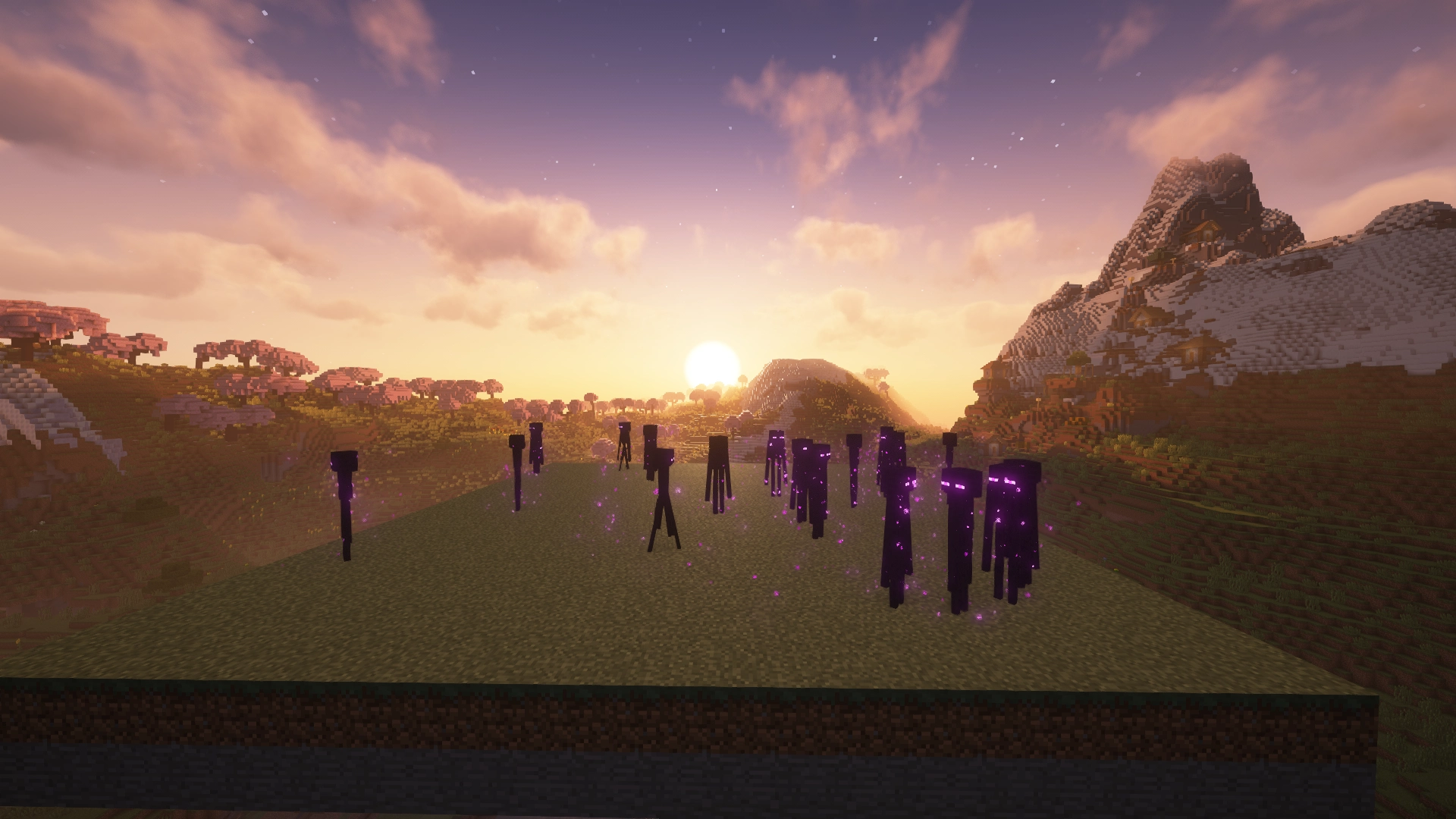
Enderman Grief Control:已启用
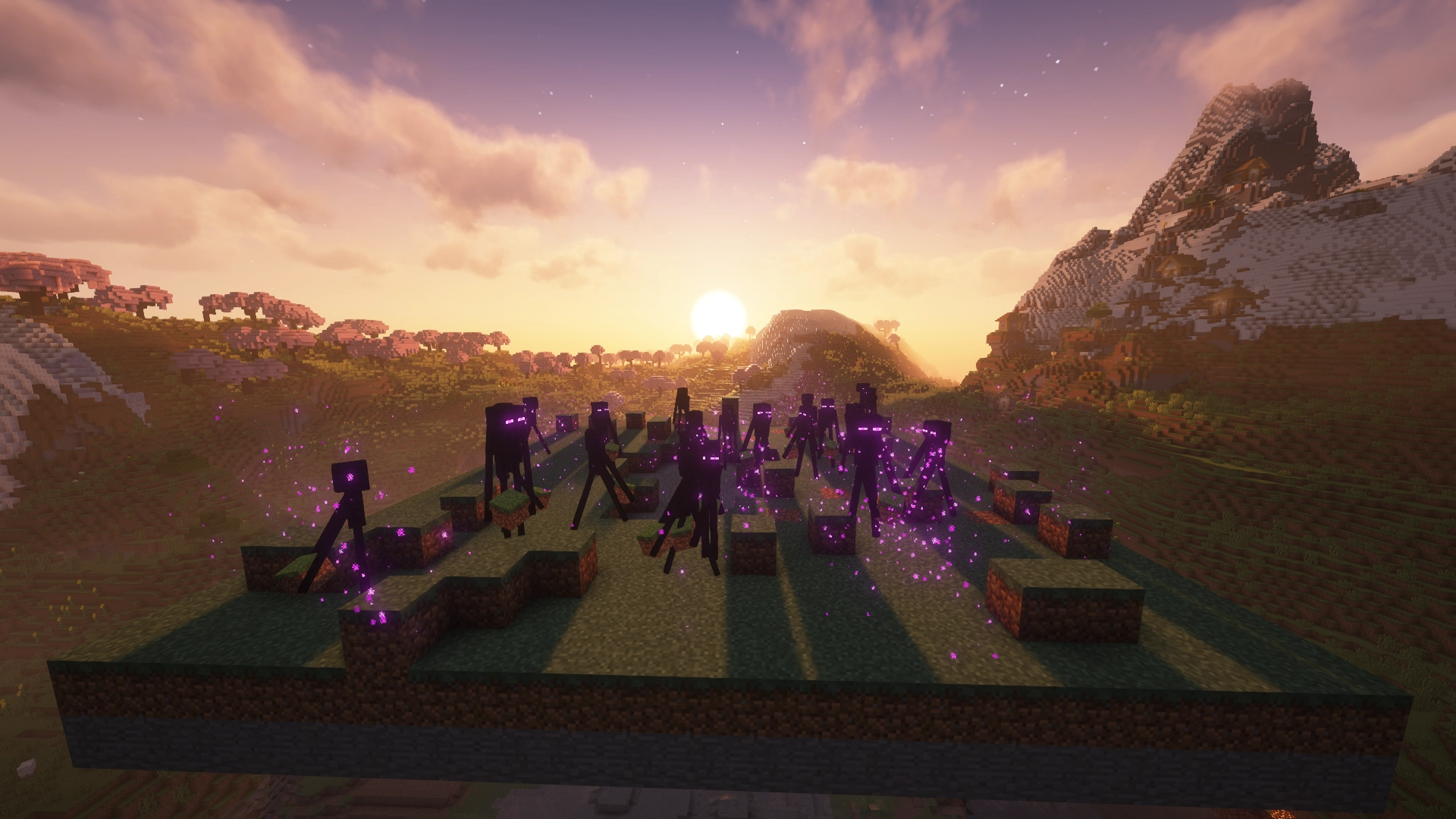
Enderman Grief Control:已禁用
我需要下载哪个版本?
Enderman Grief Control 提供 Paper 和 Fabric 的独立构建版本。请选择与你的环境匹配的文件。
| 你的环境 | 使用版本 |
|---|---|
| Paper 服务器 | Paper 版本 |
| Fabric 服务器 | Fabric 版本 |
| Fabric 单人游戏 | Fabric 版本 |
使用“Versions”选项卡下载与你 Minecraft 版本匹配的构建。
平台特性
- 管理员
/enderman命令用于检查设置、进行修改以及无需重启即可重新加载配置 - 可配置的现有携带方块末影人的处理方式
- 可选的日志记录和针对被阻止尝试及清理携带方块的实时公告
- 命令更改立即生效并自动保存
Paper
- 按世界保护的设置和载体处理方式,带有全局默认值
- 命令补全和服务端控制台支持
Fabric
- 支持单人和专用服务器
- 跨维度的全局设置共享
- 命令参数建议
- 本地世界的常用设置可选 Mod Menu 界面
安装
Paper
- 从 Versions 选项卡下载 Paper 版本。
- 将
.jar文件放入服务器的plugins文件夹中。 - 重启服务器。
Fabric
- 为你的 Minecraft 版本安装 Fabric Loader。
- 从 Versions 选项卡下载 Fabric 版本。
- 将
.jar文件放入你的mods文件夹中。 - 启动游戏或服务器。
不需要 Fabric API。
配置
Enderman Grief Control 默认启用保护功能。无需进行任何配置即可开始保护你的世界。
对于已经携带方块的末影人,auto-clear(默认)会清除末影人持有的方块而不掉落物品,alert 会保留它们并定期报告末影人的坐标,而 off 则不触碰携带者且不发出警报。检查在保护启用期间定期运行,且仅影响已加载的末影人。未加载的区块永远不会被强制加载。
Paper
配置文件位于:
plugins/EndermanGriefControl/config.yml
使用 /enderman 管理按世界保护、载体处理、全局默认值和日志记录。命令需要 endermangriefcontrol.admin 权限(默认授予操作员)。
Fabric
配置文件位于:
config/no-enderman-grief.json
使用 /enderman 管理全局保护、载体处理和日志记录。命令需要等级 2 权限,并在授予适当权限时在单人和专用服务器环境中均可用。
可选的 Mod Menu 界面为本地/集成服务器世界中的常用设置提供了控件。更改通过 Save & Quit 应用;Cancel 会丢弃更改。远程专用服务器通过命令或配置文件进行管理。
手动编辑任一平台的配置文件后,请使用 /enderman reload 或重启游戏/服务器。
默认情况下禁用被阻止的拾取/放置日志记录;启用自动清理携带方块的日志记录。这些设置控制受影响世界/维度中的服务器日志和聊天公告。在 alert 模式下,载体警报独立于日志开关保持激活状态。
消息措辞、颜色以及用于分组拒绝尝试的冷却时间可以在配置文件中自定义。这些选项不会通过命令或 Mod Menu 暴露。
有关可用配置选项的完整参考,请参阅 GitHub documentation。
兼容性
- Paper: 仅支持
Paper服务器。Bukkit、Spigot和Purpur不受官方支持。 - Fabric: 需要
Fabric Loader,可在单人和专用服务器上运行。
源代码、错误反馈与建议
Enderman Grief Control 基于 Apache 2.0 License 开源。
欢迎提交错误报告和建议。
Enderman Grief Control prevents Endermen from picking up or placing blocks while leaving the global mobGriefing gamerule unchanged.
Why use Enderman Grief Control?
- Protect builds and terrain: Keep Endermen from moving blocks around your world.
- Preserve vanilla mechanics: Keep villagers farming, sheep grazing, and other
mobGriefing-dependent behavior working normally. - Optimize mob farms: Prevent Endermen from introducing spawnable blocks into cleared or spawn-proofed areas, while stopping persistent block-carrying Endermen from accumulating nearby.
- Handle existing block-carriers: Choose whether to clear, monitor, or leave Endermen that were already carrying blocks when protection was enabled.
Enderman Grief Control: Enabled
Enderman Grief Control: Disabled
Which download do I need?
Enderman Grief Control has separate builds for Paper and Fabric. Choose the file that matches your setup.
| Your setup | Use |
|---|---|
| Paper server | Paper version |
| Fabric server | Fabric version |
| Fabric singleplayer | Fabric version |
Use the Versions tab to download the build that matches your Minecraft version.
Platform features
- Administrator
/endermancommands to inspect settings, make changes, and reload configuration without restarting - Configurable handling of existing block-carrying Endermen
- Optional logging and in-game announcements for blocked attempts and carried-block cleanup
- Command changes take effect immediately and are saved automatically
Paper
- Per-world protection and carrier-handling settings, with global defaults
- Command tab completion and server console support
Fabric
- Singleplayer and dedicated server support
- Global settings shared across dimensions
- Command argument suggestions
- Optional Mod Menu screen for common settings in local worlds
Installation
Paper
- Download the Paper version from the Versions tab.
- Place the
.jarfile in your server'spluginsfolder. - Restart the server.
Fabric
- Install Fabric Loader for your Minecraft version.
- Download the Fabric version from the Versions tab.
- Place the
.jarfile in yourmodsfolder. - Launch the game or server.
Fabric API is not required.
Configuration
Enderman Grief Control has protection enabled by default. No configuration is needed to start protecting your world.
For existing block-carrying Endermen, auto-clear (default) clears blocks held by Endermen without dropping items, alert preserves them and periodically reports the Endermen's coordinates, and off leaves carriers untouched without alerts. Checks run periodically while protection is enabled and only affect loaded Endermen. Unloaded chunks are never forced to load.
Paper
Configuration is located at:
plugins/EndermanGriefControl/config.yml
Use /enderman to manage per-world protection and carrier handling, global defaults, and logging. Commands require endermangriefcontrol.admin permission (granted to operators by default).
Fabric
Configuration is located at:
config/no-enderman-grief.json
Use /enderman to manage global protection, carrier handling, and logging. Commands require permission level 2 and are available in both singleplayer and dedicated server environments when the appropriate permissions are granted.
The optional Mod Menu screen provides controls for common settings in local/integrated-server worlds. Changes apply through Save & Quit; Cancel discards them. Remote dedicated servers are managed through commands or configuration files.
After manually editing either platform's configuration file, use /enderman reload or restart the game/server.
Blocked pickup/placement logging is disabled by default; automatic carried-block cleanup logging is enabled. These settings control server logs and chat announcements in the affected world/dimension. Carrier alerts remain active in alert mode independently of the logging toggles.
Message wording, colors, and the cooldown used to group denied attempts can be customized in the configuration files. These options are not exposed through commands or Mod Menu.
For a full reference of available configuration options, see the GitHub documentation.
Compatibility
- Paper: Supports
Paperservers only.Bukkit,Spigot, andPurpurare not officially supported. - Fabric: Requires
Fabric Loaderand works in both singleplayer and on dedicated servers.
Source, bugs, and feedback
Enderman Grief Control is open source under the Apache 2.0 License.
Bug reports and feedback are welcome.

下载 Enderman Grief Control
需要联机服务器吗?
稳定流畅、一键部署,几分钟即可和朋友联机开服
最低仅需 8 元/月 即可畅快联机
下载 Enderman Grief Control
需要联机服务器吗?
稳定流畅、一键部署,几分钟即可和朋友联机开服
最低仅需 8 元/月 即可畅快联机
下载 Enderman Grief Control
需要联机服务器吗?
稳定流畅、一键部署,几分钟即可和朋友联机开服
最低仅需 8 元/月 即可畅快联机
下载 Enderman Grief Control
需要联机服务器吗?
稳定流畅、一键部署,几分钟即可和朋友联机开服
最低仅需 8 元/月 即可畅快联机
下载 Enderman Grief Control
需要联机服务器吗?
稳定流畅、一键部署,几分钟即可和朋友联机开服
最低仅需 8 元/月 即可畅快联机
下载 Enderman Grief Control
需要联机服务器吗?
稳定流畅、一键部署,几分钟即可和朋友联机开服
最低仅需 8 元/月 即可畅快联机
下载 Enderman Grief Control
需要联机服务器吗?
稳定流畅、一键部署,几分钟即可和朋友联机开服
最低仅需 8 元/月 即可畅快联机
更新内容
- feat(actions): 限制仅开发者可向 master 分支提交 PR by @Jack-Underhill in
- feat(paper): 添加管理员命令控制 by @Jack-Underhill in
- feat(fabric): 添加 Mod Menu 集成 by @Jack-Underhill in
- feat: 修复末影人卡住持有方块的问题 by @Jack-Underhill in
- feat: 跨平台发布卡住持有者的处理逻辑 by @Jack-Underhill in
- feat(messaging): 改进跨平台公告 by @Jack-Underhill in
- feat(ci): 添加构建和发布自动化 by @Jack-Underhill in
- release: 发布公告及 CI/CD 更新 by @Jack-Underhill in
- fix(ci): 完善发布说明和 Paper CurseForge 发布流程 by @Jack-Underhill in
- fix(ci): 完善发布说明和 Paper CurseForge 发布流程 by @Jack-Underhill in
- 重构发布工作流中的游戏版本处理逻辑 by @Jack-Underhill in
- Release 1.2.0: 更好的公告和 CI/CD 发布 by @Jack-Underhill in
新贡献者
- @Jack-Underhill 在 中完成了首次贡献
完整更改日志:
关于这个资源的讨论、问题反馈与使用心得
还没有讨论,来发第一帖吧
你是这个资源的作者?登录后可认领此资源。
相似资源
 插件
重新定义服务器上的生物运输方式。使用高度可定制的口袋道具,安全地捕获、存储和释放任何实体。
 插件

使床在所有维度中爆炸的模组
 插件
为 Armor Poser 模组添加兼容性
 插件

SkyBlock、OneBlock、Boxed、SkyGrid、AcidIsland、CaveBlock、Poseidon、StrangerRealms——以及更多!这些只是由 BentoBox 支持的基于岛屿的游戏模式之一。来自原版 ASkyBlock 的作者。
 插件
一个高度兼容、功能完善且稳定的 TPA 模组
 插件
AbAcc AbAcc 是一款适用于 Minecraft 服务器的管理插件,可简化玩家作弊检测与举报管理工作。工作人员可以发起并管理对可疑玩家的检查流程,并在检查完成后将其释放。
评论 0
登录后参与评分
还没有评论,来抢沙发吧