
描述
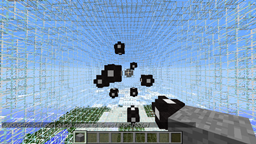
Enders Game 是一款团队迷你游戏,玩家将在零重力环境中飞行,并通过双击空格键蹬离物体来推动自己前进。他们可以使用“闪光枪”进行射击,击杀一名玩家即可将其淘汰出局。一旦玩家蹬离物体后,便无法改变航向,但在此期间仍可射击,同时也可能成为被射击的目标。当某队的一名成员抵达对方队伍的“门”时,该队即获得胜利。
功能特性
- 零重力环境
- 禁用状态下仍可进行旁观
- 玩家退出游戏时自动离开
- 加入告示牌
- 大厅
- 目标门
- 完全自动化
- 权限系统
- 游戏内权限命令与权限管理
- 通过命令进行旁观
- 侧边栏计分板
计划中的功能
- 统计数据(优先开发)
命令
- /eg - 用于加入 Enders Game 加入游戏(需要 joincommand 权限)
- /eg spectate 用于开始/停止旁观 Enders Game 竞技场
- /eg setspawn (red/blue/hub) 用于设置指定队伍或大厅的出生点(需要 setup 权限)
- /eg perm (player) (joinall / joinsign / joincommand / setup / admin / force / *) [可选参数:take/give,若留空则默认为 give] 为指定玩家赋予指定的权限(需要 admin 权限)
- /eg start 强制开始游戏,无论参与者数量多少(需要 force 权限)
关于权限
默认情况下,所有权限均授予管理员(Ops)。但只有 joinsign 权限默认对所有玩家开放。 * 权限允许玩家使用所有 Enders Game 命令。 admin 权限允许玩家使用 /eg perm (player) (permission) (give/take) 命令为其他玩家分配权限。 force 权限允许玩家强制启动游戏。 joinall 权限允许玩家通过任何方式加入游戏。 joincommand 权限允许玩家使用 /eg 命令加入游戏! joinsign 权限允许玩家使用加入告示牌进入游戏。
如何搭建竞技场
- 第一步是构建一个玩家无法逃脱的竞技场,最好是由 Worldedit 生成的空心球体。
- 接下来,使用 /eg setspawn (red|blue|hub) 设置出生点(红色、蓝色和大厅)。
- 第三步是使用冰块(蓝色队伍的门)和下界岩(红色队伍的门)创建队伍的“门”。建议将这些门放置在难以到达的区域,否则游戏会在几秒钟内结束。
- 最后,尽情游玩吧!
如何制作加入告示牌
- 第一行:[Enders Game]
- 就这样!
BungeeCord
有关此插件的 BungeeCord 版本,请参阅 此处。
不兼容重载命令
面向开发者
此链接 将带您前往源代码页面。
Description
Enders Game is a team mini-game where players fly around in zero-gravity and can push off of objects by double clicking space bar to launch themselves. They can shoot with their "flash gun" and killing a player takes them out of the game. Once a player has pushed off, they cannot change course, However, they can shoot during this time and can also be shot. A team wins when one of its members reaches the other team's "gate".
Features
- Zero-Gravity
- Spectating while disabled
- Players automatically leaves game if they quit
- Join Signs
- Lobby
- Gates
- Full Automation
- Permissions
- In-Game permission commands and permissions management
- spectating on command
- Side-Bar Scoreboard
Planned Features
- Stats (first)
Commands
- /eg - used to join Enders Game joins the game (requires joincommand permission)
- /eg spectate used to start/stop spectating the enders game arena
- /eg setspawn (red/blue/hub) used to set the spawnpoint of the specified team or the hub (requires setup permission)
- /eg perm (player) (joinall / joinsign / joincommand / setup / admin / force / *) [optional: take/give, if left blank will default to give] gives the specified player the specified permission (requires admin permission)
- /eg start forces the game to start, no matter how many participants (requires force permission)
About Permissions
All permissions are given, by default, to Ops. But only the joinsign permission defaults to everyone. The * permission gives permission to all Enders Game commands. The admin permission allows the player to give other players permissions using the /eg perm (player) (permission) (give/take) command. The force permission allows the player to forcefully start the game. The joinall permission gives access to any way of joining a game. The joincommand permission allows the player to use the /eg command to join a game! The joinsign permission allow the player to use join signs to enter a game.
How To Set Up An Arena
- The first step is to build an arena from which the players could not escape, preferably a hallow sphere made by Worldedit
- Next, you set the spawnpoints (red, blue, and hub) using the /eg setspawn (red|blue|hub)
- Thirdly, you create the teams "gates" using ice (for blue teams gate) and netherrack (for red teams gate). It would be wise to put these in a hard to reach area, because otherwise the game will be done in a couple seconds.
- Finnally, you enjoy!
How To Make A Join Sign
- Line 1: [Enders Game]
- Thats it!
BungeeCord
For the bungeeCord version of this plugin please see this site.
NOT RELOAD COMPATIBLE
For Developers
This link sends you to the source code page.
下载 Enders Game
下载 Enders Game
下载 Enders Game
下载 Enders Game
下载 Enders Game
下载 Enders Game
下载 Enders Game
下载 Enders Game
下载 Enders Game
下载 Enders Game
修复了盔甲架的问题,现在它们可以正常工作了。我还修复了充电功能,显然之前的几个版本存在故障。
无
关于这个资源的讨论、问题反馈与使用心得
还没有讨论,来发第一帖吧
你是这个资源的作者?登录后可认领此资源。
相似资源
 插件
重新定义服务器上的生物运输方式。使用高度可定制的口袋道具,安全地捕获、存储和释放任何实体。
 插件
用于绘制游戏内地图或在浏览器中随探索实时进行地图绘制的实时地图。
 插件

使床在所有维度中爆炸的模组
 插件
为 Armor Poser 模组添加兼容性
 插件

SkyBlock、OneBlock、Boxed、SkyGrid、AcidIsland、CaveBlock、Poseidon、StrangerRealms——以及更多!这些只是由 BentoBox 支持的基于岛屿的游戏模式之一。来自原版 ASkyBlock 的作者。
 插件
一个高度兼容、功能完善且稳定的 TPA 模组
评论 0
登录后参与评分
还没有评论,来抢沙发吧