EnergyCraft
下载:
最新版本:1.3.0 Beta | 兼容 CB1.5.1-R0.1!
由 R_Shadowhand 制作的 EnergyCraft Reloaded:在此下载
描述
你的箱子里是否堆满了占用空间的杂物?
这个插件可以解决这个问题!
现在,你可以使用“能量冷凝器”将无用的圆石转化为钻石。
我为什么要使用它?
虽然《等价交换》(Equivalent Exchange)中也有能量冷凝器(尽管在新版本中已移除),并且它是 Tekkit 整合包的一部分,但许多人更倾向于在不依赖客户端模组的情况下使用此类功能。本插件允许服务器在不添加任何额外要求的情况下提供此功能,因为它仅使用原版方块和图形。虽然有些人会因直接复制 EE 的功能而批评这一点,但我并不认同。EE 需要客户端模组支持,无论是单人还是多人游戏。本插件并未声称优于 EE,因为许多功能尚未实现。它仅仅是一个可以在原版 Minecraft 中完美运行的替代方案。
功能
- 使用原版方块构建类似《等价交换》中的“能量冷凝器”。
- 使用 EE 的 EMC 值,或自定义你自己的数值!
即将发布一段记录所有最新功能的新视频!
我已经安装了插件,接下来该怎么做?
建造冷凝器
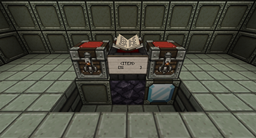
让我们开始建造你的第一个冷凝器吧!
可以建造的冷凝器共有四个等级。
等级越高,转化过程中的能量损耗越少(可配置)
标准冷凝器的合成配方为:
箱子 | 附魔台 | 箱子
铁块 | 黑曜石 | 修饰方块
默认情况下,以下是各等级对应的修饰方块及其损耗率:
| 等级 | 修饰方块 | 损耗率 % |
|---|
| 1 | 金块 | 35% |
| 2 | 绿宝石块 | 25% |
| 3 | 钻石块 | 10% |
| 4 | 信标方块 | 0% |
(修饰方块类型和损耗百分比均可完全配置)
使用方法
要为冷凝器设定目标物品,只需右键点击告示牌或附魔台的任意部分即可。
现在,要让冷凝器运行起来,只需将你希望转化的物品倒入左侧的 INPUT(输入)箱中,然后观看效果吧!
请注意,打开 IN(输入)或 OUT(输出)箱子需要拥有 ec.use 权限,或者拥有该冷凝器的所有权(详见权限部分)
其他事项
当你手中未持有任何物品时,右键点击告示牌/附魔台可以暂停/恢复冷凝器的工作。此状态变化将在告示牌的第四行显示。
如果停止服务器,所有冷凝器的状态将被保存到 "condensers.sav" 文件中,并在服务器启动时重新加载。所有的 EMC 值和物品状态都会被保存。
左键点击告示牌可以重置冷凝器,但前提是你拥有 ec.reset 权限。
对受损工具进行转化只会返回其总 EMC 值的一定比例。
计算公式为:(1 - (damage_value / max_damage)) * EMC_value
将一个受损工具设为目标物将会生成相同损坏程度的工具。如果你想转化出满耐久度的工具,你必须先有一个可用于转化的工具……
命令
'/emc' 会告诉你手中物品的 EMC 价值。这将返回完整的 EMC 值,因此如果你的冷凝器存在能量损耗,该物品的实际产出价值会更低。
'/ec reload' 会在服务器运行时重新加载 EMCConfig 配置文件。这允许你在不停止服务器的情况下编辑配置。一旦执行此命令,所有冷凝器和 /emc 命令的数据都会立即更新。执行此命令需要 "ec.reload" 权限。
权限
| 操作 | 所有者 | 所需权限 |
|---|
| 建造 | 无关紧要 | "ec.build" |
| 编辑 | 是 | 无需权限 |
| 编辑 | 否 | "ec.edit" |
| 打开 | 是 | 无需权限 |
| 打开 | 否 | "ec.use"(见备注) |
| 破坏 | 是 | "ec.build" |
| 破坏 | 否 | "ec.build" AND "ec.edit" |
| 重置 | 无关紧要 | "ec.reset" |
| /ec reload | n/a | "ec.reload" |
| 接收建造/破坏消息 | 无关紧要 | "ec.broadcast" |
“编辑”指的是更改目标方块或暂停冷凝器。本质上,任何右键点击告示牌的操作都属于编辑。
“打开”指的是访问 I/O 箱子。此权限可在配置文件中关闭。
ec.use 权限比较特殊,你可以通过授予用户 ec.use.* 权限使其能够访问任意冷凝器,或者针对特定冷凝器授予权限。
特定冷凝器的权限格式如下:ec.use.[World]:[X]:[Y]:[Z]:[Orientation]
一个特定权限的示例为:ec.use.MyWorld:32:15:-135:2
要查找特定冷凝器的 ID,请检查你的 condensers.sav 文件。其中世界名称、X、Y 和 Z 坐标代表冷凝器中铁块的位置。方向是一个 1-4 的数字,其计算过程过于复杂难以解释。请直接查看 sav 文件!
配置
主配置文件 (config.yml) 包含以下选项:
- check-interval: 1
- max-stack-condense: 4
- permission-to-use: false
- broadcast-messages: true
- level1: 41-35%
- level2: 133-25%
- level3: 57-10%
- level4: 138-0%
check-interval 控制 INPUT 箱子中方块的转化频率。1 = 每 0.25 秒一次。2 = 每 0.5 秒一次,依此类推……
(注意,由于服务器可能会卡顿或运行速度偏离理论值,这不是精确计时)
max-stack-condense 控制当冷凝器中存在额外 EMC 时,输出箱中一次会生成多少物品。
permission-to-use 开启或关闭 ec.use。当此选项为 false 时,用户无需 ec.use 即可访问 I/O。
broadcast-messages 消息仅会向拥有 ec.broadcast 权限的用户广播。如果此选项为 false,则不会广播任何消息。
levels 第一个数字是修饰块(modifier block)的 BlockID,第二个数字是损耗百分比。
EMC 配置文件(emcConfig.yml)为每个物品 ID 提供了选项。
- 值以 'ID-DAMAGE_VALUE': EMC 的形式存储。
- 部分物品以 'ID-A':EMC 的形式存储——这意味着无论损坏值如何,所有具有该 ID 的物品都将拥有相同的 EMC(例如羊毛)。
- 部分物品以 'ID-X':EMC 的形式存储——这意味着该物品可以受损,其 EMC 将根据损坏值按给定 EMC 的百分比进行计算。
注意事项
源代码将在我的 GitHub 上提供
插件创意由 inventorman101 提出,代码由 vsams14 编写
我的其他插件:
EnergyCraft
Downloads:
Newest Version: 1.3.0 Beta | CB1.5.1-R0.1 Compatible!
EnergyCraft Reloaded by R_Shadowhand: Download Here
Description
Do you have tons of random things in your chests that are just taking up room?
This plugin solves that!
Now you can turn your useless cobblestone into diamonds with an "energy condenser".
Why Should I use it?
Although Equivalent Exchange has an Energy Condenser (not anymore), and is included in the tekkit pack, many people would prefer to be able to use such a feature without requiring client-side mods. This plugin will allow a server to have this feature, without any extra requirements, because it will only utilize vanilla blocks/graphics. While some people will flame this for directly copying EE, I disagree. EE requires client mods, whether single or multi-player. This plugin does not claim to be superior to EE, since many features are not implemented. It is simply an alternate that will work just fine in vanilla minecraft.
Features
- Use vanilla blocks to build a Equivalent Exchange-esque "Energy Condenser."
- Use EE's EMC values, or specify your own!
There will be a new video soon documenting all the newest features!
I've Got the Plugin. Now What?
Building The Condenser
Lets get started on building your first condenser!
There are four levels of condensers that can be built.
The higher the level, the less energy is lost through conversion (configurable)
The standard condenser recipe is:
Chest | Enchantment Table | Chest
Iron Block | Obsidian | Modifier Block
By default, here are the modifiers along with loss factors:
| Level | Modifier | Loss % |
|---|
| 1 | Gold Block | 35% |
| 2 | Emerald Block | 25% |
| 3 | Diamond Block | 10% |
| 4 | Beacon Block | 0% |
(Both the modifier block and % loss is fully configurable)
Using it
To set a target for the condenser, just right click the sign, or any part of the enchantment table!
Now, to get the condenser going, just dump anything you want into the INPUT (left) chest, and watch!
Please note, opening either IN or OUT chest requires the permission ec.use, or ownership over the condenser (see Permissions section)
Other Things
You can right click the sign/enchantment table while you're not holding anything to PAUSE/UNPAUSE the condenser. This change will be displayed on line 4 of the sign.
If you stop the server, all condensers will be saved to "condensers.sav", and loaded again upon server start. All EMC and items will be saved.
Left clicking the sign will reset the condenser, but only if you have the permission ec.reset
Condensing a damaged tool will only return a percent of it's total EMC.
(1 - (damage_value / max_damage)) * EMC_value
Setting a damaged tool as a target will create more tools with the same damage level. If you want to condense tools at full health, you must have one available to condense...
Commands
'/emc' will tell you the value of the item in your hand. This will return the FULL EMC value, so if your condenser has energy loss, the item will actually be worth less
'/ec reload' will reload the EMCConfig while the server is running. This allows for editing the config without stopping the server. All condensers and /emc will be updated the moment this command is run. This command requires the perm "ec.reload"
Permissions
| Action | Owner | Needed Perm |
|---|
| Build | Doesn't Matter | "ec.build" |
| Edit | Yes | none |
| Edit | No | "ec.edit" |
| Open | Yes | none |
| Open | No | "ec.use" (see note) |
| Break | Yes | "ec.build" |
| Break | No | "ec.build" AND "ec.edit" |
| Reset | Doesn't Matter | "ec.reset" |
| /ec reload | n/a | "ec.reload" |
| Get build/destroy messages | Doesn't Matter | "ec.broadcast" |
"Edit" means changing the target block, or pausing a condenser. Essentially, any right clicking the sign is an edit.
"Open" means accessing the I/O chests. This perm can be turned off in the config.
ec.use is unique in that you can give a user the ability to access any condenser with ec.use.* or specific condensers.
The perm format for a specific condenser is as follows: ec.use.[World]:[X]:[Y]:[Z]:[Orientation]
An example of a specific perm would be: ec.use.MyWorld:32:15:-135:2
To find the specific ID of a condenser, please check your condensers.sav file. The world, X, Y, and Z points are the location of the Iron block in the condenser. The orientation is a number 1-4, whose calculation is too difficult to explain. Please, just look in the sav file!
Configuration
The main config (config.yml) has the following options:
- check-interval: 1
- max-stack-condense: 4
- permission-to-use: false
- broadcast-messages: true
- level1: 41-35%
- level2: 133-25%
- level3: 57-10%
- level4: 138-0%
check-interval controls how often blocks in the INPUT chest will get condensed. 1 = once every .25 seconds. 2 = once every .5 seconds, etc...
(Note, this is not exact because your server might lag or run slower/faster than it theoretically should)
max-stack-condense controls how many blocks are created at a time in the OUTPUT chest if there is extra EMC in the condenser.
permission-to-use turns ec.use on and off. When this is false, users do not need ec.use to access I/O
broadcast-messages Messages will only be broadcast to users with ec.broadcast. If this is false, no messages will be broadcast at all
levels The first number is the BlockID of the modifier block, and the second is the percent loss.
The EMC config (emcConfig.yml) has a option for every item ID.
- The values are stored as 'ID-DAMAGE_VALUE': EMC
- Some items are stored as 'ID-A':EMC - this means that regardless of the damage value, all items with that id will have the same EMC (like wool)
- Some are stored as 'ID-X':EMC - this means that this item can be damaged, and it's emc will be calculated as a percent of the given EMC, based on damage.
Notes
Source code will be available on my github
Plugin Idea by inventorman101, code by vsams14
My other plugins:

 插件
 插件

 插件
 插件

 插件
 插件
评论 0
登录后参与评分
还没有评论,来抢沙发吧