Enhanced Rails

⚡ 概览
欢迎来到 Enhanced Rails v1.1,这是一款插件,通过令人兴奋的功能彻底改变了你的 Minecraft 轨道系统,从极致的速度到智能自动化。无论你是正在构建复杂的交通网络还是简单的自动物品输送系统,此插件都为矿车旅行带来了全新的功能水平。
Enhanced Rails 在特定条件下修改动力铁轨的行为,显著增加玩家乘坐矿车的速度,并启用自动矿车装载/卸载系统。
✨ 特性
- 极速旅行:将玩家的矿车速度提高多达原版 Minecraft 的 10 倍
- 自动装载/卸载 ✨ V1.1 新增!✨:无需复杂的红石即可创建自动物品运输系统!当矿车载满或为空时会自动发出
- 特殊物品激活:配置稀有物品,玩家必须手持该物品才能激活极速,使其成为完美的任务奖励或 VIP 特权
- 基于方块的激活:或者,当铁轨放置在特定方块上时启用特殊功能,提供可见的基础设施升级
- 智能减速系统:配置特殊方块以自动降低曲线和坡度的速度,防止脱轨
- 可自定义设置:通过全面的配置系统微调所有参数,以匹配你服务器的需求
此插件非常适合用于创建任务奖励、增强交通网络、构建令人兴奋的轨道系统以及在你的 Minecraft 世界中自动化物品运输。
? 要求
- Minecraft 1.21.4+
- Paper 服务器(由于 Paper 最近的硬分叉,纯 Spigot 服务器上的功能无法保证)
- Java 17 或更高版本
注意: 从 1.21.4 版本开始,Paper 创建了硬分叉,不再以 Spigot 作为基础 API。此插件使用最新的 Paper API 构建,可能在纯 Spigot 服务器上无法正常运行。
? 安装
-
下载插件
-
在服务器上安装
- 停止你的服务器(以避免配置冲突)
- 将 EnhancedRails.jar 放入服务器的
plugins/ 文件夹中
- 重启服务器——EnhancedRails 将在
plugins/EnhancedRails/ 中生成默认的 config.yml
-
验证安装
- 检查服务器控制台是否显示:“EnhancedRails is now enabled! Config loaded from [path]”
- 准备就绪!
⚙️ 配置指南
plugins/EnhancedRails/ 中的 config.yml 文件控制所有插件功能。以下是带有解释的默认配置:
极速配置
super-speed:
  enabled: true
特殊物品配置
启用后,仅当玩家在主手持有指定物品时才提供极速。
special-item:
  enabled: true
  material: "TRIAL_KEY"  # 推荐:使用稀有物品
  custom-name: "Super Speed Key"  # 可选的自定义名称要求
特殊方块配置
如果你不喜欢使用特殊物品的方法,你可以基于动力铁轨下方的方块来启用极速。注意:如果启用了 special-item,则忽略本节。
special-block:
  enabled: true
  material: "SMOOTH_STONE"
速度参数
针对不同轨道条件微调速度设置。超出推荐限制的风险自负!
super-speed-parameters:
  flat-speed-multiplier: 2.0  # 最大推荐值:2.0
  flat-max-speed: 4.0  # 最大推荐值:4.0
  slope-speed-multiplier: 1.1  # 必须大于 1.0,最大推荐值:1.1
  slope-max-speed: 1.0  # 最大推荐值:1.0
  max-uphill-velocity: 2.0  # 最大推荐值:2.0
  max-downhill-velocity: 2.0  # 最大推荐值:2.0
减速方块
配置自动降低矿车速度的特殊方块。
slow-down-parameters:
  enabled: true
  block1-material: "GRAVEL"
  block1-max-speed: 0.4  # 0.4 是相对较慢的速度
  block2-material: "SAND"
  block2-max-speed: 0.1  # 0.1 表示极端减速
矿车装载器/卸载器配置
配置新的自动矿车装载/卸载系统(v1.1 新增)。
minecart-loader:
  enabled: true
  # 推力强度应为多少(默认 Minecraft 矿车速度约为 0.4)
  push-strength: 1.0
  # 启用调试日志
  debug: false
  # 特殊方块设置
  special-block:
    enabled: true
    material: "SMOOTH_STONE"
注意: 在进行更改之前,请始终备份你的配置,并避免超过推荐的速度值,以防止出现意外行为。
? 游戏内命令
需要更新设置而不重启?请使用重载命令:
- 命令:
/enhancedrails reload
- 权限:
enhancedrails.use(默认:仅限管理员)
- 用法:
- 编辑
plugins/EnhancedRails/ 中的 config.yml
- 在游戏内或控制台运行
/enhancedrails reload
- 消息“EnhancedRails config reloaded!”确认更改生效
? 矿车装载器/卸载器系统
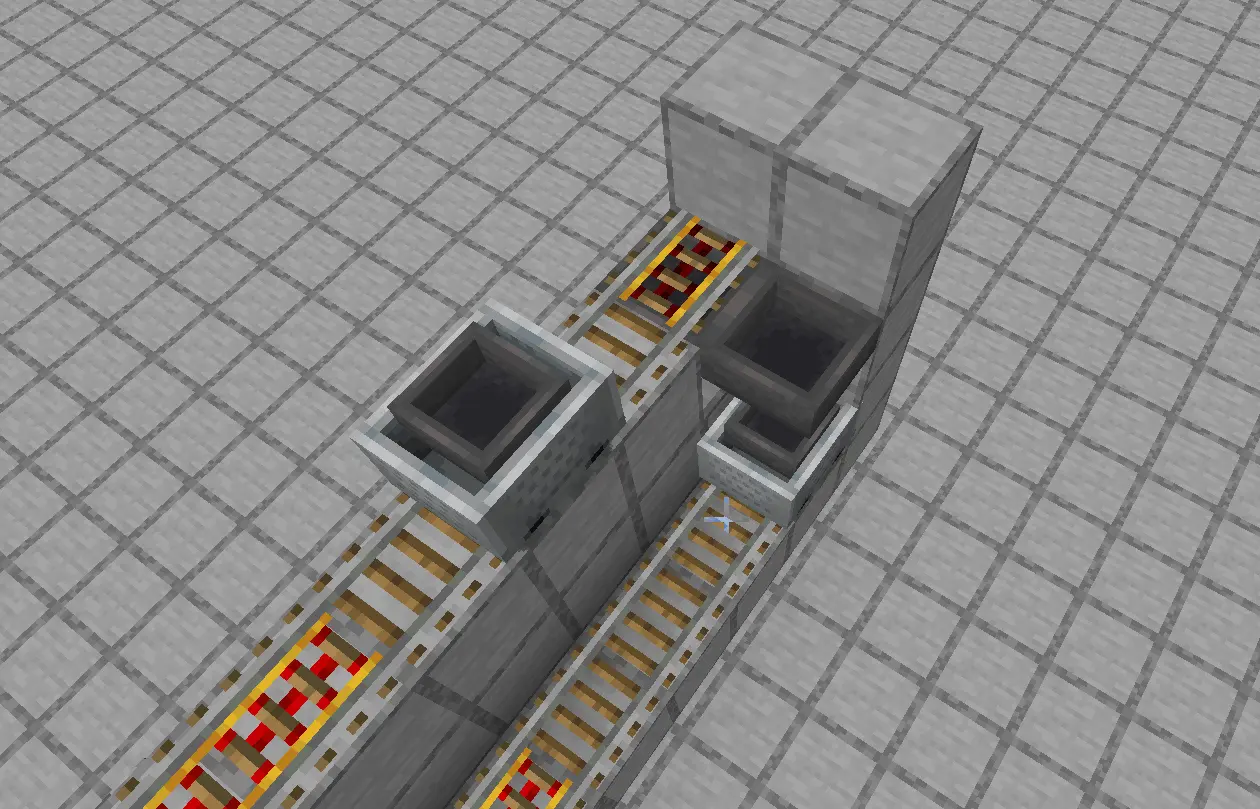 新的矿车装载器/卸载器功能(v1.1)简化了自动物品运输,无需复杂的红石电路,使构建高效的交通网络变得比以往更容易。
矿车装载器设置
装载器系统会在漏斗矿车装满或供应容器为空但矿车内含有物品时自动发出漏斗矿车。
安装要求:
- 在任意方块(漏斗除外)上放置一节充能铁轨
- 将漏斗或箱子直接放置在即将停留的漏斗矿车位置的正上方
- 将漏斗矿车放在充能铁轨上
- 如果您启用了特殊方块功能,请在轨道末端放置已配置的方块
工作原理:
- 当漏斗矿车完全装满(所有槽位均为最大堆叠数量)时,它会自动沿铁轨被推动
- 当上方的容器变空但矿车内仍有物品时,矿车也会被推动
- 如果容器和矿车都为空,矿车将保持静止,等待新物品
卸货站设置
卸载系统会在漏斗矿车转移完所有内容物后,自动将其排空并推送出去。
安装要求:
- 在漏斗上方放置一节充能铁轨
- 确保矿车停留位置的上方没有漏斗或箱子
- 将漏斗矿车放在充能铁轨上
- 如果您启用了特殊方块功能,请在轨道末端放置已配置的方块
工作原理:
- 漏斗矿车会将其内容物倒入下方的漏斗中
- 一旦完全清空,矿车将自动沿铁轨被推动
?️ 轨道设计指南
极速体验虽然刺激,但需要精心规划轨道以防止脱轨。以下是必备的设计技巧:
重要提示: 下文提到的所有减速方块必须直接放置在充能铁轨的正下方。插件通过检测充能铁轨下方的方块类型来确定速度行为。
1. 处理弯道
- 问题:在 4.0 米/刻的速度下,急转弯(90度角)会导致矿车脱轨
- 解决方案:在弯道前放置两节下方垫有砂砾方块的充能铁轨,将车速降至 0.4 米/刻
- 提示:在弯道后的普通方块上添加充能铁轨,以重新加速至极速
2. 管理上坡路段
- 问题:全速接近坡道可能导致反弹或脱轨
- 解决方案:在上坡铁轨前放置两节下方垫有砂砾方块的充能铁轨,将速度降至 0.4 米/刻
- 提示:沿上坡方向连续铺设多节充能铁轨,以实现稳定的攀爬,最高可达 2.0 米/刻
3. 控制下坡路段
- 问题:高速可能导致矿车冲出下降轨道
- 解决方案:在下坡前使用两节下方垫有砂砾方块的充能铁轨以确保安全,允许以受控的 2.0 米/刻速度下坡
- 提示:避免从平地突然过渡到下坡路段
4. 设计装载/卸载车站
- 进站方式:在车站前使用下方垫有沙块(0.1 米/刻)的充能铁轨以实现极端制动
- 车站布局:对于装载站,在充能铁轨上方放置漏斗/箱子;对于卸载站,在下方放置漏斗
- 出站铁轨:确保在装载/卸载点之后有清晰的出站路径,并配备充能铁轨
- 特殊方块:如果使用特殊方块作为矿车加载器,请将其放置在车站轨道的末端
专业提示: 在主世界建造之前,创建一个包含所有常见场景(弯道、上坡、下坡、装载/卸载车站)的测试轨道,以完善您的设计。
❓ 故障排除
| 问题 |
解决方案 |
| 矿车脱轨 |
在弯道或坡道前增加更多减速方块 |
| 极速未生效 |
检查玩家是否手持正确的特殊物品,或铁轨是否放置在正确的特殊方块上 |
| 矿车加载器未激活 |
验证您的设置是否符合要求(漏斗/箱子在上方或下方,若启用则在轨道末端有特殊方块) |
| 满载矿车未被推动 |
检查所有槽位是否均为最大堆叠数量(而非仅仅填满) |
| 配置未应用 |
验证您是否正确使用了重载命令,并检查控制台是否有错误信息 |
| 插件无效 |
确认您使用的是运行 Minecraft 1.21.4+ 版本的 Paper 服务器(而非 Spigot) |
? 支持
如需进一步帮助、提交漏洞报告或功能请求:
Enhanced Rails v1.1 — Making Minecraft transportation better, faster, and more exciting!
© 2025 ElFahja. All rights reserved.
Enhanced Rails
⚡ Overview
Welcome to Enhanced Rails v1.1, a plugin that transforms your Minecraft rail systems with exciting features, from blazing-fast speeds to smart automation. Whether you're building complex transportation networks or simple automated item delivery systems, this plugin brings a new level of functionality to minecart travel.
Enhanced Rails modifies powered rail behavior under specific conditions, significantly increasing minecart speed for players and enabling automated minecart loading/unloading systems.
✨ Features
- Super-Speed Travel: Dramatically increase minecart speeds for players up to 10x faster than vanilla Minecraft
- Automated Loading/Unloading ✨ NEW IN V1.1! ✨: Create automated item transportation systems without complex redstone! Minecarts are dispatched automatically when full or empty
- Special Item Activation: Configure rare items that players must hold to activate super-speed, creating perfect quest rewards or VIP perks
- Block-Based Activation: Alternatively, enable special features when rails are placed on specific blocks, providing visible infrastructure upgrades
- Smart Slowdown System: Configure special blocks that automatically reduce speed for curves and slopes, preventing derailments
- Customizable Settings: Fine-tune all parameters to match your server's needs through a comprehensive configuration system
This plugin is perfect for creating quest rewards, enhancing transportation networks, building exciting rail systems, and automating item transport across your Minecraft world.
? Requirements
- Minecraft 1.21.4+
- Paper server (functionality on pure Spigot servers is not guaranteed due to Paper's recent hard-fork)
- Java 17 or higher
Note: As of version 1.21.4, Paper has created a hard-fork and no longer follows Spigot as a base API. This plugin is built using the latest Paper API and may not function correctly on pure Spigot servers.
? Installation
-
Download the Plugin
-
Install on Your Server
- Stop your server (to avoid config conflicts)
- Place EnhancedRails.jar into your server's
plugins/ folder
- Restart the server—EnhancedRails will generate a default
config.yml in plugins/EnhancedRails/
-
Verify Installation
- Check the server console for: "EnhancedRails is now enabled! Config loaded from [path]"
- You're ready to roll!
⚙️ Configuration Guide
The config.yml file in plugins/EnhancedRails/ controls all plugin features. Below is the default configuration with explanations:
Super Speed Configuration
super-speed:
  enabled: true
Special Item Configuration
When enabled, provides super-speed only when players hold the specified item in their main hand.
special-item:
  enabled: true
  material: "TRIAL_KEY"  # Recommended: use a rare item
  custom-name: "Super Speed Key"  # Optional custom name requirement
Special Block Configuration
If you prefer not using the special item approach, you can enable super-speed based on the block beneath powered rails. Note: This section is ignored if special-item is enabled.
special-block:
  enabled: true
  material: "SMOOTH_STONE"
Speed Parameters
Fine-tune speed settings for different track conditions. Exceed recommended limits at your own risk!
super-speed-parameters:
  flat-speed-multiplier: 2.0  # Max recommended: 2.0
  flat-max-speed: 4.0  # Max recommended: 4.0
  slope-speed-multiplier: 1.1  # Must be greater than 1.0, max recommended: 1.1
  slope-max-speed: 1.0  # Max recommended: 1.0
  max-uphill-velocity: 2.0  # Max recommended: 2.0
  max-downhill-velocity: 2.0  # Max recommended: 2.0
Slowdown Blocks
Configure special blocks that reduce minecart speed automatically.
slow-down-parameters:
  enabled: true
  block1-material: "GRAVEL"
  block1-max-speed: 0.4  # 0.4 is a relatively slow speed
  block2-material: "SAND"
  block2-max-speed: 0.1  # 0.1 for extreme slowdown
Minecart Loader/Unloader Configuration
Configure the new automatic minecart loading/unloading system (new in v1.1).
minecart-loader:
  enabled: true
  # How strong the push should be (default Minecraft minecart speed is around 0.4)
  push-strength: 1.0
  # Enable debug logging
  debug: false
  # Special block settings
  special-block:
    enabled: true
    material: "SMOOTH_STONE"
Note: Always back up your configuration before making changes, and avoid exceeding the recommended speed values to prevent unexpected behavior.
? In-Game Commands
Need to update settings without restarting? Use the reload command:
- Command:
/enhancedrails reload
- Permission:
enhancedrails.use (default: ops only)
- Usage:
- Edit
config.yml in plugins/EnhancedRails/
- Run
/enhancedrails reload in-game or console
- A "EnhancedRails config reloaded!" message confirms the changes
? Minecart Loader/Unloader System
The new Minecart Loader/Unloader feature (v1.1) simplifies automated item transportation without complex redstone circuits, making it easier than ever to build efficient transportation networks.
Minecart Loader Setup
The loader system automatically dispatches hopper minecarts when they're full or when the supply container is empty but the minecart contains items.
Setup Requirements:
- Place a powered rail on any block (not a hopper)
- Position a hopper or chest directly above where the hopper minecart will sit
- Place a hopper minecart on the powered rail
- If you have special block feature enabled, place the configured block at the end of the rail
How It Works:
- When the hopper minecart becomes completely full (all slots at maximum stack size), it will automatically be pushed along the rail
- When the container above becomes empty but the minecart has some items, it will also be pushed
- If both the container and minecart are empty, the minecart remains stationary, waiting for new items
Minecart Unloader Setup
The unloader system automatically dispatches empty hopper minecarts after they've transferred all their contents.
Setup Requirements:
- Place a powered rail above a hopper
- Make sure there is no hopper or chest above where the minecart will sit
- Place a hopper minecart on the powered rail
- If you have special block feature enabled, place the configured block at the end of the rail
How It Works:
- The hopper minecart will empty its contents into the hopper below
- Once completely empty, the minecart will automatically be pushed along the rail
?️ Track Design Guide
Super-Speed is thrilling but requires careful track planning to prevent derailments. Here are essential design tips:
Important: All slowdown blocks mentioned below must be placed directly underneath the powered rails. The plugin detects the block type beneath the powered rail to determine speed behavior.
1. Handling Curves
- Problem: At 4.0 meters/tick, tight 90-degree turns will derail carts
- Solution: Place two powered rails with gravel blocks underneath them before curves to slow carts to 0.4 meters/tick
- Tip: Add powered rails on normal blocks after the curve to re-accelerate to Super-Speed
2. Managing Uphill Slopes
- Problem: Approaching slopes at full speed can cause bounce-back or derailment
- Solution: Place two powered rails with gravel blocks underneath them before ascending rails to reduce speed to 0.4 meters/tick
- Tip: Chain multiple powered rails uphill for a consistent climb that reaches 2.0 meters/tick
3. Controlling Downhill Slopes
- Problem: High speeds can launch carts off descending rails
- Solution: Use two powered rails with gravel blocks underneath them before descent for safety, allowing controlled 2.0 meters/tick downhill travel
- Tip: Avoid sudden transitions from flat to downhill
4. Designing Loading/Unloading Stations
- Station Approach: Use powered rails with sand blocks (0.1 meters/tick) before stations for extreme braking
- Station Layout: For loader stations, place a hopper/chest above the powered rail; for unloader stations, place a hopper below
- Exit Rails: Ensure there's a clear exit path with powered rails after the loading/unloading point
- Special Blocks: If using special blocks for the minecart loader, place them at the end of the station rails
Pro Tip: Create a test track with all the common scenarios (curves, uphills, downhills, loading/unloading stations) to perfect your design before building in your main world.
❓ Troubleshooting
| Problem |
Solution |
| Carts Derailing |
Add more slowdown blocks before curves or slopes |
| Super-Speed Not Working |
Check that players are holding the correct special item or that rails are placed on the correct special blocks |
| Minecart Loader Not Activating |
Verify your setup matches the requirements (hopper/chest above or below, special block at rail end if enabled) |
| Minecart Not Pushing With Full Inventory |
Check that all slots are at maximum stack size (not just filled) |
| Config Not Applying |
Verify you've used the reload command correctly and check console for errors |
| Plugin Not Working |
Confirm you're using a Paper server (not Spigot) running Minecraft 1.21.4+ |
? Support
For further assistance, bug reports, or feature requests:
Enhanced Rails v1.1 — Making Minecraft transportation better, faster, and more exciting!
© 2025 ElFahja. All rights reserved.


 插件
 插件

 插件
 插件

 插件

 插件
评论 0
登录后参与评分
还没有评论,来抢沙发吧