Enhanced Survival
Enhanced Survival 是一款开源的 Paper 插件,专为小型到中型的朋友、家庭或社区服务器(即“两周 Minecraft 阶段”)设计。其目标是让生存游戏体验更加有趣和便捷。
主要功能
您可以在配置文件中关闭您不想使用的功能(见下文)。
导航 (/nav)
您可以使用粒子效果导航至航点或玩家的实时位置。

|
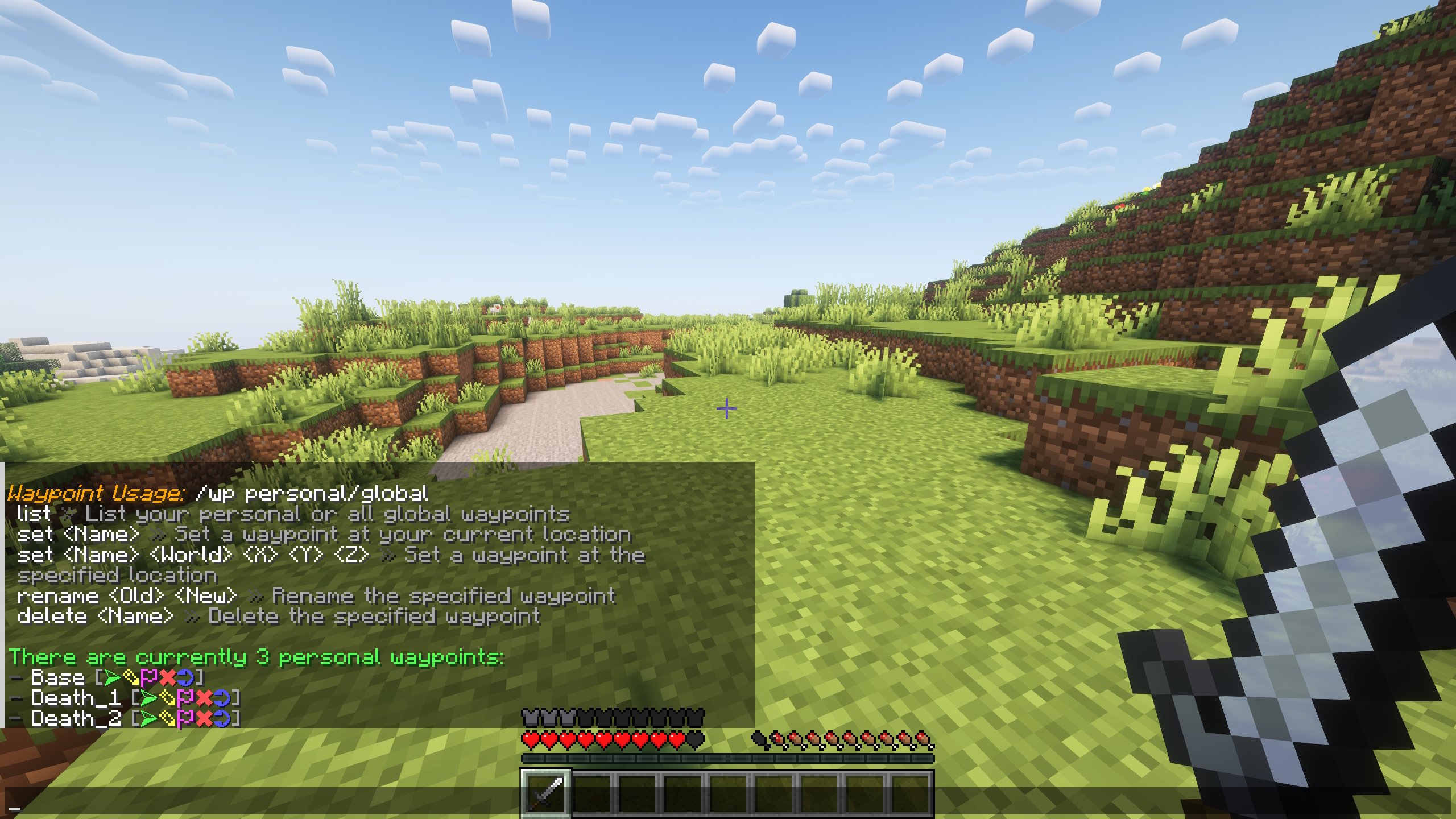
航点 (/wp)
您可以创建仅对您可见的个人航点和与服务器上所有人共享的全局航点,以保存和分享重要地点。
|
背包 (/bp)
您可以制作便携式背包来携带额外物品。合成配方可以在配置文件中调整。

|
墓碑
玩家死亡后会留下一个墓碑,其中存放他们的物品,直到他们破坏该墓碑为止。

|
农田保护
防止因行走或跳跃在农田上而破坏农田(适用于所有实体,例如玩家和村民)。
|
游戏时间追踪器 (/playtime)
追踪并显示每位玩家的总游戏时间。此追踪独立于服务器 TPS 或游戏统计数据,使用的是 UNIX 时间戳。
|
自定义加入/离开消息
设置玩家加入或离开服务器时的自定义消息。
|
自定义聊天格式
为服务器上的所有人配置您喜欢的自定义聊天格式。
|
每日公告 (MOTD)
自定义服务器列表中玩家看到的每日公告。它还可以包含动态值,如服务器版本、天气和时间。
|
垃圾桶 (/trash)
打开一个“垃圾桶”库存界面,这样您就不必把物品丢弃到世界中。关闭后,其中的物品将被移除。
|
合成配方
原木变木棍
需要大量木棍用于村民交易?您可以将两根原木上下放置直接获得木棍,无需先合成木板。
腐肉变皮革
在熔炉中烧炼腐肉以获得皮革。
石英块变石英
将您的石英块合成为石英,以减少所需的存储空间。
|
实用命令
/ping
检查您的延迟。
/lastonline
查看某位玩家上次在线的时间。
/gravestone (仅限管理员)
从任何已保存的墓碑中恢复物品,即使墓碑已被破坏或移除。该命令会打开一个临时库存,其中包含存储在该墓碑中的所有物品。查看此库存不会修改或删除原始墓碑。需要 OP 权限或 enhancedsurvival.admin.gravestone 权限。
|
随时欢迎在 GitHub 或 Discord 上建议新功能或报告错误! :)
安装
- 下载与您 Minecraft 版本对应的最新版的 Enhanced Survival。
- 将
.jar 文件放入服务器的 plugins 文件夹中。
- 重启服务器以激活插件。
支持
Discord:
配置文件
隐藏内容: config.yml
# 使用 MiniMessage 进行消息格式化:
# - 文档:https://docs.advntr.dev/minimessage/index.html
# - 网页编辑器:https://docs.papermc.io/misc/tools/minimessage-web-editor

# 自定义变量以 "v-" 开头,仅在默认消息中使用它们时才在消息中生效。
config:
  # 请勿更改
  version: 57

  # 如果启用,插件将检查是否有更新,并在启动时向控制台发送一条消息
  check-for-updates: true

  # 如果启用,行走或跳跃在农田上时无法破坏农田
  farm-protection: true

  # 如果启用,可以使用 /playtime 查看自己的游戏时间
  # 即使此项关闭,游戏时间也会始终保存
  playtime: true

  # 如果启用,可以使用 /trash 命令快速销毁物品。
  # 当玩家输入 /trash 时,会打开一个空白库存。任何放入
  # 此库存中的物品在玩家关闭它时都会被永久销毁。
  # 此命令有助于在不将物品丢弃到世界中的情况下移除物品。
  trash: true

  # 如果启用,可以使用 /lastonline 命令查看玩家上次在线的时间。
  last-online: true
为自定义玩家加入和离开消息
custom-join-quit-messages:
enabled: false
join: "<green><v-name> <gray>加入了服务器"
quit: "<green><v-name> <gray>离开了服务器"
自定义聊天消息格式
custom-chat-format:
enabled: true
# 如果需要,你也可以在此处使用 v-displayname 代替 v-name。
# 如果你安装了 PlaceholderAPI,你可以使用 "papi:占位符名称" 来指定占位符(%placeholder_name% 不起作用!)
format: "<green><v-name> <dark_gray>» <white><v-message>"
可以使用下方指定的配方制作的背包
可以通过 /backpack (/bp) 命令查看该配方
如果背包被销毁(例如在熔岩中)或丢失,其中的物品也会随之丢失
backpacks:
# 如果禁用背包系统,则无法制作背包
# 并且已有的背包也无法再打开
enabled: true
# 背包的合成配方。
# 定义 3x3 合成网格中每个格子的物品布局。
# 可用的物品名称来自枚举常量摘要:
# https://jd.papermc.io/paper/1.21.3/org/bukkit/Material.html
# 使用 _ 表示留空一个格子。物品之间必须用单个空格 (" ") 分隔。
# 示例:"STRING _ STRING" 表示左右两格为 STRING,中间为空。
# 示例:"_ DIAMOND _" 表示中间格为 DIAMOND,左右为空。
crafting-recipe:
  top-row: "STRING _ STRING"
  center-row: "STICK CHEST STICK"
  bottom-row: "_ DIAMOND _"

# 如果启用,背包物品的名称也将作为背包库存的标题。
# 如果禁用,背包库存的标题将始终为 "Backpack"。
backpack-item-name-as-inventory-title: true

# 如果启用,当背包处于打开状态时,点击另一个背包即可打开它。
# 这允许在库存中更方便地在多个背包之间切换。
allow-inventory-click-to-open: true
recipes:
# 如果启用,可以将腐肉放入熔炉以获取皮革
rotten-flesh-to-leather: true
# 如果启用,石英块可以重新合成为 4 个石英(类似于铁块)
quartz-block-to-quartz: true

# 如果启用,可以通过将两根原木上下叠放来合成木棍,从而不再需要先合成木板
logs-to-sticks: true
gravestones:
# 如果启用,当有人死亡时,会生成一个包含该玩家所有物品的墓碑(营火)。
# 如果墓碑被摧毁,其中的物品将会掉落。
enabled: true
# 墓碑在被自动摧毁且所有物品丢失前的时间(分钟)。
# 设置为 0 可使墓碑保留直到被玩家手动摧毁。
# 稍后启用此功能时,现有的(过期的)墓碑也会被移除。
remove-after-minutes: 20
用于轻松保存坐标的路标。不支持通过此功能进行传送。仅用于保存重要位置。
waypoints:
# 如果启用,可使用 /waypoint (/wp) 命令
enabled: true
# 如果启用,当玩家死亡时会设置一个个人死亡地点路标(例如 "Death_1")
set-waypoint-on-death: true

# 所有玩家共享的全服路标
global-waypoints:
  # 如果启用,可使用全局路标
  enabled: true

  # 如果启用,没有权限 "enhancedsurvival.waypoints.global.admin" 或非 OP 的玩家
  # 只能列出并导航至全局路标,但不能修改它们
  require-permission-to-modify: false
使用 /navigate 命令进行导航,可前往路标、玩家或坐标
navigation:
# 如果启用,可通过 /navigate waypoint ... 导航至路标
# -> 如果路标功能被禁用,则自动禁用此项
# -> 如果全局路标被禁用,则无法导航至这些路标
to-waypoints: true
# 如果启用,可通过 /navigate player ... 导航至玩家
to-players: true

# 如果启用,可通过 /navigate coordinates ... 导航至坐标
to-coordinates: true

# 当到达目的地时应被视为已到达并自动取消导航的距离(方块数)。
# 设置为 0 以关闭此功能。默认值为 4。最大值为 20。推荐值为 4 或更高。
destination-reached-blocks: 4
每日消息(显示在服务器列表中的消息)
motd:
# 如果启用,将显示下方的 motd
# 如果禁用,将显示 server.properties(或其他插件)的默认 motd
enabled: true
# motd 的文本 - 在两行中均可使用 <v-version>、<v-weather> 和 <v-time>
line-one: "<aqua>生存服务器 <light_purple>[<v-version>] <dark_gray>- <yellow>私人服务器"
line-two: "<gray>时间: <v-time> <dark_gray>- <gray>天气: <v-weather>"

# 应显示其天气和时间的世界名称(如果上方使用了相关变量)
world-name: world
</details>

## 贡献代码
欢迎贡献!如需贡献,请访问 [GitHub 仓库](https://github.com/bnt4/EnhancedSurvival)。


项目图标由 [juicy-fish](https://www.flaticon.com/authors/juicy-fish) 提供。
Enhanced Survival
Enhanced Survival is an open-source Paper plugin designed for small to medium-sized friend, family or community servers (the "2-week minecraft phase"). Its goal is to make survival gameplay more enjoyable and convenient.
Key Features
You can turn off things you don't want to use in the config (see below).
Navigation (/nav)
You can navigate to waypoints or the live location of players using particles.
|
Waypoints (/wp)
You can create personal and global waypoints to save and share important locations.
|
Backpacks (/bp)
You can craft portable backpacks to carry extra items. The recipe can be adjusted in the config.
|
Gravestones
On death, players leave a gravestone that holds their items until they break it.
|
Farm Protection
Protects farmland from being destroyed by walking or jumping on it (works for all entities, so for example players and villagers).
|
Playtime Tracker (/playtime)
Tracks and displays each player's total playtime. This tracking is independent of the server TPS or game statistics, it is using UNIX timestamps.
|
Custom Join/Quit Messages
Set custom messages for when players join or leave the server.
|
Custom Chat Format
Configure a custom chat format that you like for everyone on the server.
|
Message of the Day (MOTD)
Customize the message of the day for players in the server list. It can also include dynamic values like the server version, weather and time.
|
Trashcan (/trash)
Open a "trashcan" inventory, so you don't have to drop the items into the world. When closed, the items in it are removed.
|
Crafting Recipes
Logs to Sticks
Need sticks, a lot of sticks, for villager trading? You can place two logs above each other to get sticks directly, so you don't have to craft planks first.
Rotten Flesh to Leather
Burn rotten flesh in a furnace to get leather.
Quartz Block to Quartz
Craft your quartz blocks back to quartz, to reduce the needed storage space for it.
|
Utility Commands
/ping
To check your ping.
/lastonline
To check when a player was last online.
/gravestone (for Admins)
To recover items from any saved gravestone, even if the gravestone has already been destroyed or removed. The command opens a temporary inventory containing all items stored in that gravestone. Viewing this inventory does not modify or delete the original gravestone. Requires OP or the enhancedsurvival.admin.gravestone permission.
|
Feel free to suggest new features or report bugs on GitHub or Discord! :)
Installation
- Download the latest release of Enhanced Survival for your Minecraft Version.
- Place the
.jar file into your server’s plugins folder.
- Restart your server to activate the plugin.
Support
Discord:
Config
Spoiler: config.yml
# Use MiniMessage for message formatting:
# - Documentation: https://docs.advntr.dev/minimessage/index.html
# - Web Editor: https://docs.papermc.io/misc/tools/minimessage-web-editor

# Custom variables start with "v-" and only work in messages if they are used in the default messages.
config:
  # do not change
  version: 57

  # If enabled, the plugin will check if there are updates and send one message to the console on startup
  check-for-updates: true

  # If enabled, farmland cannot be destroyed by walking or jumping on it
  farm-protection: true

  # If enabled, the playtime of yourself can be viewed with /playtime
  # The playtime is always saved, even if this is off
  playtime: true

  # If enabled, the /trash command can be used to destroy items quickly.
  # When a player enters /trash, it opens a blank inventory. Any items placed
  # in this inventory are permanently destroyed when the player closes it.
  # This command is useful for removing items without dropping them in the world.
  trash: true

  # If enabled, the /lastonline command can be used to check when a player was online.
  last-online: true

  # Specify custom join and quit messages for players
  custom-join-quit-messages:
    enabled: false
    join: "<green><v-name> <gray>joined the server"
    quit: "<green><v-name> <gray>left the server"

  # Specify a custom chat message format
  custom-chat-format:
    enabled: true
    # You can also use v-displayname instead of v-name here if needed.
    # If you have PlaceholderAPI installed, you can use "<papi:placeholder_name>" to specify placeholders (%placeholder_name% does NOT work!)
    format: "<green><v-name> <dark_gray>» <white><v-message>"

  # Backpacks that can be crafted using the recipe specified below
  # The recipe can be viewed with the /backpack (/bp) command
  # If a backpack is destroyed (for example in lava) or lost, the items in it are lost
  backpacks:
    # If the backpack system is disabled, backpacks can't be crafted
    # and already existing backpacks can't be opened anymore
    enabled: true

    # The crafting recipe for the backpack.
    # Define the item layout for each slot in the 3x3 crafting grid.
    # Available item names are from the Enum Constant Summary:
    # https://jd.papermc.io/paper/1.21.3/org/bukkit/Material.html
    # Use _ to leave a slot empty. Items must be separated by a single blank space (" ").
    # Example: "STRING _ STRING" means STRING in the left and right slots, empty in the middle.
    # Example: "_ DIAMOND _" means DIAMOND in the middle slot, empty in the left and right.
    crafting-recipe:
      top-row: "STRING _ STRING"
      center-row: "STICK CHEST STICK"
      bottom-row: "_ DIAMOND _"

    # If enabled, the name of the backpack item will also be the title of the backpack inventory.
    # If disabled, the title of the backpack inventory will always be "Backpack".
    backpack-item-name-as-inventory-title: true

    # If enabled, if a backpack is open, another backpack can be clicked to open it.
    # This allows switching between multiple backpacks in the inventory easier.
    allow-inventory-click-to-open: true

  recipes:
    # If enabled, rotten flesh can be put in a furnace to get leather
    rotten-flesh-to-leather: true

    # If enabled, a quartz block can be crafted back to 4 quartz (similar to iron blocks)
    quartz-block-to-quartz: true

    # If enabled, sticks can be crafted by putting 2 logs above each other, so crafting planks first is no longer needed
    logs-to-sticks: true

  gravestones:
    # If enabled, a gravestone (campfire) will spawn if somebody dies that contains all items of the player.
    # The items will drop if the gravestone is destroyed.
    enabled: true

    # The time in minutes after a gravestone is destroyed automatically and all items are lost.
    # Set to 0 to keep the gravestones until they are manually destroyed by a player.
    # When enabling this later, existing (too old) gravestones will also be removed.
    remove-after-minutes: 20

  # Waypoints to save coordinates easily. Teleportation is not possible with this. It's to save important locations.
  waypoints:
    # If enabled, the /waypoint (/wp) command is usable
    enabled: true

    # If enabled, a personal waypoint of the death location is set if a player dies (e.g. "Death_1")
    set-waypoint-on-death: true

    # Waypoints shared across the whole server with all players
    global-waypoints:
      # If enabled, global waypoints can be used
      enabled: true

      # If enabled, players without the permission "enhancedsurvival.waypoints.global.admin" or OP
      # can only list and navigate to global waypoints, but not modify them
      require-permission-to-modify: false

  # Navigation with /navigate to waypoints, players or coordinates
  navigation:
    # If enabled, navigation to waypoints with /navigate waypoint ... is possible
    # -> automatically disabled if waypoints are disabled
    # -> if global waypoints are disabled, navigation to those is not possible
    to-waypoints: true

    # If enabled, navigation to players with /navigate player ... is possible
    to-players: true

    # If enabled, navigation to coordinates with /navigate coordinates ... is possible
    to-coordinates: true

    # Distance in blocks when the destination should be considered as reached and the navigation should be canceled automatically.
    # Set to 0 to turn off. Default is 4. Max is 20. Recommended is 4 or more.
    destination-reached-blocks: 4

  # The message of the day (the message displayed in the server list)
  motd:
    # If enabled, the motd below will be displayed
    # If disabled, the default motd of the server.properties (or of another plugin) will be displayed
    enabled: true

    # The text of the motd - you can use <v-version>, <v-weather> and <v-time> in both lines
    line-one: "<aqua>Survival Server <light_purple>[<v-version>] <dark_gray>- <yellow>Private"
    line-two: "<gray>Time: <v-time> <dark_gray>- <gray>Weather: <v-weather>"

    # The name of the world of which the weather and time should be displayed (if the variables are used above)
    world-name: world
Contributing
Contributions are welcome! To contribute, visit the GitHub Repository.
Project icon by juicy-fish.


 插件

 插件
 插件
 插件
 插件
 插件
评论 0
登录后参与评分
还没有评论,来抢沙发吧