简介
Entei 的库存管理器
使用此插件,您可以管理玩家加入或访问其他世界时加载的库存内容。您可以配置此插件以按世界为每个玩家单独加载其库存,也可以在 config.yml 中设置不同世界对应的库存加载方式。此插件将保存并加载所有当前的 Minecraft 物品,包括附魔物品、自定义名称的物品、带有背景文本(lore)的物品以及书籍。其他可选功能包括:使玩家加载特定的已保存游戏模式;配置库存数据的保存方式(Beta 版)。
功能特性
- 保存的文件是**人类可读的**,这意味着你可以使用其他插件编辑和/或修改它们!
- 保存并加载所有类型的物品数据(书籍、描述、物品名称、伤害值、附魔[包括不安全的附魔]等,应有尽有)!
选择为玩家加载哪些物品栏(按世界单独的物品栏,或共享所有世界的物品栏并可选择排除某些世界)
在需要时保存/加载玩家的普通物品栏
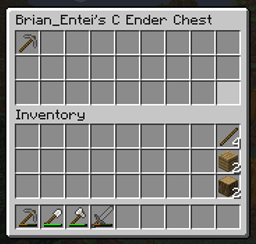
玩家的末影箱(如果玩家有权限,可以通过命令打开;或者玩家可以像平常一样获取末影箱)
每个玩家额外的双箱大小的库存(可以通过命令权限让玩家查看和编辑这些库存)
以上所有功能均支持可选的特定游戏模式独立背包!这意味着,如果玩家在一个世界中处于生存模式,随后以某种方式切换为创造模式或冒险模式,其原游戏模式的背包将被保存,而新游戏模式的背包会被加载/创建!这在冒险地图中非常有用,因为玩家可能需要在不同时间点拥有特定的背包内容。
插件可保存/加载以下内容:
- 按世界独立的背包(每个世界拥有自己的背包)或者
- 合并的世界背包(例如 world_a 和 world_c 可共享一个背包,而 world_b 则单独使用,此设置可在配置文件中调整)
- 状态效果(可选地)随游戏模式和世界背包一同保存,同时经验值、生命值与饥饿值(含饥饿消耗度)也会被保存。
- 拥有相应权限的玩家或管理员可通过游戏内命令操作玩家生命值。
- 玩家的生命值与饥饿值/饥饿饱和度(可选地)可与游戏模式和世界背包一同保存。
此外,我正在开发 /save_inv <自定义名称> 和 /load_inv <自定义名称> 命令,将在 0.52 版本中允许你保存自己的背包、生命值、经验值、饥饿值、饥饿消耗度等数据!当然,这些数据也可按游戏模式和/或世界分别保存。
即将推出的功能
- [版本 0.6] 能够选择允许哪些玩家拥有哪些物品(例如 eim.allowitem.ID.PlayerName 或 eim.denyitem.ID.PlayerName)
- [版本 0.6] 使用游戏内命令来管理谁可以查看你的背包。例如:
- /invperm {give|take} {view|edit} [gamemode] [worldName] {inv|ender|extra} {playerName}
因此,使用该用法时,以下命令将允许 joeBob 查看(仅查看,不可编辑)pvpWorld 世界中 Notch 的生存模式末影箱:
- /invperm give joeBob view survival pvpWorld ender Notch
……而此命令将撤销 joeBob 查看该背包的权限:
- /invperm take joeBob view survival pvpWorld ender Notch
若要允许某人编辑背包,请使用 edit 参数代替 view。
- [版本 0.6] 实现插件 API,以控制在线和离线玩家的已保存背包数据。
例如,以下特定函数将允许你打开未登录玩家的额外箱子:
MainInvClass.openOfflinePlayerInventory(Player targetPlayer, String uuid/playerName, String invType, GameMode gm, World world);
注意:如果你在此插件运行的服务器上测试它,我很乐意与你一起进行测试!如果你想这样做,可以通过 br45entei@gmail.com 联系我、在这里私信我,或在 Google+ 上找到 Brian_Entei。
命令
命令、用法及命令权限均在 plugin.yml 中。以下是该部分的副本:
/eim: 本插件的主命令。
    权限:eim.cmd.use.eim
    用法:/eim {info|save|reload}
    别名:/enteisinventorymanager
/setmaxhealth: 操作员命令,用于增加目标玩家的最大生命值。需要相应权限才能使用。
    权限:eim.cmd.use.setmaxhealth
    用法:/setmaxhealth [target] amount 或 /setmaxhealth -add [target] amount
/view: 允许玩家查看自己或其他玩家的背包、末影箱或额外箱子。
    权限:eim.cmd.use.view
    用法:/view [survival|creative|adventure] {inv|ender|extra} 或 /view {playerName} [survival|creative|adventure] {inv|ender|extra}
/invperm: 让你控制谁可以查看你的背包。
    权限:"eim.cmd.use.invperm"
    用法:/invperm {give|take} {view|edit} {inv|ender|extra|armorinv|armourinv} {playerName} 或 /invperm {give|take} {view|edit} {gamemode} {worldName} {inv|ender|extra|armorinv|armourinv} {playerName} [ownerName]
权限
以下是权限列表,来自 plugin.yml(如果这里看起来混乱,请复制粘贴到 wordpad 中):
permissions:
  eim.*:
    description: "授予与此插件相关的所有权限、命令和能力的访问权限。"
    children:
      eim.cmd.use.eim:
description: "允许使用 /eim 命令。"
eim.cmd.use.view:
description: "允许使用 /view 命令。"
eim.cmd.use.setmaxhealth:
description: "允许使用 /setmaxhealth 命令。"
eim.cmd.use.viewoffline:
description: "允许使用 /viewoffline 命令。"
  eim.cmd.use.invperm:
    description: "允许使用 /invperm 命令。"
  eim.cmd.use.disown:
    description: "允许使用 /disown 命令。"
  eim.cmd.use.claimitem:
    description: "允许使用 /claimitem 命令。"
  eim.view.others:
    description: "允许查看他人的物品栏,前提是对方也授予了相应的权限。"
  eim.view.*:
    description: "允许查看任何人的物品栏(任何类型),无论其权限设置如何。"
    children:
      eim.view.inv.owner.PLAYERNAME:
        description: "允许查看 PLAYERNAME 的物品栏,但仅当启用了按游戏模式和按世界保存模式时被禁用时有效。"
      eim.view.gamemode.GAMEMODE.inv.owner.PLAYERNAME:
        description: "允许查看 PLAYERNAME 的 GAMEMODE 物品栏,但仅当启用了按世界保存模式时被禁用时有效。"
      eim.view.inv.world.WORLDNAME.owner.PLAYERNAME:
        description: "允许查看 PLAYERNAME 在 WORLDNAME 世界中的物品栏,但仅当启用了按游戏模式保存模式时被禁用时有效。"
      eim.view.gamemode.GAMEMODE.inv.world.WORLDNAME.owner.PLAYERNAME:
        description: "允许查看 PLAYERNAME 在 WORLDNAME 世界中 GAMEMODE 的物品栏。"

eim.view.ender.owner.PLAYERNAME:
description: "授予查看 PLAYERNAME 的末影箱的权限,但仅在禁用按游戏模式和按世界保存模式时有效。"
eim.view.gamemode.GAMEMODE.ender.owner.PLAYERNAME:
description: "授予查看 PLAYERNAME 的 GAMEMODE 末影箱的权限,但仅在禁用按世界保存模式时有效。"
eim.view.ender.world.WORLDNAME.owner.PLAYERNAME:
description: "授予查看 PLAYERNAME 在 WORLDNAME 世界中末影箱的权限,但仅在禁用按游戏模式保存模式时有效。"
eim.view.gamemode.GAMEMODE.ender.world.WORLDNAME.owner.PLAYERNAME:
description: "授予查看 PLAYERNAME 在 WORLDNAME 世界中 GAMEMODE 末影箱的权限。"
      eim.view.extra.owner.PLAYERNAME:
        description: "授予查看 PLAYERNAME 的额外箱子的权限,但仅在禁用按游戏模式和按世界保存模式时有效。"
      eim.view.gamemode.GAMEMODE.extra.owner.PLAYERNAME:
        description: "授予查看 PLAYERNAME 的 GAMEMODE 额外箱子的权限,但仅在禁用按世界保存模式时有效。"
      eim.view.extra.world.WORLDNAME.owner.PLAYERNAME:
        description: "授予查看 PLAYERNAME 在 WORLDNAME 世界中额外箱子的权限,但仅在禁用按游戏模式保存模式时有效。"
      eim.view.gamemode.GAMEMODE.extra.world.WORLDNAME.owner.PLAYERNAME:
        description: "授予查看 PLAYERNAME 在 WORLDNAME 世界中 GAMEMODE 额外箱子的权限。"

      eim.view.armor.owner.PLAYERNAME:
        description: "授予查看 PLAYERNAME 的盔甲栏的权限,但仅在禁用按游戏模式和按世界保存模式时有效。"
      eim.view.gamemode.GAMEMODE.armor.owner.PLAYERNAME:
        description: "授予查看 PLAYERNAME 的 GAMEMODE 盔甲栏的权限,但仅在禁用按世界保存模式时有效。"
      eim.view.armor.world.WORLDNAME.owner.PLAYERNAME:
        description: "授予查看 PLAYERNAME 在 WORLDNAME 世界中盔甲栏的权限,但仅在禁用按游戏模式保存模式时有效。"
      eim.view.gamemode.GAMEMODE.armor.world.WORLDNAME.owner.PLAYERNAME:
        description: "授予查看 PLAYERNAME 在 WORLDNAME 世界中 GAMEMODE 盔甲栏的权限。"

  eim.edit.others:
    description: "授予编辑他人物品栏的权限,前提是该人也拥有相应的权限。"
  eim.edit.*:
    description: "授予编辑任何人(任何类型)物品栏的权限,无论其是否拥有相应权限。"
    children:
      eim.edit.inv.owner.PLAYERNAME:
        description: "授予查看 PLAYERNAME 的物品栏的权限,但仅在禁用按游戏模式和按世界保存模式时有效。"
      eim.edit.gamemode.GAMEMODE.inv.owner.PLAYERNAME:
        description: "授予查看 PLAYERNAME 的 GAMEMODE 物品栏的权限,但仅在禁用按世界保存模式时有效。"
      eim.edit.inv.world.WORLDNAME.owner.PLAYERNAME:
        description: "授予查看 PLAYERNAME 在 WORLDNAME 世界中物品栏的权限,但仅在禁用按游戏模式保存模式时有效。"
      eim.edit.gamemode.GAMEMODE.inv.world.WORLDNAME.owner.PLAYERNAME:
        description: "授予编辑 PLAYERNAME 在 WORLDNAME 世界中 GAMEMODE 物品栏的权限。"

      eim.edit.ender.owner.PLAYERNAME:
        description: "授予查看 PLAYERNAME 的末影箱的权限,但仅在禁用按游戏模式和按世界保存模式时有效。"
      eim.edit.gamemode.GAMEMODE.ender.owner.PLAYERNAME:
        description: "授予查看 PLAYERNAME 的 GAMEMODE 末影箱的权限,但仅在禁用按世界保存模式时有效。"
      eim.edit.ender.world.WORLDNAME.owner.PLAYERNAME:
        description: "授予查看 PLAYERNAME 在 WORLDNAME 世界中末影箱的权限,但仅在禁用按游戏模式保存模式时有效。"
      eim.edit.gamemode.GAMEMODE.ender.world.WORLDNAME.owner.PLAYERNAME:
        description: "授予编辑 PLAYERNAME 在 WORLDNAME 世界中 GAMEMODE 末影箱的权限。"

      eim.edit.extra.owner.PLAYERNAME:
        description: "授予查看 PLAYERNAME 的额外箱子的权限,但仅在禁用按游戏模式和按世界保存模式时有效。"
      eim.edit.gamemode.GAMEMODE.extra.owner.PLAYERNAME:
        description: "授予查看 PLAYERNAME 的 GAMEMODE 额外箱子的权限,但仅在禁用按世界保存模式时有效。"
      eim.edit.extra.world.WORLDNAME.owner.PLAYERNAME:
        description: "授予查看 PLAYERNAME 在 WORLDNAME 世界中额外箱子的权限,但仅在禁用按游戏模式保存模式时有效。"
      eim.edit.gamemode.GAMEMODE.extra.world.WORLDNAME.owner.PLAYERNAME:
        description: "授予编辑 PLAYERNAME 在 WORLDNAME 世界中 GAMEMODE 额外箱子的权限。"

eim.edit.armor.owner.PLAYERNAME:
description: "授予查看 PLAYERNAME 盔甲库存的权限,但仅在禁用按游戏模式和按世界保存模式时有效。"
eim.edit.gamemode.GAMEMODE.armor.owner.PLAYERNAME:
description: "授予查看 PLAYERNAME 盔甲库存的权限,但仅在禁用按世界保存模式时有效。"
eim.edit.armor.world.WORLDNAME.owner.PLAYERNAME:
description: "授予在 WORLDNAME 世界中查看 PLAYERNAME 盔甲库存的权限,但仅在禁用按游戏模式保存模式时有效。"
eim.edit.gamemode.GAMEMODE.armor.world.WORLDNAME.owner.PLAYERNAME:
description: "授予在 WORLDNAME 世界中编辑 PLAYERNAME 的 GAMEMODE 盔甲库存的权限。"
下载
所有文件的下载链接:http:dev.bukkit.org/bukkit-plugins/enteis-inventory-manager/files/
下载最新文件(zip):http:dev.bukkit.org/bukkit-plugins/enteis-inventory-manager/files/11-1-7-2-enteis-inventory-manager-v0-5-zip/
安装
只需将 jar 文件和“Entei's Plugin Library.jar”从下载链接拖入服务器的 plugins 文件夹即可。
请务必下载最新的 .zip/jar 文件以获取所有必需的文件!
配置
config.yml 文件模板如下,请确保遵循此格式:
# 重要!请确保此 config.yml 文件的版本设置与插件版本匹配!
version: "0.5"
这允许在使用插件时将调试消息发送到控制台。
可能会向控制台发送大量消息造成刷屏。
默认值:false
showDebugMsgs: false
如果您不希望任何世界共享库存,请启用此项;
如果希望共享,请禁用此项。
启用此项将完全禁用“库存列表部分”。
默认值:true
worldsHaveSeparateInventories: true
这告诉插件您希望每个世界的玩家库存
按游戏模式分离。
设置为 true:库存将同时按游戏模式以及您的
“worldsHaveSeparateInventories”设置进行分离。
设置为 false:默认为 Minecraft 行为(忽略游戏模式)
以及您的“worldsHaveSeparateInventories”设置。
默认值:false
loadByGameMode: false
以下是新功能,允许您识别物品属于哪个玩家。如果要启用此功能,
请设置“enableItemOwnership: true”。
如果您希望在登出或服务器重启后保存物品的所有权,
请设置“saveItemOwnership: true”。
如果您希望将物品设为获得该物品的玩家的所有物(即使
该物品原本属于其他人),请设置“overwriteItemOwnershipOnObtain: true”。将此设置设为 false
并将前两项设置设为 true,将使所有物品拥有永久性的
所有权设置,直到该物品被合成、使用或销毁。丢弃物品(或携带它死亡)不会重置
所有权,因此死亡的玩家会在其物品中留下所有权证明,
这样如果有其他玩家来拾取,您可以
设置“allowItemStealing: false”以防止该玩家‘偷窃’。
注意,设置“overwriteItemOwnershipOnObtain: true”将
禁用“allowItemStealing”设置(自动将其设为 true)。
设置“removeOwnerOnClick: true”可使插件在您在任何
库存界面中使用光标拾取物品时移除您对物品的所有权
(将其放入自己的库存时会自动重新分配)。
“removeOwnerOnClick”在您需要轻松进行大量掉落活动时非常有用。
设置“autoItemOwnership: true”可使放置或以其他方式进入玩家库存的物品成为其所有物。请注意,这与
“overwriteItemOwnershipOnObtain”设置不同,因为这里不会覆盖
其他玩家的所有权。
如果您希望玩家必须使用“/claimitem”命令,请将“autoItemOwnership: false”。
默认值:false
enableItemOwnership: false
默认值:true
saveItemOwnership: true
默认值:false
overwriteItemOwnershipOnObtain: false
默认值:false
allowItemStealing: false
默认值:false
removeOwnerOnClick: false
默认值:false
autoItemOwnership: false
================================================================================
这是发送给命令执行者的消息,如果
他们没有权限使用他们输入的命令。
默认值:“You do not have permission to use this command.”
noPermission: "You do not have permission to use this command."
这允许您设置是否随玩家库存一起保存和加载玩家经验等级。
默认值:true
manageExp: true
这允许您设置是否随玩家库存一起保存和加载玩家生命值。
默认值:true
manageHealth: true
这允许您设置是否随玩家库存一起保存和加载玩家药水效果。
默认值:true
manageEffects: true
此选项允许插件每 30 秒自动更新并保存所有在线玩家的状态效果,以防止他们试图利用服务器漏洞获取更长的效果持续时间。
请注意,这可能会增加对硬盘的读写操作,
如果长时间开启(极端情况下),可能导致硬盘最终损坏。
你可以将此设置为 true,然后通过以下命令在控制台中关闭它:
"/eim deactivate30sectimer",或者输入 "/eim activate30sectimer"
以重新激活该功能。
仅当 "manageEffects" 设置为 true 时,此功能才生效。
默认值:false
updatePlayerPotionEffectsEvery30Seconds: false
此选项用于设置是否将玩家的饥饿值和饥饿饱和度等级
随玩家物品栏一起保存和加载。
默认值:true
manageHunger: true
此选项设置默认情况下是否允许任何玩家查看和编辑他们的额外
箱子物品栏。(使用的命令为:"/view extra")
默认值:false
ownerCanEditExtraChestByDefault: true
物品栏列表部分 ------------------------------------------
这是下方显示的列表数量。
将此数值设置为低于你设定的列表总数,
会导致插件忽略超出此数量的后续列表。
另一方面,如果将此数值设置为高于下方实际列出的列表数量,
插件会报错,提示你没有列出超过实际设定数量的每个列表。
numberOfLists: 2
按以下格式输入你的世界名称:
#list_#: "world1Name|world2Name"
(其中 '#' 是列表的编号,从 1 开始,按照从上到下的顺序排列,
直到列表的总数量。
示例:
#list_1: "pvpWorld|arenaSpleefWorld"
#list_2: "spawnWorld|survivalWorld"
list_1: "world_a|world_c"
list_2: "world_b"
依赖要求
必需:Entei's Plugin Library(为方便起见,也包含在 .zip 文件中)
注意:首次安装插件库后,除非在主插件更新的版本说明中明确指出,否则你通常不需要在发布主插件更新时更新该库。这样可以减少我每次更新插件时你需要处理的大量文件。
可选:Vault(用于使用非常棒的 /invperm 命令,该命令允许玩家互相共享他们的物品栏!)
备注
这是一个相对较新的插件,它基于我自己 recently 创建的 awesome 作为其核心基础。希望你觉得它有用!
注意:“Entei's Plugin Library.jar” 本身没有任何独立功能,正如它的名字所暗示的那样——它是一个库。本插件需要它才能正常运行,因为我目前还有其他正在开发的插件也使用了相同的资源,因此我决定保持简洁,在我的项目中使用插件库。
注意:此插件很可能会破坏或干扰其他管理物品栏的插件,或产生奇怪的错误!如果你希望我添加另一个导致问题的插件所具备的功能,欢迎在主页面留言或通过电子邮件联系我:br45entei@gmail.com,我会尽快回复你!
源代码
注意:Github 上的源代码目前已过时。
本插件的源代码仓库可在此处找到。
InventoryAPI 的源代码可在此处找到。
如果你使用了本插件的源代码,请务必给予我署名!Bukkit 论坛上有专门关于 InventoryAPI 的页面:这里。
拉取请求 (Pull Requests)
你可以查看此页面以获取更多有关拉取请求的信息。感谢你的贡献!
调试
如果你想提供帮助,或者只是出于好奇,你可以在 config.yml 中添加 "showDebugMessages: true",使插件在工作时输出各种详细的信息。但是请注意,在有两名以上玩家在线的服务器上,调试信息可能会导致服务器卡顿甚至崩溃!
感谢你浏览此页面,希望你喜欢我的作品!
Introduction
Entei's Inventory Manager
With this plugin, you can manage what inventory is loaded for your players when
they join/visit another world. You can configure this plugin to load the individual players' inventory for each world, or you can set up what inventory is loaded for which world in the config.yml. This plugin will save and load all current Minecraft items, such as enchanted items, items with custom names, items with lore, and books. Other optional features include: Make players load certain saved gamemodes; Configure how the inventory data is saved(Beta)
Features
- Saved files are HUMAN READABLE, meaning you can edit them and/or modify them with another plugin!
- Saves and loads all kinds of item data(Books, lores, item names, damage values, enchantments[unsafe ones too!], you name it, we got it covered!)
- Choose what inventories are loaded for the player(per world inventories, or shared-world inventories with certain worlds excluded optionally)
- The players' normal inventory will be saved/loaded when necessary
- The players' enderchest(can be opened with a command, if the player has permission, or the player can obtain an enderchest like normal)
- Extra double-chest sized inventories per-player(players can be given permission for a command to view and edit these)
- ALL of the above features with optional gamemode-specific inventories! This means that you could have players in survival on one world, then they somehow obtain creative or adventure, and their inventory for their old gamemode is saved, and their new gamemode is loaded/created! This would be useful for adventure maps, when players only need to have certain inventories at certain times.
- Plugin can save/load the following:
- Per-world inventories(each world has its own inventory) OR
- Combined world inventories(world_a and world_c could share an inventory, whilst world_b would be all alone, this is configurable)
- Effects are saved(optionally) with gamemode and world inventories, as well as experience, health & hunger(&food exhaustion).
- Player health is able to be manipulated via commands in game by a player with permission or an operator.
- Player health and hunger/hunger_saturation can be (optionally)saved along with gamemode and world inventories.
Also, I'm working on a /save_inv <custom_name> and /load_inv <custom_name> that will allow you to save your inventory, health, exp, hunger, hunger exhaustion level, etc. for Version 0.52! All optionally per-gamemode and/or per world, of course.
Upcoming Features
- [Version 0.6]Ability to choose what players are allowed to have what item(for example, eim.allowitem.ID.PlayerName or eim.denyitem.ID.PlayerName)
- [Version 0.6]Use an in-game command to help handle who can view your inventory. For example:
- /invperm {give|take} {view|edit} [gamemode] [worldName] {inv|ender|extra} {playerName}
So, with that usage, the following command would allow joeBob to view(only view, not edit) Notch's survival ender chest for the world 'pvpWorld':
- /invperm give joeBob view survival pvpWorld ender Notch
...and this would take joeBob's ability to view that inventory away again:
- /invperm take joeBob view survival pvpWorld ender Notch
To allow someone to edit an inventory, use the edit argument instead of the view one.
- [Version 0.6]Plugin API to be implemented allowing control of online and offline player's saved inventory data.
For example, this function in particular would allow you to open the extra chest of someone who is not logged on:
MainInvClass.openOfflinePlayerInventory(Player targetPlayer, String uuid/playerName, String invType, GameMode gm, World world);
Note: If you run a server with this plugin, I'd love to test it out with you! If you would like to do this, you can contact me @ br45entei@gmail.com, pm me here, or find Brian_Entei on Google+.
Commands
Commands, usages, and command permissions are in the plugin.yml. Here is a copy of that section:
/eim: Master command for this plugin.
    Permission: eim.cmd.use.eim
    Usage: /eim {info|save|reload}
    Aliases: /enteisinventorymanager
/setmaxhealth: Operator's command to increase the amount of health target player can have. Requires permission to use.
    Permission: eim.cmd.use.setmaxhealth
    Usage: /setmaxhealth [target] amount OR /setmaxhealth -add [target] amount
/view: Allows players to view either their own or another players: inventory, enderchest, or extra chest inventory.
    Permission: eim.cmd.use.view
    Usage: /view [survival|creative|adventure] {inv|ender|extra} or /view {playerName} [survival|creative|adventure] {inv|ender|extra}
/invperm: Lets you control who can view your inventories.
    Permission: "eim.cmd.use.invperm"
    Usage: /invperm {give|take} {view|edit} {inv|ender|extra|armorinv|armourinv} {playerName} or /invperm {give|take} {view|edit} {gamemode} {worldName} {inv|ender|extra|armorinv|armourinv} {playerName} [ownerName]
Permissions
Here is the list of permissions, from the plugin.yml(copy and paste it into wordpad if it looks scrappy here):
permissions:
  eim.*:
    description: "Gives access to all permissions, commands, and abilites pertaining to this plugin."
    children:
      eim.cmd.use.eim:
        description: "Gives permission to use the /eim command."
      eim.cmd.use.view:
        description: "Gives permission to use the /view command."
      eim.cmd.use.setmaxhealth:
        description: "Gives permission to use the /setmaxhealth command."
#      eim.cmd.use.viewoffline:
#        description: "Gives permission to use the /viewoffline command."
      eim.cmd.use.invperm:
        description: "Gives permission to use the /invperm command."
      eim.cmd.use.disown:
        description: "Gives permission to use the /disown command."
      eim.cmd.use.claimitem:
        description: "Gives permission to use the /claimitem command."
      eim.view.others:
        description: "Gives permission to view another person's inventory, if they have that person's permission as well."
      eim.view.*:
        description: "Gives permission to view anyone's inventory(of any type), regardless of their permissions."
        children:
          eim.view.inv.owner.PLAYERNAME:
            description: "Gives permission to view PLAYERNAME's inventory, but only when the per-gamemode and per-world saving modes are disabled."
          eim.view.gamemode.GAMEMODE.inv.owner.PLAYERNAME:
            description: "Gives permission to view PLAYERNAME's GAMEMODE inventory, but only when the per-world saving mode is disabled."
          eim.view.inv.world.WORLDNAME.owner.PLAYERNAME:
            description: "Gives permission to view PLAYERNAME's inventory in the world WORLDNAME, but only when the per-gamemode saving mode is disabled."
          eim.view.gamemode.GAMEMODE.inv.world.WORLDNAME.owner.PLAYERNAME:
            description: "Gives permission to view PLAYERNAME's GAMEMODE inventory in the world WORLDNAME."
      eim.view.ender.owner.PLAYERNAME:
        description: "Gives permission to view PLAYERNAME's ender chest, but only when the per-gamemode and per-world saving modes are disabled."
      eim.view.gamemode.GAMEMODE.ender.owner.PLAYERNAME:
        description: "Gives permission to view PLAYERNAME's GAMEMODE ender chest, but only when the per-world saving mode is disabled."
      eim.view.ender.world.WORLDNAME.owner.PLAYERNAME:
        description: "Gives permission to view PLAYERNAME's ender chest in the world WORLDNAME, but only when the per-gamemode saving mode is disabled."
      eim.view.gamemode.GAMEMODE.ender.world.WORLDNAME.owner.PLAYERNAME:
        description: "Gives permission to view PLAYERNAME's GAMEMODE ender chest in the world WORLDNAME."

      eim.view.extra.owner.PLAYERNAME:
        description: "Gives permission to view PLAYERNAME's extra chest, but only when the per-gamemode and per-world saving modes are disabled."
      eim.view.gamemode.GAMEMODE.extra.owner.PLAYERNAME:
        description: "Gives permission to view PLAYERNAME's GAMEMODE extra chest, but only when the per-world saving mode is disabled."
      eim.view.extra.world.WORLDNAME.owner.PLAYERNAME:
        description: "Gives permission to view PLAYERNAME's extra chest in the world WORLDNAME, but only when the per-gamemode saving mode is disabled."
      eim.view.gamemode.GAMEMODE.extra.world.WORLDNAME.owner.PLAYERNAME:
        description: "Gives permission to view PLAYERNAME's GAMEMODE extra chest in the world WORLDNAME."

      eim.view.armor.owner.PLAYERNAME:
        description: "Gives permission to view PLAYERNAME's armour inventory, but only when the per-gamemode and per-world saving modes are disabled."
      eim.view.gamemode.GAMEMODE.armor.owner.PLAYERNAME:
        description: "Gives permission to view PLAYERNAME's GAMEMODE armour inventory, but only when the per-world saving mode is disabled."
      eim.view.armor.world.WORLDNAME.owner.PLAYERNAME:
        description: "Gives permission to view PLAYERNAME's armour inventory in the world WORLDNAME, but only when the per-gamemode saving mode is disabled."
      eim.view.gamemode.GAMEMODE.armor.world.WORLDNAME.owner.PLAYERNAME:
        description: "Gives permission to view PLAYERNAME's GAMEMODE armour inventory in the world WORLDNAME."

  eim.edit.others:
    description: "Gives permission to edit another person's inventory, if they have that person's permission as well."
  eim.edit.*:
    description: "Gives permission to edit anyone's inventory(of any type), regardless of their permissions."
    children:
      eim.edit.inv.owner.PLAYERNAME:
        description: "Gives permission to view PLAYERNAME's inventory, but only when the per-gamemode and per-world saving modes are disabled."
      eim.edit.gamemode.GAMEMODE.inv.owner.PLAYERNAME:
        description: "Gives permission to view PLAYERNAME's GAMEMODE inventory, but only when the per-world saving mode is disabled."
      eim.edit.inv.world.WORLDNAME.owner.PLAYERNAME:
        description: "Gives permission to view PLAYERNAME's inventory in the world WORLDNAME, but only when the per-gamemode saving mode is disabled."
      eim.edit.gamemode.GAMEMODE.inv.world.WORLDNAME.owner.PLAYERNAME:
        description: "Gives permission to edit PLAYERNAME's GAMEMODE inventory in the world WORLDNAME."

      eim.edit.ender.owner.PLAYERNAME:
        description: "Gives permission to view PLAYERNAME's ender chest, but only when the per-gamemode and per-world saving modes are disabled."
      eim.edit.gamemode.GAMEMODE.ender.owner.PLAYERNAME:
        description: "Gives permission to view PLAYERNAME's GAMEMODE ender chest, but only when the per-world saving mode is disabled."
      eim.edit.ender.world.WORLDNAME.owner.PLAYERNAME:
        description: "Gives permission to view PLAYERNAME's ender chest in the world WORLDNAME, but only when the per-gamemode saving mode is disabled."
      eim.edit.gamemode.GAMEMODE.ender.world.WORLDNAME.owner.PLAYERNAME:
        description: "Gives permission to edit PLAYERNAME's GAMEMODE ender chest in the world WORLDNAME."

      eim.edit.extra.owner.PLAYERNAME:
        description: "Gives permission to view PLAYERNAME's extra chest, but only when the per-gamemode and per-world saving modes are disabled."
      eim.edit.gamemode.GAMEMODE.extra.owner.PLAYERNAME:
        description: "Gives permission to view PLAYERNAME's GAMEMODE extra chest, but only when the per-world saving mode is disabled."
      eim.edit.extra.world.WORLDNAME.owner.PLAYERNAME:
        description: "Gives permission to view PLAYERNAME's extra chest in the world WORLDNAME, but only when the per-gamemode saving mode is disabled."
      eim.edit.gamemode.GAMEMODE.extra.world.WORLDNAME.owner.PLAYERNAME:
        description: "Gives permission to edit PLAYERNAME's GAMEMODE extra chest in the world WORLDNAME."

      eim.edit.armor.owner.PLAYERNAME:
        description: "Gives permission to view PLAYERNAME's armour inventory, but only when the per-gamemode and per-world saving modes are disabled."
      eim.edit.gamemode.GAMEMODE.armor.owner.PLAYERNAME:
        description: "Gives permission to view PLAYERNAME's armour inventory, but only when the per-world saving mode is disabled."
      eim.edit.armor.world.WORLDNAME.owner.PLAYERNAME:
        description: "Gives permission to view PLAYERNAME's armour inventory in the world WORLDNAME, but only when the per-gamemode saving mode is disabled."
      eim.edit.gamemode.GAMEMODE.armor.world.WORLDNAME.owner.PLAYERNAME:
        description: "Gives permission to edit PLAYERNAME's GAMEMODE armour inventory in the world WORLDNAME."
Download
Download link for all files: http:dev.bukkit.org/bukkit-plugins/enteis-inventory-manager/files/
Download latest file(zip): http:dev.bukkit.org/bukkit-plugins/enteis-inventory-manager/files/11-1-7-2-enteis-inventory-manager-v0-5-zip/
Installation
Just drag both the jar file and the "Entei's Plugin Library.jar" from the download link into your server's plugins folder.
Be sure to download the latest .zip/jars to get all of the required files!
Configuration
The config.yml file template is here, be sure to follow it:
# Important! Make sure this config.yml file's version setting matches the version of the plugin!
version: "0.5"
This allows debugging messages to be sent to the console when the
plugin is being used. May spam console with many messages.
Default: false
showDebugMsgs: false
Enable this if you don't want any worlds to share inventories, or
disable it if you do.
Enabling this disables the "Inventory Listing Section" entirely.
Default: true
worldsHaveSeparateInventories: true
This tells the plugin that you want the players' inventories to be
separated by gamemode for each world.
Set it to true: inventories will be per-gamemode as well as your
setting of "worldsHaveSeparateInventories".
Set it to false: Default Minecraft behavior(gamemodes are ignored)
and your setting of "worldsHaveSeparateInventories".
Default: false
loadByGameMode: false
The following is a new feature that allows you to be able to tell what item
belongs to which player. Set "enableItemOwnership: true" if you want
to enable this feature.
Set "saveItemOwnership: true" if you would like the ownership of items
to be saved after logout or server restart.
Set "overwriteItemOwnershipOnObtain: true" if you want the ownership
of an item to be set as the player that obtains the item(even if the
item is owned by someone else). Setting this setting to false
and the first two settings to true will make all items have permanent
ownership settings until the item is crafted-with, used,
or destroyed. Dropping the item(or dying with it) will not reset the
ownership, so players who die will leave proof of ownership in their items,
so that if another player comes along to pick it up, you can
set "allowItemStealing: false" to prevent that player from 'stealing'.
Note that setting "overwriteItemOwnershipOnObtain: true" will
disable the "allowItemStealing" setting(by setting it to true automatically).
Set "removeOwnerOnClick: true" to make the plugin remove your ownership
of an item whenever you pick it up with your cursor in any
inventory screen(it is automatically re-assigned when placing in your inventory).
"removeOwnerOnClick" is useful when you want to do a lot of drop parties easily.
Set "autoItemOwnership: true" to have items placed or otherwise obtained
into a players' inventory become theirs. Note that this is different than
the "overwriteItemOwnershipOnObtain" setting, as this doesn't overwrite
other players' ownership.
Set "autoItemOwnership: false" if you want players to have to use the "/claimitem"
command instead.
Default: false
enableItemOwnership: false
Default: true
saveItemOwnership: true
Default: false
overwriteItemOwnershipOnObtain: false
Default: false
allowItemStealing: false
Default: false
removeOwnerOnClick: false
Default: false
autoItemOwnership: false
================================================================================
This is the message sent to the command sender if
they don't have permission to use the command they typed.
Default: "You do not have permission to use this command."
noPermission: "You do not have permission to use this command."
This allows you to set whether or not player experience levels are
saved and loaded with the player inventories or not.
Default: true
manageExp: true
This allows you to set whether or not player health is saved
and loaded with the player inventories or not.
Default: true
manageHealth: true
This allows you to set whether or not player potion effects are
saved and loaded with the player inventories or not.
Default: true
manageEffects: true
This allows you to have the plugin automatically update and save
all online players' effects every 30 seconds so that they don't
try to glitch the server and get more effect time.
Note that this can add more read/writes to your hard drive,
causing progressed eventual hard drive failure(if left on ridiculously long).
You can set this to true and then turn it off later by typing the following
into the console: "/eim deactivate30sectimer", or "/eim activate30sectimer"
to re-activate it again.
This only works if "manageEffects" is set to true.
Default: false
updatePlayerPotionEffectsEvery30Seconds: false
This allows you to set whether or not player hunger and
hunger saturation levels are saved and loaded with the player
inventories or not.
Default: true
manageHunger: true
This sets whether or not any player can view and edit their extra
chest inventory by default.(Command to use would be: "/view extra")
Default: false
ownerCanEditExtraChestByDefault: true
Inventory Listing Section ------------------------------------------
This is the number of lists that are shown below.
Setting this to a number lower than the amount of lists you set will
cause the plugin to ignore the lists past the number you set here.
On the other hand, setting this number higher than the amount of
lists shown below will cause the plugin to complain about you not
having listed each list past the actual amount of lists that you set.
numberOfLists: 2
Enter your worlds in the following format:
#list_#: "world1Name|world2Name"
(Where '#' is the number of the list, in order from 1 to how many
lists there are, top to bottom.
Example:
#list_1: "pvpWorld|arenaSpleefWorld"
#list_2: "spawnWorld|survivalWorld"
list_1: "world_a|world_c"
list_2: "world_b"
Requirements
REQUIRED: Entei's Plugin Library(Also included with .zip file for your convenience)
Note: After the first installation of the plugin library, you shouldn't need to update that when an update for the main plugin is released unless it is explicitly stated in that versions' description. That way you won't be having to handle as many files every time I update the plugin.
OPTIONAL: Vault(for using the awesome new /invperm command, which allows players to share their inventories with each other!)
Notes
This is a relatively new plugin, which uses my awesome (which I have recently created!) as the basis for what is does. I hope you find it useful!
Notice: The plugin "Entei's Plugin Library.jar" does nothing on its own, as it is only what its name suggests - a library. It is required for this plugin to function correctly, as I have other plugins I am developing right now that also use the same resources as this one, so I decided to keep it simple and use a plugin library for my projects.
Notice: This plugin will most likely break/mess with other inventory-managing plugins, or produce strange bugs! If you would like me to add a feature that another plugin that is causing problems has, feel free to comment on the main page or contact me via e-mail at br45entei@gmail.com, and I'll get back to you as soon as I can!
Source
Note: Github source is currently outdated.
The source repository for this plugin can be found here.
The InventoryAPI's source can be found here.
If you use this plugins' source, be sure to give me some credit! There is a Bukkit Forum page on the InventoryAPI here.
Pull Requests
You can view this page for more information on pull requests. Thanks for contributing!
Debugging
If you would like to help out, or you're just curious, you can add in "showDebugMessages: true" to the config.yml to make the plugin spit out various detailed information about what's going on while it works. Beware, though, that on servers with more than two players online, the debug messages can bog the server down, or even crash it!
Thanks for viewing this page, and I hope you like my work!

 插件

 插件
 插件
 插件
 插件

 插件
评论 0
登录后参与评分
还没有评论,来抢沙发吧