
关于此插件
在我亲自寻找一款好用的 /enchant 插件时,我发现它们大多拥有复杂的权限设置,有时甚至无法正常工作;或者包含了我并不需要的多余功能,而且文件体积相当庞大。因此,我决定自己开发一款插件,于是就有了它!
- 该插件对服务器的资源占用极低。
- 所有附魔仅需一个权限:brian_enteismagicenchanter.enchant
- 该插件极易上手。
- 无需任何配置文件,只需将 .jar 文件放入服务器的 plugins 文件夹即可,大功告成!
如何使用此插件
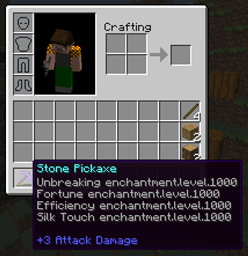
使用 /enchant 命令时,请先手持你想要附魔的物品,然后输入命令、附魔的 ID 数字以及其等级。别担心!我不会把你一个人扔在一堆数字里不管的!如果你操作有误,插件会发送提示消息,告诉你如何修正命令以使其生效。这也是学习 ID 的好方法!请阅读下方的示例:
示例:为剑附魔锋利 IV
/enchant 16 4
……就是这么简单!如果附魔等级填错,插件会告知你错误原因及修复方法。
欢迎留下任何评论或建议,我会尽力在有空时回复大家。
-Brian_Entei
你是这个资源的作者?登录后可认领此资源。
相似资源
 插件

数据包事件PacketEvents
retrooper
PacketEvents 是一款专为 Minecraft Java 版打造的协议库,旨在简化数据包的处理与传输。
前置科技
46
 插件

Beds Always Explode
rabiesland
使床在所有维度中爆炸的模组
诅咒玩法机制
30
 插件
ExyliaLib
ExyliaServices
ExyliaPlugins 的库。
前置实用
26
 插件
ProAuthMeLogin
3623813757
通过对话框或铁砧界面帮助你的 Anthme
实用
16
 插件
可自定义玩家模型
tom5454
自定义你的Minecraft头像!
装饰社交
16
 插件
Vessel
muhdfdeen
重新定义服务器上的生物运输方式。使用高度可定制的口袋道具,安全地捕获、存储和释放任何实体。
生物存储
13
评论 0
登录后参与评分
还没有评论,来抢沙发吧