核心功能
全局 Ping 列表
在 Minecraft 服务器列表中显示玩家 ID。
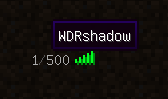
全局 Tab 列表
在 Tab 列表中显示全局玩家。
- 你现在可以自定义全局玩家的显示模式和显示消息。(参见配置文件)

连接消息
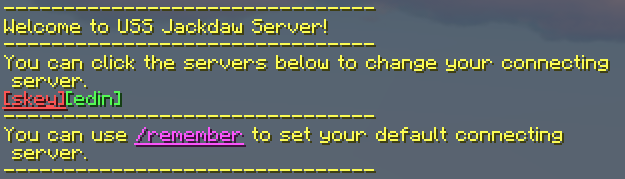
当玩家连接到注册服务器时,将欢迎消息发送给每位玩家。并提供一种点击切换服务器的方法。

全局聊天 & 连接提示
最基础的全服聊天功能。& 简单的连接提示。
- 你现在可以点击 [ServerName] 切换到目标服务器。

记住我的初始连接服务器
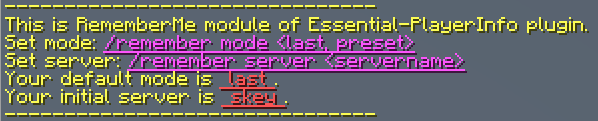
允许玩家自定义初始连接服务器的功能。默认设置为“记住他们上次连接的服务器”。
玩家可以使用命令来设置模式和服务器。
-
设置默认模式
- 描述:如果设置为
preset,玩家每次连接到代理时都会连接到特定的服务器。这个初始服务器可以通过另一个命令设置。如果设置为 last,玩家将连接到他们最后退出的服务器。
- 用法:
/remember mode <last, preset>
- 默认值:
last
-
设置初始服务器
- 描述:仅在默认模式为
preset 时生效。设置初始连接服务器。
- 用法:
/remember server <servername>
- 默认值:
null(如果为 null,玩家将连接到代理的默认服务器)
玩家也可以通过点击命令 /remember 或连接消息进行操作。

可选功能
自定义你的消息文本
你可以在配置文件中更改自定义文本。你可以使用 MiniMessage 来为消息着色。
你可以使用 %player%, %server% ,%previousServer% 和 %serverList% 来替换变量。
命令广播
对于那些不希望他们的服务器进行连续全服广播的人,我们提供了一个选项来启用“命令广播”。这意味着这些服务器中的聊天消息只有在消息开头是 "#" 时才会被广播。
Core Features
Global PingList
Display the player ID on the Minecraft server list.

Global TabList
Show global players on the TabList.
- You can now customize the display mode and display message of global players. (see config)

Connection Message
Welcome message will be sent to every player when they connect to a register server. And provide a way to click to
switch servers.
- You can now customize the message in config file.

Global Chat & ConnectionTips
The most basic cross-server chat function. & Simple connection tips.
- You can now click the [ServerName] to switch to the target server.

Remember my initial connecting server
A feature to let your players set the initial connecting server as they like. The default setting is "remember their
last connected server".
Players can use command to set the mode and server.
-
Set default mode
- Description: If set to
preset, players will connect to a specific server every time when they connect to the
proxy. This initial server can be set by another command. If set to last, players will connect to the server they
last exit.
- Usage:
/remember mode <last, preset>
- Default:
last
-
Set initial server
- Description: Only work if the default mode is
preset. Set the initial connecting server.
- Usage:
/remember server <servername>
- Default:
null (If null, players will connect to the default server of the proxy)
Players can also use click to command with /remember or connection message.

Optional Features
Customize your message text
You can change the custom text in the config file. You can use MiniMessage to color the message.
You can use %player%, %server% ,%previousServer% and %serverList% to replace the variable.
Command-to-broadcast
For those who don't want their servers to be continuous global broadcasts, we provide an option to enable "command to
broadcast". Which means the chat messages in these servers would be broadcast only when the beginning of the message
is "#".
评论 0
登录后参与评分
还没有评论,来抢沙发吧