Event-PVP-Plugin
运行自定义事件,举办带有物品或金钱赌注的 PvP 决斗,并通过浏览器管理你的设置。Event-PVP-Plugin 将事件、竞技场、装备套件和库存恢复整合在一个插件中。
打造单人生存活动,组织团队战斗,或者让玩家通过可配置规则、奖励和负载进行赌注对战。

自定义事件
- 单人和团队模式: 大乱斗、两队和三队事件。
- 灵活的获胜条件: 最后存活者、物品收集、击杀目标和限时生存。
- 你的竞技场,你的规则: 配置 PvP、饥饿、淘汰、观众以及可选的活动前大厅。
- 七种出生点类型: 单点、随机半径、随机区域、随机立方体、多点、团队出生点和基于命令的出生点。
- 自动调度: 按可配置的时间间隔随机或按顺序轮换事件。
- 奖励与统计: 向获胜者和参与者发放物品或基于命令的奖励。使用 PlaceholderAPI、AJLeaderboards 和 DecentHolograms 显示统计数据。
PvP 赌注
让玩家通过游戏内 GUI 互相挑战,选择竞技场并确定赌注。
- 通过兼容 Vault 的经济系统押注 物品或金钱。
- 使用可配置的装备套件,包括护甲、武器、附魔、副手物品和背包。
- 支持反提议、平局投票、投降和旁观。
- 配置竞技场保护和重复比赛的重置功能。
- 保留持久的支付记录,并为符合条件的离线玩家排队奖励。不确定的支付结果仍可供管理员审查。
在浏览器中配置
Web 配置器为管理员提供了一种可视化的方式来管理设置、事件、世界、装备和库存备份。YAML 文件仍然可用于手动配置。
- 可视化编辑器: 配置事件和套件,使用 Minecraft 纹理预览物品,并检查生成的 YAML。
- 库存备份浏览器: 搜索玩家,检查包含护甲、副手和经验的已保存库存,并在确认目标玩家后恢复选定的备份。
- 恢复概览: 检查库存保护会话和库存管理设置。
- 世界管理: 通过 Multiverse 创建、导入、加载和卸载世界。备份和还原世界,或在明确确认后删除它们。
- 清晰的保存反馈: 查看未保存的更改,重试失败的加载,并处理保存冲突,而不会静默丢弃编辑内容。
- 基于令牌的访问: 在游戏中通过
/eventpvp webtoken 生成一次性登录令牌。
- 自定义外观: 调整主题颜色。深色界面支持窄屏、键盘导航和减少运动,并使用本地 SVG 图标和捆绑的原版物品纹理。
- 资源包纹理: 可选择从服务器资源包中导入物品纹理。
面板默认使用端口 8085。其端口、绑定地址和公共 URL 可在 web-config.yml 中配置。为了实现远程访问,请将其置于 HTTPS 反向代理 之后。
库存恢复
使用 InventoryBackup,受管理的事件和对战会在玩家进入前保存其库存,并在会话结束时恢复。持久的会话记录和返回位置支持断开连接和重启后的恢复。
Web 面板提供备份预览和恢复失败信息,以便管理员检查恢复问题。库存恢复依赖于一个兼容且启用的 InventoryBackup 提供程序;它不能替代常规服务器备份。
避免在活动世界和竞技场世界中存在竞争的库存管理器。 如果你有意使用其他插件来管理库存交换,请先检查库存提供程序设置。
七种语言
英文、德文、西班牙文、法文、日文、波兰文和俄文均已包含在游戏界面和 Web 配置器中。缺失的自定义翻译条目将回退到捆绑的英文默认值。
要求
对于当前的 1.1.x 版本:
此版本不支持 Minecraft 1.21.x 及更早版本、Java 17/21 和 Folia。
可选集成:PlaceholderAPI、AJLeaderboards、DecentHolograms 和 PvPManager。
快速开始
- 将所需的依赖项和
event-pvp-plugin-1.1.3.jar 安装到服务器的 plugins/ 文件夹中。
- 启动服务器并检查控制台是否有依赖项或配置错误。
- 以管理员身份在游戏中运行
/eventpvp webtoken。
- 打开消息中显示的 Web 地址,输入令牌并配置你的事件、竞技场和套件。
- 使用
/event start <name> 启动事件,或使用 /pvpask <player> 发送决斗请求。
基本命令
玩家
/event list                  列出可用事件
/event join <name>           加入事件
/event leave                 离开当前事件
/pvpask <player>              发起 PvP 挑战
/pvpaccept                   接受挑战
/pvpdeny                     拒绝挑战
/surrender                   投降当前比赛
/draw                        投票平局
/pvp spectate <player>       旁观决斗
管理员
/eventpvp webtoken            生成网页登录令牌
/eventpvp reload              重载配置文件和语言文件
/event start <name>           启动一个事件
/event stop <name>            停止一个事件
/event forcestart <name>      跳过剩余的加入倒计时
/eventpvp rescue list         列出等待返回或恢复的玩家
/eventpvp payouts list        检查待处理的赔付
更新现有服务器
停止服务器,并在替换 JAR 文件之前备份插件数据。请检查上述当前服务器、Java 及依赖项要求,特别是在从较旧的 Minecraft 版本升级时。
配置迁移会保留现有设置,并在需要更改时创建备份。来自 1.1.2 之前的更新还会引入新的赔付账本:回滚操作需要预先更新的数备份,并审查自更新以来进行的任何赔付。
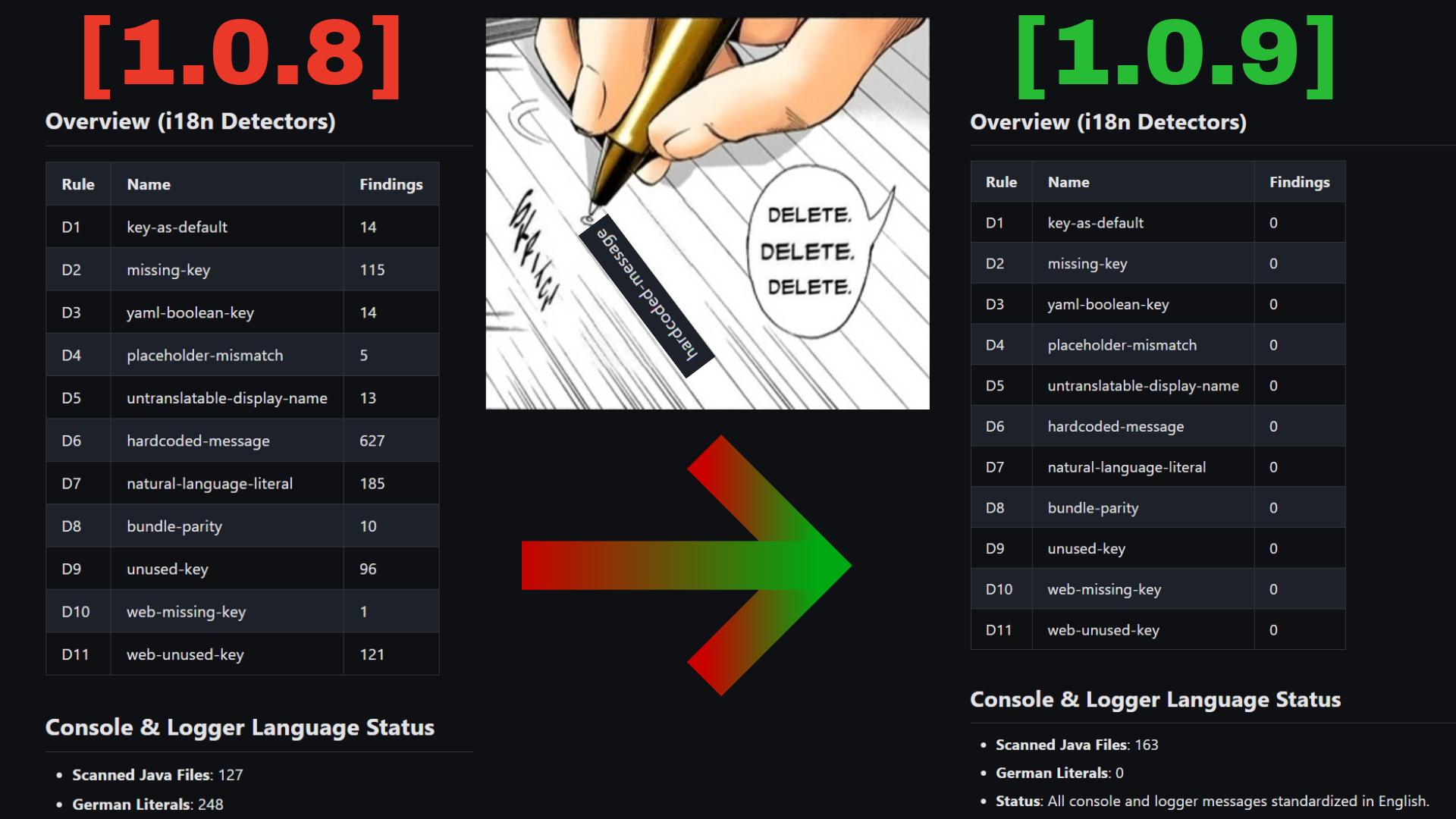
请参阅 1.0.8 → 1.0.9 的升级指南 以了解旧版依赖项转换,以及 1.1.2 迁移与恢复说明 以获取赔付恢复和回滚详情。
文档 · 发行说明 · 报告问题
Event-PVP-Plugin
Run custom events, host PvP duels with item or money wagers, and manage your setup from a browser. Event-PVP-Plugin brings events, arenas, equipment kits and inventory recovery together in one plugin.
Build a solo survival event, organize team battles, or let players challenge each other to a wager match with configurable rules, rewards and loadouts.
Custom events
- Solo and team modes: Free-for-all, two-team and three-team events.
- Flexible win conditions: Last player standing, item collection, kill targets and timed survival.
- Your arena, your rules: Configure PvP, hunger, elimination, spectators and an optional pre-event lobby.
- Seven spawn types: Single point, random radius, random area, random cube, multiple points, team spawns and command-based spawning.
- Automatic scheduling: Rotate events randomly or in sequence at configurable intervals.
- Rewards and statistics: Give winners and participants items or command-based rewards. Display statistics with PlaceholderAPI, AJLeaderboards and DecentHolograms.
PvP wagers
Let players challenge each other through an in-game GUI, choose an arena and agree on their stakes.
- Wager items or money through a Vault-compatible economy.
- Use configurable equipment kits with armor, weapons, enchantments, offhand items and inventories.
- Support counter-offers, draw votes, surrender and spectators.
- Configure arena protection and resets for repeatable matches.
- Keep persistent payout records and queue eligible offline rewards. Uncertain payout outcomes remain available for administrator review.
Configure it in your browser
The web configurator gives administrators a visual way to manage settings, events, worlds, equipment and inventory backups. YAML files remain available for manual configuration.
- Visual editors: Configure events and kits, preview items with Minecraft textures, and inspect generated YAML.
- Inventory backup explorer: Search players, inspect saved inventories with armor, offhand and XP, and restore a selected backup after confirming the target player.
- Recovery overview: Inspect inventory-guard sessions and inventory-management settings.
- World management: Create, import, load and unload worlds through Multiverse. Back up and restore worlds, or delete them with explicit confirmation.
- Clear save feedback: See unsaved changes, retry failed loads and handle save conflicts without silently discarding edits.
- Token-based access: Generate a one-time login token in-game with
/eventpvp webtoken.
- Custom appearance: Adjust theme colors. The darker interface supports narrow screens, keyboard navigation and reduced motion, with local SVG icons and bundled vanilla item textures.
- Resource-pack textures: Optionally import item textures from your server resource pack.
The panel uses port 8085 by default. Its port, bind address and public URL are configurable in web-config.yml. For remote access, put it behind an HTTPS reverse proxy.
Inventory recovery
With InventoryBackup, managed events and matches save player inventories before entry and restore them when the session ends. Persistent session records and return locations support recovery after disconnects and restarts.
The web panel exposes backup previews and restore failures so administrators can inspect recovery problems. Inventory recovery depends on a compatible, enabled InventoryBackup provider; it does not replace regular server backups.
Avoid competing inventory managers on event and arena worlds. If you intentionally use another plugin to manage inventory swaps, review the inventory-provider settings first.
Seven languages
English, German, Spanish, French, Japanese, Polish and Russian are included for the in-game interface and web configurator. Missing custom translation entries fall back to the bundled English defaults.
Requirements
For the current 1.1.x release:
| Requirement |
Version / details |
| Server |
Purpur, Paper or Spigot 26.2 / 26.3 |
| Java |
25 or newer |
| Multiverse-Core |
Version 4 or 5 |
| VaultUnlocked or Vault |
Install one of these; money wagers also require a compatible economy plugin |
| InventoryBackup |
0.2.0 / API revision 2 or newer |
Minecraft 1.21.x and older, Java 17/21 and Folia are not supported by this release.
Optional integrations: PlaceholderAPI, AJLeaderboards, DecentHolograms and PvPManager.
Quick start
- Install the required dependencies and
event-pvp-plugin-1.1.3.jar in your server's plugins/ folder.
- Start the server and check the console for dependency or configuration errors.
- Run
/eventpvp webtoken in-game as an administrator.
- Open the web address shown in the message, enter your token and configure your events, arenas and kits.
- Start an event with
/event start <name> or send a duel request with /pvpask <player>.
Essential commands
Players
/event list                  List available events
/event join <name>           Join an event
/event leave                 Leave the current event
/pvpask <player>              Open a PvP challenge
/pvpaccept                   Accept a challenge
/pvpdeny                     Decline a challenge
/surrender                   Surrender the current match
/draw                        Vote for a draw
/pvp spectate <player>       Spectate a duel
Administrators
/eventpvp webtoken            Generate a web login token
/eventpvp reload              Reload configuration and language files
/event start <name>           Start an event
/event stop <name>            Stop an event
/event forcestart <name>      Skip the remaining join countdown
/eventpvp rescue list         List players awaiting return or recovery
/eventpvp payouts list        Inspect pending payouts
Updating an existing server
Stop the server and back up plugin data before replacing the JAR. Check the current server, Java and dependency requirements above, especially when upgrading from an older Minecraft version.
Configuration migrations preserve existing settings and create backups when changes are needed. Updates from before 1.1.2 also introduce a new payout ledger: rolling back requires the pre-update data backup and a review of any payouts made since the update.
See the upgrade guide for 1.0.8 → 1.0.9 for the older dependency transition and the 1.1.2 migration and recovery notes for payout recovery and rollback details.
Documentation · Release notes · Report an issue


 插件

 插件

 插件
 插件
 插件
 插件
评论 0
登录后参与评分
还没有评论,来抢沙发吧