EventTime! - 玩家活动
EventTime 是一款功能多样且易于使用的 Minecraft 服务器插件,旨在通过传送、倒计时和无缝的玩家参与控制来管理玩家活动。它允许服务器管理员设置特殊的活动地点,使用冷却时间控制玩家加入,并自动启动带有倒计时的活动,确保所有参与者都能获得顺畅且公平的活动体验。
不信吗?立即试用最新版本!
⚠️ 注意 需要 Java 21 或更高版本!
功能
- 完整配置
- 全面的公告系统
- 灵活的管理
- 活动倒计时
- 即开即玩
- 玩家限制
- 加入冷却
- 传送延迟
- 物品栏限制
- 便捷的玩家控制
- 以及更多!
命令
- /event join - 加入活动。
- /event leave - 离开活动。
- /event admin set - 设置传送地点。
- /event admin reload - 刷新配置文件。
- /event admin start - 开始一场有玩家参与的活动。
- /event admin lobby - 切换是否允许加入活动的状态。
- /event admin break - 切换玩家破坏方块的能力。
- /event admin build - 切换玩家建造方块的能力。
- /event admin pvp - 切换玩家进行 PvP 的能力。
- /event admin tpall - 将所有玩家传送到你的位置。
- /event admin stop - 立即停止活动
- /event admin name <text> - 为活动命名(名称将显示在大厅中)
- /event admin announcement <text> - 发布公告(将显示在 Boss 条和聊天栏中。)
- /event admin giveitem <percent> <item> <amount> - 给予一定比例的玩家物品。
- /event admin alivelist - 存活玩家列表。
- /event admin deadlist - 死亡玩家列表。
权限
- eventtime.admin - 访问所有功能
- eventtime.use - 访问加入活动的权限(默认)
使用方法
剧透
-
将 .jar 文件放入服务器的 plugins 文件夹中。
-
重启服务器并在控制台中检查:[EventTime] Loaded saves!
-
在允许玩家加入活动之前,使用 /event admin name <text> 设置活动名称。
-
使用 /event admin set 设置 /event join 的传送地点。
-
根据需要调整活动规则——例如,使用 /event admin break 启用或禁用方块破坏。您还可以配置其他设置,如 PvP 或建造。(注意:这些是切换命令——只需输入命令即可切换状态;不要添加 "on/off"。)
-
使用 /event admin lobby 使大厅可用。一旦聚集了多名玩家,使用 /event admin start 开始活动。
-
倒计时将开始(倒计时时长可在配置文件中更改)。
-
活动已开始!玩家可以自由竞争——记住,必须只剩一名玩家活动才会结束!
-
在活动过程中,您可以使用特殊的管理员命令:/event admin tpall, /event admin pvp, /event admin build, /event admin break 和 /event admin announcement。
简易配置
来自版本 1.1 BETA 的配置!
剧透
# # ______ _ _______ _
# # | ____| | |__ __(_)
# # | |____ _____ _ __ | |_ | | _ _ __ ___ ___
# # | __\ \ / / _ \ '_ \| __|| | | | '_ ` _ \ / _ \
# # | |___\ V / __/ | | | |_ | | | | | | | | | __/
# # |______\_/ \___|_| |_|\__||_| |_|_| |_|_|_| |_|_|\___|
# 此选项会根据你输入 /event admin lobby(允许或不允许加入活动)而不断变化。
event-enabled: true
# 你可以将前缀更改为你自己的,例如 &3Server Event
prefix: '&x&0&0&B&F&C&C&lE&x&0&0&A&F&C&8&lv&x&0&0&A&0&C&3&le&x&0&0&9&0&B&F&ln&x&0&0&8&0&B&B<&x&0&0&7&0&B&6&lT&x&0&0&6&1&B&2&li&x&0&0&5&1&A&D&lm&x&0&0&4&1&A&9&le
&f'
join-with-items: false # 携带物品加入活动(默认禁用)
start-countdown-seconds: 10
cooldown-join: 3 # 传送到活动前需要等待的时间
no-move-teleportation: true # 移动后取消传送(默认启用)
move-delay-seconds: 3 # 通常与 cooldown-join 相同
every-interaction-message: true # 是否应显示每次交互的消息,
# 例如破坏方块?(仅在操作被禁用时,如 break, build, pvp)
message-cooldown: 0 # 如果 every-interaction-message: false,你可以设置消息出现的时间间隔(默认为 0)
event-location: # 来自命令 /event admin set 的数据
world: world
x: 0
y: 64
z: 0
yaw: 0
pitch: 0
permissions: # 权限也可以通过游戏中的 /event admin build,break,pvp 更改
build: false
pvp: true
break: false
messages: # 游戏中显示的消息
only-players: '&c只有玩家可以使用此命令!'
teleport-disabled: '&c目前无法传送至该活动。'
items-not-allowed: '&c你背包中有物品,无法加入。'
teleported: '&a你已被传送至活动现场!'
not-set: '&c尚未设置活动地点。'
no-permission: '&c你没有权限使用此命令。'
location-set: '&a活动地点已设置。'
config-reloaded: '&a配置已重新加载!'
toggle-on: '&a已启用传送至活动的功能。'
toggle-off: '&c已禁用传送至活动的功能。'
event-started: '&3活动已开始!'
countdown: '&7活动将在 &3&l%seconds% &7秒后开始!'
move-cancel: '&c你移动了!传送已取消。'
teleport-wait: '&7在 &3&l%seconds% &7秒内请勿移动以完成传送...'
cooldown-active: '&c请等待后再使用该命令!'
player-died: '&3%player% &7已死亡!&7剩余玩家:&3&l%remaining%'
player-won:
- ' '
- '&7&m============&7 &x&0&0&B&F&C&C&lE&x&0&0&B&4&C&9&lV&x&0&0&A&8&C&6&lE&x&0&0&9&D&C&2&lN&x&0&0&9&1&B&F&lT
&x&0&0&7&A&B&9&lW&x&0&0&6&F&B&6&lI&x&0&0&6&3&B&3&lN&x&0&0&5&8&A&F&lN&x&0&0&4&C&A&C&lE&x&0&0&4&1&A&9&lR
&7&m============'
- '&7获胜者:&3&l%winner%'
- '&7恭喜!'
- '&7&m======================================='
- ' '
died-on-leave: '&c你离开了活动。你已被淘汰。'
not-enough-players: '&c玩家数量不足,无法开始活动!'
player-left: '&c%player% 离开了服务器并已被淘汰!'
already-eliminated: '&c你已被从活动中淘汰,无法再次加入。'
unknown-admin-subcommand: '&c未知的管理员子命令。'
countdown-started: '&a倒计时已开始...'
event-not-started: '&c活动尚未开始。'
tpall-success: '&a已成功将 &3&l%count% &a名活动参与者传送到你的位置。'
build-on: '&a现在允许活动参与者建造。'
build-off: '&c不再允许活动参与者建造。'
pvp-on: '&a现在已为活动参与者启用 PVP。'
pvp-off: '&c现在已为活动参与者禁用 PVP。'
break-on: '&a现在允许活动参与者破坏方块。'
break-off: '&c不再允许活动参与者破坏方块。'
build-disabled: '&c你在活动期间无法建造。'
break-disabled: '&c你在活动期间无法破坏方块。'
pvp-disabled: '&c活动期间当前禁用了 PVP。'
already-joined: '&c你无法加入,因为你已经参与了该活动!'
event-stopped: '&c活动已被管理员停止。所有参与者均被淘汰。'
announcement-no-text: '&c你必须提供一条要公告的消息。'
announcement-sent: '&a你的公告已发送给所有活动参与者。'
name-no-text: '&c你必须为活动提供一个名称。'
name-set: '&a活动名称已设置为:&r%name%'
titles: # 活动开始和结束时的标题也可以禁用 enabled: false
enabled: true
event-start:
title: '&3&l祝你好运!'
subtitle: '&7活动已开始'
fade-in: 10
stay: 60
fade-out: 10
event-end:
title: '&3&l恭喜!'
subtitle: '&7活动已结束'
fade-in: 10
stay: 60
fade-out: 10
bossbar:
enabled: true
title: '&7剩余玩家 &7» &3&l%count%'
color: BLUE # 颜色:BLUE, GREEN, PINK, PURPLE, RED, WHITE, YELLOW
style: SOLID # 样式:SOLID, SEGMENTED_6, SEGMENTED_10, SEGMENTED_12, SEGMENTED_20
winner-title: '&7活动获胜者 &7» &3&l%winner%'
lobby-bossbar:
title: '&7准备好迎接 » &3'
color: BLUE # 颜色:BLUE, GREEN, PINK, PURPLE, RED, WHITE, YELLOW
style: SEGMENTED_10 # "SOLID" # 样式:SOLID, SEGMENTED_6, SEGMENTED_10, SEGMENTED_12, SEGMENTED_20
announcement:
send-to-chat: true # 是否作为聊天消息发送公告
send-to-bossbar: true # 是否在大厅 BossBar 上显示公告
chat-prefix: '&x&0&0&B&F&C&C&lE&x&0&0&A&0&C&3&lv&x&0&0&8&0&B&B&le&x&0&0&6&1&B&2&ln&x&0&0&4&1&A&9<&3' # 聊天公告的前缀
bossbar-duration: 10 # 公告 BossBar 应显示的时长(秒)
游戏截图
获胜的玩家!

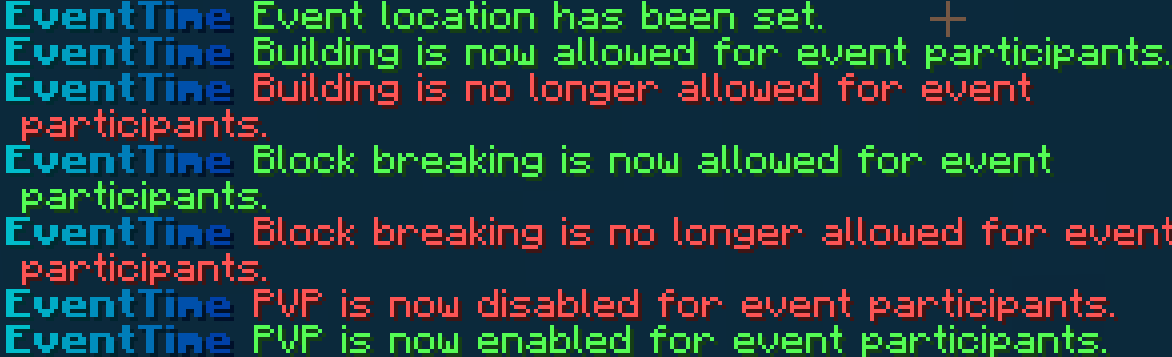
管理你的玩家!
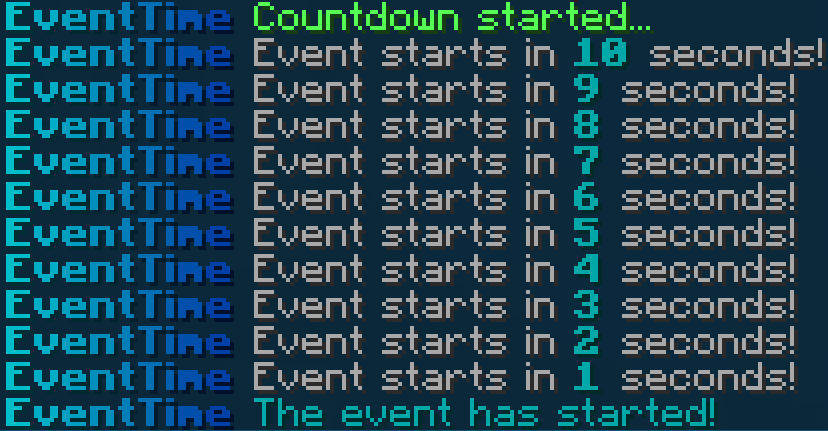
倒计时!(可配置)
Bug 报告与联系
oskoonixland@gmail.com - 新邮箱
EventTime! - Events for players
EventTime is a versatile and easy-to-use Minecraft server plugin designed to manage player events with teleportation, countdowns, and seamless player participation control. It allows server administrators to set up special event locations, control player joins with cooldowns, and automatically start events with countdown timers, ensuring a smooth and fair event experience for all participants.
Don’t believe it? TRY THE LATEST RELEASE NOW!
⚠️ NOTE Java 21 or higher is required!
Features
- Full Configuration
- Comprehensive Announcement System
- Flexible Management
- Event Countdown
- Ready-to-Play
- Player Restrictions
- Join Cooldown
- Teleportation Delay
- Inventory Restrictions
- Easy Player Control
- And more!
Commands
- /event join - Join the event.
- /event leave - leave the event.
- /event admin set - Sets the teleportation location.
- /event admin reload - Refreshes the configuration file.
- /event admin start - starts an event with players.
- /event admin lobby - Toggles the ability to join the event.
- /event admin break - toggle players ability to destroy blocks.
- /event admin build - toggle players ability to build.
- /event admin pvp - toggle players ability to PvP.
- /event admin tpall - teleports all players to your position.
- /event admin stop - stop the event immediately
- /event admin name <text> - Give the event a name (the name will be displayed in the lobby)
- /event admin announcement <text> - announce something (will be displayed on the bossbar and chat.)
- /event admin giveitem <percent> <item> <amount> - give a given percentage of players an item.
- /event admin alivelist - List of alive players.
- /event admin deadlist - List of dead players.
Permissions
- eventtime.admin - access to everything
- eventtime.use - access to join an event (default)
How to use
Spoiler
-
Place the .jar file in the server's plugins folder.
-
Restart the server and check the console for: [EventTime] Loaded saves!
-
Before allowing players to join the event, set the event name using /event admin name <text>.
-
Set the teleport location for /event join with /event admin set.
-
Adjust the event rules as needed — for example, enabling or disabling block breaking with /event admin break. You can also configure other settings like PvP or building. (Note: These are toggle commands — just type the command to switch the state; do not add "on/off".)
-
Use /event admin lobby to make the lobby available. Once multiple players are gathered, start the event using /event admin start.
-
A countdown will begin (the countdown duration can be changed in the config).
-
The event has started! Players are free to compete — remember, only one player must remain for the event to end!
-
During the event, you have access to special admin commands: /event admin tpall, /event admin pvp, /event admin build, /event admin break, and /event admin announcement.
Easy configuration
configuration from version 1.1 BETA!
Spoiler
# # ______ _ _______ _
# # | ____| | |__ __(_)
# # | |____ _____ _ __ | |_ | | _ _ __ ___ ___
# # | __\ \ / / _ \ '_ \| __|| | | | '_ ` _ \ / _ \
# # | |___\ V / __/ | | | |_ | | | | | | | | | __/
# # |______\_/ \___|_| |_|\__||_| |_|_| |_|_|_| |_|_|\___|
# This option changes constantly, depending on whether you enter /event admin lobby (allows you to join the event or not).
event-enabled: true
# You can change the prefix to your own, e.g. &3Server Event
prefix: '&x&0&0&B&F&C&C&lE&x&0&0&A&F&C&8&lv&x&0&0&A&0&C&3&le&x&0&0&9&0&B&F&ln&x&0&0&8&0&B&B<&x&0&0&7&0&B&6&lT&x&0&0&6&1&B&2&li&x&0&0&5&1&A&D&lm&x&0&0&4&1&A&9&le
&f'
join-with-items: false # joining an event with items (disabled by default)
start-countdown-seconds: 10
cooldown-join: 3 # Time to wait before teleporting to an event
no-move-teleportation: true # cancel teleportation after moving (enabled by default)
move-delay-seconds: 3 # usually the same as cooldown-join
every-interaction-message: true # Should a message be displayed for every interaction,
# such as destroying a block? (Only when the action is disabled e.g break, build, pvp)
message-cooldown: 0 # If every-interaction-message: false you can set the time interval for the message to appear (default is 0)
event-location: # data from command /event admin set
world: world
x: 0
y: 64
z: 0
yaw: 0
pitch: 0
permissions: # Permissions can also be changed in-game using /event admin build,break,pvp
build: false
pvp: true
break: false
messages: # Messages displayed in the game
only-players: '&cOnly players can use this command!'
teleport-disabled: '&cTeleportation to the event is currently disabled.'
items-not-allowed: '&cYou cannot join with items in your inventory.'
teleported: '&aYou have been teleported to the event!'
not-set: '&cThe event location has not been set yet.'
no-permission: '&cYou do not have permission to use this command.'
location-set: '&aEvent location has been set.'
config-reloaded: '&aConfig has been reloaded!'
toggle-on: '&aTeleportation to the event has been enabled.'
toggle-off: '&cTeleportation to the event has been disabled.'
event-started: '&3The event has started!'
countdown: '&7Event starts in &3&l%seconds% &7seconds!'
move-cancel: '&cYou moved! Teleportation canceled.'
teleport-wait: '&7Don''t move for &3&l%seconds% &7seconds to teleport...'
cooldown-active: '&cPlease wait before using this command again!'
player-died: '&3%player% &7has died! &7Remaining players: &3&l%remaining%'
player-won:
- ' '
- '&7&m============&7 &x&0&0&B&F&C&C&lE&x&0&0&B&4&C&9&lV&x&0&0&A&8&C&6&lE&x&0&0&9&D&C&2&lN&x&0&0&9&1&B&F&lT
&x&0&0&7&A&B&9&lW&x&0&0&6&F&B&6&lI&x&0&0&6&3&B&3&lN&x&0&0&5&8&A&F&lN&x&0&0&4&C&A&C&lE&x&0&0&4&1&A&9&lR
&7&m============'
- '&7Winner: &3&l%winner%'
- '&7Congratulations!'
- '&7&m======================================='
- ' '
died-on-leave: '&cYou left the event. You have been &neliminated.'
not-enough-players: '&cNot enough players to start the event!'
player-left: '&c%player% left the server and has been eliminated!'
already-eliminated: '&cYou have been eliminated from the event and cannot join again.'
unknown-admin-subcommand: '&cUnknown admin subcommand.'
countdown-started: '&aCountdown started...'
event-not-started: '&cThe event has not started yet.'
tpall-success: '&aSuccessfully teleported &3&l%count% &aevent participants to your
location.'
build-on: '&aBuilding is now allowed for event participants.'
build-off: '&cBuilding is no longer allowed for event participants.'
pvp-on: '&aPVP is now enabled for event participants.'
pvp-off: '&cPVP is now disabled for event participants.'
break-on: '&aBlock breaking is now allowed for event participants.'
break-off: '&cBlock breaking is no longer allowed for event participants.'
build-disabled: '&cYou cannot build during the event.'
break-disabled: '&cYou cannot break blocks during the event.'
pvp-disabled: '&cPVP is currently disabled during the event.'
already-joined: '&cYou can''t join because you''re already participating in the
event!'
event-stopped: '&cThe event has been stopped by an administrator. All participants
have been eliminated.'
announcement-no-text: '&cYou must provide a message to announce.'
announcement-sent: '&aYour announcement has been sent to all event participants.'
name-no-text: '&cYou must provide a name for the event.'
name-set: '&aEvent name has been set to: &r%name%'
titles: # Titles at the start and end of the event may also be disabled enabled: false
enabled: true
event-start:
title: '&3&lGood luck!'
subtitle: '&7The event has started'
fade-in: 10
stay: 60
fade-out: 10
event-end:
title: '&3&lCongratulations!'
subtitle: '&7The event has ended'
fade-in: 10
stay: 60
fade-out: 10
bossbar:
enabled: true
title: '&7The remaining players &7» &3&l%count%'
color: BLUE # COLORS: BLUE, GREEN, PINK, PURPLE, RED, WHITE, YELLOW
style: SOLID # STYLES: SOLID, SEGMENTED_6, SEGMENTED_10, SEGMENTED_12, SEGMENTED_20
winner-title: '&7Event winner &7» &3&l%winner%'
lobby-bossbar:
title: '&7Get ready for the » &3'
color: BLUE # COLORS: BLUE, GREEN, PINK, PURPLE, RED, WHITE, YELLOW
style: SEGMENTED_10 # "SOLID" # STYLES: SOLID, SEGMENTED_6, SEGMENTED_10, SEGMENTED_12, SEGMENTED_20
announcement:
send-to-chat: true # Whether to send the announcement as a chat message
send-to-bossbar: true # Whether to display the announcement on a lobby-bossbar
chat-prefix: '&x&0&0&B&F&C&C&lE&x&0&0&A&0&C&3&lv&x&0&0&8&0&B&B&le&x&0&0&6&1&B&2&ln&x&0&0&4&1&A&9<&3' # The prefix for the chat announcement
bossbar-duration: 10 # How long the announcement bossbar should be displayed in seconds
Screenshots from the game
Winning player!
Manage your players!
Countdown! (configurable)
Bug report and contact
oskoonixland@gmail.com - new mail


 插件

 插件
 插件
 插件
 插件
 插件
评论 0
登录后参与评分
还没有评论,来抢沙发吧