EzAuction 是一款为 Paper、Spigot、Purpur 和 Bukkit Minecraft 服务器打造的完整图形用户界面(GUI)驱动拍卖行插件。玩家可通过平滑的分页菜单列出物品进行限时出售,创建带有保底价格的买入订单,并参与实时直播拍卖——所有功能均依托 Vault 经济系统、MySQL 或 YAML 持久化存储、PlaceholderAPI 支持以及可选的 Discord Webhook 通知实现。
无论您运营的是生存服、空岛服、SMP 还是阵营服,EzAuction 都能妥善处理您的服务器经济:包括限时上架、离线安全的物品退回、附魔感知搜索、带有一键出价功能的实时拍卖会话,以及通过 TeamsAPI 实现的团队范围拍卖。
|
|
| 平台 |
Paper, Spigot, Purpur, Bukkit 1.13 – 26.1.* |
| Java |
21+ |
| 存储 |
YAML(内置)· MySQL |
| 语言 |
English · Dutch · Spanish · Chinese |
| 依赖项 |
Vault + 任意经济插件 |
需要安装 Vault 及兼容的经济插件(如 EzEconomy)以处理货币交易。
更新日志 – v2.3.0
直播拍卖重构
-
实时拍卖卖家管理 – 拥有 ezauction.auction.live.sell 权限的玩家现在可以直接通过实时拍卖浏览器(GUI 中的出售按钮)或 /liveauction sell 命令将物品加入队列。加入队列时,聊天栏会显示确认消息并告知队列位置。执行 /liveauction cancel 可移除该条目并退还押金;当玩家有待处理的队列条目时,GUI 中也会出现取消按钮。拥有 ezauction.auction.live.admin 权限的管理员可以使用 /liveauction cancel <id> 强制取消任何进行中的拍卖。
-
/bid 命令(别名 /livebid)– 专用于实时拍卖交互的命令:放置竞拍出价(/bid <amount>)、查看会话状态以及管理每位玩家的倒计时偏好设置。玩家也可以通过点击实时拍卖聊天消息中的建议提示来放置出价。
-
每位玩家的通知偏好设置 – 使用 /bid notify [on|off] 切换倒计时提醒,并通过 /bid notify display <types…> 选择显示类型。这些偏好设置会保存在 live-preferences.yml 文件(或 MySQL 表)中,重启后依然保留。
-
EzCountdown 集成(可选的软依赖)——通过 ACTION_BAR、BOSS_BAR、TITLE、SCOREBOARD 或 CHAT 显示实时拍卖倒计时。
-
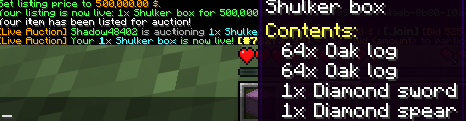
可点击的出价消息与物品悬停预览——聊天中的出价公告直接链接到 /bid <next-minimum>;将鼠标悬停在物品名称上时,会显示附魔、药水效果以及潜影盒内容。
-
五个新的 Bukkit 事件——LiveAuctionStartedEvent(可取消)、LiveAuctionBidPlacedEvent(可取消)、LiveAuctionEndedEvent、LiveAuctionPlayerJoinedEvent、LiveAuctionPlayerLeftEvent。
-
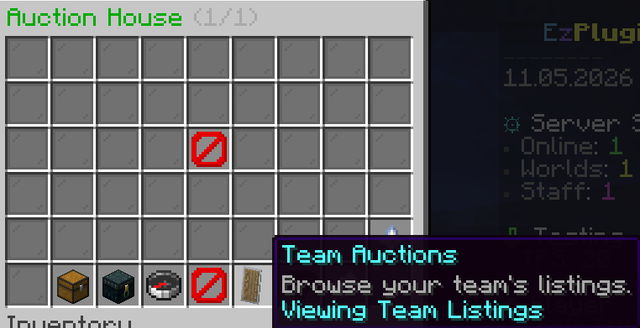
拍卖行中的“实时拍卖”快捷方式——在主 /auction 浏览界面中有一个快速访问信标按钮(槽位 47),可直接打开实时拍卖选择器,无需输入 /liveauction。


修复与其他新增内容
- 领取界面 –
/auction claim 命令以及浏览器中的“Claims”按钮现在会打开一个 54 格的界面,展示每个待领取的返还物品,并在物品的描述 lore 中显示过期日期。点击 Claim All(全部领取)按钮可一次性收取所有物品;点击 Back(返回)按钮则回到拍卖浏览器。
- 可配置的领取过期时间 – 在
auction.yml 中设置 claim.expiry-days(默认为 7),以控制待领取物品在被标记为过期前保留的天数,该天数会在领取界面中显示。
- 首拍底价修复 – 实时拍卖的起拍价现在仅要求达到起始价格;加价幅度仅适用于后续出价。发送空响应的
/bid 命令会自动放置最低出价。
为什么选择 EzAuction?

- 菜单优先的交易体验 – 分页浏览器、出售/订单编辑器以及确认弹窗确保每笔交易都有引导且易于点击操作。
- 商品列表与购买订单 – 运行限时销售,为购买请求预留余额,并可直接通过 GUI 或命令流程完成两方面的交易。


- 团队拍卖 – TeamsAPI 集成允许团队成员共同上架和领取拍卖物品,非常适合阵营和空岛经济系统。
- 异步持久化与回退机制 – 商品列表和历史记录通过专用的执行器写入,如果 MySQL 不可用,则自动回退到 YAML 存储。
- 离线安全的返还 – 过期或无法送达的物品会存入一个可领取的储物区,并提供登录提醒和
/auction claim 恢复功能。
- 基于权限等级的限制 – 接入自定义的
AuctionListingLimitResolver 服务,根据权限等级、岛屿或进度数据动态调整槽位上限。
- 智能价值覆盖层 – 在菜单描述 lore 中显示配置的价格提示,或直接接入 EzShops 的买卖估价。

功能亮点
- 可配置的菜单与翻译 – 覆盖捆绑的英语、荷兰语、西班牙语和中文菜单文件中的浏览器/确认布局、填充玻璃和按钮文本。
- 灵活的存储 – 从轻量级的 YAML 开始,或切换到支持连接池、SSL 标志和表前缀的生产级 MySQL。
- 异步历史记录 – 后台保存队列批量写入玩家历史记录,即使在拍卖流量高峰期也能保持游戏流畅响应。
- 玩家保护机制 – 存款退款、余额检查、过期清理以及库存感知的交付功能,防止重复刷取和货币丢失。
- PlaceholderAPI 支持 – 将
%ezauction_*% 占位符放入记分板、全息图或聊天中,以显示活跃列表、订单、限制和待处理退货。
- 易于集成的 API – 注册 Bukkit 服务以覆盖列表上限或提供自定义价值提供商,无需分叉插件。
- 附魔感知搜索 – 搜索
sharpness v、fortune 3 或 minecraft:looting 即可找到带有精确附魔堆叠的列表和购买订单——支持罗马数字、数值等级、命名空间键以及下划线/空格变体。
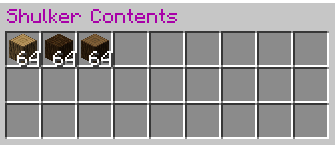
- 潜影盒预览 – 买家可以在购买前直接从拍卖浏览器中检查潜影盒内容。
Discord 集成
- 独立 Webhook – 将 Webhook URL 粘贴到
discord.yml 中,即可向任何 Discord 频道发送带颜色编码的嵌入通知。无需 DiscordSRV 或机器人设置。
- DiscordSRV 支持 – 可选择通过现有的 DiscordSRV 安装路由通知,并为每个事件提供可选的账户链接和角色门控。
- 四种事件类型 – 每当拍卖上架、售出、出价或被取消时,都会收到一条消息,每种消息都配有其独特的强调色(绿色 / 蓝色 / 黄色 / 红色)。
- 实时管理命令 – 在游戏中使用
/auctiondiscord webhook 配置、启用、禁用和测试 Webhook —— 更改立即生效,无需重启。
- 异步且非阻塞 – 所有 HTTP 调用均在后台线程上运行;发送失败会记录为 WARNING 级别日志,绝不会中断游戏进程。
Discord Webhook 快速设置
- 打开目标 Discord 频道 → 编辑频道 → 集成 → Webhooks → 新建 Webhook → 复制 Webhook URL。
- 在游戏中或通过控制台运行:
/auctiondiscord webhook set url https://discord.com/api/webhooks/YOUR_ID/YOUR_TOKEN
- 使用
/auctiondiscord webhook test 进行验证 —— 测试嵌入将立即出现在你的频道中。
# discord.yml - webhook section
webhook:
  enabled: true
  url: "https://discord.com/api/webhooks/123456789/YOURTOKEN"
  username: "EzAuction"
  use-embeds: true
  events:
    auction_start: true
    auction_end: true
    auction_bid: true
    auction_cancel: true
有关完整的 DiscordSRV 集成指南和所有选项,请参阅 Discord 集成文档。
全息图功能
- 拍卖全息图 – 在世界中放置交互式全息图,以显示实时拍卖统计信息、顶级列表或购买订单摘要。支持点击/触摸交互以快速获取信息和执行未来操作。
- 性能优化 – 可配置的最大全息图数量和批量更新选项确保即使有许多全息图处于活动状态时,游戏依然流畅。
- 权限和距离控制 – 可选择通过权限节点或玩家距离来限制全息图的可见性和交互性。
- 可配置类型 – 通过全息图类型选择,决定显示哪些拍卖统计数据或列表。
全息图配置
holograms:
  enabled: true
  update-interval-ticks: 100
  search-radius: 2.5
  height-offset: 1.75
  max-holograms: 100
  batch-update: true
  require-permission: false # Set true to require a permission node
  view-permission: ezauction.hologram.view # Permission node for viewing/interacting
  proximity-limit: false # Set true to restrict by distance
  proximity-distance: 32.0 # Max distance for interaction
快速开始
- 上传
EzAuction.jar,重启 Paper 或 Purpur 服务器,并确认 Vault 及一个经济插件已激活。
- 编辑
plugins/EzAuction/auction.yml 以设置定价规则、持续时间和 GUI 槽位,调整 auction-storage.yml 以配置 YAML/MySQL 持久化,并根据需要更新 auction-values.yml 或 messages/menu-interactions_*.yml。
- 选择 YAML 或 MySQL 存储,然后授予玩家
ezauction.auction(以及可选的 sell/order/history 节点),以便他们浏览和交易。
- 鼓励使用
/auction history,让买家和卖家可以直接在聊天中审计他们的最新活动。
实时拍卖
- 安排直播拍卖列表 – 开启
live-auctions.enabled(如果希望有滚动队列,请同时开启 queue-enabled),以便将新的待售物品编排为广播内容,并通过 /liveauction 命令查看。
- 通过 GUI 出售 – 拥有
ezauction.auction.live.sell 权限的玩家可以在“直播拍卖”浏览器中看到出售按钮。点击一次即可打开已预配置好以加入直播队列的出售菜单,无需使用命令。
- 队列位置反馈 – 在排队待售物品后,卖家会收到一条包含其排队序号的聊天确认消息。如果队列功能已禁用,拍卖将立即开始,并显示不同的确认信息。
- 随时取消 – 当玩家有待售条目在队列中时,GUI 中会出现取消按钮;点击它(或运行
/liveauction cancel)即可将物品移出队列并退还押金。
- 管理员强制取消 – OP 玩家以及拥有
ezauction.auction.live.admin 权限的玩家可以通过 /liveauction cancel <auction-id> 立即停止正在进行的拍卖。所有出价将被退款,物品也将归还给卖家。
/bid 命令 – 竞拍者可以使用 /bid <amount> 或通过点击聊天中的可点击建议来出价。/bid notify 和 /bid notify display 用于管理每位玩家的倒计时偏好设置。- 在聊天中营造气氛 – 保持
display-in-chat 开启,每隔 announcement-interval-ticks 个刻钟广播直播列表,其中包含可点击的出价链接以及物品名称上的悬停预览。
- 从直播菜单进行策展 – “直播拍卖” GUI 显示队列位置、卖家姓名、价格摘要,并使用徽章和附魔光效高亮显示您自己的条目。
命令与权限
| 命令 |
描述 |
权限 |
/auction |
打开拍卖浏览器,认领物品,并取消上架。 |
ezauction.auction |
/auction sell <price> [duration] |
立即列出手持物品或打开出售 GUI。 |
ezauction.auction.sell |
/auction order <price> <amount> [duration] |
创建带有预留资金的购买订单。 |
ezauction.auction.order |
/auction cancel [id] |
审查并取消活跃的上架或购买订单。 |
ezauction.auction |
/auction history [buy/sell] |
显示每个类别的最新交易记录。 |
ezauction.auction.history |
/auction live |
预览即将进行的直播拍卖广播并刷新队列。 |
ezauction.auction.live |
/liveauction |
打开直播拍卖查看器。 |
ezauction.live |
/liveauction sell |
将手持物品排队进入直播拍卖。 |
ezauction.auction.live.sell |
/liveauction cancel |
取消你自己的直播拍卖排队条目并收取押金退款。 |
ezauction.auction.live.sell |
/liveauction cancel <id> |
根据 ID 强制取消活跃的直播拍卖。退款所有竞拍者并将物品归还。(管理员) |
ezauction.auction.live.admin |
/bid [amount] |
在活跃的直播拍卖中出价或查看会话状态。 |
ezauction.bid |
/auction claim |
提取存储的返还物品。 |
ezauction.auction |
/auction search <query> |
按物品名称、附魔或关键字过滤打开拍卖浏览器。 |
ezauction.auction.search |
/auctionhologram <create/remove/list> [args] |
管理拍卖全息图:创建、移除或列出世界中的拍卖展示。 |
ezauction.hologram.manage |
设置指南
安装与配置
需要更多详情? 请参阅 完整文档 以获取所有 YAML、MySQL、菜单和高级设置选项。
要求
| 要求 |
备注 |
| Java 21+ |
与 EzAuction 使用的 Paper 1.21+ API 目标匹配。 |
| Paper / Spigot / Purpur 1.21+ |
该插件依赖于兼容 Paper 的服务器 API。 |
| Vault |
提供用于存款、购买订单和支付的经济学桥接。 |
| 经济插件(推荐:EzEconomy) |
需要一个兼容 Vault 的服务提供商。推荐使用 EzEconomy 以获得最佳兼容性和现代功能。 |
| 可选:EzShops |
通过 values.mode = ezshops-buy 或 ezshops-sell 解锁直播价值叠加层。 |
| 可选:自定义限制解析器 |
将 AuctionListingLimitResolver 暴露为 Bukkit 服务以扩展上架上限。 |
| 可选:菜单本地化覆盖 |
复制捆绑的 _nl、_es 或 _zh 菜单文件,以保持翻译与您的品牌同步。 |
配置概览
- 存储选择 – 在
yaml 和 mysql 之间切换 storage.type;MySQL 连接支持 SSL 标志和池调整。
- 菜单 –
menu.browser 和 menu.confirm 控制所有语言变体中的库存大小、填充面板和导航槽位。
- 出售与订单编辑器 – 配置默认价格建议和点击调整,适用于上架和购买订单编辑器。
- 上架规则 – 限制持续时间,强制执行最低定价,计划自定义持续时间选项,并保留可退还的押金,具有基于执行者的自动过期清理。
- 菜单交互 – 通过
messages/menu-interactions_*.yml 针对每种语言微调点击增量、确认按钮和聊天提示。
- 直播拍卖 – 管理
live-auctions.enabled、queue-enabled、display-in-chat 和 announcement-interval-ticks,以编排用于公告或 GUI 预览的上架。
- 价值显示 – 显示配置的材料价格或来自 EzShops 的估算值,通过
values.format 进行模板化处理。
可选集成
- 暴露自定义
AuctionListingLimitResolver 服务,以便根据玩家等级、岛屿或其他进度数据动态调整上架数量上限。
- 安装 EzShops,这样在配置完成后,拍卖行浏览器可以在物品描述中直接显示买入或卖出价格。
- 安装 PlaceholderAPI,以启用
%ezauction_*% 占位符,用于排行榜、记分板或 Discord 机器人消息。
网络设置 (Bungee/Velocity)
- 将
storage.type 切换为 mysql,并让每个 Paper/Purpur 后端指向相同的凭据,以便集中存储商品列表、买入订单和退款记录。内置的 MySQL 驱动实现了 DistributedAuctionListingStorage,确保跨服务器的插入和认领操作保持原子性。
- 在每个代理服务器背后的游戏服务器上部署相同的
EzAuction.jar,然后复制一套经过调优的配置(auction.yml、auction-storage.yml、messages/*.yml),以保持全服菜单、限制和语言的一致性。
- 编辑配置后重启每个后端节点(避免使用 /reload),以便每个实例在玩家加入前从 MySQL 预热缓存。管理器只有在存储标记为就绪状态后才会提供商品列表。
- 如果大厅服务器不应显示拍卖内容,请在该节点上不加载 EzAuction,或将其指向不同的
table-prefix,使其维护独立的数据池。
- 确认所有服务器共享相同的 Vault 经济提供商或同步后的余额后端。货币提取是本地进行的,因此如果各节点间的经济数据不匹配,会导致存款和预留资金不同步。
内置菜单翻译
- EzAuction 附带了适用于英语、荷兰语、西班牙语和中文 (
_en, _nl, _es, _zh) 的 menu-layout_*.yml 和 menu-interactions_*.yml 包。
- 可将任意语言包复制到其他语言标签(例如
_de),从而在不修改代码的情况下引入自定义语言支持。
- 保持各语言按钮文本的一致性,以确保导航槽位和确认按钮与 GUI 配置对齐。
自定义上架限制解析器示例
package com.example.auctionlimits;

import com.skyblockexp.ezauction.api.AuctionListingLimitResolver;
import org.bukkit.Bukkit;
import org.bukkit.plugin.ServicePriority;
import org.bukkit.plugin.java.JavaPlugin;

public final class AuctionLimitPlugin extends JavaPlugin {

    @Override
    public void onEnable() {
        saveDefaultConfig();

        AuctionListingLimitResolver resolver = (sellerId, baseLimit) -> {
            int bonus = getConfig().getInt("extra-slots." + sellerId.toString(), 0);
            return Math.max(0, baseLimit + bonus);
        };

        Bukkit.getServicesManager().register(
                AuctionListingLimitResolver.class,
                resolver,
                this,
                ServicePriority.Normal
        );
    }

    @Override
    public void onDisable() {
        Bukkit.getServicesManager().unregisterAll(this);
    }
}
name: AuctionLimitPlugin
version: 1.0.0
main: com.example.auctionlimits.AuctionLimitPlugin
loadbefore: [EzAuction]
# plugins/AuctionLimitPlugin/config.yml
extra-slots:
  123e4567-e89b-12d3-a456-426614174000: 2
  2a2f4982-0c7a-4f13-86a1-4f85c4a94cf7: 4
此辅助插件在 EzAuction 启用之前注册,并在 EzAuction 的基础限制之上,为每位玩家 UUID 添加配置的额外插槽数。你可以根据需要更新 UUID 键值或计算额外插槽的方式,以反映你服务器的进度规则。
配置概览
auction.yml
storage:
  type: yaml # 或 mysql
  mysql:
    host: localhost
    port: 3306
    database: skyblock
    username: root
    password: secret
    use-ssl: true
    table-prefix: ezauction_
    pool:
      maximum-pool-size: 10
      minimum-idle: 2
      connection-timeout-millis: 10000
      idle-timeout-millis: 600000
      max-lifetime-millis: 1800000
menu:
  browser:
    title: "&2拍卖行 &7({page}/{total_pages})"
    size: 54
    filler:
      material: GRAY_STAINED_GLASS_PANE
      display-name: "&8 "
    navigation:
      previous-slot: 45
      close-slot: 49
      next-slot: 53
    empty-listing-slot: 22
  confirm:
    title: "&2确认购买"
    size: 27
    filler:
      material: GRAY_STAINED_GLASS_PANE
      display-name: "&8 "
    confirm-slot: 11
    listing-slot: 13
    cancel-slot: 15
listings:
  default-duration-hours: 24
  max-duration-hours: 72
  minimum-price: 10.0
  listing-deposit-percent: 5.0
  max-listings-per-player: 3
live-auctions:
  enabled: false
  queue-enabled: true
  display-in-chat: true
  announcement-interval-ticks: 200
values:
  enabled: false
  format: "&7价值: &6{value}"
  materials:
    diamond: 2500.0
auction-storage.yml
type: yaml # 或 mysql
mysql:
  host: localhost
  port: 3306
  database: skyblock
  username: root
  password: secret
  use-ssl: true
  table-prefix: ezauction_
  pool:
    maximum-pool-size: 10
    minimum-idle: 2
    connection-timeout-millis: 10000
    idle-timeout-millis: 600000
    max-lifetime-millis: 1800000
auction-values.yml
enabled: false
mode: configured # 或 ezshops-buy / ezshops-sell
format: "&7价值: &6{value}"
materials:
  diamond: 2500.0
支持与链接
准备好为你的 Minecraft 服务器添加一个拍卖行了吗?
立即部署 EzAuction —— 一款精致、基于图形界面的拍卖行插件,适用于 Paper、Spigot、Purpur 和 Bukkit。下载后只需将 jar 文件放入 plugins 目录,配置好 Vault,玩家即可在几分钟内开始交易。
EzAuction is a complete, GUI-driven auction house plugin for Paper, Spigot, Purpur, and Bukkit Minecraft servers. Players list items for timed sale, create reserve-balance buy orders, and compete in real-time live broadcast auctions – all through smooth, paginated menus backed by Vault economy, MySQL or YAML persistence, PlaceholderAPI support, and optional Discord webhook notifications.
Whether you run survival, skyblock, SMP, or factions, EzAuction handles your server economy: timed listings, offline-safe item returns, enchantment-aware search, live auction sessions with one-click bidding, and team-scoped auctions via TeamsAPI.
|
|
| Platforms |
Paper, Spigot, Purpur, Bukkit 1.13 – 26.1.* |
| Java |
21+ |
| Storage |
YAML (built-in) · MySQL |
| Languages |
English · Dutch · Spanish · Chinese |
| Dependencies |
Vault + any economy plugin |
Requires Vault and a compatible economy plugin such as EzEconomy to process currency.
What's New – v2.3.0
Live Auction Overhaul
- Live auction seller management – Players with
ezauction.auction.live.sell can now queue items directly from the Live Auction browser (sell button in the GUI) or via /liveauction sell. On enqueue, a chat message confirms the queue position. /liveauction cancel removes the entry and refunds the deposit; a cancel button also appears in the GUI while the player has a queued entry. Admins with ezauction.auction.live.admin can force-cancel any active auction with /liveauction cancel <id>.
/bid command (alias /livebid) – Dedicated command for live auction interactions: place bids (/bid <amount>), view session status, and manage per-player countdown preferences. Bids can also be placed by clicking the suggestion in the live auction chat message.- Per-player notification preferences – Toggle countdowns with
/bid notify [on|off] and select display type with /bid notify display <types…>. Preferences persist across restarts in live-preferences.yml (or a MySQL table).
- EzCountdown integration (optional soft-dependency) – Display live auction countdowns via
ACTION_BAR, BOSS_BAR, TITLE, SCOREBOARD, or CHAT.
- Clickable bid messages & item hover previews – The bid announcement in chat links directly to
/bid <next-minimum>; hovering the item name shows enchantments, potion effects, and shulker box contents on hover.
- Five new Bukkit events –
LiveAuctionStartedEvent (cancellable), LiveAuctionBidPlacedEvent (cancellable), LiveAuctionEndedEvent, LiveAuctionPlayerJoinedEvent, LiveAuctionPlayerLeftEvent.
- Live Auctions shortcut in Auction House – A quick-access beacon button (slot 47) in the main
/auction browser opens the Live Auction picker directly, without having to type /liveauction.
Fixes & Other Additions
- Claim GUI –
/auction claim and the Claims button in the browser now open a 54-slot GUI showing each pending return item with its expiry date displayed in the item lore. A single Claim All button collects everything at once; a Back button returns to the auction browser.
- Configurable claim expiry – Set
claim.expiry-days in auction.yml (default 7) to control how many days pending return items are held before expiry is shown in the Claim GUI.
- First-bid minimum fix – The opening bid on a live auction now only requires the starting price; the increment is applied to subsequent bids only. Sending an empty
/bid response automatically places the minimum bid.
Why Use EzAuction?
- Menu-first trading – Paginated browsers, sell/order editors, and confirmation popups keep every transaction guided and click-friendly.
- Listings + buy orders – Run timed sales, reserve balance for buy requests, and fulfill either side straight from the GUI or command flow.
- Team auctions – TeamsAPI integration lets team members co-list and co-claim auctions, perfect for faction and skyblock economies.
- Async persistence & fallbacks – Listings and history write through dedicated executors, automatically falling back to YAML storage if MySQL is unreachable.
- Offline-safe returns – Expired or undeliverable items go to a claimable stash with login reminders and
/auction claim recovery.
- Rank-aware limits – Plug in a custom
AuctionListingLimitResolver service to scale slot caps with ranks, islands, or progression data.
- Smart value overlays – Surface configured price hints or pipe in EzShops buy/sell estimates directly into menu lore.
Feature Highlights
- Configurable menus & translations – Override browser/confirm layouts, filler glass, and button text across the bundled English, Dutch, Spanish, and Chinese menu files.
- Flexible storage – Start on lightweight YAML or flip to production-ready MySQL with connection pooling, SSL flags, and table prefixes.
- Asynchronous history – Background save queues batch player history writes to keep gameplay responsive, even during heavy auction traffic.
- Player protections – Deposit refunds, balance checks, expiry sweeps, and inventory-aware delivery prevent dupes and lost currency.
- PlaceholderAPI support – Drop
%ezauction_*% placeholders into scoreboards, holograms, or chat to surface active listings, orders, limits, and pending returns.
- Integration-ready API – Register Bukkit services to override listing caps or provide custom value providers without forking the plugin.
- Enchant-aware search – Search
sharpness v, fortune 3, or minecraft:looting to find listings and buy orders carrying exact enchantment stacks - supports roman numerals, numeric levels, namespaced keys, and underscore/space variants.
- Shulker box previews – Buyers can inspect shulker contents directly from the auction browser before purchasing.
Discord Integration
- Standalone webhook – Post colour-coded embed notifications to any Discord channel by pasting a webhook URL into
discord.yml. No DiscordSRV or bot setup required.
- DiscordSRV support – Optionally route notifications through an existing DiscordSRV installation with optional account-linking and role-gating per event.
- Four event types – Receive a message whenever an auction is listed, sold, bid on, or cancelled, each styled with its own accent colour (green / blue / yellow / red).
- Live admin commands – Configure, enable, disable, and test the webhook in-game with
/auctiondiscord webhook - changes take effect instantly without a restart.
- Async & non-blocking – All HTTP calls run on a background thread; a failed delivery is logged at WARNING level and never interrupts gameplay.
Discord Webhook Quick Setup
- Open the target Discord channel → Edit Channel → Integrations → Webhooks → New Webhook → Copy Webhook URL.
- In-game or via console, run:
/auctiondiscord webhook set url https://discord.com/api/webhooks/YOUR_ID/YOUR_TOKEN
- Verify with
/auctiondiscord webhook test - a test embed will appear in your channel immediately.
# discord.yml - webhook section
webhook:
  enabled: true
  url: "https://discord.com/api/webhooks/123456789/YOURTOKEN"
  username: "EzAuction"
  use-embeds: true
  events:
    auction_start: true
    auction_end: true
    auction_bid: true
    auction_cancel: true
For the full DiscordSRV integration guide and all options, see the Discord integration docs.
Hologram Features
- Auction holograms – Place interactive holograms in the world to display live auction stats, top listings, or buy order summaries. Supports click/touch interaction for quick info and future actions.
- Performance optimized – Configurable max hologram count and batch update options ensure smooth gameplay even with many holograms active.
- Permission and proximity controls – Optionally restrict hologram visibility and interaction by permission node or player proximity (distance).
- Configurable types – Choose which auction stats or listings to display via hologram type selection.
Hologram Configuration
holograms:
  enabled: true
  update-interval-ticks: 100
  search-radius: 2.5
  height-offset: 1.75
  max-holograms: 100
  batch-update: true
  require-permission: false # Set true to require a permission node
  view-permission: ezauction.hologram.view # Permission node for viewing/interacting
  proximity-limit: false # Set true to restrict by distance
  proximity-distance: 32.0 # Max distance for interaction
Quick Start
- Upload
EzAuction.jar, restart your Paper or Purpur server, and confirm Vault plus an economy plugin are active.
- Edit
plugins/EzAuction/auction.yml for pricing rules, durations, and GUI slots, adjust auction-storage.yml for YAML/MySQL persistence, and update auction-values.yml or messages/menu-interactions_*.yml as needed.
- Choose between YAML or MySQL storage, then grant players
ezauction.auction (and optional sell/order/history nodes) so they can browse and trade.
- Encourage
/auction history so buyers and sellers can audit their latest activity right from chat.
Live Auctions
- Queue the spotlight listings – Flip
live-auctions.enabled on (and queue-enabled if you want a rolling lineup) so fresh sales are staged for broadcast and visible through /liveauction.
- Sell from the GUI – The Live Auction browser shows a sell button for players with
ezauction.auction.live.sell. One click opens the sell menu pre-configured for the live queue – no command needed.
- Queue position feedback – After queuing an item, the seller receives a chat confirmation with their position number. If the queue is disabled, the auction starts immediately and a different confirmation is shown.
- Cancel anytime – A cancel button appears in the GUI while the player has a queued entry; clicking it (or running
/liveauction cancel) dequeues the item and refunds the deposit.
- Admin force-cancel – OPs and players with
ezauction.auction.live.admin can stop an active auction immediately via /liveauction cancel <auction-id>. All bids are refunded and the item is returned to the seller.
/bid command – Bidders place bids with /bid <amount> or by clicking the clickable suggestion in chat. /bid notify and /bid notify display manage per-player countdown preferences.- Hype them in chat – Keep
display-in-chat enabled to broadcast live listings every announcement-interval-ticks ticks with clickable bid links and hover previews on the item name.
- Curate from the live menu – The Live Auctions GUI shows queue position, seller names, price summaries, and highlights your own entry with a badge and enchant glow.
Commands & Permissions
| Command |
Description |
Permission |
/auction |
Open the auction browser, claim items, and cancel listings. |
ezauction.auction |
/auction sell <price> [duration] |
List the held item instantly or open the sell GUI. |
ezauction.auction.sell |
/auction order <price> <amount> [duration] |
Create a buy order with reserved funds. |
ezauction.auction.order |
/auction cancel [id] |
Review and cancel active listings or buy orders. |
ezauction.auction |
/auction history [buy/sell] |
Show the latest transactions for each category. |
ezauction.auction.history |
/auction live |
Preview upcoming live auction broadcasts and refresh the queue. |
ezauction.auction.live |
/liveauction |
Open the live auction viewer. |
ezauction.live |
/liveauction sell |
Queue the held item for the live auction. |
ezauction.auction.live.sell |
/liveauction cancel |
Cancel your own queued live auction entry and receive a deposit refund. |
ezauction.auction.live.sell |
/liveauction cancel <id> |
Force-cancel an active live auction by ID. Refunds all bidders and returns the item. (Admin) |
ezauction.auction.live.admin |
/bid [amount] |
Place a bid or view session status in an active live auction. |
ezauction.bid |
/auction claim |
Withdraw stored return items. |
ezauction.auction |
/auction search <query> |
Open the auction browser filtered by item name, enchantment, or keyword. |
ezauction.auction.search |
/auctionhologram <create/remove/list> [args] |
Manage auction holograms: create, remove, or list in-world auction displays. |
ezauction.hologram.manage |
Setup Guide
Installation & Configuration
Need more details? See the full documentation for all YAML, MySQL, menu, and advanced settings options.
Requirements
| Requirement |
Notes |
| Java 21+ |
Matches the Paper 1.21+ API target used by EzAuction. |
| Paper / Spigot / Purpur 1.21+ |
The plugin relies on Paper-compatible server APIs. |
| Vault |
Provides the economy bridge for deposits, buy orders, and payouts. |
| Economy plugin (recommended: EzEconomy) |
A Vault-compatible provider is required. EzEconomy is recommended for best compatibility and modern features. |
| Optional: EzShops |
Unlock live value overlays via values.mode = ezshops-buy or ezshops-sell. |
| Optional: Custom limit resolver |
Expose AuctionListingLimitResolver as a Bukkit service to scale listing caps. |
| Optional: Menu localisation overrides |
Duplicate the bundled _nl, _es, or _zh menu files to keep translations in sync with your branding. |
Configuration Overview
- Storage selection – Toggle
storage.type between yaml and mysql; MySQL connections support SSL flags and pool tuning.
- Menus –
menu.browser and menu.confirm control inventory sizes, filler panes, and navigation slots across all language variants.
- Sell & order editors – Configure default price suggestions and click adjustments for both listing and buy-order editors.
- Listing rules – Clamp durations, enforce minimum pricing, schedule custom duration options, and reserve refundable deposits, with automatic executor-based expiry sweeps.
- Menu interactions – Tweak click increments, confirmation buttons, and chat prompts through
messages/menu-interactions_*.yml per locale.
- Live auctions – Manage
live-auctions.enabled, queue-enabled, display-in-chat, and announcement-interval-ticks to stage listings for announcements or GUI previews.
- Value display – Display configured material prices or EzShops-sourced estimates, templated through
values.format.
Optional Integrations
- Expose a custom
AuctionListingLimitResolver service to scale listing caps with ranks, islands, or other progression data.
- Install EzShops so the auction browser can display buy or sell prices directly in listing lore when configured.
- Install PlaceholderAPI to unlock
%ezauction_*% placeholders for leaderboards, scoreboards, or Discord relays.
Network Setup (Bungee/Velocity)
- Switch
storage.type to mysql and point each Paper/Purpur backend to the same credentials so listings, buy orders, and returns are stored centrally. The bundled MySQL driver implements DistributedAuctionListingStorage so inserts and claims remain atomic across servers.
- Drop the same
EzAuction.jar on every gameplay server behind your proxy, then copy a single set of tuned configs (auction.yml, auction-storage.yml, messages/*.yml) to keep menus, limits, and language consistent network-wide.
- Restart each backend (avoid /reload) after editing the configs so every instance warms its cache from MySQL before players join. The manager only serves listings once storage is marked ready.
- If a lobby should not show auctions, leave EzAuction off that node or point it at a different
table-prefix so it maintains a separate pool.
- Confirm every server shares the same Vault economy provider or synchronised balance backend. Currency withdrawals happen locally, so mismatched economy data across nodes can desync deposits and reserved funds.
Bundled menu translations
- EzAuction ships with
menu-layout_*.yml and menu-interactions_*.yml bundles for English, Dutch, Spanish, and Chinese (_en, _nl, _es, _zh).
- Copy any bundle to another locale tag (for example
_de) to introduce custom language support without touching code.
- Keep button text consistent across languages so navigation slots and confirmation buttons remain aligned with the GUI configuration.
Custom listing limit resolver example
package com.example.auctionlimits;

import com.skyblockexp.ezauction.api.AuctionListingLimitResolver;
import org.bukkit.Bukkit;
import org.bukkit.plugin.ServicePriority;
import org.bukkit.plugin.java.JavaPlugin;

public final class AuctionLimitPlugin extends JavaPlugin {

    @Override
    public void onEnable() {
        saveDefaultConfig();

        AuctionListingLimitResolver resolver = (sellerId, baseLimit) -> {
            int bonus = getConfig().getInt("extra-slots." + sellerId.toString(), 0);
            return Math.max(0, baseLimit + bonus);
        };

        Bukkit.getServicesManager().register(
                AuctionListingLimitResolver.class,
                resolver,
                this,
                ServicePriority.Normal
        );
    }

    @Override
    public void onDisable() {
        Bukkit.getServicesManager().unregisterAll(this);
    }
}
name: AuctionLimitPlugin
version: 1.0.0
main: com.example.auctionlimits.AuctionLimitPlugin
loadbefore: [EzAuction]
# plugins/AuctionLimitPlugin/config.yml
extra-slots:
  123e4567-e89b-12d3-a456-426614174000: 2
  2a2f4982-0c7a-4f13-86a1-4f85c4a94cf7: 4
This companion plugin registers before EzAuction enables and adds any configured bonus slots per player UUID on top of EzAuction's base limit. Update the UUID keys or compute the bonus however you like to reflect your network's progression rules.
Configuration at a Glance
auction.yml
storage:
  type: yaml # or mysql
  mysql:
    host: localhost
    port: 3306
    database: skyblock
    username: root
    password: secret
    use-ssl: true
    table-prefix: ezauction_
    pool:
      maximum-pool-size: 10
      minimum-idle: 2
      connection-timeout-millis: 10000
      idle-timeout-millis: 600000
      max-lifetime-millis: 1800000
menu:
  browser:
    title: "&2Auction House &7({page}/{total_pages})"
    size: 54
    filler:
      material: GRAY_STAINED_GLASS_PANE
      display-name: "&8 "
    navigation:
      previous-slot: 45
      close-slot: 49
      next-slot: 53
    empty-listing-slot: 22
  confirm:
    title: "&2Confirm Purchase"
    size: 27
    filler:
      material: GRAY_STAINED_GLASS_PANE
      display-name: "&8 "
    confirm-slot: 11
    listing-slot: 13
    cancel-slot: 15
listings:
  default-duration-hours: 24
  max-duration-hours: 72
  minimum-price: 10.0
  listing-deposit-percent: 5.0
  max-listings-per-player: 3
live-auctions:
  enabled: false
  queue-enabled: true
  display-in-chat: true
  announcement-interval-ticks: 200
values:
  enabled: false
  format: "&7Value: &6{value}"
  materials:
    diamond: 2500.0
auction-storage.yml
type: yaml # or mysql
mysql:
  host: localhost
  port: 3306
  database: skyblock
  username: root
  password: secret
  use-ssl: true
  table-prefix: ezauction_
  pool:
    maximum-pool-size: 10
    minimum-idle: 2
    connection-timeout-millis: 10000
    idle-timeout-millis: 600000
    max-lifetime-millis: 1800000
auction-values.yml
enabled: false
mode: configured # or ezshops-buy / ezshops-sell
format: "&7Value: &6{value}"
materials:
  diamond: 2500.0
Support & Links
- Discord: Join the EzPlugins server for help, bug reports, and release announcements.
- Documentation: ez-plugins.github.io/ezauction
- EzEconomy - Modern Vault economy plugin, recommended for best compatibility.
- EzShops - Dynamic player shops and GUI, integrates with EzAuction value overlays.
Ready to add an auction house to your Minecraft server?
Deploy EzAuction today - a polished, GUI-driven auction house plugin for Paper, Spigot, Purpur, and Bukkit. Download, drop in the jar, configure Vault, and your players are trading in minutes.

 插件

 插件

 插件
 插件
 插件
 插件
评论 0
登录后参与评分
还没有评论,来抢沙发吧