
一款适用于 Spigot 和 Paper 的简易出生点插件。
FancySetSpawn 允许玩家设置服务器出生点,并通过 /spawn 传送回该位置。它还支持自定义声音、消息和操作栏通知。
兼容 Spigot 和 Paper 1.8.8+。
功能
- 使用
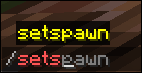
/setspawn 设置出生点
- 使用
/spawn 传送到出生点
- 传送、设置出生点和加入服务器时的自定义声音
- 聊天或操作栏消息
- 通过
/fancyspawn 进行游戏内配置
- 可配置的声音、音量、音调和消息
- 无需重启服务器即可重载配置
- API:自版本 1.2 起为其他插件提供 API
命令
| Command |
Permission |
Description |
/setspawn |
fancyspawn.setspawn |
将当前所在位置设置为出生点。 |
/spawn |
fancyspawn.spawn |
将你传送到已保存的出生点。 |
/fancyspawn |
fancyspawn.admin |
显示当前设置。 |
/fancyspawn reload |
fancyspawn.admin |
重载配置和出生点数据。 |
/fancyspawn sound <teleport|setspawn|join> <sound|off> |
fancyspawn.admin |
设置或禁用声音。 |
/fancyspawn volume <0-10> |
fancyspawn.admin |
更改声音音量。 |
/fancyspawn pitch <0.5-2> |
fancyspawn.admin |
更改声音音调。 |
/fancyspawn messagelocation <chat|actionbar> |
fancyspawn.admin |
选择消息显示的位置。 |
/fancyspawn message <set|teleport|notset|onlyplayer> <text> |
fancyspawn.admin |
更改玩家消息。支持 & 颜色代码。 |
权限
| Permission |
Default |
Description |
fancyspawn.spawn |
Everyone |
允许使用 /spawn。 |
fancyspawn.setspawn |
Operators |
允许使用 /setspawn。 |
fancyspawn.admin |
Operators |
允许使用 /fancyspawn 及其子命令。 |
安装
- 下载最新的 FancySpawn
.jar 文件。
- 将其放入服务器的
plugins 文件夹中。
- 启动或重启服务器。
- 在
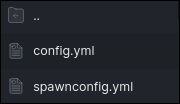
plugins/FancySetSpawn/config.yml 中配置插件,或使用 /fancyspawn。
出生点位置存储在:
plugins/FancySetSpawn/spawnconfig.yml
配置
FancySpawn 支持聊天和操作栏消息。
将 messageLocation 设置为 chat 或 actionbar。
通过将声音设置为 off 或留空来禁用声音。
config.yml
messages:
messageLocation: actionbar
spawnSet: "&a出生点已设置为你的当前位置!"
teleportToSpawn: "&a你已被传送到出生点!"
spawnNotSet: "&c出生点位置未设置。"
commandOnlyPlayer: "&c此命令只能由玩家使用。"
reloaded: "&a配置已重载。"
reloadFailed: "&c无法重载配置。请检查控制台。"
valueSet: "&a{key} 已设置为 &f{value}&a。"
soundDisabled: "&a声音 &f{key} &a已禁用。"
saveFailed: "&c无法保存配置。"
sounds:
teleport: "minecraft:entity.experience_orb.pickup"
setSpawn: "minecraft:entity.experience_orb.pickup"
playerJoin: "minecraft:entity.player.levelup"
soundSettings:
volume: 1.0
pitch: 1.0
手动更改配置后,请使用:
/fancyspawn reload
API
从版本 1.2 开始,FancySpawn 为其他插件提供了 API。
该 API 允许其他插件访问已保存的出生点并将玩家传送到该位置。
在你的 plugin.yml 中将 FancySpawn 添加为依赖项:
depend: [FancySetSpawn]
插件名称为 FancySetSpawn。
可用方法
| Method |
Description |
getSpawnLocation() |
返回已保存的出生点位置,如果未设置或其世界不可用,则返回 null。 |
isSpawnSet() |
如果设置了有效的出生点,则返回 true。 |
teleportPlayerToSpawn(Player) |
将玩家传送到已保存的出生点,并处理传送声音和消息。如果传送失败,则返回 false。 |
API example
import org.bukkit.entity.Player;
import org.patekcz.setSpawn.FancySpawnAPI;
import org.patekcz.setSpawn.SetSpawn;
public void teleportToSpawn(Player player) {
SetSpawn plugin = (SetSpawn) getServer()
.getPluginManager()
.getPlugin("FancySetSpawn");
```java
if (plugin == null || !plugin.isEnabled()) {
return;
}
FancySpawnAPI api = plugin.getAPI();
api.teleportPlayerToSpawn(player);
}
由 patek_cz 用 ❤️ 构建

A simple spawn plugin for Spigot and Paper.
FancySetSpawn lets players set a server spawn and teleport back to it with /spawn. It also supports customizable sounds, messages, and action bar notifications.
Works with Spigot and Paper 1.8.8+.
Features

- Set spawn with
/setspawn
- Teleport to spawn with
/spawn
- Custom sounds for teleporting, setting the spawn, and joining
- Chat or action bar messages
- In-game configuration through
/fancyspawn
- Configurable sounds, volume, pitch, and messages
- Reload configuration without restarting the server
- API for other plugins, available since version 1.2
Commands
| Command |
Permission |
Description |
/setspawn |
fancyspawn.setspawn |
Sets the spawn at your current location. |
/spawn |
fancyspawn.spawn |
Teleports you to the saved spawn. |
/fancyspawn |
fancyspawn.admin |
Shows the current settings. |
/fancyspawn reload |
fancyspawn.admin |
Reloads the configuration and spawn data. |
/fancyspawn sound <teleport|setspawn|join> <sound|off> |
fancyspawn.admin |
Sets or disables a sound. |
/fancyspawn volume <0-10> |
fancyspawn.admin |
Changes the sound volume. |
/fancyspawn pitch <0.5-2> |
fancyspawn.admin |
Changes the sound pitch. |
/fancyspawn messagelocation <chat|actionbar> |
fancyspawn.admin |
Selects where messages are displayed. |
/fancyspawn message <set|teleport|notset|onlyplayer> <text> |
fancyspawn.admin |
Changes a player message. Supports & color codes. |
Permissions
| Permission |
Default |
Description |
fancyspawn.spawn |
Everyone |
Allows /spawn. |
fancyspawn.setspawn |
Operators |
Allows /setspawn. |
fancyspawn.admin |
Operators |
Allows /fancyspawn and its subcommands. |
Installation
- Download the latest FancySpawn
.jar.
- Put it into your server's
plugins folder.
- Start or restart the server.
- Configure the plugin in
plugins/FancySetSpawn/config.yml, or use /fancyspawn.
The spawn location is stored in:
plugins/FancySetSpawn/spawnconfig.yml
Configuration
FancySpawn supports both chat and action bar messages.
Set messageLocation to either chat or actionbar.
Sounds can be disabled by setting them to off or leaving them empty.
config.yml
messages:
messageLocation: actionbar
spawnSet: "&aSpawn has been set to your current location!"
teleportToSpawn: "&aYou have been teleported to spawn!"
spawnNotSet: "&cSpawn position is not set."
commandOnlyPlayer: "&cThis command can only be used by a player."
reloaded: "&aConfiguration reloaded."
reloadFailed: "&cCould not reload the configuration. Check the console."
valueSet: "&a{key} set to &f{value}&a."
soundDisabled: "&aSound &f{key} &ahas been disabled."
saveFailed: "&cCould not save the configuration."
sounds:
teleport: "minecraft:entity.experience_orb.pickup"
setSpawn: "minecraft:entity.experience_orb.pickup"
playerJoin: "minecraft:entity.player.levelup"
soundSettings:
volume: 1.0
pitch: 1.0
After changing the configuration manually, use:
/fancyspawn reload
API
FancySpawn provides an API for other plugins starting with version 1.2.
The API allows other plugins to access the saved spawn and teleport players to it.
Add FancySpawn as a dependency in your plugin.yml:
depend: [FancySetSpawn]
The plugin name is FancySetSpawn.
Available methods
| Method |
Description |
getSpawnLocation() |
Returns the saved spawn location, or null if it is not set or its world is unavailable. |
isSpawnSet() |
Returns true if a valid spawn is set. |
teleportPlayerToSpawn(Player) |
Teleports the player to the saved spawn and handles the teleport sound and message. Returns false if the teleport fails. |
API example
import org.bukkit.entity.Player;
import org.patekcz.setSpawn.FancySpawnAPI;
import org.patekcz.setSpawn.SetSpawn;
public void teleportToSpawn(Player player) {
SetSpawn plugin = (SetSpawn) getServer()
.getPluginManager()
.getPlugin("FancySetSpawn");
if (plugin == null || !plugin.isEnabled()) {
return;
}
FancySpawnAPI api = plugin.getAPI();
api.teleportPlayerToSpawn(player);
}
Built with ❤️ by patek_cz
评论 0
登录后参与评分
还没有评论,来抢沙发吧