FastStorage
FastStorage 是一款智能的存储整理插件。
玩家无需使用法杖、命令或客户端模组,只需制作并放置特殊的 FastStorage Plate(快速存储板)。
容器链接后,玩家只需走过该板块,背包中与已存物品匹配的物品就会自动整理到对应的存储容器中。
FastStorage 旨在为玩家提供简便的操作体验,同时适用于生存服务器(SMP)、团队基地以及大型储物间。
✨ 功能特性
- 基于压力板的物品整理
- 游戏内直接链接容器
- 仅将物品整理到已存有同类物品的容器中
- 支持箱子、带陷阱的箱子、 barrels(木桶)以及已放置的潜影盒
- 拥有者(Owner)和共享(Shared)模式
- 可选的简易模式(Easy mode)
- 安全信任系统,需请求/接受保护
- 玩家可使用
/fs leave 移除自己与板块的关联
- 忽略快捷栏物品
- 忽略护甲、工具、武器、钓鱼竿、耐久类物品及附魔书
- 可选支持自定义 PDC 物品
- 可配置的作用范围和已链接容器数量限制
- SQLite 数据存储
- 提供德语和英语语言文件
- 支持 WorldGuard
- 支持 SimpleClaimSystem
- 支持 bStats
- Modrinth 更新检查及管理员通知
? 工作原理
FastStorage 采用非常简单的逻辑:
- 制作一个 FastStorage Plate
- 在基地中放置它
- 链接你想要使用的容器
- 走过该板块
- 匹配的物品会被移动到你链接的存储容器中
仅整理匹配的物品。
例如,如果箱子里已经存有铁锭,你背包中的更多铁锭就可以被移入该箱子。
FastStorage 会优先填满现有的堆叠,然后在匹配的容器中利用空闲槽位。
这使得整理过程可预测,并防止随机填充存储空间。
? 合成配方
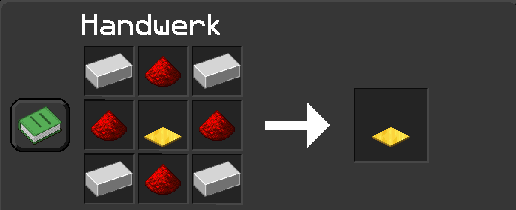
该配方用于制作自定义的 FastStorage Plate。
? FastStorage Plate 物品
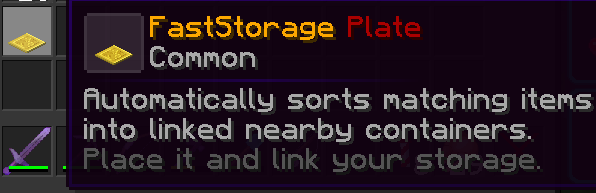
该板块可通过命令获取,或在启用合成配方时进行制作。
? 放置与链接容器
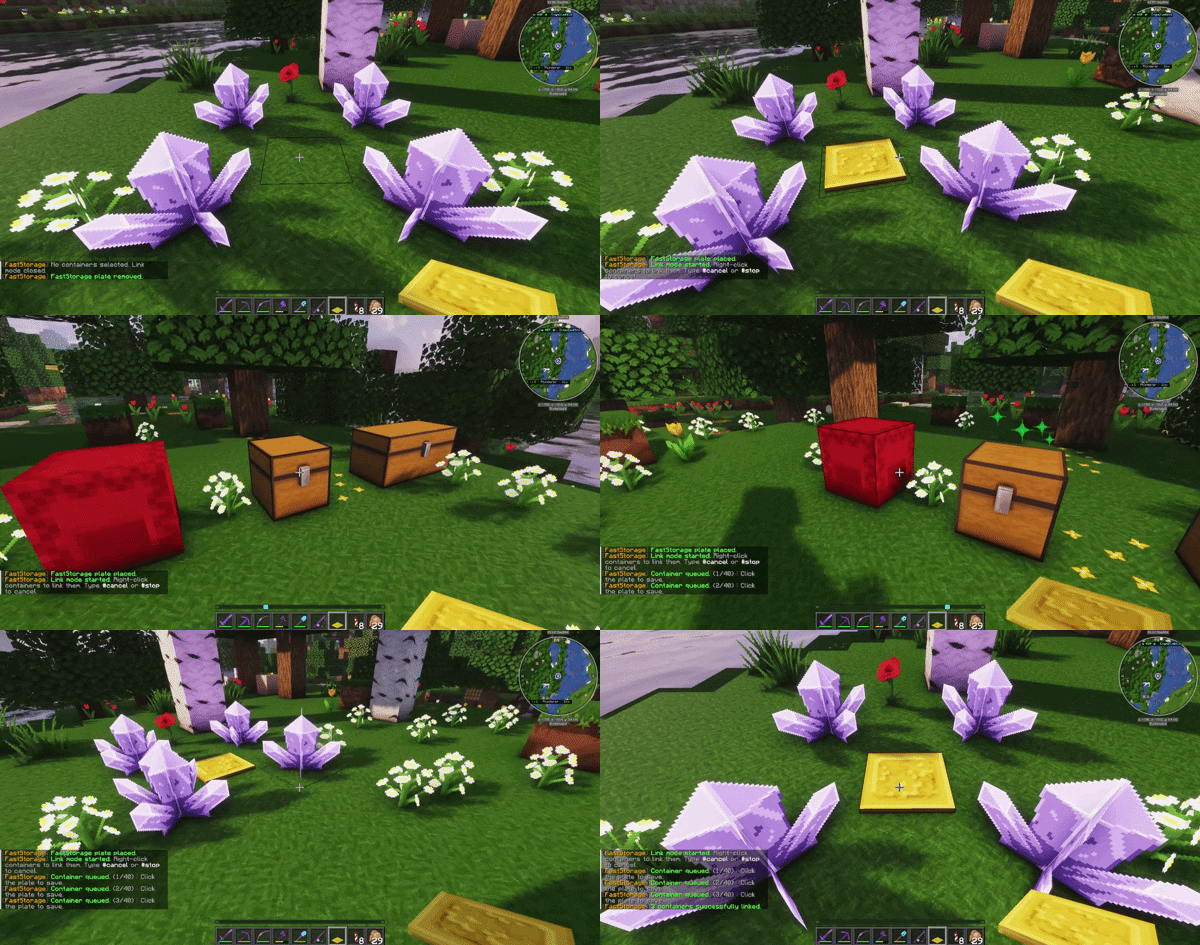
放置 FastStorage Plate 后,链接模式会自动开始。
右键点击容器以将其加入队列。
再次点击 FastStorage Plate 以保存已链接的容器。
你可以使用以下命令取消链接过程:
#cancel
#stop
被取消的链接不会被保存。
⚡ 物品传输
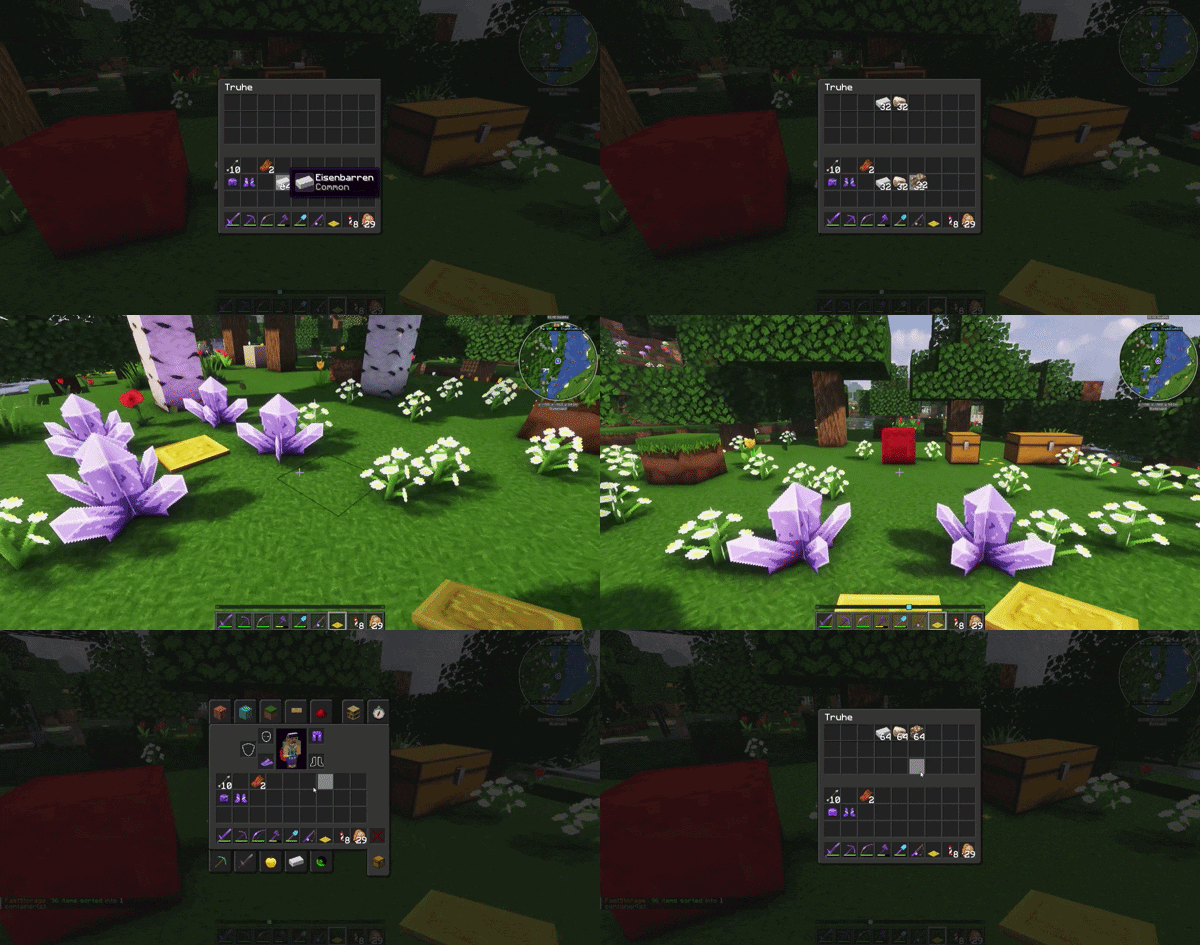
容器链接完成后,只需走过板块即可。
你背包中的匹配物品将被移动到已链接的容器中。
? 板块模式
OWNER(拥有者)
默认模式。
只有板块拥有者和受信任的玩家可以使用该板块。
已链接的容器归拥有者所有。
SHARED(共享)
适合团队使用。
受信任的玩家可以使用同一个板块,但每位玩家可以链接自己的容器。
这允许多名玩家共用一个 FastStorage Plate,而不会混淆各自的存储链接。
EASY(简易)
实验性模式。
简易模式可在配置文件中启用。
它不需要手动链接,而是扫描附近已加载的容器。
对于公共服务器,建议默认使用 OWNER 模式。
? 信任系统
FastStorage 使用安全的信任请求系统。
当板块拥有者想要信任另一名玩家时,目标玩家会收到一条请求,必须手动接受。
/fs trust <player>
/fs accept
/fs deny
也支持德语快捷键:
/fs ja
/fs nein
请求在 120 秒后过期。
受信任的玩家随时可以移除自己与板块的关联:
/fs leave
这可以防止隐藏或非预期的信任访问。
? 命令
/fs help
显示命令概览。
/fs link start
开始链接容器到板块。
/fs unlink
开始取消链接模式。
/fs mode <owner|shared|easy>
更改板块模式。
/fs trust <player>
向其他玩家发送信任请求。
/fs accept
/fs deny
/fs ja
/fs nein
接受或拒绝信任请求。
/fs trustlist
显示所选板块的信任玩家列表。
/fs leave
将自己从板块中移除。
/fs info
显示板块的相关信息。
/fs give <player> [amount]
给予玩家 FastStorage Plates。
/fs reload
重新加载插件配置文件和语言文件。
? 重要权限
faststorage.use
允许使用 FastStorage。
faststorage.link
允许链接和取消链接容器。
faststorage.trust
允许信任、取消信任以及查看受信任的玩家。
faststorage.give
允许发放 FastStorage Plates。
faststorage.reload
允许重新加载 FastStorage。
faststorage.admin
包含所有 FastStorage 权限。
faststorage.link.<amount>
动态链接容器上限。数值受 limits.linked-containers.hard-max 限制。
faststorage.range.<amount>
可选的动态作用范围权限。数值受 range.hard-max 限制。
⚙ 配置
FastStorage 可配置,但设计上保持简洁清晰。
你可以配置以下内容:
- 语言
- 默认板块模式
- 简易模式的可用性
- 更新通知
- 板块材质
- 合成配方的启用/禁用
- 玩家和 OP 的作用范围
- 已链接容器的数量限制
- 传输安全限制
- 自定义 PDC 物品支持
- 允许的容器类型
- 保护钩子(Protection hooks)
- 音效和粒子效果
示例默认配置:
settings:
  language: en-US
  default-mode: OWNER
  allow-easy-mode: false

range:
  default-player: 12
  default-op: 24
  hard-max: 32

limits:
  linked-containers:
    default-player: 10
    default-op: 40
    hard-max: 80
缺失的配置项和语言键会在重新加载或插件更新时自动添加。
? Protection Support
FastStorage supports optional protection hooks:
- WorldGuard
- SimpleClaimSystem
Protection checks are used when linking containers, using plates, and transferring items.
FastStorage trust and claim permissions are separate systems.
If a player should no longer use a plate, remove them with:
/fs untrust <player>
or the player can remove themselves with:
/fs leave
? Perfect together with NearbyCraft+
FastStorage works especially well together with my plugin NearbyCraft+.
FastStorage keeps your storage organized by sorting matching items into linked containers.
NearbyCraft+ then lets you craft directly from nearby containers.
For survival servers, SMP bases, and storage rooms, both plugins together create a very comfortable workflow without requiring any client-side mods.
Use FastStorage to sort your items.
Use NearbyCraft+ to craft from your storage.
NearbyCraft+:
? Languages
FastStorage includes:
English is the default language.
? bStats
FastStorage uses bStats to collect anonymous usage statistics.
No personal data is collected.
You can disable bStats globally in the bStats config folder.
✅ Requirements
- Paper,Spigot,Purpur server
- Minecraft 1.21.x
FastStorage was built for modern Paper servers and tested on Minecraft 1.21.x.
? Links
Wiki:
Website:
? Notes
FastStorage is designed as a clean replacement for classic quick-stash tools.
Instead of sorting with a wand, players use a physical storage plate in their base.
This keeps the feature immersive, visible, and easy to understand for everyone on the server.
FastStorage
FastStorage is a smart storage sorting plugin.
Instead of using a wand, command, or client mod, players can craft and place a special FastStorage Plate.
Once containers are linked, players simply walk over the plate and matching items from their inventory are automatically sorted into their storage.
FastStorage is designed to be simple for players and useful for survival SMP, team bases, and large storage rooms.
✨ Features
- Pressure-plate based item sorting
- Link containers directly ingame
- Items are only sorted into containers that already contain matching items
- Supports chests, trapped chests, barrels, and placed shulker boxes
- Owner and Shared plate modes
- Optional Easy mode
- Safe trust system with request/accept protection
- Players can remove themselves from a plate with
/fs leave
- Hotbar items are ignored
- Armor, tools, weapons, fishing rods, durability items, and enchanted books are ignored
- Optional support for custom PDC items
- Configurable range and linked-container limits
- SQLite storage
- German and English language files
- WorldGuard support
- SimpleClaimSystem support
- bStats support
- Modrinth update check with admin notification
? How it works
FastStorage uses a very simple idea:
- Craft a FastStorage Plate
- Place it in your base
- Link the containers you want to use
- Walk over the plate
- Matching items are moved into your linked storage
Only matching items are sorted.
For example, if a chest already contains iron ingots, more iron ingots from your inventory can be moved into that chest.
FastStorage first fills existing stacks and then uses free slots inside matching containers.
This keeps sorting predictable and prevents random storage filling.
? Crafting Recipe
The recipe creates the custom FastStorage Plate.
? FastStorage Plate Item
The plate can be given by command or crafted if the recipe is enabled.
? Placing and Linking Containers
After placing a FastStorage Plate, the link mode starts automatically.
Right-click containers to queue them.
Click the FastStorage Plate again to save the linked containers.
You can cancel the link process with:
#cancel
#stop
Cancelled links are not saved.
⚡ Item Transfer
Once containers are linked, just walk over the plate.
Matching items from your inventory will be moved into the linked containers.
? Plate Modes
OWNER
The default mode.
Only the plate owner and trusted players can use the plate.
Linked containers belong to the owner.
SHARED
Useful for teams.
Trusted players can use the same plate, but each player can link their own containers.
This allows multiple players to use one shared FastStorage Plate without mixing their storage links.
EASY
Experimental mode.
Easy mode can be enabled in the config.
It does not require manual linking and scans nearby loaded containers instead.
For public servers, OWNER mode is recommended as the default.
? Trust System
FastStorage uses a safe trust request system.
When a plate owner wants to trust another player, the target player receives a request and must accept it manually.
/fs trust <player>
/fs accept
/fs deny
German shortcuts are also supported:
/fs ja
/fs nein
Requests expire after 120 seconds.
A trusted player can remove themselves from a plate at any time:
/fs leave
This prevents hidden or unwanted trust access.
? Commands
/fs help
Shows the command overview.
/fs link start
Starts linking containers to the plate.
/fs unlink
Starts unlink mode.
/fs mode <owner|shared|easy>
Changes the plate mode.
/fs trust <player>
Sends a trust request to another player.
/fs accept
/fs deny
/fs ja
/fs nein
Accepts or denies a trust request.
/fs trustlist
Shows trusted players for the selected plate.
/fs leave
Removes yourself from a plate.
/fs info
Shows information about a plate.
/fs give <player> [amount]
Gives FastStorage Plates.
/fs reload
Reloads the plugin configuration and language files.
? Important Permissions
faststorage.use
Allows using FastStorage.
faststorage.link
Allows linking and unlinking containers.
faststorage.trust
Allows trusting, untrusting, and viewing trusted players.
faststorage.give
Allows giving FastStorage Plates.
faststorage.reload
Allows reloading FastStorage.
faststorage.admin
Includes all FastStorage permissions.
faststorage.link.<amount>
dynamic linked-container limit. Values are capped by limits.linked-containers.hard-max.
faststorage.range.<amount>
Optional dynamic range permission. Values are capped by range.hard-max.
⚙ Configuration
FastStorage is configurable but intentionally kept clean.
You can configure:
- Language
- Default plate mode
- Easy mode availability
- Update notifications
- Plate material
- Recipe enabled/disabled
- Player and OP range
- Linked container limits
- Transfer safety limit
- Custom PDC item support
- Allowed container types
- Protection hooks
- Sounds and particles
Example defaults:
settings:
  language: en-US
  default-mode: OWNER
  allow-easy-mode: false

range:
  default-player: 12
  default-op: 24
  hard-max: 32

limits:
  linked-containers:
    default-player: 10
    default-op: 40
    hard-max: 80
Missing config and language keys are automatically added on reload or plugin update.
? Protection Support
FastStorage supports optional protection hooks:
- WorldGuard
- SimpleClaimSystem
Protection checks are used when linking containers, using plates, and transferring items.
FastStorage trust and claim permissions are separate systems.
If a player should no longer use a plate, remove them with:
/fs untrust <player>
or the player can remove themselves with:
/fs leave
? Perfect together with NearbyCraft+
FastStorage works especially well together with my plugin NearbyCraft+.
FastStorage keeps your storage organized by sorting matching items into linked containers.
NearbyCraft+ then lets you craft directly from nearby containers.
For survival servers, SMP bases, and storage rooms, both plugins together create a very comfortable workflow without requiring any client-side mods.
Use FastStorage to sort your items.
Use NearbyCraft+ to craft from your storage.
NearbyCraft+:
? Languages
FastStorage includes:
English is the default language.
? bStats
FastStorage uses bStats to collect anonymous usage statistics.
No personal data is collected.
You can disable bStats globally in the bStats config folder.
✅ Requirements
- Paper,Spigot,Purpur server
- Minecraft 1.21.x
FastStorage was built for modern Paper servers and tested on Minecraft 1.21.x.
? Links
Wiki:
Website:
? Notes
FastStorage is designed as a clean replacement for classic quick-stash tools.
Instead of sorting with a wand, players use a physical storage plate in their base.
This keeps the feature immersive, visible, and easy to understand for everyone on the server.


 插件

 插件
 插件
 插件
 插件
 插件
评论 0
登录后参与评分
还没有评论,来抢沙发吧