烟花秀!
FireworkShowManager
创建全自动的烟花表演。随心所欲地自定义或随机化。就是这么简单。
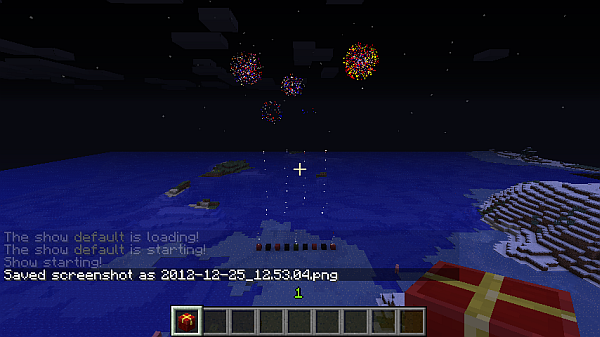
如何开始创建烟花表演?
首先从间隔(interval)的角度去思考,因为插件也是基于这种方式运行的 ;)
因此,首先要考虑你的最小时间偏移量应该是多少。当然,这需要提前规划,但之后可以随时更改。不过请注意,例如缩小你的间隔会使已设置好的烟花表演节奏变快。希望这很清楚 ;)
假设你将间隔设置为 10,这意味着你每秒可以触发 2 个烟花定义。
接下来考虑总持续时间,以间隔数为单位测量。因此,如果间隔为 10,要达到 300 秒(5 分钟),总间隔数应为 600,这是我建议初学者采用的方案。
现在去设置你的烟花,通过在特定的间隔位置设置生成点来完成。你可以设置零个或多个生成点。如果你使用较低的间隔值,你不会在每个刻(tick)都触发一次爆炸,但你会注意到这一点。这时 TEST 命令就会派上用场,用来查看你是否过度触发了 :)
当设置了生成点后,你需要在此时设置烟花类型/形状字符串。它可以是随机的,这意味着如果你提供多个生成点,每次爆炸都将是随机的。太棒了!
命令
现在让我们看看所有命令及其用法的概览:
    fwfw:
        description: 烟花管理器 烟花命令
        usage: |
           /fwfw [string] - 将烟花效果添加到当前时间
        permission: dwsm.admin
    fws:
        description: 通用烟花管理器命令
        usage: |
           /fws time [hour] - 开始的小时时间 (18=下午6点)
           /fws duration [intervals] - 间隔数量
           /fws interval [ticks] - 以刻为单位的间隔持续时间
           /fws biginterval [seconds] - 表演的间隔时间
        permission: dwsm.admin
    fwsm:
        description: 烟花管理器 管理命令
        usage: |
           /fwsm test - 启动表演用于调试或娱乐
           /fwsm stop - 停止任何正在进行的表演
           /fwsm fullstop - 停止主计时器
        permission: dwsm.admin
    fwss:
        description: 烟花管理器 设置命令
        usage: |
           /fwss [n] - 为第 n 个间隔设置生成点
        permission: dwsm.admin
烟花效果定义
首先请记住,烟花可以由多个效果组成,所以你不需要把所有东西塞进一个效果里,你可以添加多个效果以获得更精确的效果 :)
基本布局由三部分组成,用冒号(':')分隔,管道符('|')用于附加功率。设置的最高功率将被应用!
第一部分:类型和效果
第一部分可以是 1 到 3 位数字。你应该在第一位数提供 TYPE(类型),之后可以添加效果。一些例子应该能使其更清晰:
'ctf': 爬行者类型,轨迹和闪烁
'ot?': 球型,轨迹和随机闪烁几率
'Of': 大球型,闪光
'x??': 爆裂,随机轨迹,随机闪烁
'*?': 星型,随机效果,轨迹或闪烁
'???': 随机类型,最多 2 个随机效果
每种类型的所有值:
  BALL:    ['.','o']
  BIGBALL: ['O','0']
  BURST:   ['x','X','y','Y']
  CREEPER: ['c','C','#']
  STAR:    ['*']
第二部分:起始颜色(默认为“一个随机”)
第三部分:褪色颜色(可选)
颜色的设置方式相同,所以我不重复写了 :p
它们由几个用逗号(',')分隔的字符串组成。如果你了解 CSS(十六进制)方式,插件就是按照这种方式理解的。因此,你可能需要了解 HEX 颜色逻辑,即十六进制且顺序为 RRGGBB。
如果两位数字的值相同,你可以缩写颜色代码,例如 F00 解析为 FF0000。
这里有一个小表格可以帮助你 :)(哦,并且不区分大小写,ff0 与 FF0 相同)
维基百科
示例
注意:功率默认值为 2 秒!
'otf:FF0000,00FF00' - ball,trail,flicker,red+lime
'*f:000,F00,FF0:0F0,FFF,00F' - star,flicker,black+red+yellow->red+white+blue
'x:000,fff|3' - burst,black+white, power 3!
'?ft:?|0' - random shape,flicker,trail,random color (1 max), igniting instantly!
'???:???:???|1' - pure randomness, power 1
待办事项
未来版本将支持同时运行多个演出
源码
Github
更新日志
- v0.1.0.8 - 针对 GitHub 的小幅调整,实现 Maven 化!
- v0.1.0.7 - 支持瞬间引爆(威力 -1)
- v0.1.0.4 - 修复低级错误
- v0.1.0.3 - 代码清理
- v0.1.0.2 - 修复未设置烟花/生成点时的空指针异常 (NPE)
- v0.1.0.1 - 添加可配置的烟花威力
- v0.1.0.0 - 所有命令均可用
- v0.0.5.0 - 主计时器计算
- v0.0.4.0 - 添加节拍和心跳效果
- v0.0.3.0 - start 命令可用
- v0.0.2.0 - 命令实现
- v0.0.1.0 - 命令结构
- v0.0.0.3 - 可通过命令设置默认字符串
- v0.0.0.2 - 通过右键点击生成烟花
- v0.0.0.1 - 可生成基础烟花(API)
Firework Shows!
FireworkShowManager
Create fully automated firework shows. Customize or randomize as you wish. That's really it.
How do I start creating a Firework Show?
Start by thinking in intervals, because the plugin does it this way ;)
So, first off, think about what your minimum time offset should be. Of course, this has to be planned beforehand, it can be changed anytime later but note that e.g. lowering your interval makes an already set up firework show quicker. I hope that is clear ;)
So, let's say you have the interval set at 10, that means that you are able to spam 2 firework definitions per second.
Now think about the total duration, measured in intervals. So having an interval of 10 would result a duration of 600 to get 300 seconds (5 minutes), that's what I would suggest for the start.
Now go and setup your firework, do this by setting spawns at certain interval positions. You can set NO positions or as many as you wish. If you have a low interval, you will not spam a charge at every tick, but you will notice this. This is where the TEST command will come in handy, to see when you're overdoing it :)
When having set the spawns, you have to set the firework type/shape string at this point of time. It can be random which effectively means that each charge will be random if you supply multiple spawn points. yay!
Commands
Now let's see an overview of all commands and their usage:
    fwfw:
        description: Fireworkshow Manager Firework Commands
        usage: |
           /fwfw [string] - add the firework effect to the current time
        permission: dwsm.admin
    fws:
        description: General Fireworkshow Manager Commands
        usage: |
           /fws time [hour] - the starting hour time (18=6pm)
           /fws duration [intervals] - the interval count
           /fws interval [ticks] - the interval duration in ticks
           /fws biginterval [seconds] - the SHOW interval
        permission: dwsm.admin
    fwsm:
        description: Fireworkshow Manager Moderation Commands
        usage: |
           /fwsm test - start the show for debug or fun
           /fwsm stop - stop any running show
           /fwsm fullstop - stop the main timer
        permission: dwsm.admin
    fwss:
        description: Fireworkshow Manager Setup Commands
        usage: |
           /fwss [n] - set spawn points for nth interval
        permission: dwsm.admin
Firework Effect Definition
First of all, remember that fireworks can consist of multiple effects, so you don't need to cramp everything in one effect, you can add multiple ones to add more precise effects :)
The general layout is that you have three parts separated by colons ( ':' ) and a PIPE ( '|' ) enables appending of a power. The highest set power will be applied!
First part: type and effects
The first part can be one to three digits. You should supply the TYPE at the first digit, and may add effects on top after that. Some examples should make it clearer:
'ctf': Creeper type, Trail and Flicker
'ot?': Ball type, Trail and random Flicker chance
'Of': Big ball type, Flair
'x??': Burst, Random Trail, Random Flicker
'*?': Star type, Random Effect, either Trail or Flicker
'???': Random type, up to 2 random effects
All values for each Type:
  BALL:    ['.','o']
  BIGBALL: ['O','0']
  BURST:   ['x','X','y','Y']
  CREEPER: ['c','C','#']
  STAR:    ['*']
Second Part: first color (defaults to "one random")
Second Part: fade color (optional)
The colors are set the same way, so I don't write this twice :p
They consist out of several strings separated by COMMA ( ',' ). The way the plugin understands it is the CSS (hex) way if you know this. So you might need to look into HEX color logic, being hexadecimal and in the order RRGGBB.
You can appreviate the color codes if both digits are the same value, so e.g. F00 parses to FF0000.
here's a little table to help you :) (oh and, it is NOT case sensitive, ff0 is the same as FF0)
Wikipedia
Examples
Note: the power defaults to 2 seconds!
'otf:FF0000,00FF00' - ball,trail,flicker,red+lime
'*f:000,F00,FF0:0F0,FFF,00F' - star,flicker,black+red+yellow->red+white+blue
'x:000,fff|3' - burst,black+white, power 3!
'?ft:?|0' - random shape,flicker,trail,random color (1 max), igniting instantly!
'???:???:???|1' - pure randomness, power 1
Todos
Future versions will include multiple shows running at the same time
Source
Github
Changelog
- v0.1.0.8 - small tweaks for github, mavenizsation!
- v0.1.0.7 - support instant detonation (power -1)
- v0.1.0.4 - derp fix
- v0.1.0.3 - code cleanup
- v0.1.0.2 - fix NPEs if you didn't set fireworks/spawns
- v0.1.0.1 - add configurable firework power
- v0.1.0.0 - all commands operational
- v0.0.5.0 - main timer calculations
- v0.0.4.0 - beat and heartBeat added
- v0.0.3.0 - start command operational
- v0.0.2.0 - command implementation
- v0.0.1.0 - command structure
- v0.0.0.3 - a default string can be set by command
- v0.0.0.2 - spawn fireworks by right clicking
- v0.0.0.1 - basic fireworks can be spawned (API)
 插件

 插件
 插件
 插件
 插件
 插件
评论 0
登录后参与评分
还没有评论,来抢沙发吧