FKBoom 插件概述
以下内容因英语非我母语而自动翻译。如有阅读障碍,敬请谅解!
主要功能:
- 标准保护:利用游戏默认的爆炸保护效果,防止由 TNT、重生锚、床等造成的破坏。
- 动态爆炸:爆炸效果会根据环境和配置动态变化,增强游戏体验。
- 禁用爆炸保护:允许所有爆炸效果发生,无任何保护限制。
- 交互管理:允许在下界和末地使用床,增强游戏交互性。
- GUI 设置界面:提供直观的图形界面,使拥有相应权限的玩家能够轻松调整设置。
- 命令与权限:简化了命令(例如 /fk xxx),便于管理。
- 多世界支持:为每个世界自定义爆炸和交互规则。
- 配置重载:无需重启即可即时更新服务器设置。
- 静音爆炸模式:启用静音爆炸,减少干扰。
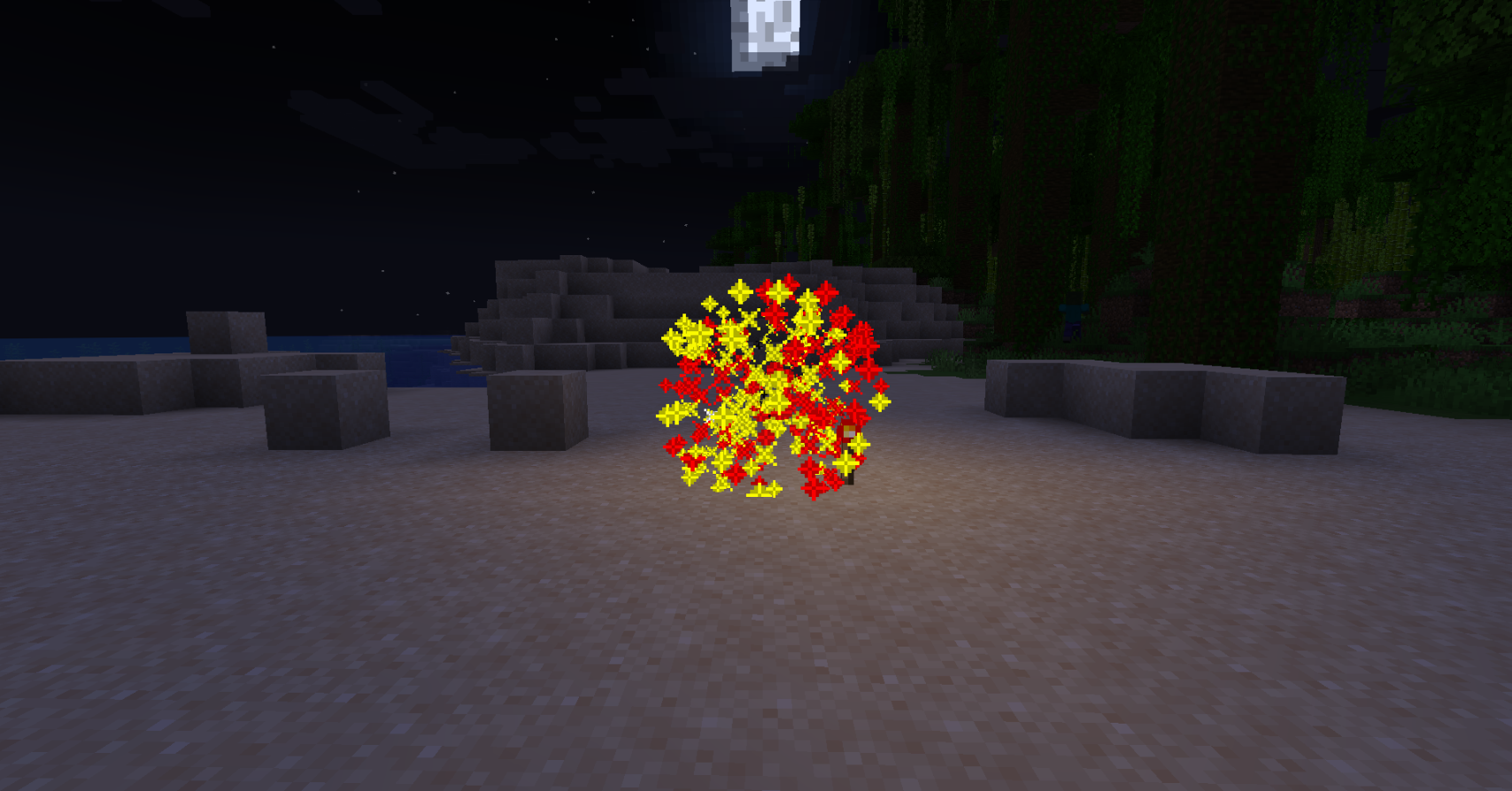
- 烟花爆炸模式:新增的烟花爆炸效果为你的游戏增添更多视觉色彩。
- 爆炸伤害:可选择启用或禁用对所有实体的爆炸伤害。
- 默认设置生成:在 GUI 中点击世界设置时,将自动生成默认设置,无需手动配置。
- 自定义 GUI 界面:提供更便捷的自定义 GUI 界面,包括主界面和世界设置界面。用户可根据需求灵活配置和管理。支持自定义 GUI 界面的语言、物品、ID 和命令。
兼容性:
- Minecraft 版本:1.20.1 至 1.21
- Java 版本:Java 17 至 Java 22
- 服务端核心支持:Spigot, Paper, Folia, Purpur, PufferFish, Leaves, Mohist, Arclight
保护措施:
- 全面保护:保护画作、盔甲架、物品展示框、船只、矿车、拴绳、发光物品展示框等免受爆炸伤害。
FKBoom 插件为 Minecraft 服务器提供了全面的爆炸管理和控制,同时确保游戏交互性和多样性。无论您是想完全控制爆炸效果,还是在多个世界中维持不同的游戏规则,FKBoom 都能满足您的需求。
模组使用说明
其他模组需单独测试
已测试版本 1.20.1:
- Botania 模组 - Manastorm Charge: 在 Manastorm Charge 的最后一次爆炸期间,虽然显示爆炸为异步状态,但实际上不会破坏任何方块。重新进入游戏后会正常显示。
- Mekanism 模组 - Obsidian TNT, Baby Creeper
- Creeper Overhaul 模组 - 所有会爆炸的爬行者
已知问题和不兼容项:
- Applied Energistics 2 Tiny TNT
对于其他单独测试的模组,如果发现物品不防爆,则该插件可能无法实现防爆效果。
Mohist 服务器的某些版本可能存在 issues,请勿向我报告此类问题。
权限介绍
-
权限节点: fkboom.command
- 描述: 允许使用 FKBoom 插件命令。
- 默认: 此权限仅默认授予服务器操作员 (op),确保只有受信任的管理员才能执行此命令。
-
权限节点: fkboom.reload
- 描述: 此权限允许用户重载插件的配置文件,应用新设置而无需重启服务器。
- 默认: 此权限仅默认授予服务器操作员 (op),确保只有受信任的管理员才能执行此命令。
-
权限节点: fkboom.gui
- 描述: 允许打开爆炸保护设置的图形用户界面 (GUI)。
- 默认: 此权限仅默认授予服务器操作员 (op),确保只有受信任的管理员才能执行此命令。
-
权限节点: fkboom.manage
- 描述: 允许管理所有爆炸保护设置。
- 默认: 此权限仅默认授予服务器操作员 (op),确保只有受信任的管理员才能执行此命令。
-
权限节点: fkboom.gui.access
- 描述: 允许访问爆炸保护设置的图形用户界面 (GUI),但不允许管理设置。
- 默认: 此权限仅默认授予服务器操作员 (op),确保只有受信任的管理员才能执行此命令。
GUI 界面
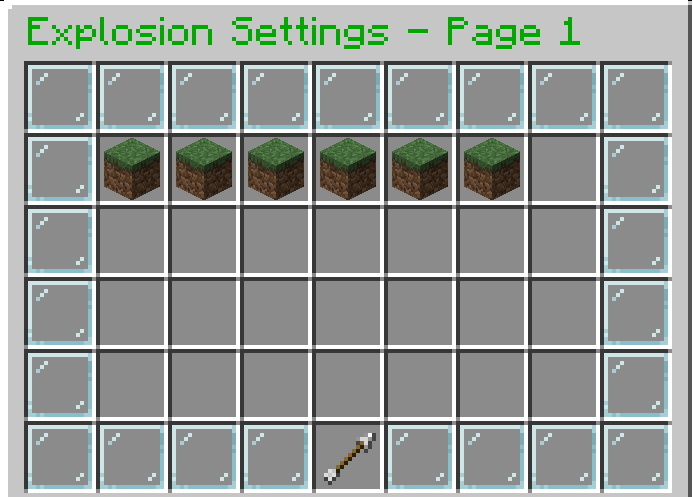
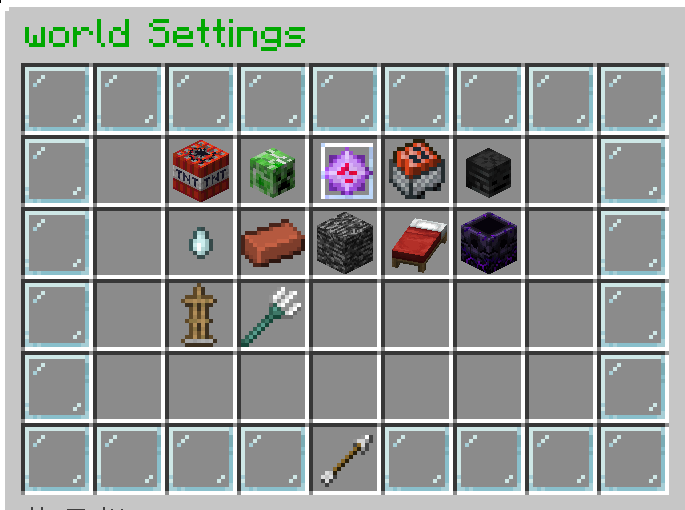
gui.yml
#在获得 fkboom.command、fkboom.gui 和 fkboom.gui.access 权限后,玩家可以查看爆炸设置 GUI,但无法修改设置。

# 用于以控制台身份执行命令的示例按钮(名称可自定义)
# 当玩家点击此按钮时,控制台将执行命令 dm open menu {player_name} clicked the button!,其中 {player_name} 将被替换为点击按钮的玩家名称。此命令名称 example_console_command 可以自定义为任何合适的名称。
#example_console_command:
#slot: 49
#material: "BARRIER"
#name: "&cReturn"
#lore:
#- "&7Click to return to the menu"
#command: "console:dm open menu {player_name}"

# 示例按钮:以玩家身份执行命令(名称可自定义)
# 当玩家点击此按钮时,他们将执行命令 kill {player_name},其中 {player_name} 将被替换为点击按钮的玩家的名字。此命令名称 suicide 可以自定义为任何合适的名称。
#suicide:
#slot: 31
#material: "DIAMOND"
#name: "&b自杀"
#lore:
#- "&7点击以自杀"
#command: "player:kill {player_name}"

# GUI 配置文件

# 主 GUI 配置
# 仅现有槽位可自定义
gui:
  main:
    title: "&2爆炸设置 - 第 "
    size: 54
    border:
      material: "GLASS_PANE"
      name: "&f "
      slots: [0, 1, 2, 3, 4, 5, 6, 7, 8, 9, 17, 18, 26, 27, 35, 36, 44, 45, 46, 47, 48, 49, 50, 51, 52, 53]
    items:
      prev_page:
        slot: 45
        material: "ARROW"
        name: "&6上一页"
        lore:
          - "&7点击前往上一页"
        command: "prev_page"
      next_page:
        slot: 53
        material: "ARROW"
        name: "&6下一页"
        lore:
          - "&7点击前往下一页"
        command: "next_page"
      return_button:
        slot: 49
        material: "BARRIER"
        name: "&c关闭"
        lore:
          - "&7点击关闭菜单"
        command: "close"
      world_items:
        material: "GRASS_BLOCK"
        name: "&a"
        lore:
          - "&7点击设置世界"
        command: "open_world_settings {world_name}"
        slots: [10, 11, 12, 13, 14, 15, 16, 19, 20, 21, 22, 23, 24, 25, 28, 29, 30, 31, 32, 33, 34, 37, 38, 39, 40, 41, 42]

# 世界设置菜单配置
# 您可以自由自定义任何槽位,包括添加或删除槽位
  world_settings:
    title: "&2{world_name} 设置"
    size: 54
    border:
      material: "GLASS_PANE"
      name: "&f "
      slots: [0, 1, 2, 3, 4, 5, 6, 7, 8, 9, 17, 18, 26, 27, 35, 36, 44, 45, 46, 47, 48, 49, 50, 51, 52, 53]
    items:
      return_button:
        slot: 49
        material: "ARROW"
        name: "&c返回主菜单"
        command: "open_main_gui"
      tnt_explosion_setting:
        slot: 11
        material: "TNT"
        name: "&cTNT 爆炸设置"
        lore:
          - "&7当前设置: &e{custom_info}"
        command: "toggle_setting tnt-explosion-setting"
      creeper_explosion_setting:
        slot: 12
        material: "CREEPER_HEAD"
        name: "&a苦力怕爆炸设置"
        lore:
          - "&7当前设置: &e{custom_info}"
        command: "toggle_setting creeper-explosion-setting"
      endercrystal_explosion_setting:
        slot: 13
        material: "END_CRYSTAL"
        name: "&b末影水晶爆炸设置"
        lore:
          - "&7当前设置: &e{custom_info}"
        command: "toggle_setting endercrystal-explosion-setting"
      minecart_tnt_explosion_setting:
        slot: 14
        material: "TNT_MINECART"
        name: "&e矿车 TNT 爆炸设置"
        lore:
          - "&7当前设置: &e{custom_info}"
        command: "toggle_setting minecart-tnt-explosion-setting"
      wither_explosion_setting:
        slot: 15
        material: "WITHER_SKELETON_SKULL"
        name: "&c凋灵爆炸设置"
        lore:
          - "&7当前设置: &e{custom_info}"
        command: "toggle_setting wither-explosion-setting"
      ghast_explosion_setting:
        slot: 20
        material: "GHAST_TEAR"
        name: "&f恶魂爆炸设置"
        lore:
          - "&7当前设置: &e{custom_info}"
        command: "toggle_setting ghast-explosion-setting"
      block_explosion_setting:
        slot: 21
        material: "BRICK"
        name: "&7方块爆炸设置"
        lore:
          - "&7当前设置: &e{custom_info}"
        command: "toggle_setting block-explosion-setting"
      wither_block_damage:
        slot: 22
        material: "SOUL_SAND"
        name: "&c凋灵方块伤害"
        lore:
          - "&7当前设置: &e{custom_info}"
        command: "toggle_setting wither-block-damage"
      allow_bed_interaction:
        slot: 23
        material: "WHITE_BED"
        name: "&c床交互"
        lore:
          - "&7当前设置: &e{custom_info}"
        command: "toggle_setting allow-bed-interaction"
      allow_anchor_interaction:
        slot: 24
        material: "RESPAWN_ANCHOR"
        name: "&d重生锚交互"
        lore:
          - "&7当前设置: &e{custom_info}"
        command: "toggle_setting allow-anchor-interaction"
      custom_protection:
        slot: 29
        material: "SHIELD"
        name: "&9受爆炸保护"
        lore:
          - "&7画、盔甲架、物品展示框"
          - "&7船、矿车、拴绳、发光物品展示框"
          - "&7当前设置: &e{custom_info}"
        command: "toggle_setting custom-protection"
      explosion_damage:
        slot: 30
        material: "REDSTONE"
        name: "&c爆炸伤害"
        lore:
          - "&7当前设置: &e{custom_info}"
        command: "toggle_setting explosion-damage"

messages:
  no_permission: "&c您没有权限更改设置。"
  unknown_command: "&c未知命令: {command}"
  config_save_error: "&c无法保存配置文件。"
  setting_updated: "&a设置已更新。"
  no_permission_msg: "&c您没有权限使用此命令。"
  config_reloaded: "&a插件重新加载成功!"
  command_help:
    - "&6-------- FKBoom --------"
    - "&6 » /fkboom help - 显示命令列表"
    - "&6 » /fkboom gui - 打开设置界面"
    - "&6 » /fkboom reload - 重新加载插件"
    - "&6 » /fkboom plugin - 显示插件信息"
    - "&6-------- FKBoom --------"
  unknown_command_msg: "&c未知命令。请使用 » /fkboom help 查看命令列表。"
  plugin_info:
    - "&6-------- FKBoom --------"
    - "&6 » 作者: _Aosion"
    - "&6 » QQ: 1435567503"
    - "&6-------- FKBoom --------"
config.yml 中的自定义世界配置
默认情况下,所有世界的设置均与世界(world)相同。
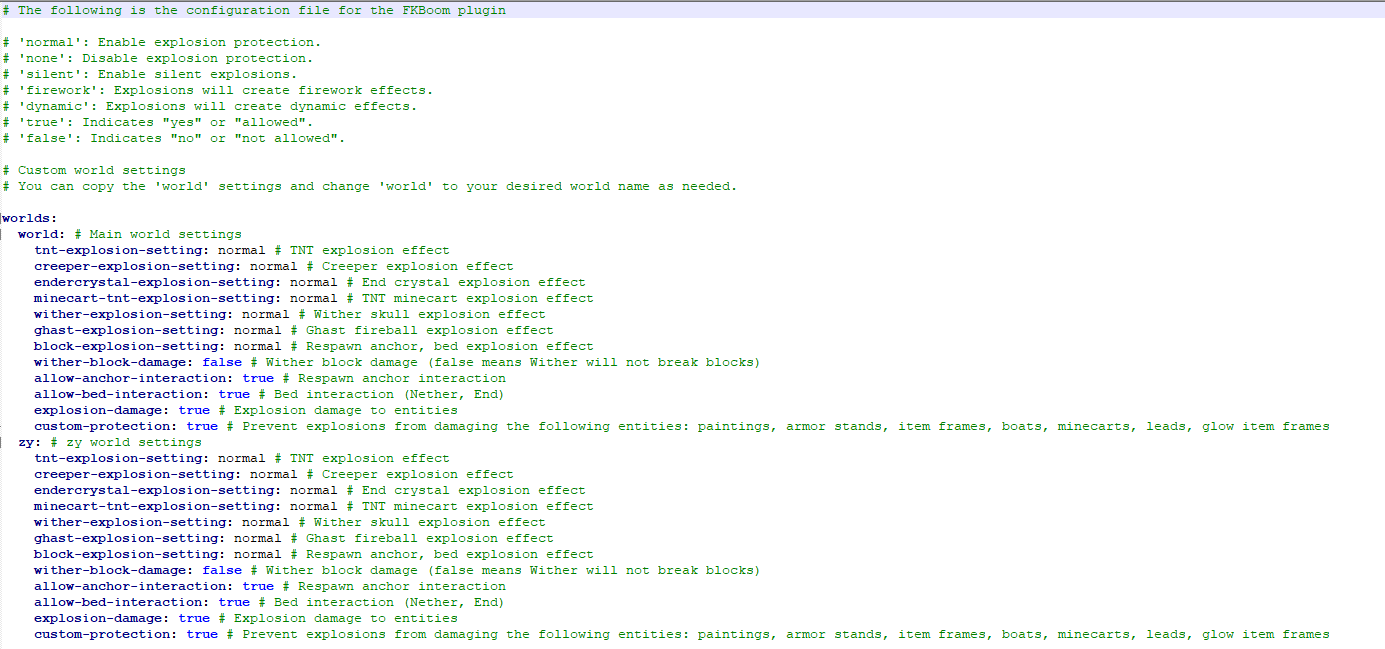
# FKBoom 插件的配置文件如下

# 'normal':启用爆炸保护。
# 'none':禁用爆炸保护。
# 'silent':启用无声爆炸。
# 'firework':爆炸将产生烟花效果。
# 'dynamic':爆炸将产生动态效果。

# 在使用模组通用防爆设置之前,请仔细阅读插件介绍(此设置不影响原版,无需关注)
explosion-settings:
  enable-general-anti-explosion: true

# 自定义世界设置
# 您可以复制 'world' 的设置,并根据需要将 'world' 更改为您想要的世界名称。
worlds:
  world: # 主世界设置
    tnt-explosion-setting: normal # TNT 爆炸效果
    creeper-explosion-setting: normal # 苦力怕爆炸效果
    endercrystal-explosion-setting: normal # 末影水晶爆炸效果
    minecart-tnt-explosion-setting: normal # TNT 矿车爆炸效果
    wither-explosion-setting: normal # 凋灵骷髅爆炸效果
    ghast-explosion-setting: normal # 恶魂火球爆炸效果
    block-explosion-setting: normal # 重生锚、床的爆炸效果
    wither-block-damage: false # 凋灵方块破坏(false 表示凋灵不会破坏方块)
    allow-anchor-interaction: true # 重生锚交互
    allow-bed-interaction: true # 床交互(下界、末地)
    explosion-damage: true # 爆炸对实体的伤害
    custom-protection: true # 防止爆炸损坏以下实体:画、盔甲架、物品展示框、船、矿车、拴绳、发光物品展示框
爆炸效果显示
动态爆炸效果
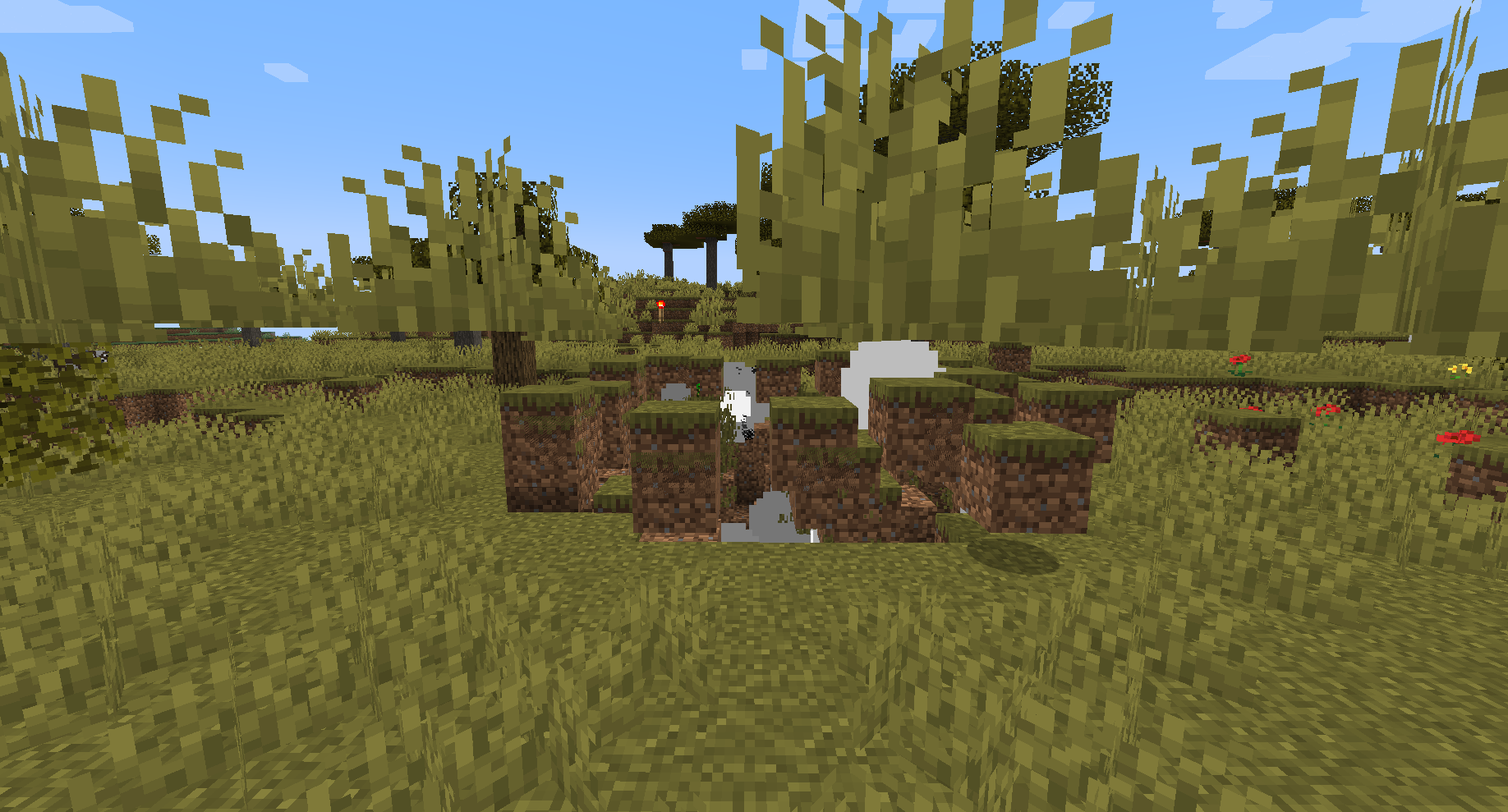
烟花爆炸效果
bStats:
FKBoom Plugin Overview
The following content is auto-translated as English is not my native language. Sorry for any readability issues!
Main Features:
- Standard Protection: Uses the game's default explosion protection effects to prevent destruction caused by TNT, respawn anchors, beds, etc.
- Dynamic Explosions: Explosion effects dynamically change based on the environment and configuration, enhancing gameplay.
- Disable Explosion Protection: Allows all explosion effects to occur without any protection.
- Interaction Management: Allows beds to be used in the Nether and End, enhancing game interaction.
- GUI Settings Interface: Provides an intuitive graphical interface that allows players with the necessary permissions to easily adjust settings.
- Commands and Permissions: Simplified commands (e.g., /fk xxx) for easy management.
- Multi-World Support: Customize explosion and interaction rules for each world.
- Config Reload: Instantly update server settings without a restart.
- Silent Explosion Mode: Enables silent explosions, reducing disturbances.
- Fireworks Explosion Mode: New fireworks explosion effects add more visual flair to your game.
- Explosion Damage: Option to enable or disable explosion damage to all entities.
- Default Settings Generation: When clicking on the world settings in the GUI, the default settings will be automatically generated without the need for manual configuration.
- Custom GUI Interface: Provides a more convenient custom GUI interface, including the main interface and world settings interface. Users can flexibly configure and manage according to their needs. Supports customization of the GUI interface language, items, IDs, and commands.
Compatibility:
- Minecraft Versions: 1.20.1 to 1.21
- Java Versions: Java 17 to Java 22
- Server Core Support: Spigot, Paper, Folia, Purpur, PufferFish, Leaves, Mohist, Arclight
Protection Measures:
- Comprehensive Protection: Protects paintings, armor stands, item frames, boats, minecarts, leashes, glowing item frames, etc., from explosion damage.
FKBoom plugin provides comprehensive explosion management and control for Minecraft servers while ensuring gameplay interaction and diversity. Whether you want to fully control explosion effects or maintain different game rules across multiple worlds, FKBoom can meet your needs.
Mod Usage Instructions
Other Mods need to be tested individually
Tested version 1.20.1:
- Botania Mod - Manastorm Charge: During the last explosion of the Manastorm Charge, although it shows the explosion as asynchronous, in reality, it does not destroy any blocks. Re-entering the game will display it normally.
- Mekanism Mod - Obsidian TNT, Baby Creeper
- Creeper Overhaul Mod - All Exploding Creepers
Known Issues and Incompatibilities:
- Applied Energistics 2 Tiny TNT
For other Mods tested individually, if you find items not explosion-proof, the plugin may not be able to achieve explosion-proof effects.
There might be issues with some versions of the Mohist server, please do not report these issues to me.
Permissions Introduction
-
Permission Node: fkboom.command
- Description: Allows the use of FKBoom plugin commands.
- Default: This permission is granted by default only to server operators (op), ensuring that only trusted administrators can execute this command.
-
Permission Node: fkboom.reload
- Description: This permission allows users to reload the plugin's configuration files, applying new settings without needing to restart the server.
- Default: This permission is granted by default only to server operators (op), ensuring that only trusted administrators can execute this command.
-
Permission Node: fkboom.gui
- Description: Allows opening the explosion protection settings graphical user interface (GUI).
- Default: This permission is granted by default only to server operators (op), ensuring that only trusted administrators can execute this command.
-
Permission Node: fkboom.manage
- Description: Allows management of all explosion protection settings.
- Default: This permission is granted by default only to server operators (op), ensuring that only trusted administrators can execute this command.
-
Permission Node: fkboom.gui.access
- Description: Allows access to the explosion protection settings graphical user interface (GUI), but does not allow management of the settings.
- Default: This permission is granted by default only to server operators (op), ensuring that only trusted administrators can execute this command.
GUI Interface
gui.yml
#After granting the permissions fkboom.command, fkboom.gui, and fkboom.gui.access, players can view the explosion settings GUI but cannot modify the settings.

# Example button to execute command as console (customizable name)
# When the player clicks this button, the console will execute the command dm open menu {player_name} clicked the button!, where {player_name} will be replaced with the name of the player who clicked the button. This command name example_console_command can be customized to any suitable name.
#example_console_command:
#slot: 49
#material: "BARRIER"
#name: "&cReturn"
#lore:
#- "&7Click to return to the menu"
#command: "console:dm open menu {player_name}"

# Example button to execute command as player (customizable name)
# When the player clicks this button, they will execute the command kill {player_name}, where {player_name} will be replaced with the name of the player who clicked the button. This command name suicide can be customized to any suitable name.
#suicide:
#slot: 31
#material: "DIAMOND"
#name: "&bSuicide"
#lore:
#- "&7Click to commit suicide"
#command: "player:kill {player_name}"

# GUI configuration file

# Main GUI configuration
# Only existing slots can be customized
gui:
  main:
    title: "&2Explosion Settings - Page "
    size: 54
    border:
      material: "GLASS_PANE"
      name: "&f "
      slots: [0, 1, 2, 3, 4, 5, 6, 7, 8, 9, 17, 18, 26, 27, 35, 36, 44, 45, 46, 47, 48, 49, 50, 51, 52, 53]
    items:
      prev_page:
        slot: 45
        material: "ARROW"
        name: "&6Previous Page"
        lore:
          - "&7Click to go to the previous page"
        command: "prev_page"
      next_page:
        slot: 53
        material: "ARROW"
        name: "&6Next Page"
        lore:
          - "&7Click to go to the next page"
        command: "next_page"
      return_button:
        slot: 49
        material: "BARRIER"
        name: "&cClose"
        lore:
          - "&7Click to close the menu"
        command: "close"
      world_items:
        material: "GRASS_BLOCK"
        name: "&a"
        lore:
          - "&7Click to set the world"
        command: "open_world_settings {world_name}"
        slots: [10, 11, 12, 13, 14, 15, 16, 19, 20, 21, 22, 23, 24, 25, 28, 29, 30, 31, 32, 33, 34, 37, 38, 39, 40, 41, 42]

# Configuration for world settings menu
# You can freely customize any slot, including adding or removing slots
  world_settings:
    title: "&2{world_name} Settings"
    size: 54
    border:
      material: "GLASS_PANE"
      name: "&f "
      slots: [0, 1, 2, 3, 4, 5, 6, 7, 8, 9, 17, 18, 26, 27, 35, 36, 44, 45, 46, 47, 48, 49, 50, 51, 52, 53]
    items:
      return_button:
        slot: 49
        material: "ARROW"
        name: "&cReturn to Main Menu"
        command: "open_main_gui"
      tnt_explosion_setting:
        slot: 11
        material: "TNT"
        name: "&cTNT Explosion Setting"
        lore:
          - "&7Current setting: &e{custom_info}"
        command: "toggle_setting tnt-explosion-setting"
      creeper_explosion_setting:
        slot: 12
        material: "CREEPER_HEAD"
        name: "&aCreeper Explosion Setting"
        lore:
          - "&7Current setting: &e{custom_info}"
        command: "toggle_setting creeper-explosion-setting"
      endercrystal_explosion_setting:
        slot: 13
        material: "END_CRYSTAL"
        name: "&bEnd Crystal Explosion Setting"
        lore:
          - "&7Current setting: &e{custom_info}"
        command: "toggle_setting endercrystal-explosion-setting"
      minecart_tnt_explosion_setting:
        slot: 14
        material: "TNT_MINECART"
        name: "&eMinecart TNT Explosion Setting"
        lore:
          - "&7Current setting: &e{custom_info}"
        command: "toggle_setting minecart-tnt-explosion-setting"
      wither_explosion_setting:
        slot: 15
        material: "WITHER_SKELETON_SKULL"
        name: "&cWither Explosion Setting"
        lore:
          - "&7Current setting: &e{custom_info}"
        command: "toggle_setting wither-explosion-setting"
      ghast_explosion_setting:
        slot: 20
        material: "GHAST_TEAR"
        name: "&fGhast Explosion Setting"
        lore:
          - "&7Current setting: &e{custom_info}"
        command: "toggle_setting ghast-explosion-setting"
      block_explosion_setting:
        slot: 21
        material: "BRICK"
        name: "&7Block Explosion Setting"
        lore:
          - "&7Current setting: &e{custom_info}"
        command: "toggle_setting block-explosion-setting"
      wither_block_damage:
        slot: 22
        material: "SOUL_SAND"
        name: "&cWither Block Damage"
        lore:
          - "&7Current setting: &e{custom_info}"
        command: "toggle_setting wither-block-damage"
      allow_bed_interaction:
        slot: 23
        material: "WHITE_BED"
        name: "&cBed Interaction"
        lore:
          - "&7Current setting: &e{custom_info}"
        command: "toggle_setting allow-bed-interaction"
      allow_anchor_interaction:
        slot: 24
        material: "RESPAWN_ANCHOR"
        name: "&dRespawn Anchor Interaction"
        lore:
          - "&7Current setting: &e{custom_info}"
        command: "toggle_setting allow-anchor-interaction"
      custom_protection:
        slot: 29
        material: "SHIELD"
        name: "&9Protected from Explosions"
        lore:
          - "&7Paintings, Armor Stands, Item Frames"
          - "&7Boats, Minecarts, Leads, Glow Item Frames"
          - "&7Current setting: &e{custom_info}"
        command: "toggle_setting custom-protection"
      explosion_damage:
        slot: 30
        material: "REDSTONE"
        name: "&cExplosion Damage"
        lore:
          - "&7Current setting: &e{custom_info}"
        command: "toggle_setting explosion-damage"

messages:
  no_permission: "&cYou do not have permission to change settings."
  unknown_command: "&cUnknown command: {command}"
  config_save_error: "&cUnable to save config file."
  setting_updated: "&aSetting updated."
  no_permission_msg: "&cYou do not have permission to use this command."
  config_reloaded: "&aPlugin reloaded successfully!"
  command_help:
    - "&6-------- FKBoom --------"
    - "&6 » /fkboom help - Shows the command list"
    - "&6 » /fkboom gui - Opens the settings interface"
    - "&6 » /fkboom reload - Reloads the plugin"
    - "&6 » /fkboom plugin - Shows information about the plugin"
    - "&6-------- FKBoom --------"
  unknown_command_msg: "&cUnknown command. Use » /fkboom help to see the command list。"
  plugin_info:
    - "&6-------- FKBoom --------"
    - "&6 » Author:_Aosion"
    - "&6 » QQ:1435567503"
    - "&6-------- FKBoom --------"
Custom Configuration World in config.yml
By default, all worlds have the same settings as the world.
# The following is the configuration file for the FKBoom plugin

# 'normal': Enable explosion protection.
# 'none': Disable explosion protection.
# 'silent': Enable silent explosions.
# 'firework': Explosions will create firework effects.
# 'dynamic': Explosions will create dynamic effects.

# Please review the plugin introduction before using the Mod Universal Explosion-proof Settings (this does not affect the original version, no need to pay attention)
explosion-settings:
  enable-general-anti-explosion: true

# Custom world settings
# You can copy the 'world' settings and change 'world' to your desired world name as needed.
worlds:
  world: # Main world settings
    tnt-explosion-setting: normal # TNT explosion effect
    creeper-explosion-setting: normal # Creeper explosion effect
    endercrystal-explosion-setting: normal # End crystal explosion effect
    minecart-tnt-explosion-setting: normal # TNT minecart explosion effect
    wither-explosion-setting: normal # Wither skull explosion effect
    ghast-explosion-setting: normal # Ghast fireball explosion effect
    block-explosion-setting: normal # Respawn anchor, bed explosion effect
    wither-block-damage: false # Wither block damage (false means Wither will not break blocks)
    allow-anchor-interaction: true # Respawn anchor interaction
    allow-bed-interaction: true # Bed interaction (Nether, End)
    explosion-damage: true # Explosion damage to entities
    custom-protection: true # Prevent explosions from damaging the following entities: paintings, armor stands, item frames, boats, minecarts, leads, glow item frames
Explosion Effect Display
Dynamic Explosion Effect
Fireworks Explosion Effect
bStats:


 插件

 插件
 插件
 插件
 插件
 插件
评论 0
登录后参与评分
还没有评论,来抢沙发吧