本插件使用 DiscordSRV 将 Bug 报告与玩家举报发送至在 DiscordSRV 配置文件中设置的频道,并支持在 config.yml 中自定义文本内容。
这是我的第一个插件,我也刚接触 Java 编程,因此如果您有任何建议,请随时告知。
该插件旨在同时用于提交 Bug 报告和玩家举报。
要使用此插件,必须先在 DiscordSRV 的配置中正确设置一个名为“reports”的频道/隧道作为报告的接收目标。
如果您需要帮助进行此项设置,请滚动至描述底部。
命令:
- /report <player> <reason> - 举报一名玩家
- /bugreport <description> - 提交一个 Bug 报告
- /flagit <reload|status|purge> - FlagIt 管理员命令
- /flagit reload - 重新加载 config.yml
- /flagit status <id> <status> - 更改报告的状态。有效的状态包括 open(未处理)、in_progress(处理中)、resolved(已解决)或 dismissed(已驳回)。
- /flagit purge - 此命令有 2 种不同的用法:
- /flagit purge <player> - 删除所有针对某名玩家的报告。
- /flagit purge old <days> - 删除所有早于指定天数的报告。
- 注意:“purge”命令仅会删除玩家举报,不会触碰 Bug 报告。
- /reporthistory <player> - 查看某名玩家的举报历史。
- /reportlist [page] - 按页查看最近的报告(每页 10 条报告)。
- /reportmenu - 打开举报菜单。
- /reportview <id> - 查看特定报告的详情
权限:
- flagit.report - 允许举报玩家
- flagit.bugreport - 允许提交 Bug 报告
- flagit.menu - 允许打开举报菜单
- flagit.admin - 允许使用管理员命令
- flagit.history - 允许查看举报历史
- flagit.list - 允许查看举报列表
- flagit.view - 允许查看报告详情
- flagit.staff - 接收新报告的游戏内工作人员通知
如何为本插件设置 DiscordSRV(您应该已经安装并设置了 DiscordSRV)DiscordSRV 设置文档:
- 在 Discord 服务器中创建一个名为“reports”的新频道(无需为私密频道)
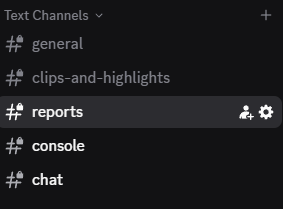
- 复制该 reports 频道的频道 ID(稍后会用到)
- 打开 DiscordSRV 中的 config.yml
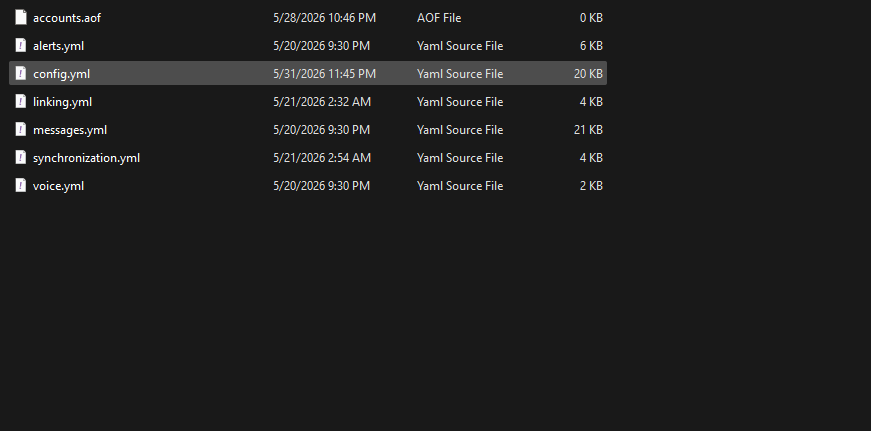
- 在配置中创建新的报告频道(将您的频道 ID 粘贴到蓝色引号 "" 中)
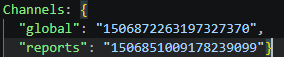
- 然后您可以在游戏中测试举报功能。

This plugin uses DiscordSRV as a way to send bug & player reports to a channel using channels setup in the config for DiscordSRV with configureable text in the config.yml.
This is my first plugin and I'm new to Java coding so if you have any recommendations, please do tell.
The plugin is designed for both use of reporting bugs as well as reporting players.
To use the plugin, DiscordSRV must be properly setup in its own config for a "reports" channel/tunnel for a destination for the reports.
If you need help doing that, please scroll to the bottom of the description.
Commands:
- /report <player> <reason> - Report a player
- /bugreport <description> - Report a bug
- /flagit <reload|status|purge> - FlagIt admin commands
- /flagit reload - Reloads the config.yml
- /flagit status <id> <status> - Changes the status of a report. Valid statuses are open, in_progress, resolved, or dismissed.
- /flagit purge - This one has 2 different usages:
- /flagit purge <player> - deletes all report that are filed to a player.
- /flagit purge old <days> - deletes all reports older than the number of days inputted.
- Note: the "purge" command will only delete player reports, bug reports will not be touched.
- /reporthistory <player> - View a player's report history.
- /reportlist [page] - View recent reports by page (10 reports per page).
- /reportmenu - Opens the report menu.
- /reportview <id> - View details of a specific report
Permissions:
- flagit.report - Allows reporting players
- flagit.bugreport - Allows reporting bugs
- flagit.menu - Allows opening the report menu
- flagit.admin - Allows use of admin commands
- flagit.history - Allows viewing report history
- flagit.list - Allows viewing the report list
- flagit.view - Allows viewing report details
- flagit.staff - Recieves in-game staff notifications for new reports
How to setup DiscordSRV for the plugin (you should already have DiscordSRV installed and setup) DiscordSRV Setup Documentation:
- Create a new channel in discord server named "reports" (doesn't have to be a private channel)

- Copy channel id for the reports channel (used later)
- Open the config.yml in DiscordSRV

- Create new report's channel in the config (paste your channel id in the blue "")

- You can then test the reporting in game.
评论 0
登录后参与评分
还没有评论,来抢沙发吧