FloodPass
AuthMe 的 Floodgate 自动登录支持 —— Xbox 验证,让基岩版玩家无需输入密码
简体中文
仅限官方 AuthMe。 FloodPass 专为原版 AuthMeReloaded(5.x / 6.x)构建。请勿将其安装在已自带原生 Floodgate 自动登录功能的分支版本上(例如 AuthMeReReloaded),否则该功能会重复运行。
功能介绍
跨平台服务器通常使用 AuthMe 来保护生存模式的账号。这对 Java 版玩家来说运作良好,但对于通过 Geyser + Floodgate 接入的基岩版玩家而言,他们在连接建立之前就已经通过 Microsoft/Xbox 账号完成了身份验证。让他们再次输入密码完全是多余的。
FloodPass 正是为了解决这一问题而设计:
- 对于基岩版玩家:永远无需输入任何内容。已注册的账号在加入后约一秒钟内自动登录;全新玩家将以随机密码静默注册并立即登录
- 对于 Java 版玩家:毫无变化,他们依然按照原有方式经过 AuthMe 流程
- 前缀友好:带有 Floodgate 前缀的基岩版名称(例如
.Steve)能够顺利通过 AuthMe 默认的 allowedNicknameCharacters 正则表达式校验,无需修改 AuthMe 配置——只有真正的 Floodgate UUID 才会被豁免
- 正版共存:当基岩版玩家的 Gamertag 与已注册正版的 Java 版账号相同时(需启用 AuthMe 6.x
/premium + PacketEvents),该基岩版玩家可正常加入,而 Java 版账号则继续享受无密码的正版登录体验
- 对于服务器管理员:只需一个 jar 文件,无需更改 AuthMe 配置,一条命令即可管理所有事务;信任决策保留在其应有的位置(Floodgate 的 Xbox Live 验证机制)
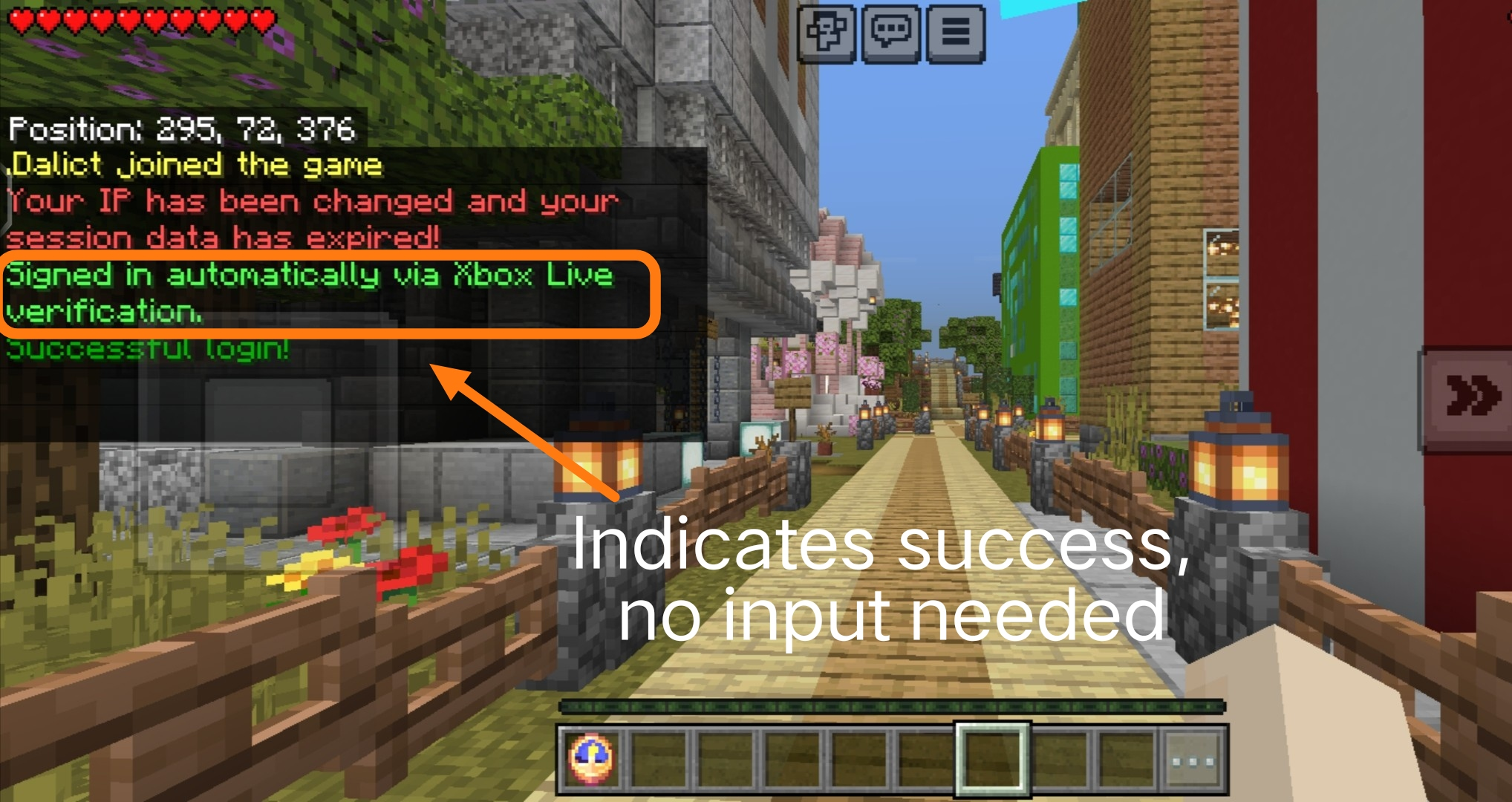
基岩版玩家加入时的截图
工作原理
- 玩家加入服务器;FloodPass 以
MONITOR 优先级监听,此时该连接的 Floodgate 身份信息数据已可用
FloodgateApi#isFloodgatePlayer(uuid) 判断这是否为真正的基岩版连接;Java 版玩家永远不会受到影响- 在经过一段可配置的延迟(默认 20 ticks)后,AuthMe 已完成其自身的加入处理流程,FloodPass 接管后续操作:
- 已注册用户:
AuthMeApi#forceLogin 在不输入密码的情况下直接登录账号
- 未注册用户(如果启用了自动注册):
AuthMeApi#forceRegister 使用随机密码注册账号并立即登录
安全基础:Floodgate 身份信息仅在基岩版客户端通过与有效的 Xbox Live 令牌完成 Floodgate 加密握手后才存在。Java 版客户端无法伪造该身份信息,因此无密码登录路径仅向已由 Microsoft 验证过的玩家开放。
兼容性
| 组件 |
要求 |
备注 |
| 服务端 |
Spigot / Paper / Purpur / Folia 1.13+ |
Java 8 字节码;较旧的遗留服务器(1.8+)通常也能加载,但未经验证 |
| Folia |
支持 |
通过反射实现实体级调度器,其他情况回退至全局调度器 |
| Java |
8+ |
JVM 最低版本通常由 AuthMe/Floodgate 决定,而非 FloodPass |
| AuthMe |
5.2+ (v3 API) |
仅限官方 AuthMeReloaded;已在 5.6.x 和 6.0.x 版本上测试。不支持内置基岩版自动登录的分支版本 |
| Floodgate |
2.x |
加载时必须存在 |
依赖项
| 插件 |
是否必需 |
版本 |
用途 |
| Floodgate |
必需 |
2.x |
通过 Xbox Live 验证基岩版玩家;这是 FloodPass 所有功能信任的基础 |
| AuthMe (官方 AuthMeReloaded) |
必需 |
5.2+ |
FloodPass 用于将基岩版玩家登录到的登录插件;不支持内置基岩版自动登录的分支版本 |
| PacketEvents |
可选 |
2.x |
仅在启用 AuthMe 6.x 正版验证 (enablePremium) 时需要 |
Geyser 本身不是 FloodPass 的插件依赖——基岩版连接可以来自任何 Geyser 设置(独立或代理),但 Floodgate 插件必须在此服务器上运行。
安装步骤
- 安装并配置 Geyser 和 Floodgate (2.x),使基岩版玩家可以加入
- 安装 AuthMe (5.2+);按常规方式为你的 Java 版玩家进行配置
- 将
FloodPass-x.x.x.jar 放入 plugins/ 目录并重启服务器
- 完成。无需更改 AuthMe 的任何设置;首次启动时会自动提取全部 17 个内置语言文件
请使用基岩版账号验证:第一次加入时应显示“已注册并自动登录”,第二次加入时显示“已自动登录”。
在代理后面运行 (Velocity / BungeeCord)
这个问题经常被问到,以下是简要说明。
FloodPass 不是一个代理插件。不要将其放入 Velocity 或 BungeeCord 的 plugins 文件夹中,它无法在那里加载。它应该放在 AuthMe 所在的地方:即运行 AuthMe 的后端服务器。
各组件的位置如下:
| 组件 |
代理层 |
后端(运行 AuthMe 的服务器) |
| Geyser |
安装 |
不需要 |
| Floodgate |
安装 |
也需安装(与代理使用相同的 key.pem) |
| AuthMe |
不安装 |
安装 |
| FloodPass |
不安装 |
安装 |
为什么后端需要自己的 Floodgate?代理上的 Floodgate 仅负责加密并转发基岩版身份信息。后端上的 Floodgate 才是实际解密它的部分,这样后端插件才能识别谁是基岩版玩家。如果仅在代理上安装 Floodgate,后端插件将无法识别基岩版玩家。任何适配基岩版的后端插件也是如此。
关于 key.pem:将代理 Floodgate 中的 key.pem 复制到每个后端服务器的 Floodgate 文件夹中。两端必须拥有完全相同的文件。
还有两个小细节:
- 在 Velocity 上,启用现代转发(modern forwarding),并确保
forwarding-secret 与后端的 Paper 配置匹配;在 BungeeCord 上,在后端的 spigot.yml 中设置 bungeecord: true(ip-forward),否则身份验证信息将无法到达
- 如果你使用 AuthMe 的
/premium 命令,代理端也需要安装官方配套插件(Velocity 对应 authme-velocity,BungeeCord 对应 authme-bungee),且后端 AuthMe 需要配置 Hooks.bungeecord: true 以及相同的 proxySharedSecret
完成后,使用基岩版客户端连接 Geyser 的端口(默认 UDP 19132)。加入服务器后约一秒钟,你应该会看到自动登录的消息。
命令与权限
| 命令 |
权限 |
描述 |
/floodpass |
floodpass.admin (默认 OP) |
显示状态(是否启用、延迟时间、自动注册) |
/floodpass reload |
floodpass.admin |
重载配置文件和语言文件;缺失的文件会自动恢复 |
别名:/fpass
已知限制
- 基岩版账户存储在其带有 Floodgate 前缀的名称下(例如默认前缀下的
.Steve)。更改 Floodgate 用户名前缀会破坏现有账户的名称映射,并需要进行 AuthMe 数据库迁移——或者你可以保持原样:玩家将使用新的随机密码自动重新注册
bypass-nickname-check 从 AuthMe 的语言文件中读取 characters_in_name 模板(包括自定义、翻译及分支发布的文件),并将实际的踢出消息与之匹配;如果无法识别该消息,控制台将显示一次警告,提示踢出文本及修复方法- 当 Floodgate 的
username-prefix 为空时,防冲突检测器无法区分这两种身份——AuthMe 本身会将两个账户存储在同一名称下,这是不受支持的
- AuthMe 的昵称长度限制(
maxNickLength,默认 20)不会被绕过;带前缀的基岩版名称(前缀 + 16 字符游戏名 = 最大 17 字符)符合默认限制
forceLogin 会绕过 AuthMe 对基岩版账户的双因素身份验证。对于经过 Xbox 验证的身份,这是预期行为,但请注意这也适用于启用了双因素身份验证的基岩版账户- 在使用 AuthMe 6.x 的实验性对话框登录界面(Minecraft 1.21.6+)时,基岩版玩家可能在延迟自动登录完成之前短暂看到登录对话框闪烁
- AuthMe 的
/premium 命令针对 Java 版账户,对于普通基岩版玩家会被安全拒绝(他们的 Floodgate 前缀名称不匹配任何 Mojang 账户);基岩版玩家不需要此命令——FloodPass 已经为他们完成了登录,且 premium-conflict-guard 确保游戏名与高级账户冲突的玩家仍可加入
支持
我希望这个插件能帮到大家!我开发它是因为我运营着一个跨平台服务器,并希望继续使用官方的 AuthMe。如果遇到任何问题,请留下反馈——谢谢!ouo
FloodPass
Floodgate Auto Login for AuthMe — Xbox-verified, so Bedrock players never type a password
简体中文
Official AuthMe only. FloodPass is built for the original AuthMeReloaded (5.x / 6.x). Do not install it on forks that already ship native Floodgate auto-login (such as AuthMeReReloaded) — the feature would run twice.
What It Does
Cross-play servers usually protect survival accounts with AuthMe. That works well for Java players, but Bedrock players arriving through Geyser + Floodgate have already proven who they are: they signed in with their Microsoft/Xbox account before the connection was even established. Making them type a password anyway is simply unnecessary.
FloodPass solves exactly that:
- For Bedrock players: nothing to type, ever. Registered accounts are signed in automatically about a second after joining; brand-new players are registered silently with a random password and signed in the same way
- For Java players: zero change, they go through AuthMe exactly as before
- Prefix-friendly: Bedrock names carrying the Floodgate prefix (for example
.Steve) pass AuthMe's default allowedNicknameCharacters regex with no AuthMe config change — only genuine Floodgate UUIDs are exempt
- Premium coexistence: a Bedrock player whose gamertag equals a premium-enrolled Java account (AuthMe 6.x
/premium + PacketEvents) joins normally while the Java account keeps its passwordless premium login
- For server owners: one jar, no AuthMe configuration changes, one command to manage everything; the trust decision stays where it belongs (Floodgate's Xbox Live verification)
Screenshot of a Bedrock Player Joining
How It Works
- A player joins; FloodPass listens at
MONITOR priority, by which time Floodgate identity data for the connection is available
FloodgateApi#isFloodgatePlayer(uuid) decides whether this is a genuine Bedrock connection; Java players are never touched- After a configurable delay (20 ticks by default), AuthMe has finished its own join processing, and FloodPass takes over:
- Registered player:
AuthMeApi#forceLogin signs the account in without a password
- Unregistered player (if auto-register is on):
AuthMeApi#forceRegister registers the account with a random password and signs it in immediately
Security basis: a Floodgate identity only exists after the Bedrock client completed Floodgate's encrypted handshake with a valid Xbox Live token. A Java Edition client cannot forge that identity, so the passwordless path is only ever offered to players Microsoft has already verified.
Compatibility
| Component |
Requirement |
Notes |
| Server |
Spigot / Paper / Purpur / Folia 1.13+ |
Java 8 bytecode; older legacy servers (1.8+) generally load it too, untested |
| Folia |
Supported |
Per-entity scheduler via reflection, global scheduler fallback elsewhere |
| Java |
8+ |
The JVM floor is usually raised by AuthMe/Floodgate builds, not by FloodPass |
| AuthMe |
5.2+ (v3 API) |
Official AuthMeReloaded only; tested against 5.6.x and 6.0.x. Not for forks with built-in Bedrock auto-login |
| Floodgate |
2.x |
Required at load time |
Dependencies
| Plugin |
Required |
Version |
Purpose |
| Floodgate |
Required |
2.x |
Verifies Bedrock players through Xbox Live; the trust basis of every FloodPass feature |
| AuthMe (official AuthMeReloaded) |
Required |
5.2+ |
The login plugin FloodPass signs Bedrock players into; forks with built-in Bedrock auto-login are not supported |
| PacketEvents |
Optional |
2.x |
Only needed when AuthMe 6.x premium verification (enablePremium) is used |
Geyser itself is not a plugin dependency of FloodPass — Bedrock connectivity can come from any Geyser setup (standalone or proxy), but the Floodgate plugin must run on this server.
Installation
- Install and configure Geyser and Floodgate (2.x) so Bedrock players can join
- Install AuthMe (5.2+); configure it as usual for your Java players
- Drop
FloodPass-x.x.x.jar into plugins/ and restart the server
- Done. No AuthMe settings need to change; all 17 bundled language files are extracted on first start
Verify with a Bedrock account: first join should say "Registered and signed in automatically", the next join "Signed in automatically".
Running Behind a Proxy (Velocity / BungeeCord)
This gets asked a lot, so here is the short version.
FloodPass is not a proxy plugin. Do not put it into the plugins folder of Velocity or BungeeCord, it will not load there. It goes wherever AuthMe goes: on the backend server that runs AuthMe.
Who sits where:
| Component |
Proxy |
Backend (the server running AuthMe) |
| Geyser |
install |
not needed |
| Floodgate |
install |
install too (same key.pem as the proxy) |
| AuthMe |
no |
install |
| FloodPass |
no |
install |
Why does the backend need its own Floodgate? The one on the proxy only encrypts and forwards the Bedrock identity. The one on the backend is what actually decrypts it, so backend plugins can tell who is a Bedrock player. With Floodgate only on the proxy, backend plugins cannot recognize Bedrock players. The same goes for any backend plugin that adapts to Bedrock.
About the key.pem: copy the one from the proxy's Floodgate into the Floodgate folder of every backend. Both sides must have the exact same file.
Two more small things:
- On Velocity, enable modern forwarding and make sure the forwarding-secret matches the backend's Paper config; on BungeeCord, set bungeecord: true in the backend's spigot.yml (ip-forward), or the identity never arrives
- If you use AuthMe's /premium, the proxy also needs the official companion (authme-velocity on Velocity, authme-bungee on BungeeCord), and the backend AuthMe needs
Hooks.bungeecord: true plus the same proxySharedSecret
When you are done, connect with a Bedrock client to Geyser's port (UDP 19132 by default). You should see the auto sign-in message about a second after joining.
Commands and Permissions
| Command |
Permission |
Description |
/floodpass |
floodpass.admin (default OP) |
Show status (enabled, delay, auto-register) |
/floodpass reload |
floodpass.admin |
Reload the config and language files; missing files are restored automatically |
Alias: /fpass
Known Limitations
- Bedrock accounts are stored under their Floodgate-prefixed name (for example
.Steve with the default prefix). Changing the Floodgate username prefix later breaks the name mapping for existing accounts and requires an AuthMe database migration — or you can simply leave it as is: the player is automatically re-registered with a fresh random password
bypass-nickname-check reads the characters_in_name template from AuthMe's language files (custom, translated and fork-shipped files included) and matches the actual kick message against it; if the message cannot be identified, a one-time console warning shows the kick text and how to fix it- With an empty Floodgate
username-prefix the premium conflict guard cannot tell the two identities apart — and AuthMe itself would store both accounts under the same name, which is unsupported
- AuthMe's nickname length limits (
maxNickLength, default 20) are not bypassed; prefixed Bedrock names (prefix + 16-char gamertag = 17 max) fit the default
forceLogin bypasses AuthMe's two-factor authentication for Bedrock accounts. For an Xbox-verified identity this is the intended behavior, but be aware it applies to Bedrock accounts with 2FA enabled as well- On AuthMe 6.x with the experimental dialog login UI (Minecraft 1.21.6+), a Bedrock player may see the login dialog flash briefly before the delayed auto sign-in completes
- AuthMe's
/premium command targets Java accounts and is safely rejected for regular Bedrock players (their Floodgate-prefixed name matches no Mojang account); Bedrock players do not need it — FloodPass already signs them in, and premium-conflict-guard keeps gamertags colliding with premium accounts joinable
Support
I hope this plugin helps you all! I built it because I run a cross-play server and want to keep using the official AuthMe. If you run into anything, please do leave feedback — thank you! ouo
- Issues:
- Source:
- License: MIT


 插件

 插件

 插件
 插件
 插件
 插件
评论 0
登录后参与评分
还没有评论,来抢沙发吧