
简单至极的 Discord 机器人
Fantasically Simple Discord Bot 是一款在 Minecraft 与流行的语音聊天平台 Discord 之间搭建简易桥梁的插件。该机器人完全运行于你的 Minecraft 服务器之上,让身处 Discord 和 Minecraft 的玩家能够无缝地交流与互动。凭借简洁的设计与实现、易于配置的特点,FSDiscordBot 正是你所需要的插件!
前置要求:
- 必须使用 Java 8
功能特性:
- Discord-Minecraft 通信桥接 - 只需简单设置,即可实现 Minecraft 服务器玩家与 Discord 服务器玩家之间的直接交流!
- 远程控制台 - 可指定一个特殊频道作为远程控制台!你可以查看服务器日志,并发送指令!
- 音乐播放器 - 是的,这个机器人可以播放音乐!它支持直接从 YouTube 播放任何歌曲、视频或播放列表!
- 更多功能正在规划中!本项目仅用几天时间完成,未来将推出许多新功能!欢迎提供建议与反馈。
命令说明:
Discord:
- !set - 将当前频道设置为可与 Minecraft 服务器玩家交流的频道!支持多个频道和服务器群组。
- !set console - 将当前频道设置为服务器的远程控制台。每个服务器只能设置一个!
- !play <歌曲名 | 链接> - 播放音乐!你必须在语音频道中,所有歌曲均从 YouTube 查询。你也可以传入直接链接!支持多个服务器群组!
- !skip - 投票跳过当前正在播放的歌曲!请求者及拥有权限者可强制跳过!
- !np - 显示当前正在播放歌曲的信息
- !remove - 移除当前文本频道作为监听器/控制台的关联
- !link <Minecraft 用户名> - 将 Discord 账号绑定至 Minecraft 账号
Minecraft:
- /discordtoggle - 切换是否与 Discord 服务器玩家交流!权限:fsd.toggle
- /discordinvite - 获取邀请链接 权限:fsd.invite
- /link - 将 Minecraft 账号认证绑定至 Discord 账号 - 权限:fsd.link
- fsd.mention 权限节点,允许从 Minecraft 端发起 @everyone 和 @here 提及
- /unlink - 解绑与 Minecraft 账号关联的任何 Discord 账号
安装配置
要完成配置,你首先需要创建一个自己的 Bot 用户应用。
1. 登录主账号后访问以下地址
2. 
3. 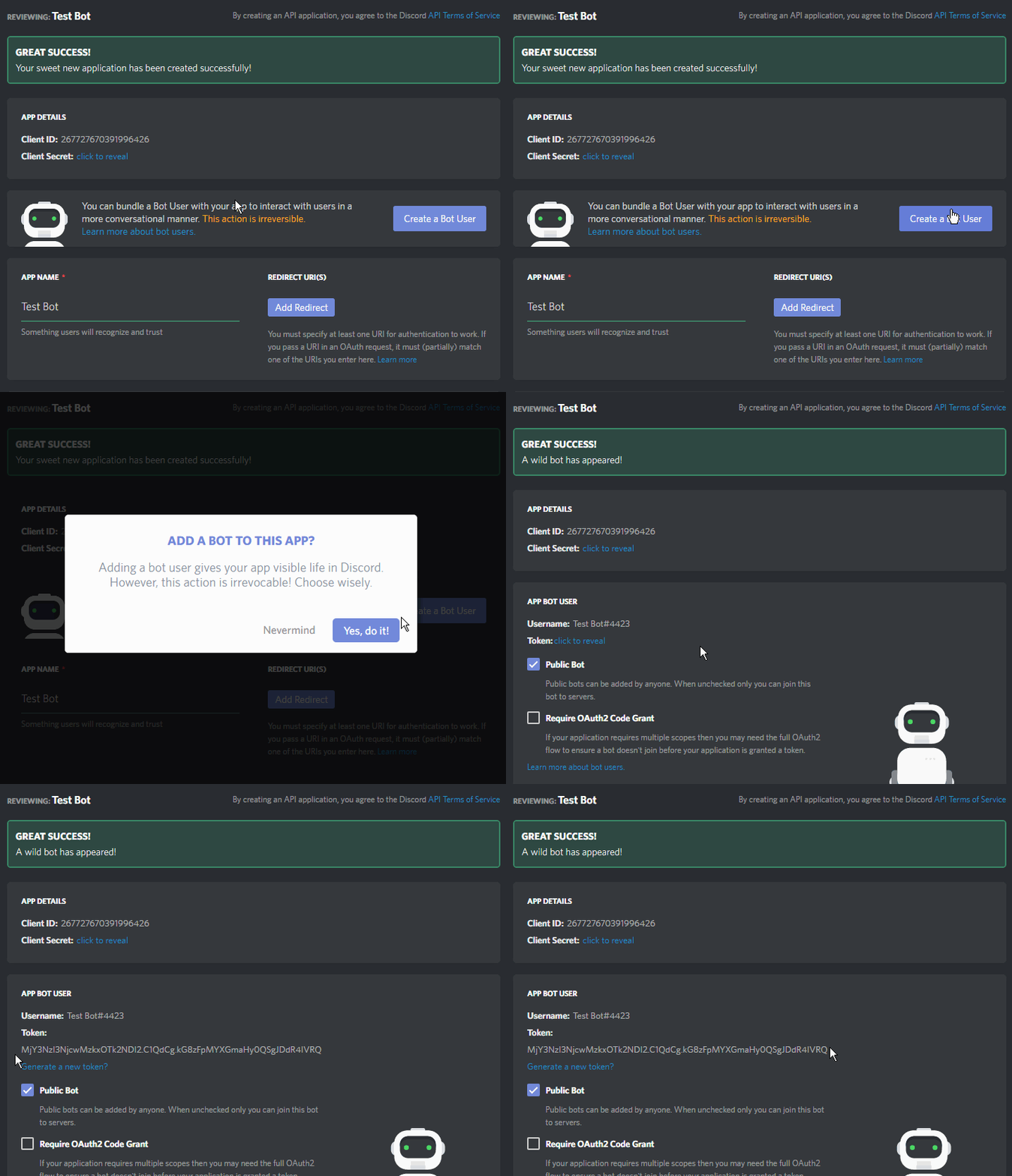
4. 按照提示复制 Bot Token,并将其粘贴到 config.yml 文件中的 "key" 部分
5. 在游戏中使用 /discordinvite 命令即可获取邀请你的机器人的链接!
一切准备就绪!现在你可以在 Discord 频道内设置通信频道和控制台频道了!
账号绑定
- 在 Discord 中使用 !link <Minecraft 用户名>。机器人将私信发送一个验证码
- 在 Minecraft 中使用 !link <验证码>。请求的用户名与验证码必须匹配才能成功绑定!
- 当 Discord 和 Minecraft 账号绑定后,你现在可以在 Minecraft 中以已绑定的 Discord 账号身份执行如 !play 或 !skip 等命令!
解绑账号
- 在 Discord 中输入 !unlink。该 Discord 账号将与 Minecraft 账号解绑。
支持/问题/建议/Bug 反馈
本项目仅用几天时间完成,唯一的目标就是“极致的简洁”。虽然我在发布前尽力修复 Bug,但若无你的帮助,彻底消灭所有问题是完全不可能的!请向我报告 Bug、性能问题、提出建议或提问,我将乐意为你提供帮助!
本项目的实现离不开 JDA(Discord API 的 Java 接口)以及 lavaplayer(音频处理库)的支持!
以下是相关项目的链接,欢迎贡献代码并支持它们!
本项目与 Discord 无关,未参与其活动,也未获其批准。
FANTASTICALLY SIMPLE DISCORD BOT
Fantasically Simple Discord Bot is a simple bridge between Minecraft and the popular VOIP server, Discord. The bot is entirely ran from your Minecraft server, and players both in Discord and your Minecraft server can seamlessly communicate and interact. With it's simple design and implementation, it's ease of setup, FSDiscordBot is the right plugin for you!
Requirements:
- Java 8 is REQUIRED
FEATURES:
- Discord-Minecraft communication bridge - Simply able to communicate with players in your Minecraft server with players in your Discord server!
- Remote console - Able to designate a special channel to act as a remote console! You can view the server logs, as well as, send commands!
- Music player - Yes, this bot can play music! This is bot is able to play any song, video, playlist straight from YouTube!
- Much more planned! This project was done in a span of a few days, and many more features will come! Suggestions and feedback are welcome.
COMMANDS:
Discord:
- !set - Sets the current channel to be able to communicate with players from your Minecraft server! Multiple channels and guilds are SUPPORTED.
- !set console - Sets the current channel to be a remote console for your server. Only one can be set!
- !play <song | link> - Plays music! You must be in a voice channel, and all songs are queried from YouTube. You can also pass a direct link! Multiple guilds are supported!
- !skip - Add your vote to skip a currently playing song! The requestor and those with permissions can force skip instead!
- !np - Displays information about the currently playing song
- !remove - Removes current text channel from being a listener/console
- !link <Minecraft Username> - Links Discord Account to Minecraft
Minecraft:
- /discordtoggle - Toggle between communicating with players from your discord server! Permission fsd.toggle
- /discordinvite - Invite link Permission: fsd.invite
- /link - Authenticate Minecraft acc to Discord - Permission: fsd.link
- fsd.mention Permission node to allow @eveyone and @here mention from Minecraft
- /unlink - Unlinks any Discord account associated with Minecraft account
SETUP
To setup you must first create your own Bot User Application.
1. Head over to with your main account signed in
2.
3.
4. Copy the Bot Token as shown into the config.yml file n the section "key"
5. To invite use the /discordinvite in game to receive invite link to your bot!
You're all set to go! Setup communication channels and console channels from within the discord channel!
Linking accounts
- !link <Minecraft Username> in discord. The bot will private message a code
- !link <code> within Minecraft. The username requested and code must match to successfully link!
- With Discord and Minecraft accounts link, you can now execute commands like !play or !skip within Minecraft under your linked Discord account!
Unlinking
- Type !unlink within Discord. The Discord account will be unlinked to Minecraft accounts.
SUPPORT/QUESTIONS/SUGGESTIONS/BUGS
This project was made in a span of a few days, made with the only thing in mind, fantastic simplicity. Though I try to squash bugs before release, it's utterly impossible to crush them all without your help! Report bugs, performance issues, suggestions, questions to me, and I will gladly help you!
This project would not have been possible by JDA, the Discord API Java interface, and lavaplayer, the audio mechanic!
Links to projects here below and consider contributing to and support them!
Project not affiliated, involved, or approved by Discord.

下载 Fantastically Simple Discord Bot
需要联机服务器吗?
稳定流畅、一键部署,几分钟即可和朋友联机开服
最低仅需 8 元/月 即可畅快联机
下载 Fantastically Simple Discord Bot
需要联机服务器吗?
稳定流畅、一键部署,几分钟即可和朋友联机开服
最低仅需 8 元/月 即可畅快联机
下载 Fantastically Simple Discord Bot
需要联机服务器吗?
稳定流畅、一键部署,几分钟即可和朋友联机开服
最低仅需 8 元/月 即可畅快联机
下载 Fantastically Simple Discord Bot
下载 Fantastically Simple Discord Bot
下载 Fantastically Simple Discord Bot
下载 Fantastically Simple Discord Bot
下载 Fantastically Simple Discord Bot
下载 Fantastically Simple Discord Bot
下载 Fantastically Simple Discord Bot
需要联机服务器吗?
稳定流畅、一键部署,几分钟即可和朋友联机开服
最低仅需 8 元/月 即可畅快联机
- 更新到 1.14
- 更新至最新的 JDA 和 lavaplayer
- 新增链接 Discord 和 Minecraft 账号的功能
- 支持通过已链接的账号在 Minecraft 中执行机器人命令
链接账号
- 在 Discord 中输入 !link <Minecraft 用户名>。机器人将私信发送一个验证码
- 在 Minecraft 中输入 !link <验证码>。请求的用户名和验证码必须匹配才能成功链接!
- 当 Discord 和 Minecraft 账号链接后,你现在可以在 Minecraft 中使用已链接的 Discord 账号执行如 !play 或 !skip 等命令!
解绑账号
- 在 Discord 中输入 !unlink。Discord 账号将与 Minecraft 账号解绑。
即将推出 -
随着链接功能的加入,还将推出更多特性,如角色关联和验证。
关于这个资源的讨论、问题反馈与使用心得
还没有讨论,来发第一帖吧
你是这个资源的作者?登录后可认领此资源。
相似资源
 插件
ExyliaPlugins 的库。
 插件
自定义你的Minecraft头像!
 插件
重新定义服务器上的生物运输方式。使用高度可定制的口袋道具,安全地捕获、存储和释放任何实体。
 插件

使床在所有维度中爆炸的模组
 插件
为 Armor Poser 模组添加兼容性
 插件

SkyBlock、OneBlock、Boxed、SkyGrid、AcidIsland、CaveBlock、Poseidon、StrangerRealms——以及更多!这些只是由 BentoBox 支持的基于岛屿的游戏模式之一。来自原版 ASkyBlock 的作者。
评论 0
登录后参与评分
还没有评论,来抢沙发吧